> ## Documentation Index
> Fetch the complete documentation index at: https://docs.xpander.ai/llms.txt
> Use this file to discover all available pages before exploring further.
# dbt Labs
> Connect dbt Labs to xpander and give agents its 143 actions: how to connect it, and which actions to hold for approval.
HTTP API connector
An HTTP API described by an OpenAPI spec, not an MCP server. Calls go to your dbt Labs address (`https://{url}/`, filled in when connecting) and carry the credential the connect dialog asks for.
## What the skill can do
API connector: 143 actions, as they appear in the skill panel. 75 of them create, change or delete something in dbt Labs; mark those under **These actions need approval** when you add the skill to an agent.
* **Semantic layer credential service** (11): Create Credentials, Partial Update Credentials, List Credentials, Retrieve Credentials, Delete Credentials, Update Credentials, Delete User Credentials, List User Credentials, Create User Credentials, Update User Credentials, Retrieve User Credentials
* **Account management** (10): Connection Management Retrieve Connection Details, Connection Management Create Connection, Connection Management List Connections, Connection Management Delete Connection, Connection Management Update Connection Settings, Delete Account Scoped PAT, Create Account Scoped PAT, List Account Scoped Pats, Rotate Account Scoped PAT, Retrieve Account Scoped Patdetails
* **Project management** (10): List Projects, Send User Invites, Create New Project, List Private Link Endpoints, Update Project, Delete Project, Connection Management List Project Connections, Retrieve Project Details, Repository Management List Project Repositories, Semantic Layer Credential List All Credentials
* **Environment variable service** (10): Create Env Variables Bulk, List Env Variables By Job, List Env Variables By User, List Environments, Create Env Variable, List Env Variables By Environment, Delete Env Variable, Update Env Variables Bulk, Delete Env Variables Bulk, Update Env Variable
* **Scim user management** (10): List Scimusers, Get Scimschemas, Retrieve Scimuser Details, Update Scimuser Attributes, Account Management List Users, Create Scimuser, Delete Scimuser License, Get Scimschema Details, Replace Scimuser, Account Management Retrieve User Details
* **Webhook service** (10): Retrieve Webhooks Receipt, Update Webhooks Subscription, List Webhooks Events For Subscription, Test Webhooks Subscription, Create Webhooks Subscription, Retrieve Webhooks Event, List Webhooks Subscriptions, List Webhooks Event Receipts, Retrieve Webhooks Subscription, Destroy Webhooks Subscription
* **Scim configuration service** (9): Create Scimconfiguration, Create Scimtoken, Delete Scimtoken, Get Scimresource Type Details, Retrieve Scimconfiguration, Retrieve Scimtokens, Retrieve Scimtoken Details, Get Scimresource Types, Retrieve Service Provider Config
* **Ip restriction service** (8): Toggle Ip Restrictions, Create Ip Restriction Rule, Validate Ip With Exclusion, Update Ip Restriction Rule, Validate Client Ip, Retrieve Ip Restriction Details, Delete Ip Restriction, List Ip Restrictions
* **Lineage integration service** (8): List Integrations, Retrieve Integration Details, Update Integration, Delete Integration, List Collections, Retrieve Collection Details, Create Integration, Update Selections
* **Service token management** (7): Account Management List All Accounts, List Service Tokens, Create Service Token, Retrieve Service Token Details, Delete Service Token, Retrieve Token Permissions, Update Service Token
* **Group management** (6): Assign User To Groups, Assign Permissions To Group, List Groups, Retrieve Group Details, Create New Group, Update Group Details
* **Repository management** (6): Create Managed Repository, Update Repository, Retrieve Repository Details, Create Project Repository, Download Managed Repository, Delete Repository
* **Scim group management** (6): List Scimgroups, Retrieve Scimgroup Details, Delete Scimgroup, Replace Scimgroup, Create Scimgroup, Update Scimgroup Attributes
* **Audit log service** (5): Download Audit Logs CSV, Submit Export Request, Check Export Status, Retrieve Audit Logs, Download Exported Logs
* **License map management** (5): Create License Map Entry, Update License Map Entry, List License Maps, Retrieve License Map Entry, Destroy License Map Entry
* **Oauth configuration service** (5): Create Oauth Config, Retrieve Oauth Config Details, List Oauth Configs, Update Oauth Config, Delete Oauth Config
* **Adapter management** (5): Retrieve Adapter Details, Create Adapter For Project, Update Adapter, Delete Adapter, Retrieve Adapter Schema
* **Connection management** (4): Create Project Connection, Delete Project Connection, Retrieve Connection, Update Project Connection
* **Environment management** (4): Create Environment, Retrieve Environment Details, Update Environment, Delete Environment
* **Extended attribute service** (4): Retrieve Extended Attribute Details, Delete Extended Attribute, Update Extended Attribute, Create Extended Attributes
## Authentication Options
### Generate a dbt Labs API Token
1. Log in to your [dbt Labs account](https://auth.cloud.getdbt.com/u/login).
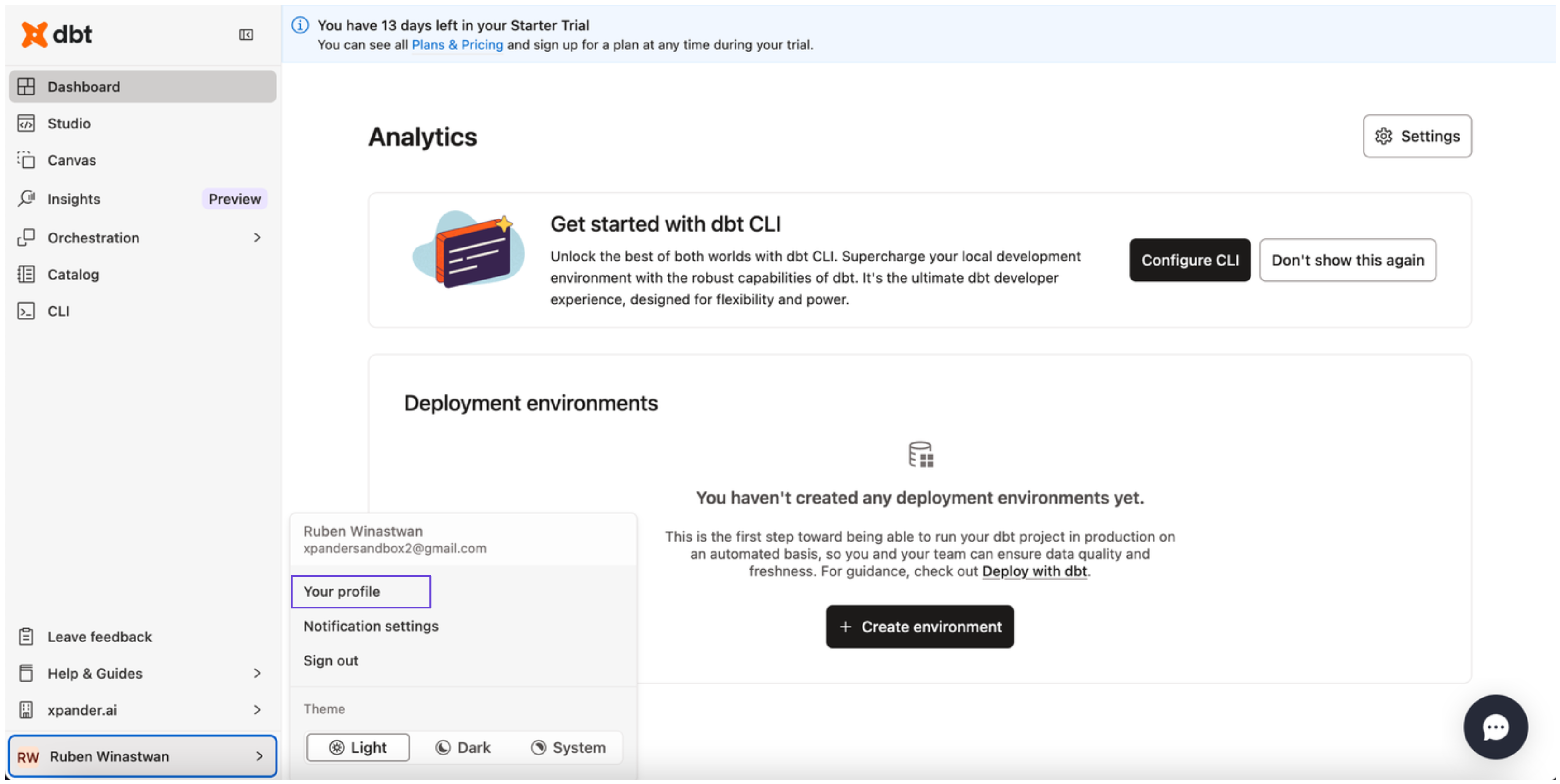
2. At the bottom of the sidebar in your dashboard, click your profile and select **Your profile**.
 3. In the sidebar, choose **Personal tokens**, then click **Create personal access token**.
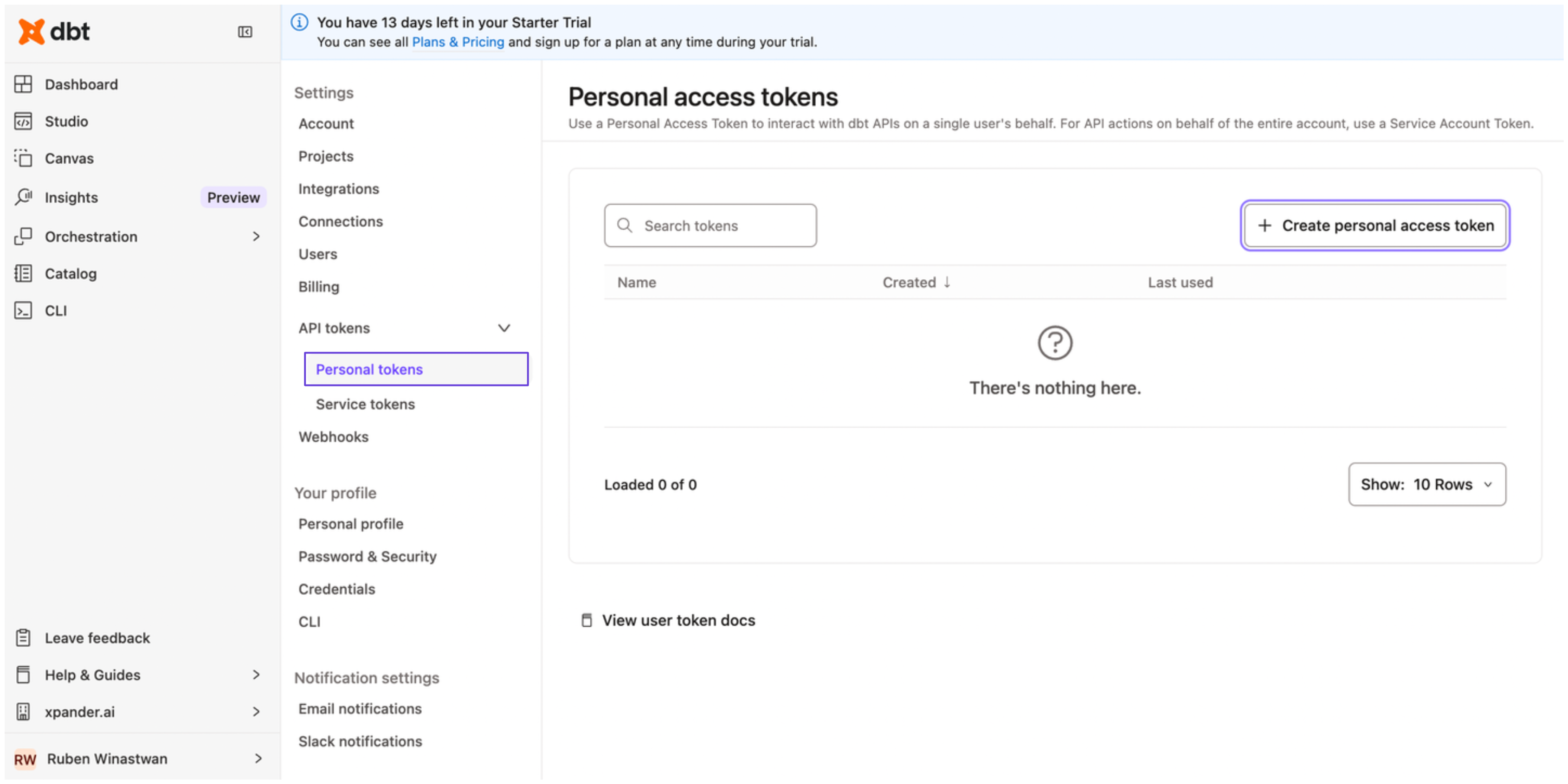 4. Enter a name for your access token, then click **Save**.
5. Copy your personal access token and store it securely before closing the dialog box.
### Connect dbt Labs in xpander
1. In Xpander Chat, open the agent's settings and click **Add skill**.
2. Search for **dbt Labs** and select it.
3. Enter a **connection name**, e.g., "xpander-dbt-labs".
4. Choose **Organization** access (one shared account) or **Personal** (your own account, so the agent acts with your permissions where systems allow). On an agent other people use, a personal connection runs their requests as you unless the binding requires each person's own sign-in; see [whose credential a shared agent uses](/use/agents/permissions#whose-credential-a-shared-agent-uses).
5. Select **API Key** as the authentication method.
6. Paste your dbt Labs access token into the provided field.
7. Set the **Type** to **Bearer**.
8. Under **Interface specific settings**, enter the base URL: `https://{url}/`, replacing **{url}** with the URL of your dbt Labs account. You can find the URL of your dbt account by clicking **Account** -> **Access URL** in the same page where you created your personal access token before.
9. Click **Connect**.
## Give an agent the dbt Labs skill
Once dbt Labs is connected, any agent you can edit may be given the skill: open the agent's settings, click **Add skill**, and choose **dbt Labs**. The skill panel lists the dbt Labs actions by group. Enable only the groups the agent needs, and mark the actions that should wait for a named person's sign-off under **These actions need approval**. Which skills exist for your organization, and who may add them, is decided by your admins; see [Skills](/use/skills).
## Related Resources
* [Skills](/use/skills)
* [dbt Labs API Documentation](https://docs.getdbt.com/dbt-cloud/api-v2#/)
4. Enter a name for your access token, then click **Save**.
5. Copy your personal access token and store it securely before closing the dialog box.
### Connect dbt Labs in xpander
1. In Xpander Chat, open the agent's settings and click **Add skill**.
2. Search for **dbt Labs** and select it.
3. Enter a **connection name**, e.g., "xpander-dbt-labs".
4. Choose **Organization** access (one shared account) or **Personal** (your own account, so the agent acts with your permissions where systems allow). On an agent other people use, a personal connection runs their requests as you unless the binding requires each person's own sign-in; see [whose credential a shared agent uses](/use/agents/permissions#whose-credential-a-shared-agent-uses).
5. Select **API Key** as the authentication method.
6. Paste your dbt Labs access token into the provided field.
7. Set the **Type** to **Bearer**.
8. Under **Interface specific settings**, enter the base URL: `https://{url}/`, replacing **{url}** with the URL of your dbt Labs account. You can find the URL of your dbt account by clicking **Account** -> **Access URL** in the same page where you created your personal access token before.
9. Click **Connect**.
## Give an agent the dbt Labs skill
Once dbt Labs is connected, any agent you can edit may be given the skill: open the agent's settings, click **Add skill**, and choose **dbt Labs**. The skill panel lists the dbt Labs actions by group. Enable only the groups the agent needs, and mark the actions that should wait for a named person's sign-off under **These actions need approval**. Which skills exist for your organization, and who may add them, is decided by your admins; see [Skills](/use/skills).
## Related Resources
* [Skills](/use/skills)
* [dbt Labs API Documentation](https://docs.getdbt.com/dbt-cloud/api-v2#/)