> ## Documentation Index
> Fetch the complete documentation index at: https://docs.xpander.ai/llms.txt
> Use this file to discover all available pages before exploring further.
# Dropbox
> Learn how to integrate AI agents with Dropbox using xpander.ai. Create intelligent agents that automatically organize, analyze, and act on your files, whether it's summarizing documents, tagging images, or triggering actions based on file updates.
## About Dropbox
Dropbox is a cloud-based file storage and collaboration platform that allows users to:
* Store files online instead of (or in addition to) their local device.
* Sync files across multiple devices (PCs, phones, tablets).
* Share files or folders with others easily via links or access permissions.
* Collaborate on documents, especially with features like Dropbox Paper and integrations with tools like Google Workspace and Microsoft Office.
## Authentication Options
Below are possible authentication options you can choose:
### Generate Dropbox Access Token
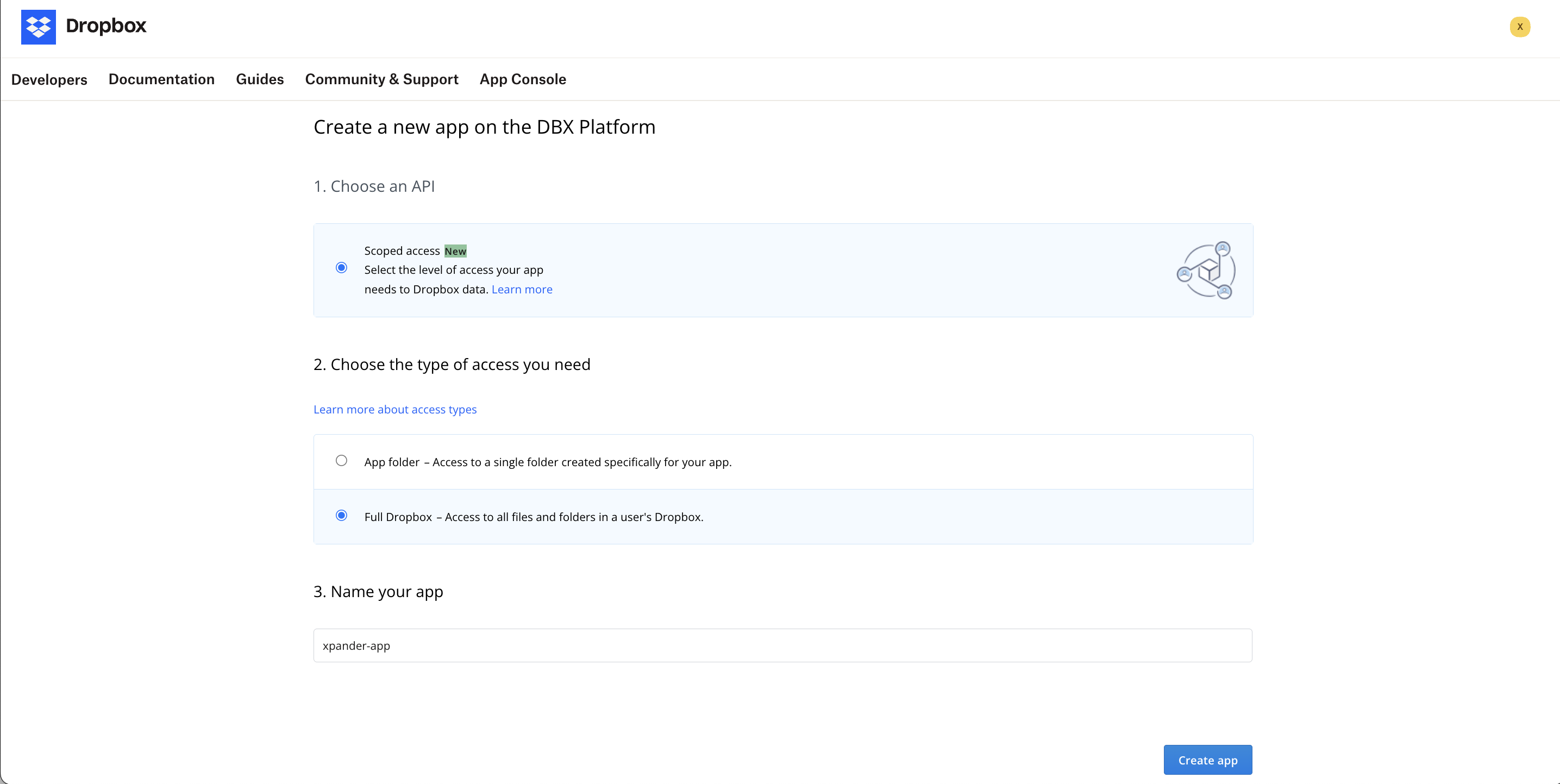
1. Go to your [Dropbox app console](https://www.dropbox.com/developers/apps).
2. Click **Create app**.
3. Set up and configure the scope of the app to your liking. Once you're done, click **Create app**.\\
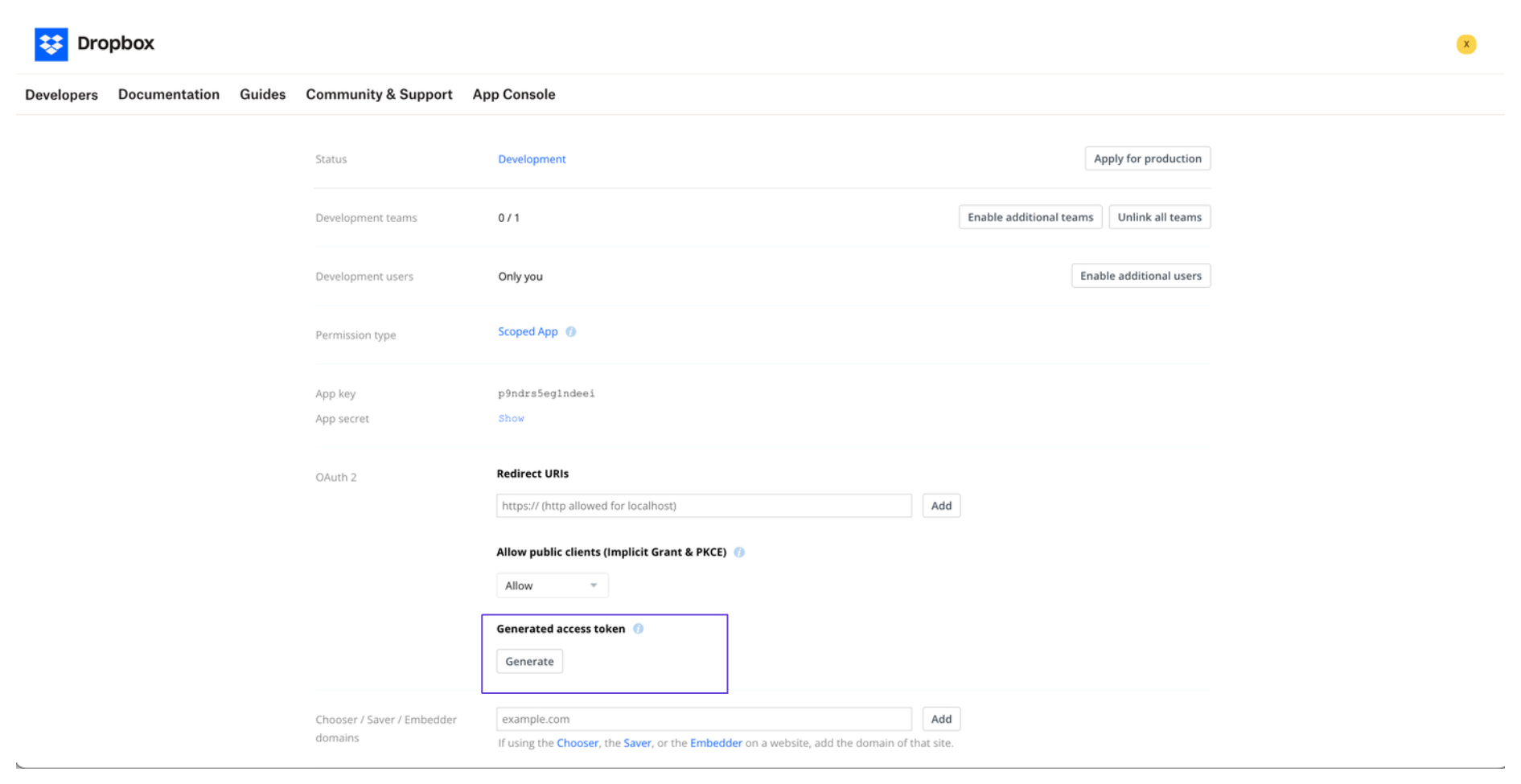
 4. Once the app has been created, navigate to the **OAuth 2** section.
5. Under **Generated access token**, click **Generate**, and you'll see your access token.\\
4. Once the app has been created, navigate to the **OAuth 2** section.
5. Under **Generated access token**, click **Generate**, and you'll see your access token.\\
 ### Integrate Dropbox into Xpander.ai
1. Go to the **Connectors** section in the sidebar of your xpander.ai dashboard.
2. Select **Dropbox** from the available integrations.
3. Click **Enable**.
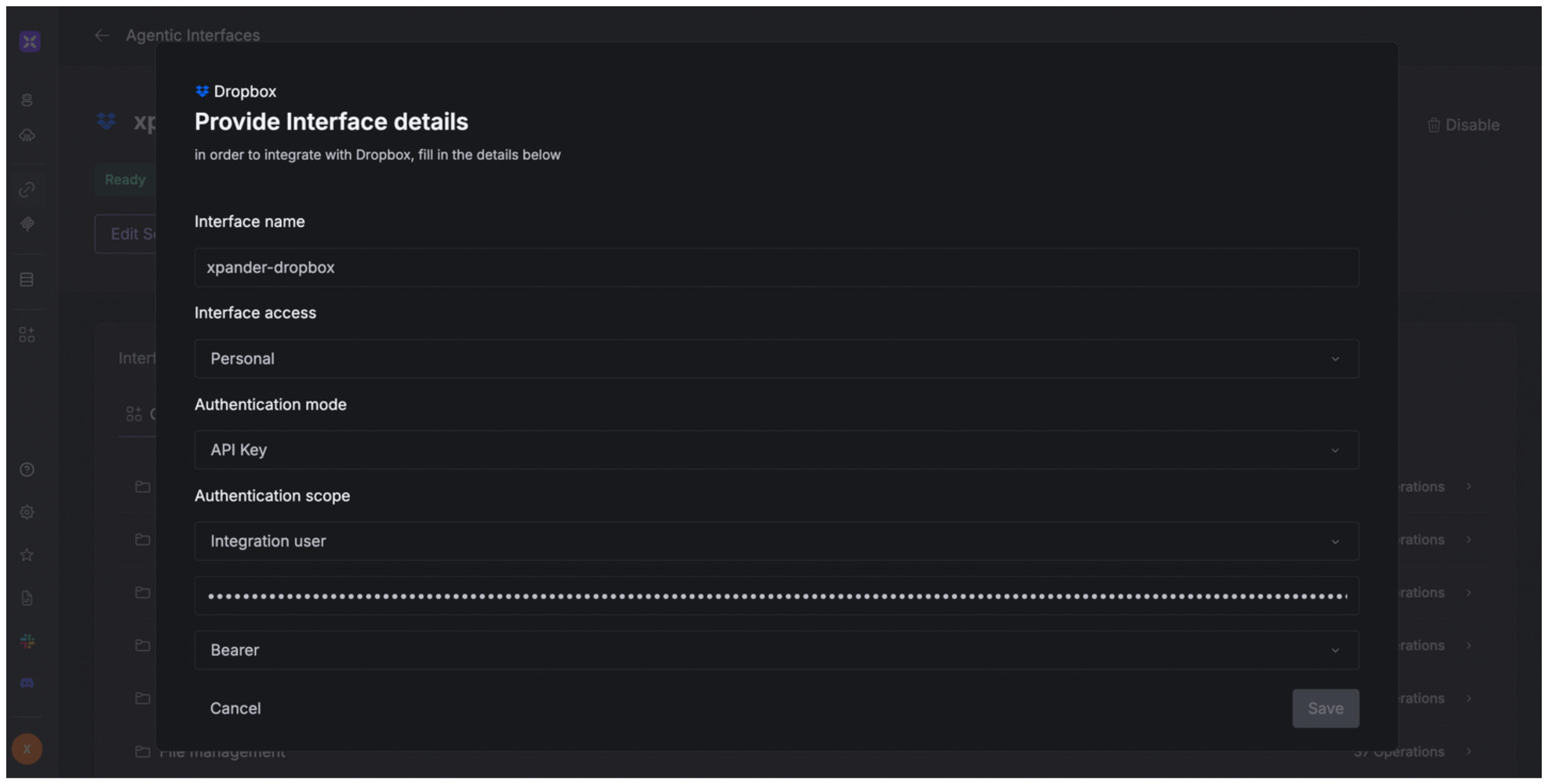
4. Fill in the **connector name** as desired, e.g., "xpander-dropbox".
5. Choose **Integration user** as the authentication mode.
6. Choose **API Key** as the authentication method.
7. Copy and paste your Dropbox access token into the provided field.
8. Choose **Bearer** as the **auth type**.
9. Save the configuration.
### Integrate Dropbox into Xpander.ai
1. Go to the **Connectors** section in the sidebar of your xpander.ai dashboard.
2. Select **Dropbox** from the available integrations.
3. Click **Enable**.
4. Fill in the **connector name** as desired, e.g., "xpander-dropbox".
5. Choose **Integration user** as the authentication mode.
6. Choose **API Key** as the authentication method.
7. Copy and paste your Dropbox access token into the provided field.
8. Choose **Bearer** as the **auth type**.
9. Save the configuration.
 ## Integration of Dropbox into AI Agent
Once you've configured your Dropbox account with the authentication option(s) described above, you can integrate it into your AI agent with xpander.ai:
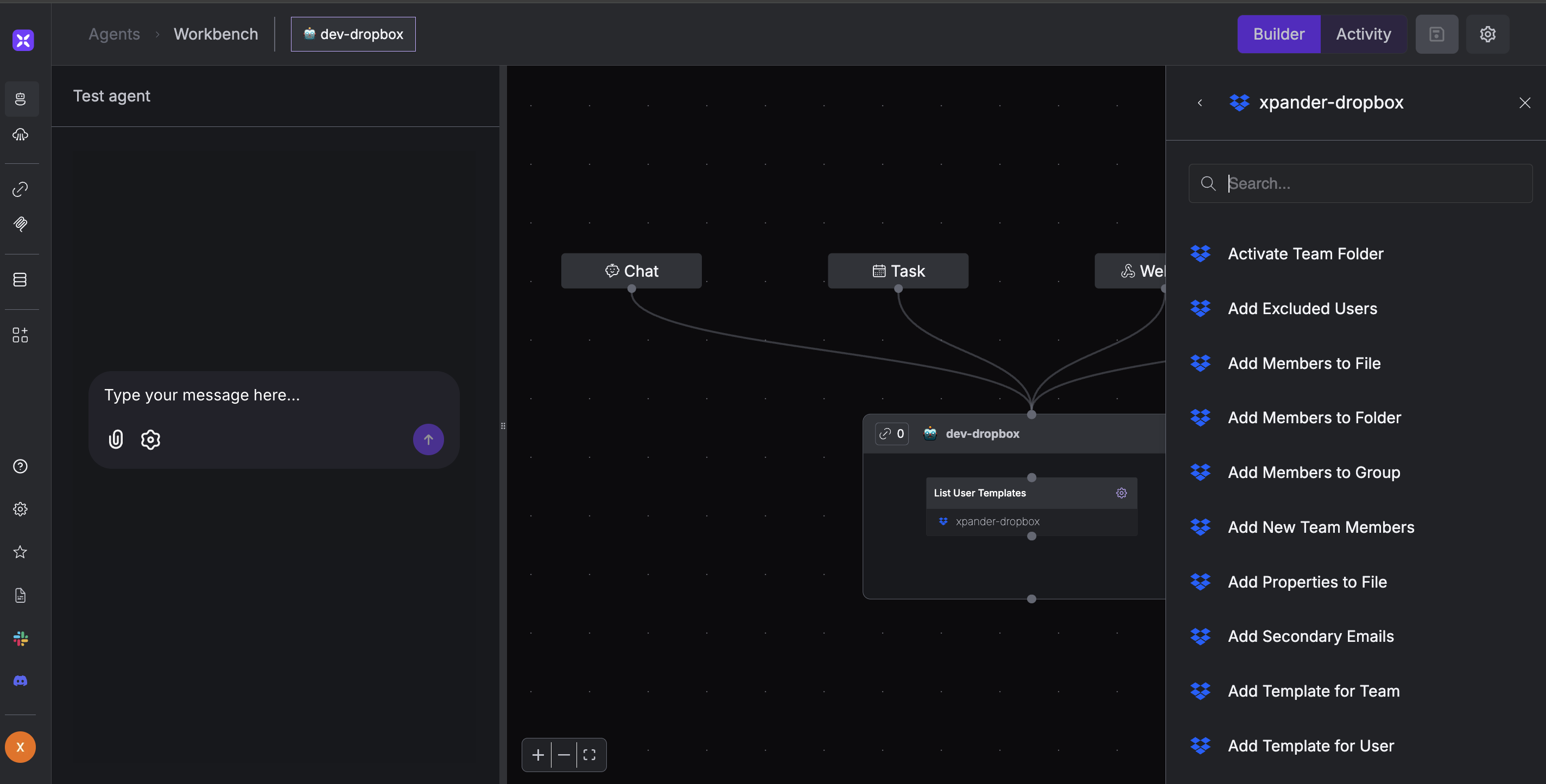
1. In your xpander.ai dashboard, go to the **Agent Configuration** tab and select **Tools**, then click **Add Tools**.
2. Select **Connectors**.
3. Choose **Dropbox** with the same **connector name** you configured in the previous section (e.g., xpander-dropbox).
4. Select the available Dropbox operations that suit your use case.
## Integration of Dropbox into AI Agent
Once you've configured your Dropbox account with the authentication option(s) described above, you can integrate it into your AI agent with xpander.ai:
1. In your xpander.ai dashboard, go to the **Agent Configuration** tab and select **Tools**, then click **Add Tools**.
2. Select **Connectors**.
3. Choose **Dropbox** with the same **connector name** you configured in the previous section (e.g., xpander-dropbox).
4. Select the available Dropbox operations that suit your use case.
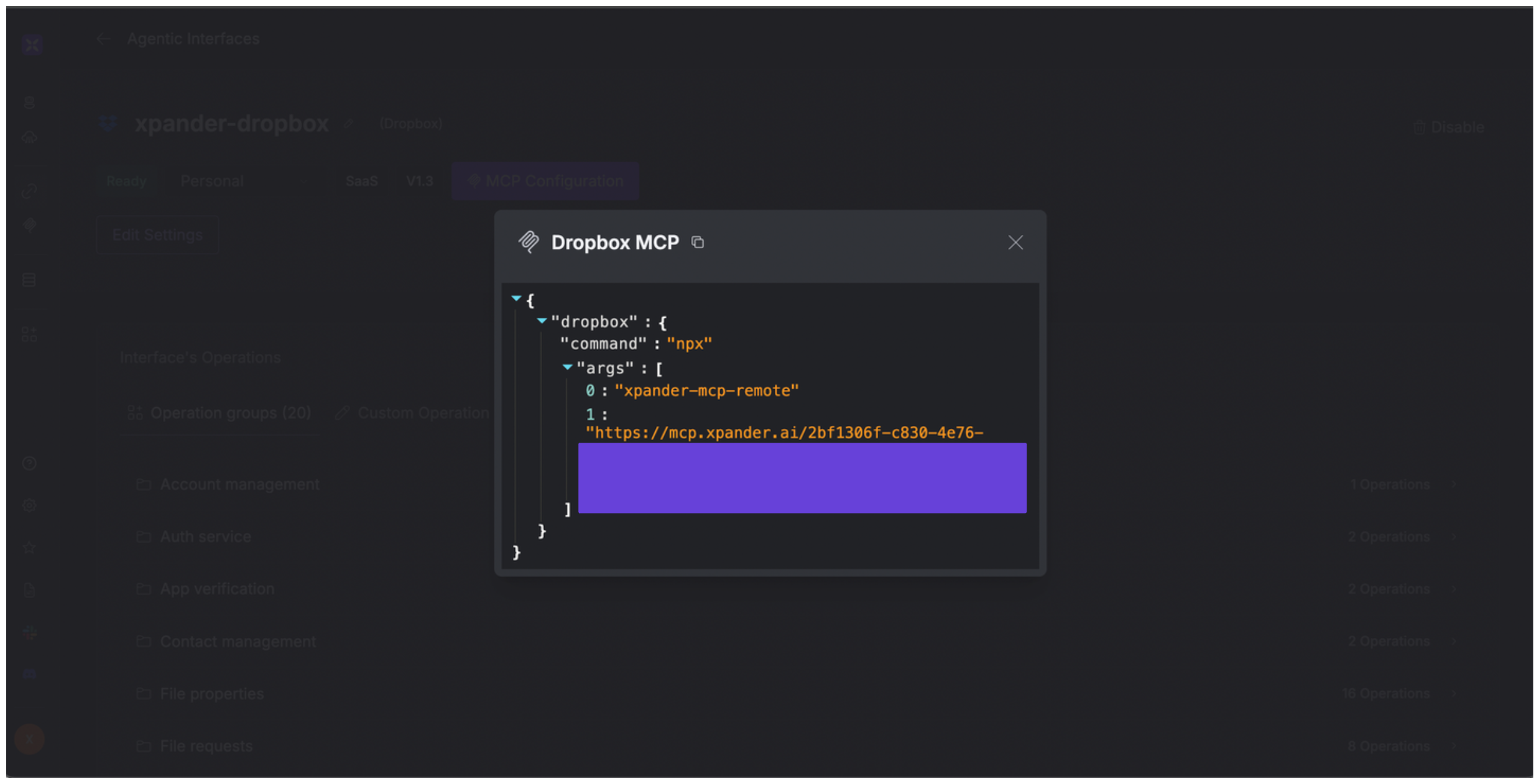
 ## Expose Dropbox as MCP Server
Alternatively, you can also expose your Dropbox account as an MCP server. To do so:
1. Go to the **Connectors** section in the sidebar of your xpander.ai dashboard.
2. Select **Dropbox** with the same **connector name** you configured in the previous section (e.g., xpander-dropbox).
3. Click **MCP Configuration**.
4. Put the MCP configuration into the appropriate settings of the client app you want to use (e.g., Cursor, Windsurf, Claude Desktop, etc.).
## Expose Dropbox as MCP Server
Alternatively, you can also expose your Dropbox account as an MCP server. To do so:
1. Go to the **Connectors** section in the sidebar of your xpander.ai dashboard.
2. Select **Dropbox** with the same **connector name** you configured in the previous section (e.g., xpander-dropbox).
3. Click **MCP Configuration**.
4. Put the MCP configuration into the appropriate settings of the client app you want to use (e.g., Cursor, Windsurf, Claude Desktop, etc.).
 ## AI Agent Dropbox Prompt Library
Below are possible prompts or use cases you can try after integrating Dropbox into your xpander AI agent:
```
Can you remove all the contacts I manually added from {source_name}?
```
```
Can you delete only the contacts with email addresses from {domain_name}?
```
```
Can you list all files in the {folder_name} folder?
```
```
Can you show me the shared link for {filename}?
```
## Related Resources
* [Understanding Model Context Protocol (MCP)](/guides/deploy/mcp)
* [Dropbox API Documentation](https://www.dropbox.com/developers/documentation/http/documentation)
## AI Agent Dropbox Prompt Library
Below are possible prompts or use cases you can try after integrating Dropbox into your xpander AI agent:
```
Can you remove all the contacts I manually added from {source_name}?
```
```
Can you delete only the contacts with email addresses from {domain_name}?
```
```
Can you list all files in the {folder_name} folder?
```
```
Can you show me the shared link for {filename}?
```
## Related Resources
* [Understanding Model Context Protocol (MCP)](/guides/deploy/mcp)
* [Dropbox API Documentation](https://www.dropbox.com/developers/documentation/http/documentation)