> ## Documentation Index
> Fetch the complete documentation index at: https://docs.xpander.ai/llms.txt
> Use this file to discover all available pages before exploring further.
# Google Forms
> Learn how to integrate AI agents with Google Forms using xpander.ai. Create dynamic, intelligent forms that can automatically analyze responses, provide personalized follow-ups, and streamline data collection.
## About Google Forms
Google Forms is a free, web-based application developed by Google that allows users to create and manage surveys, quizzes, and various types of online forms.
Key features include:
* **Question Types**: Google Forms offers a variety of question formats, including multiple-choice, short answer, checkboxes, dropdowns, linear scales, file uploads, and more.
* **Conditional Logic**: You can set up forms to show or hide questions based on previous answers, allowing for dynamic and personalized surveys.
* **Templates**: The platform provides a range of pre-designed templates for different purposes, such as event registrations, feedback surveys, and quizzes.
* **Customization**: Customize the look of your forms by adding images, videos, and adjusting the theme colors and fonts.
* **Real-Time Collaboration**: Multiple users can collaborate on the same form simultaneously, making it ideal for team projects.
* **Data Analysis**: Responses are automatically collected and can be viewed in summary charts or exported to Google Sheets for detailed analysis.
## Authentication Options
Below are possible authentication options you can choose:
### Generate a Google Forms API Key
1. Log in to your [Google Cloud Console](https://console.cloud.google.com/).
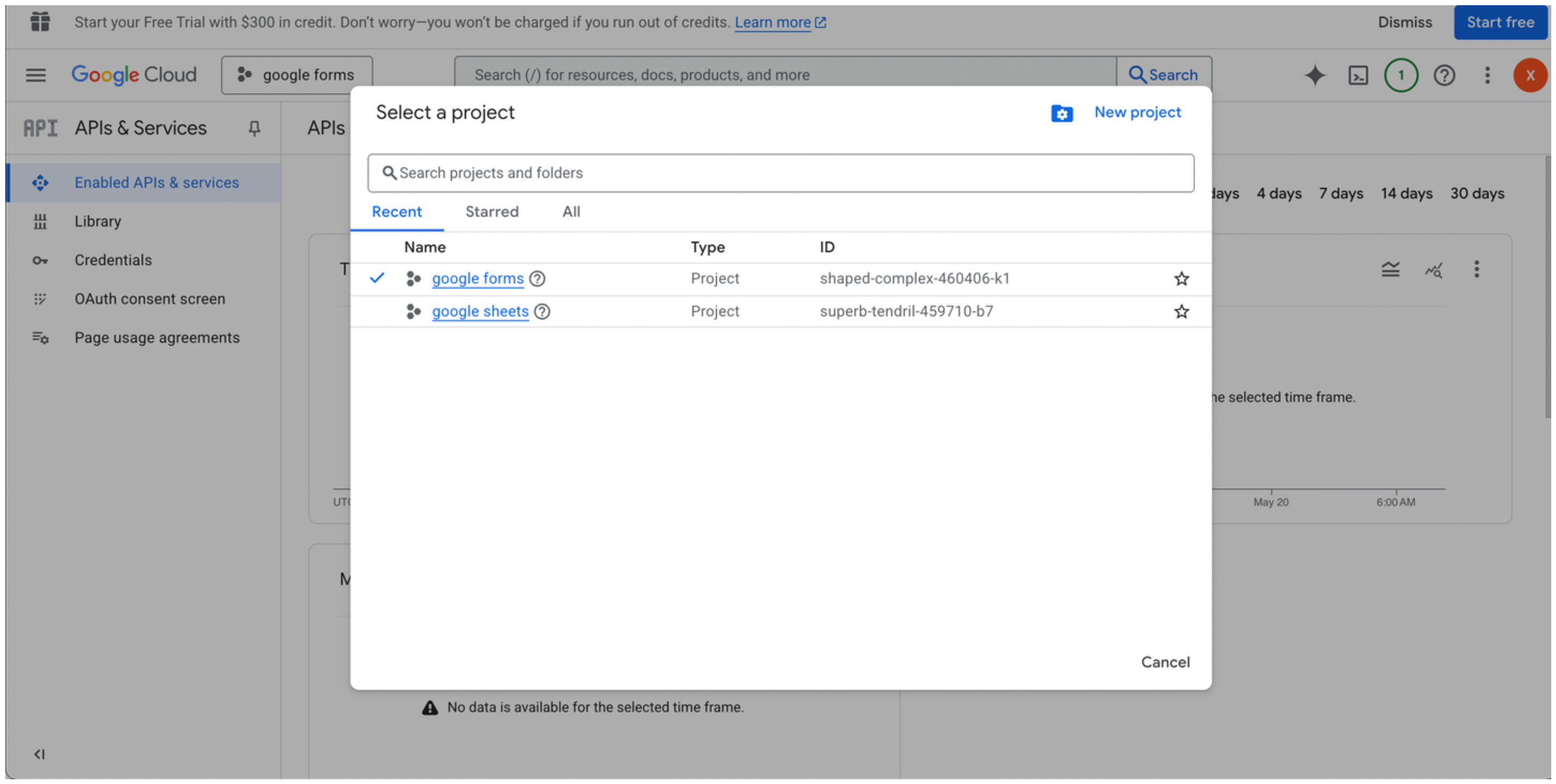
2. Create a new project or select an existing one.\\
 3. Go to the [Google Cloud API Library](https://console.cloud.google.com/apis/library).\\
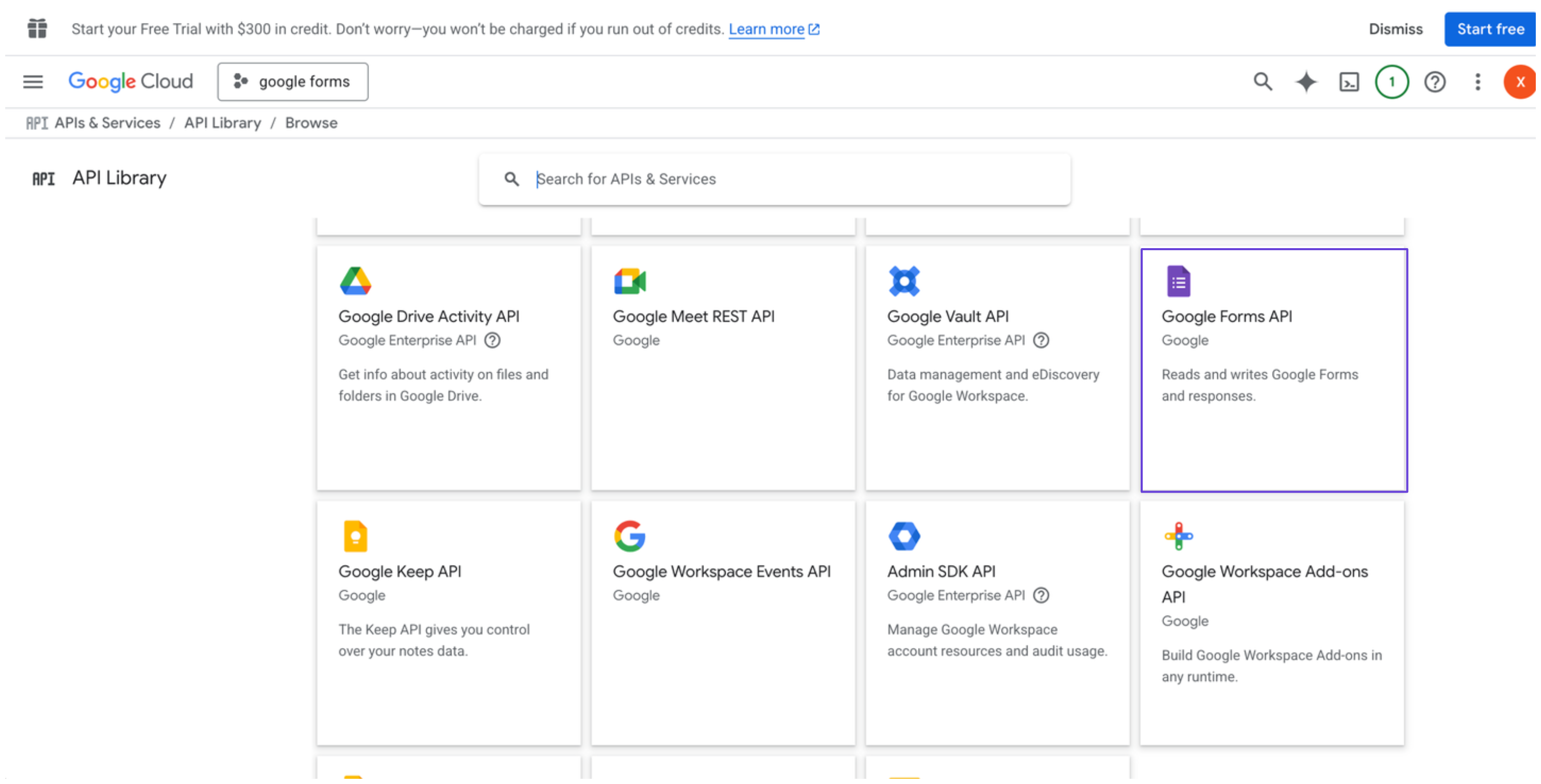 4. Search for and select **Google Forms API**, then click **Enable**.
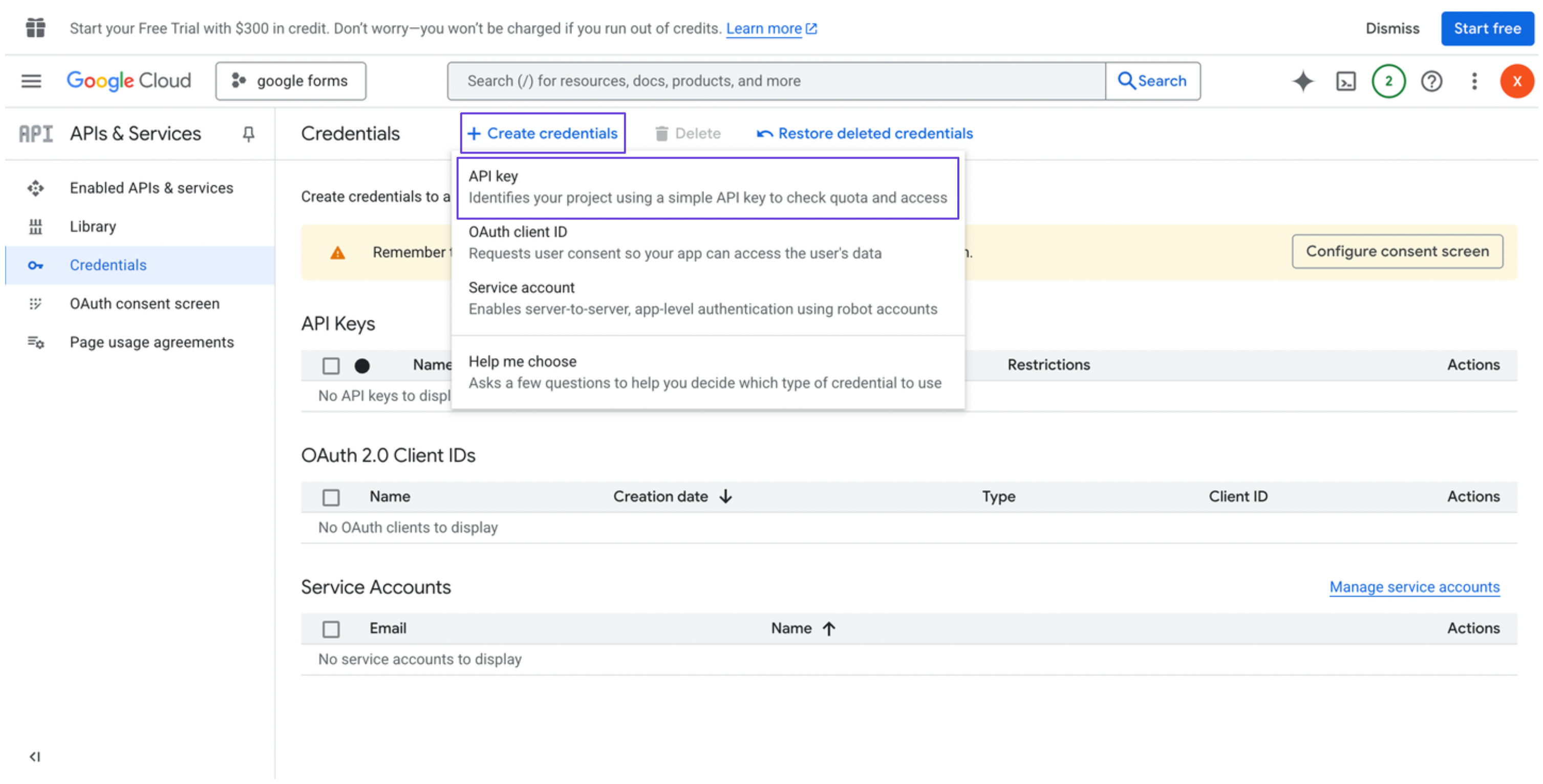
5. In the sidebar, go to **Credentials**.
6. Click **Create credentials**, and select **API key**.\\
4. Search for and select **Google Forms API**, then click **Enable**.
5. In the sidebar, go to **Credentials**.
6. Click **Create credentials**, and select **API key**.\\
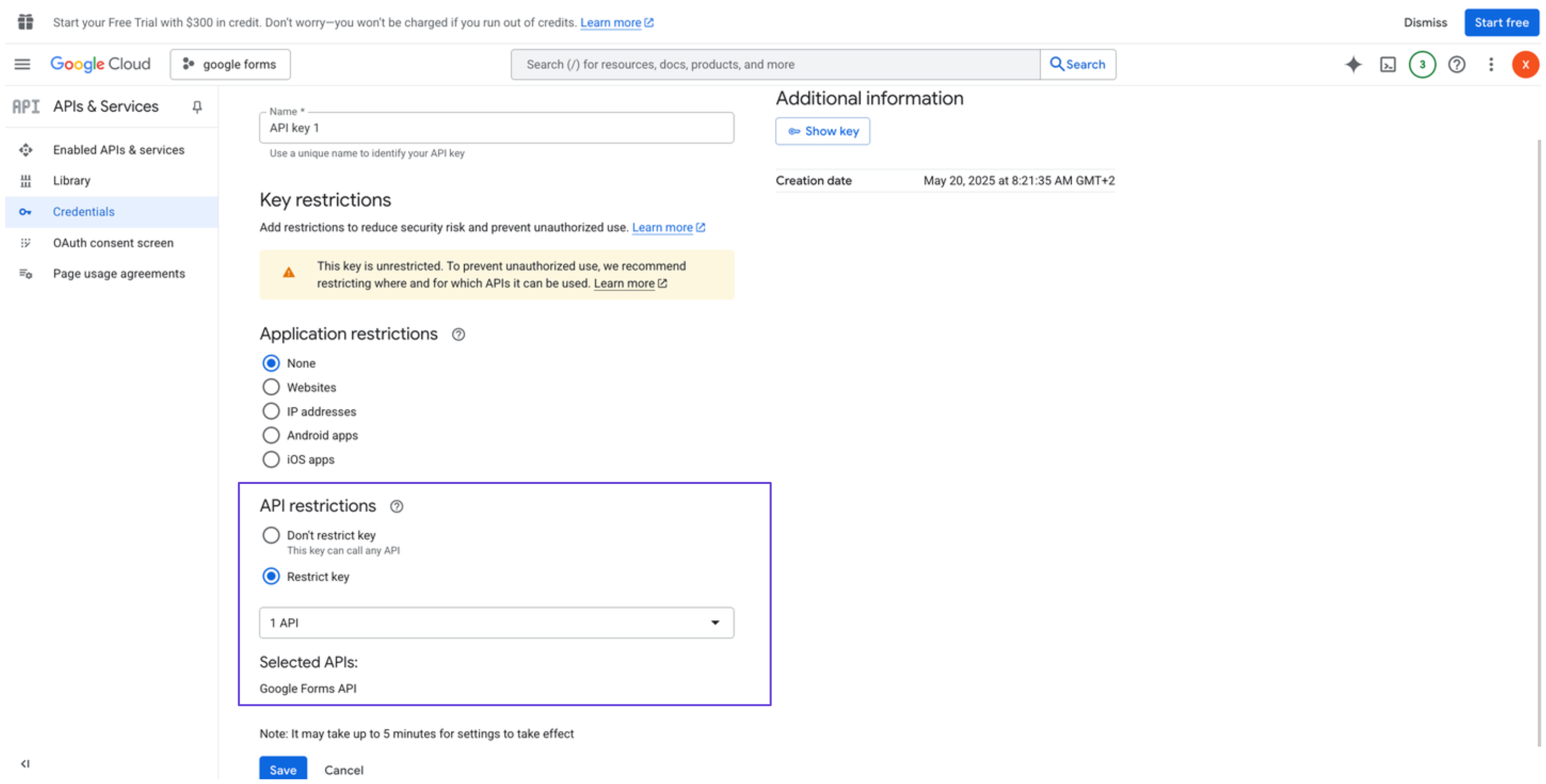
 7. Restrict the API key to Google Forms API only (optional but recommended).\\
 ### Integrate Google Forms into xpander.ai
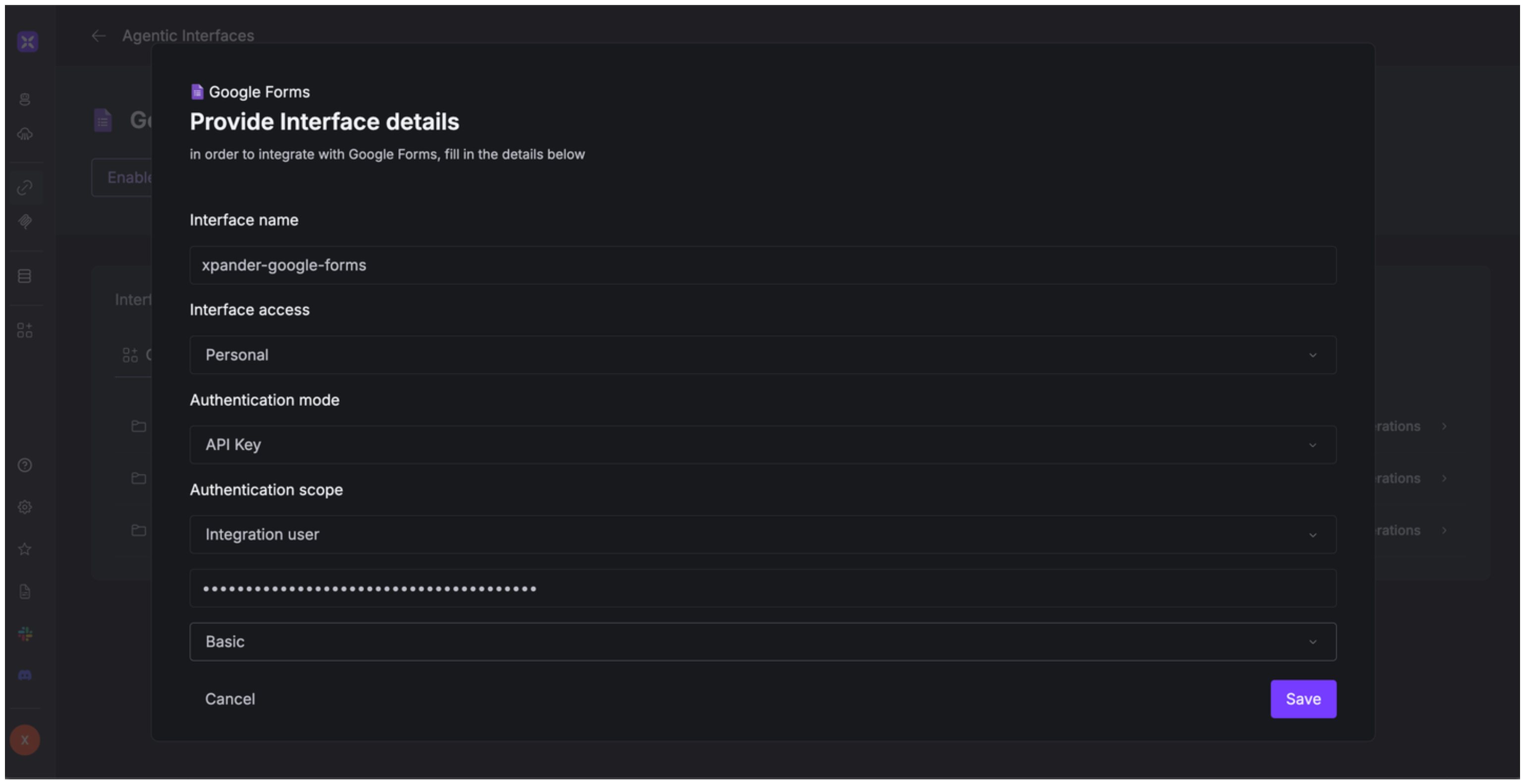
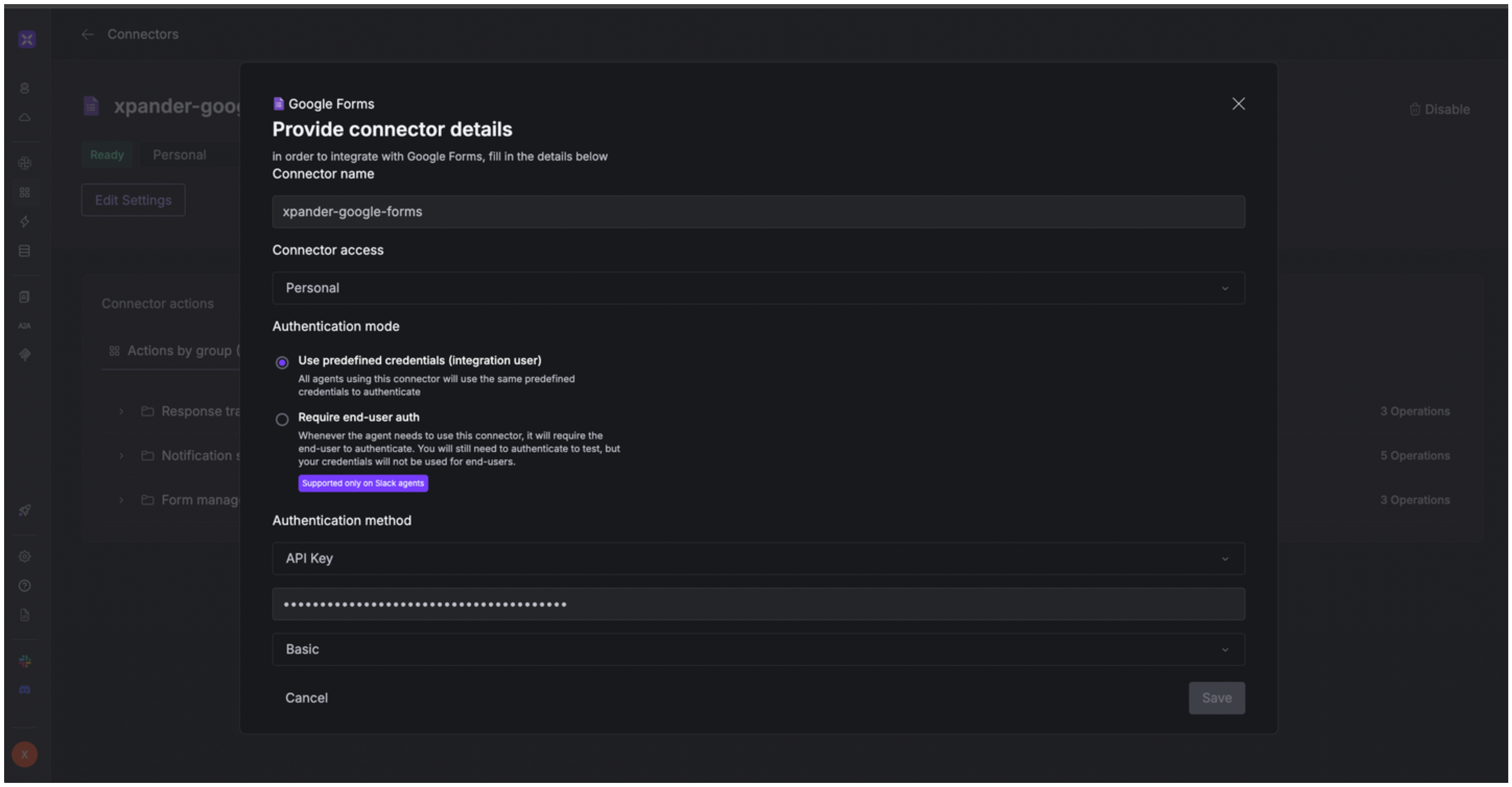
1. Go to the **Connectors** section in the sidebar of your xpander.ai dashboard.
2. Select **Google Forms** from the available integrations.
3. Click **Enable**.
4. Enter a **connector name**, e.g., "xpander-google-forms".
5. Select **Integration User** as the authentication mode.
6. Select **API Key** as the authentication method.
7. Paste the Google Forms API key into the provided field.
8. Choose **Basic** as the **Auth Type**.
9. Save the configuration.\\
### Integrate Google Forms into xpander.ai
1. Go to the **Connectors** section in the sidebar of your xpander.ai dashboard.
2. Select **Google Forms** from the available integrations.
3. Click **Enable**.
4. Enter a **connector name**, e.g., "xpander-google-forms".
5. Select **Integration User** as the authentication mode.
6. Select **API Key** as the authentication method.
7. Paste the Google Forms API key into the provided field.
8. Choose **Basic** as the **Auth Type**.
9. Save the configuration.\\
 ## Integration of Google Forms into AI Agent
Once you've configured your Google Forms account with the authentication option(s) described above, you can integrate it into your AI agent with xpander.ai:
1. In your xpander.ai dashboard, go to the **Agent Configuration** tab and select **Tools**, then click **Add Tools**.
2. Select **Connectors**.
3. Choose **Google Forms** with the same **connector name** you configured in the previous section (e.g., xpander-google-forms).
4. Select the available Google Forms operations that suit your use case.
## Integration of Google Forms into AI Agent
Once you've configured your Google Forms account with the authentication option(s) described above, you can integrate it into your AI agent with xpander.ai:
1. In your xpander.ai dashboard, go to the **Agent Configuration** tab and select **Tools**, then click **Add Tools**.
2. Select **Connectors**.
3. Choose **Google Forms** with the same **connector name** you configured in the previous section (e.g., xpander-google-forms).
4. Select the available Google Forms operations that suit your use case.
 ## Expose Google Forms as MCP Server
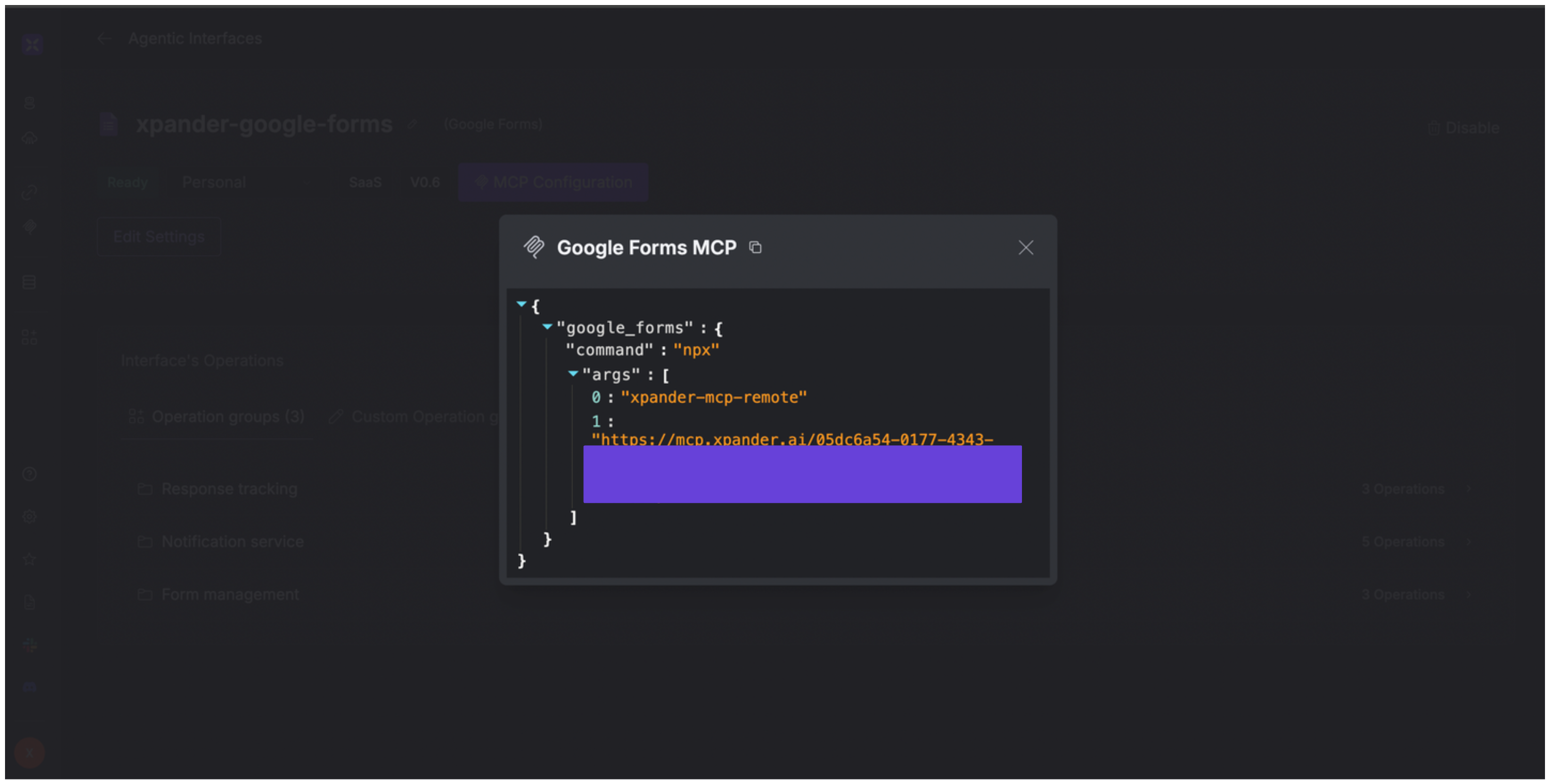
Alternatively, you can also expose your Google Forms account as an MCP server. To do so:
1. Go to the **Connectors** section in the sidebar of your xpander.ai dashboard.
2. Select **Google Forms** with the same **connector name** you configured in the previous section (e.g., xpander-google-forms).
3. Click **MCP Configuration**.
4. Enter the MCP configuration into the appropriate settings of the client app you want to use (e.g., Cursor, Windsurf, Claude Desktop, etc.).
## Expose Google Forms as MCP Server
Alternatively, you can also expose your Google Forms account as an MCP server. To do so:
1. Go to the **Connectors** section in the sidebar of your xpander.ai dashboard.
2. Select **Google Forms** with the same **connector name** you configured in the previous section (e.g., xpander-google-forms).
3. Click **MCP Configuration**.
4. Enter the MCP configuration into the appropriate settings of the client app you want to use (e.g., Cursor, Windsurf, Claude Desktop, etc.).
 ## AI Agent Google Forms Prompt Library
Below are possible prompts or use cases you can try after integrating Google Forms into your xpander AI agent:
```
Can you create a new Google Form titled {form_title} for our upcoming event?
```
```
Can you list all responses for the Google Form {form_name} for our data analysis?
```
```
Can you list all notification watches for the Google Form {form_name} to ensure proper monitoring?
```
```
Can you update the Google Form {form_name} to add a new question about {question_topic}?
```
## Related Resources
* [Understanding Model Context Protocol (MCP)](/guides/deploy/mcp)
* [Google Forms API Documentation](https://developers.google.com/workspace/forms/api/reference/rest)
## AI Agent Google Forms Prompt Library
Below are possible prompts or use cases you can try after integrating Google Forms into your xpander AI agent:
```
Can you create a new Google Form titled {form_title} for our upcoming event?
```
```
Can you list all responses for the Google Form {form_name} for our data analysis?
```
```
Can you list all notification watches for the Google Form {form_name} to ensure proper monitoring?
```
```
Can you update the Google Form {form_name} to add a new question about {question_topic}?
```
## Related Resources
* [Understanding Model Context Protocol (MCP)](/guides/deploy/mcp)
* [Google Forms API Documentation](https://developers.google.com/workspace/forms/api/reference/rest)