> ## Documentation Index
> Fetch the complete documentation index at: https://docs.xpander.ai/llms.txt
> Use this file to discover all available pages before exploring further.
# HubSpot Blogs
> Learn how to integrate AI agents with HubSpot Blogs using xpander.ai. Create intelligent, automated content workflows that personalize blog posts, optimize SEO in real-time, and schedule publishing based on audience engagement trends.
## About HubSpot Blogs
HubSpot Blogs refer to two interconnected offerings from HubSpot:
* **HubSpot's Official Blog**: This is a content-rich platform where HubSpot publishes articles on marketing, sales, customer service, and business growth. It serves as a resource for professionals seeking insights and strategies in these domains.
* **HubSpot's Blogging Tool**: This is a feature within HubSpot's Content Management System (CMS) that allows users to create, manage, and optimize their own blogs. It's designed to help businesses attract and engage audiences through content marketing.
## Authentication Options
Below are possible authentication options you can choose:
The simplest way to connect HubSpot Blogs is by using xpander.ai's built-in authentication:
1. Go to the **Connectors** section in the sidebar of your xpander.ai dashboard.
2. Select **HubSpot Blogs** from the available integrations.
3. Click **Sign in with HubSpot Blogs**.
4. Choose the account you want to connect and grant xpander.ai permission to access it.
5. HubSpot Blogs is now ready to use.
### Generate a HubSpot Blogs API Key
1. Log in to your [HubSpot Blogs account](https://www.hubspot.com/products/content/blog).
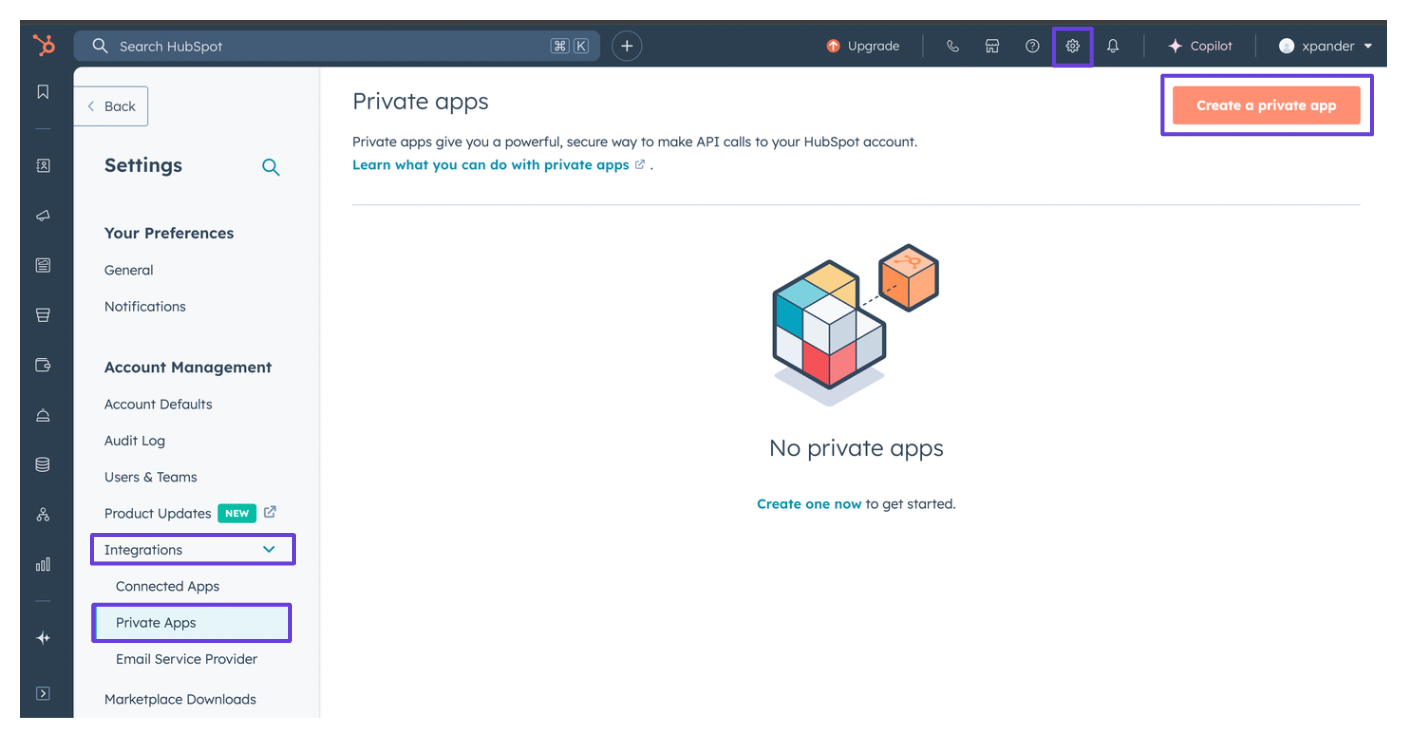
2. Click on **Settings** (the gear icon) in the top bar of your dashboard.
3. In the sidebar, click on **Integration**.
4. Choose **Private Apps**, then click **Create Private App**.\\
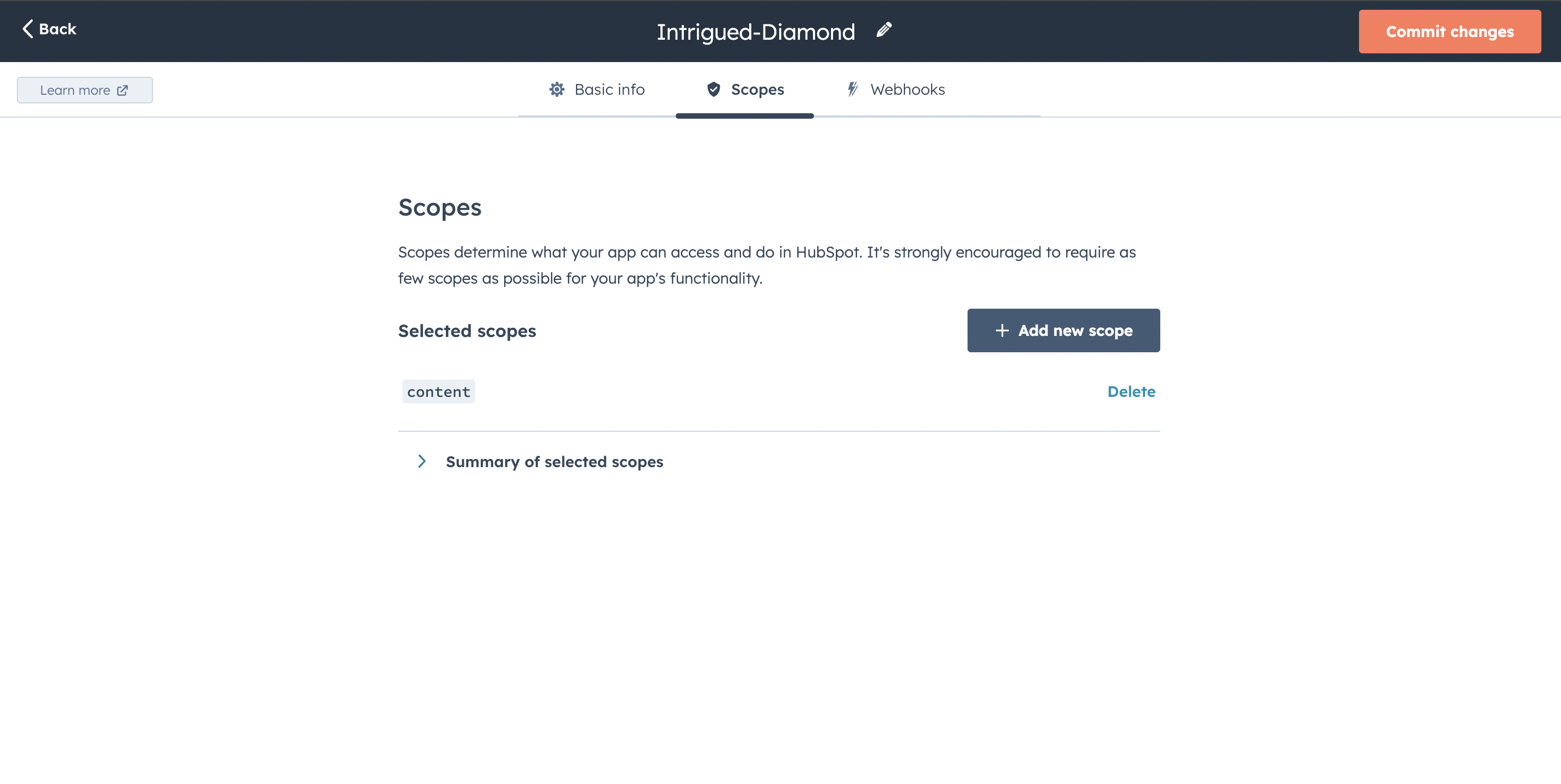
 5. Give your app a name, then go to the **Scopes** tab and click **Add new scope**.
6. Under the **Other** section, check the box for `content`.\\
5. Give your app a name, then go to the **Scopes** tab and click **Add new scope**.
6. Under the **Other** section, check the box for `content`.\\
 7. Click **Create App**.
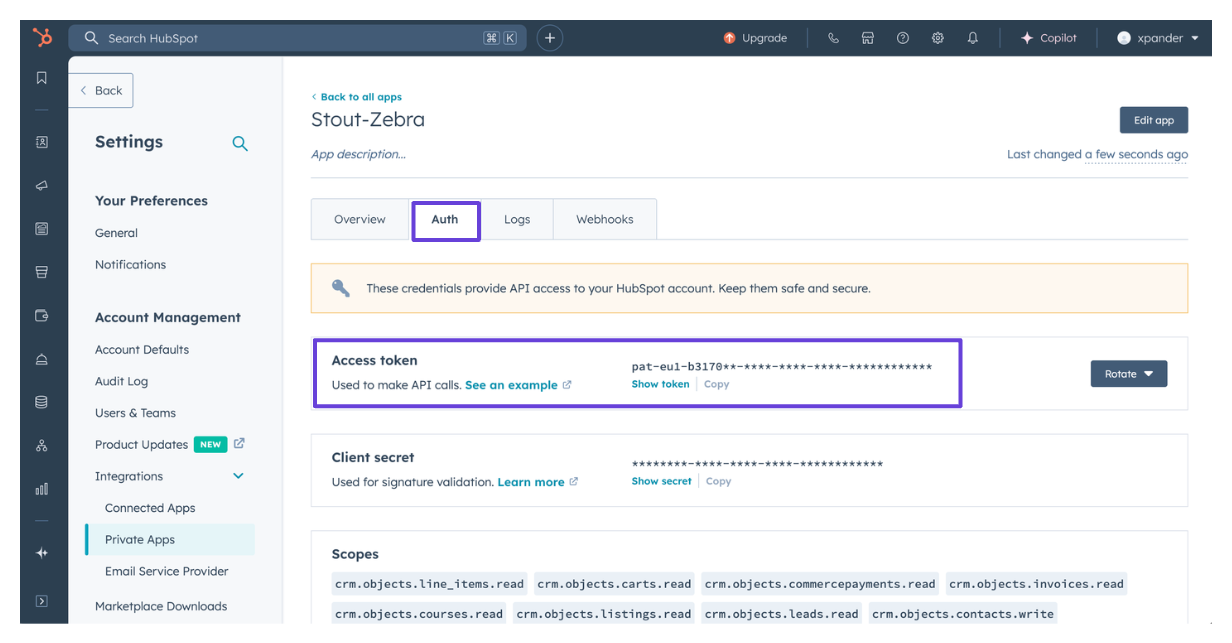
8. Your access token will be available in the **Auth** tab of your newly created private app.\\
7. Click **Create App**.
8. Your access token will be available in the **Auth** tab of your newly created private app.\\
 ### Integrate HubSpot Blogs into xpander.ai
1. Go to the **Connectors** section in the sidebar of your xpander.ai dashboard.
2. Select **HubSpot Blogs** from the available integrations.
3. Click **Other auth options**.
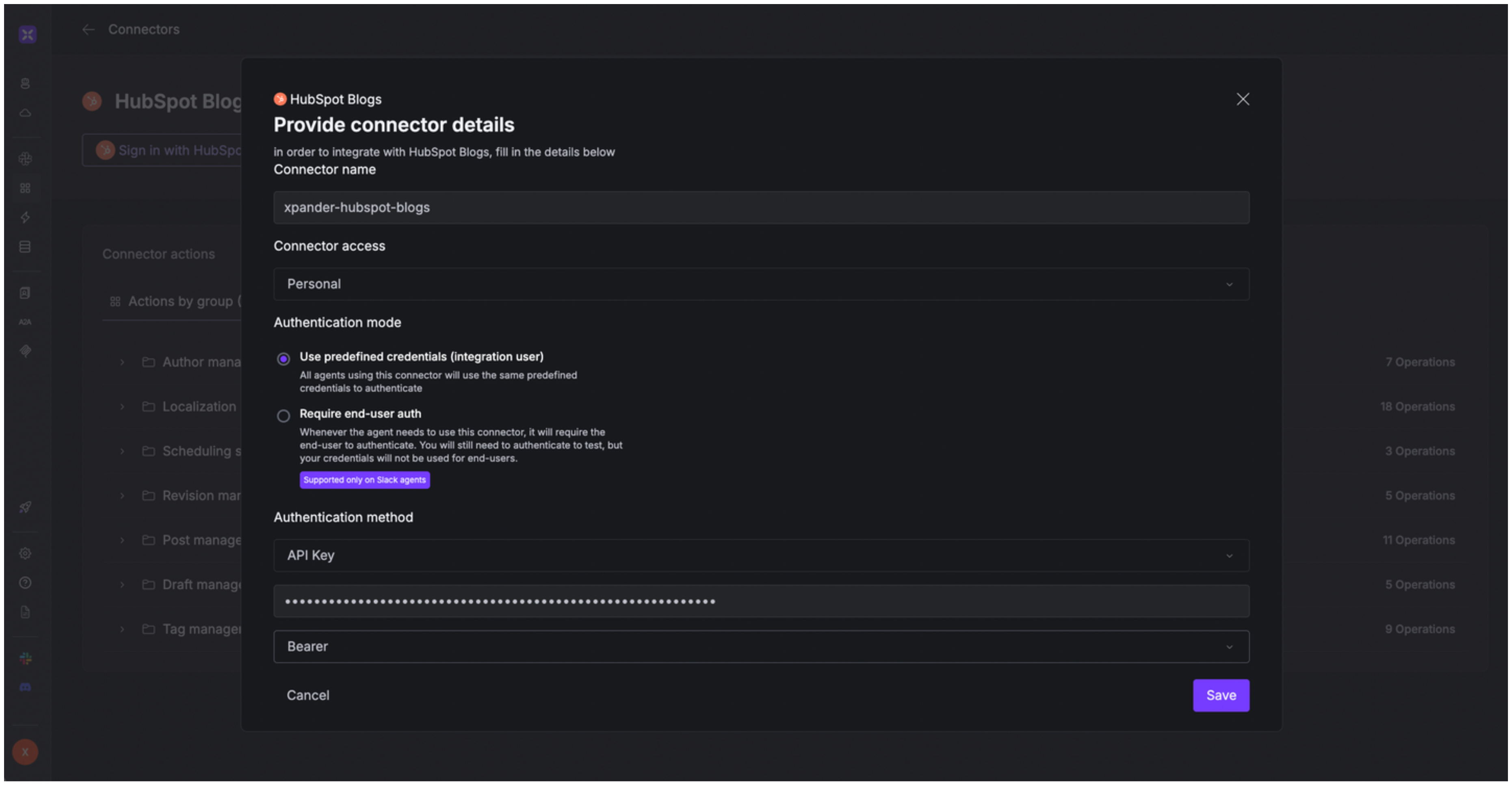
4. Enter a **connector name**, e.g., "xpander-hubspot-blogs".
5. Select **Integration User** as the authentication mode.
6. Select **API Key** as the authentication method.
7. Paste the HubSpot access token into the provided field.
8. Choose **Bearer** as the **Auth Type**.
9. Save the configuration.
### Integrate HubSpot Blogs into xpander.ai
1. Go to the **Connectors** section in the sidebar of your xpander.ai dashboard.
2. Select **HubSpot Blogs** from the available integrations.
3. Click **Other auth options**.
4. Enter a **connector name**, e.g., "xpander-hubspot-blogs".
5. Select **Integration User** as the authentication mode.
6. Select **API Key** as the authentication method.
7. Paste the HubSpot access token into the provided field.
8. Choose **Bearer** as the **Auth Type**.
9. Save the configuration.
 ## Integration of HubSpot Blogs into AI Agent
Once you've configured your HubSpot Blogs account with the authentication option(s) described above, you can integrate it into your AI agent with xpander.ai:
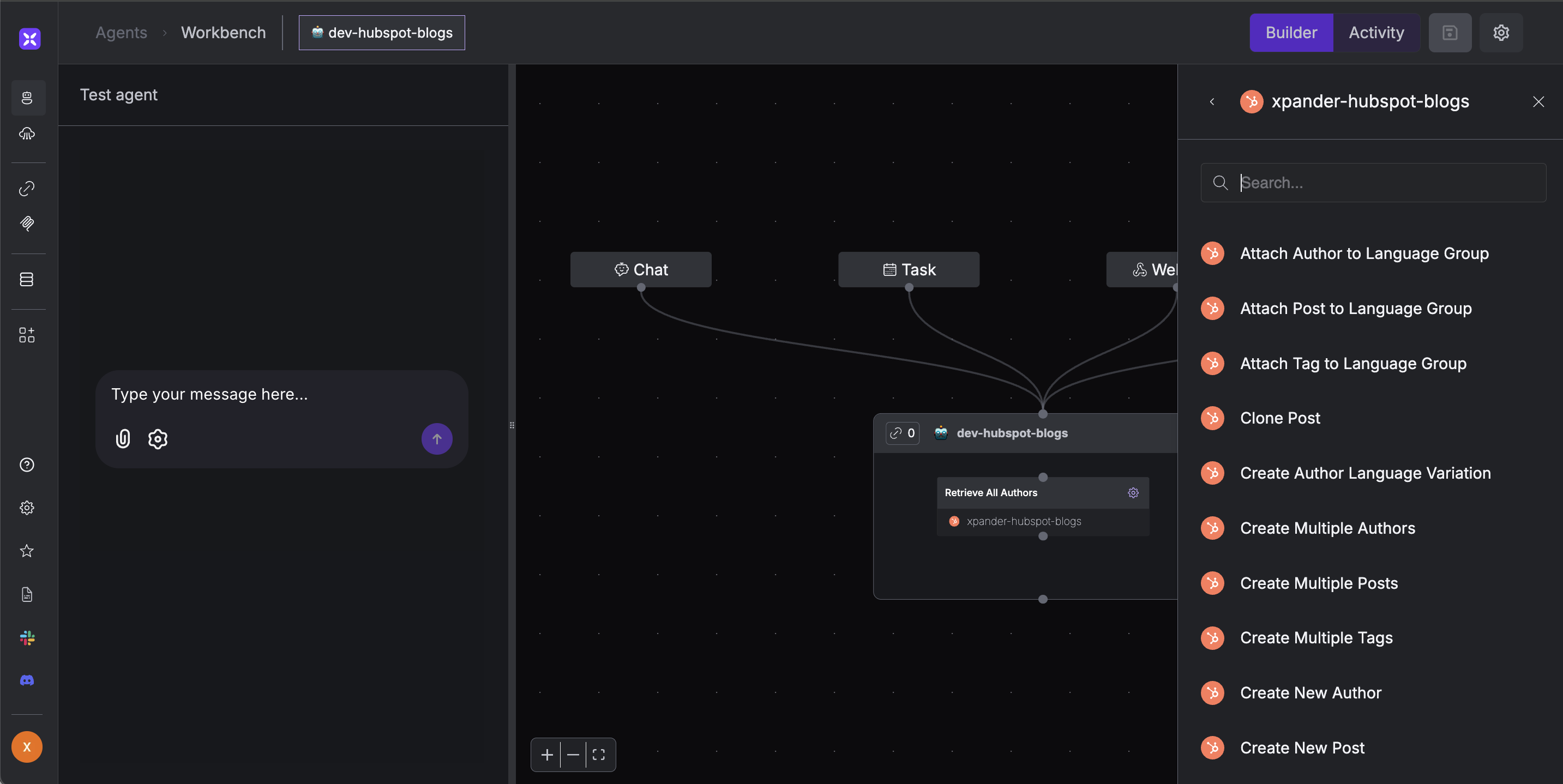
1. In your xpander.ai dashboard, go to the **Agent Configuration** tab and select **Tools**, then click **Add Tools**.
2. Select **Connectors**.
3. Choose **HubSpot Blogs** with the same **connector name** you configured in the previous section (e.g., xpander-hubspot-blogs).
4. Select the available HubSpot Blogs operations that suit your use case.
## Integration of HubSpot Blogs into AI Agent
Once you've configured your HubSpot Blogs account with the authentication option(s) described above, you can integrate it into your AI agent with xpander.ai:
1. In your xpander.ai dashboard, go to the **Agent Configuration** tab and select **Tools**, then click **Add Tools**.
2. Select **Connectors**.
3. Choose **HubSpot Blogs** with the same **connector name** you configured in the previous section (e.g., xpander-hubspot-blogs).
4. Select the available HubSpot Blogs operations that suit your use case.
 ## AI Agent HubSpot Blogs Prompt Library
Below are possible prompts or use cases you can try after integrating HubSpot Blogs into your xpander AI agent:
```
Can you retrieve the details for post {blog_title}?
```
```
Can you schedule the {blog_titile} post to publish on {future_date}?
```
```
Can you create a Spanish version of the {blog_title} blog post?
```
```
Can you fetch all the revision history for our {blog_title} post?
```
## Related Resources
* [Understanding Model Context Protocol (MCP)](/guides/deploy/mcp)
* [HubSpot Blogs API Documentation](https://developers.hubspot.com/docs/reference/api/overview)
## AI Agent HubSpot Blogs Prompt Library
Below are possible prompts or use cases you can try after integrating HubSpot Blogs into your xpander AI agent:
```
Can you retrieve the details for post {blog_title}?
```
```
Can you schedule the {blog_titile} post to publish on {future_date}?
```
```
Can you create a Spanish version of the {blog_title} blog post?
```
```
Can you fetch all the revision history for our {blog_title} post?
```
## Related Resources
* [Understanding Model Context Protocol (MCP)](/guides/deploy/mcp)
* [HubSpot Blogs API Documentation](https://developers.hubspot.com/docs/reference/api/overview)