> ## Documentation Index
> Fetch the complete documentation index at: https://docs.xpander.ai/llms.txt
> Use this file to discover all available pages before exploring further.
# HubSpot
> HubSpot on xpander: 2 skills, 244 actions in total, how each connects, and which actions to hold for approval.
HTTP API connector
## What the skills can do
The platform lists 2 HubSpot skills, each added to an agent separately. All are HTTP APIs described by OpenAPI specs, not MCP servers:
* **HubSpot Blogs**: 50 actions. Calls go to `https://api.hubapi.com/cms/v3/blogs` and carry an OAuth 2.0 token obtained with **Sign in with HubSpot** on the cloud edition, or an API key or custom header on a self-hosted installation, which offers no sign-in flow.
* **HubSpot CRM**: 194 actions. Calls go to `https://api.hubapi.com` and carry an OAuth 2.0 token obtained with **Sign in with HubSpot** on the cloud edition, or an API key or custom header on a self-hosted installation, which offers no sign-in flow.
### What the HubSpot Blogs skill can do
API connector: 50 actions, as they appear in the skill panel. 41 of them create, change or delete something in HubSpot Blogs; mark those under **These actions need approval** when you add the skill to an agent.
* **Localization service** (15): Blog Localization Attach Author To Language Group, Blog Localization Detach Author From Language Group, Blog Localization Update Author Languages, Blog Localization Attach Post To Language Group, Blog Localization Create Language Variation Of Author, Blog Localization Set Author As Primary Language, Blog Localization Create Language Variation Of Post, Blog Localization Set Post As Primary Language, Blog Localization Attach Tag To Language Group, Blog Localization Detach Post From Language Group, Blog Localization Update Post Languages, Blog Localization Detach Tag From Language Group, Blog Localization Create Language Variation Of Tag, Blog Localization Set Tag As Primary Language, and 1 more
* **Tag management** (9): Blog Tag Management Create New Blog Tag, Blog Tag Management Retrieve Multiple Blog Tags, Blog Tag Management Retrieve Paginated List Of Tags, Blog Tag Management Delete Multiple Blog Tags, Blog Tag Management Create Multiple Blog Tags, Blog Tag Management Update Multiple Blog Tags, Blog Tag Management Update Tag By Id, Blog Tag Management Delete Tag By Id, Blog Tag Management Retrieve Tag By Id
* **Post management** (8): Blog Post Management Create New Blog Post, Blog Post Management Create Multiple Blog Posts, Blog Post Management Retrieve Multiple Blog Posts, Blog Post Management Clone Blog Post, Blog Post Management Delete Multiple Blog Posts, Blog Post Management Update Multiple Blog Posts, Blog Post Management Delete Post By Id, Blog Post Management Update Post By Id
* **Author management** (7): Blog Author Management Retrieve Author By Id, Blog Author Management Retrieve Paginated List Of Authors, Blog Author Management Update Multiple Blog Authors, Blog Author Management Create New Blog Author, Blog Author Management Delete Multiple Blog Authors, Blog Author Management Create Multiple Blog Authors, Blog Author Management Retrieve Multiple Blog Authors
* **Draft management** (5): Blog Post Management Retrieve Post By Id, Blog Draft Management Retrieve Draft Version Of Post, Blog Draft Management Update Draft Version Of Post, Blog Draft Management Publish Draft Version Of Post, Blog Draft Management Reset Draft Version Of Post
* **Revision system** (4): Blog Revision Management Retrieve Specific Revision Of Post, Blog Revision Management Restore Revision As Current Live, Blog Revision Management Retrieve All Revisions Of Post, Blog Revision Management Restore Revision As New Draft
* **Scheduling service** (2): Blog Post Management Retrieve Paginated List Of Posts, Blog Scheduling Schedule Post For Publishing
### What the HubSpot CRM skill can do
API connector: 194 actions, as they appear in the skill panel. 137 of them create, change or delete something in HubSpot CRM; mark those under **These actions need approval** when you add the skill to an agent.
* **Automation workflow** (23): Complete Multiple Callbacks, Complete Callback By Id, Get Action Definitions, Create Action Definition, Get Action Definition By Id, Archive Action Definition, Update Action Definition, Get Action Functions, Get Action Function By Type, Update Action Function, Delete Action Function, Get Action Function By Id, Update Action Function By Id, Delete Action Function By Id, and 9 more
* **List management** (17): Fetch Multiple Lists, Create List, Fetch List By Name, Get Record Memberships, Search Lists, Fetch List By Id, Restore Deleted List By Id, Delete List By Id, Fetch List Memberships By Id, Delete All List Memberships, Add Records To List, Modify List Memberships, Add Records From Source List, Fetch List Memberships By Join Date, and 3 more
* **Timeline management** (13): Get All Object Schemas, Create Single Event, Batch Create Events, Get Event By Id, Get Event Details, Render Event Template, Get All Event Templates, Create New Event Template, Get Template By Id, Update Existing Template, Delete Event Template, Create New Token, Get All Properties
* **Pipeline management** (13): Create New Pipeline, Get Pipeline By Id, Replace Pipeline, Delete Pipeline, Update Pipeline, Get Pipeline Changes, Get All Stages, Create New Stage, Get Stage By Id, Replace Stage, Delete Stage, Update Stage, Get Stage Changes
* **Deal management** (12): Get Deals Page, Create Deal, Batch Archive Deals, Batch Create Deals, Batch Read Deals, Batch Update Deals, GDPR Delete Deal, Merge Deals, Get Deal By Id, Archive Deal, Update Deal, Get All Pipelines
* **Line item management** (12): Get Line Items Page, Create Line Item, Batch Archive Line Items, Batch Create Line Items, Batch Read Line Items, Batch Update Line Items, GDPR Delete Line Item, Merge Line Items, Search Line Items, Get Line Item By Id, Archive Line Item, Update Line Item
* **Product management** (12): Get Products Page, Create Product, Batch Archive Products, Batch Create Products, Batch Read Products, Batch Update Products, GDPR Delete Product, Merge Products, Search Products, Get Product By Id, Archive Product, Update Product
* **Quote management** (12): Get Quotes Page, Create Quote, Batch Archive Quotes, Batch Create Quotes, Batch Read Quotes, Batch Update Quotes, GDPR Delete Quote, Merge Quotes, Search Quotes, Get Quote By Id, Archive Quote, Update Quote
* **Property management** (12): Create New Property, Batch Archive Properties, Batch Create Properties, Batch Read Properties, Get All Groups, Create New Group, Get Group By Name, Archive Group, Update Group, Get Property By Name, Archive Property, Update Property
* **Company management** (11): Get Companies Page, Create Company, Batch Archive Companies, Batch Create Companies, Batch Read Companies, Batch Update Companies, GDPR Delete Company, Merge Companies, Get Company By Id, Archive Company, Update Company
* **Contact management** (11): Get Contacts Page, Create Contact, Batch Archive Contacts, Batch Create Contacts, Batch Read Contacts, Batch Update Contacts, GDPR Delete Contact, Merge Contacts, Get Contact By Id, Archive Contact, Update Contact
* **Custom object management** (11): Get Objects Page, Create Single Object, Batch Archive Objects, Batch Create Objects, Batch Read Objects, Batch Update Objects, Batch Upsert Objects, Search Objects, Get Object By Id, Archive Object, Update Object
* **Calling extension** (8): Mark Call Recording Ready, Get App Settings, Configure App Settings, Delete Calling Extension, Update App Settings, Get Recording Endpoint, Configure Recording Endpoint, Update Recording Endpoint
* **Task management** (8): Get Tasks Page, Create New Task, Batch Create Tasks, Batch Read Tasks, Get Task By Id, Update Task, Associate Task, Get All Owners
* **Association management** (8): Get All Association Configurations, Get Association Types, Update Association Type, Create Association Type, Batch Create Association Configurations, Batch Delete Association Configurations, Batch Update Association Configurations, Delete Association Type
* **Schema management** (5): Create New Object Schema, Get Object Schema By Type, Delete Object Schema, Update Object Schema, Purge Object Schema
* **Import service** (5): Get Active Imports, Start New Import, Get Import Summary, Cancel Active Import, Get Import Errors
* **Owner management** (1): Get Owner By Id
## Give an agent the HubSpot skill
Once HubSpot is connected, any agent you can edit may be given the skill: open the agent's settings, click **Add skill**, and choose **HubSpot**. Enable only the action groups the agent needs, and mark the actions that should wait for a named person's sign-off under **These actions need approval**. Which skills exist for your organization, and who may add them, is decided by your admins; see [Skills](/use/skills).
## Related Resources
* [Skills](/use/skills)
## HubSpot Blogs: connect and authenticate
### Authentication Options
The simplest way to connect HubSpot Blogs is by using xpander's built-in authentication:
1. In Xpander Chat, open the agent's settings and click **Add skill**.
2. Search for **HubSpot Blogs** and select it.
3. Click **Sign in with HubSpot Blogs**.
4. Choose the account you want to connect and grant xpander permission to access it.
5. HubSpot Blogs is now ready to use.
### Generate a HubSpot Blogs API Key
1. Log in to your [HubSpot Blogs account](https://www.hubspot.com/products/content/blog).
2. Click on **Settings** (the gear icon) in the top bar of your dashboard.
3. In the sidebar, click on **Integration**.
4. Choose **Private Apps**, then click **Create Private App**.\\
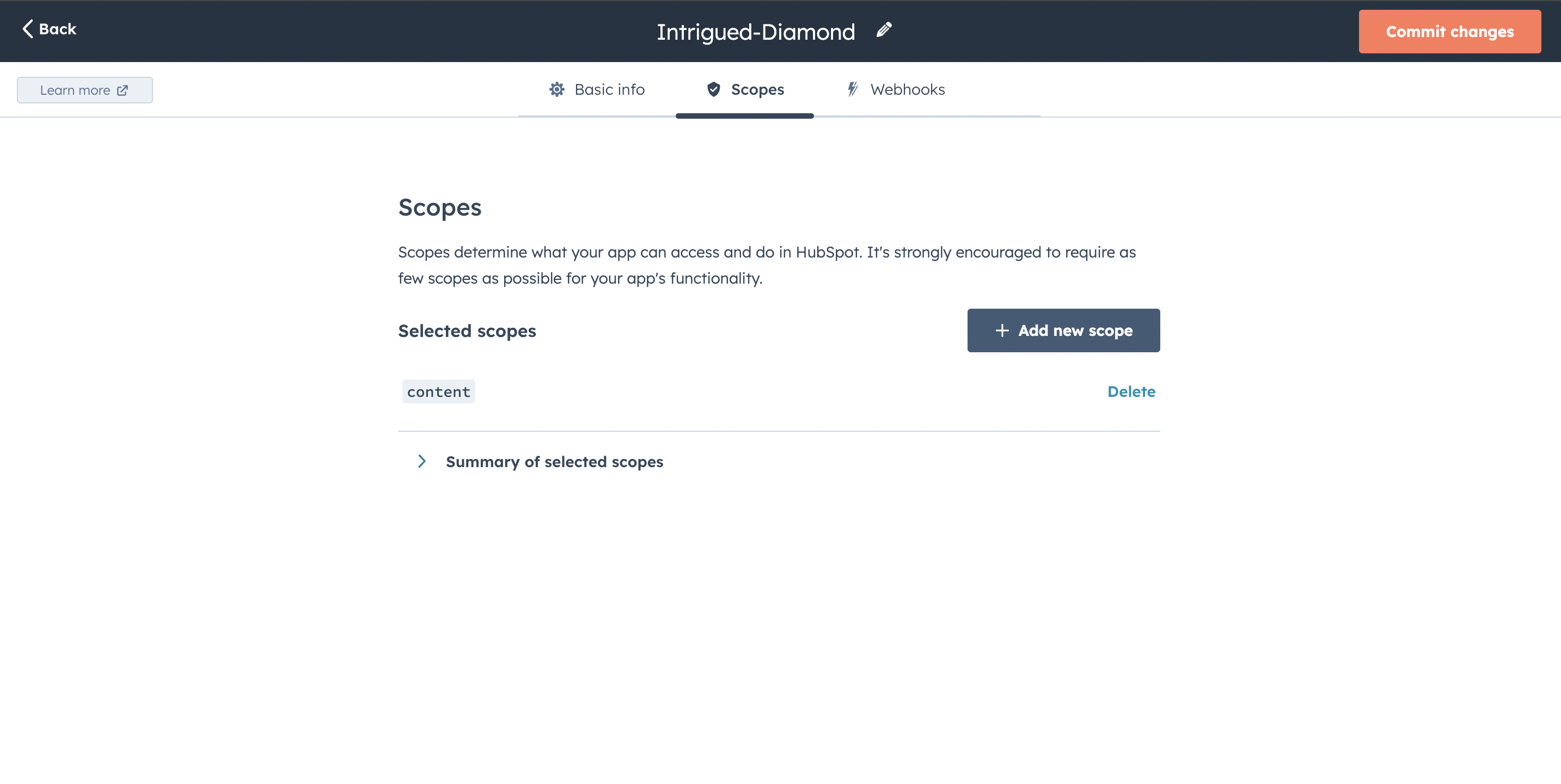
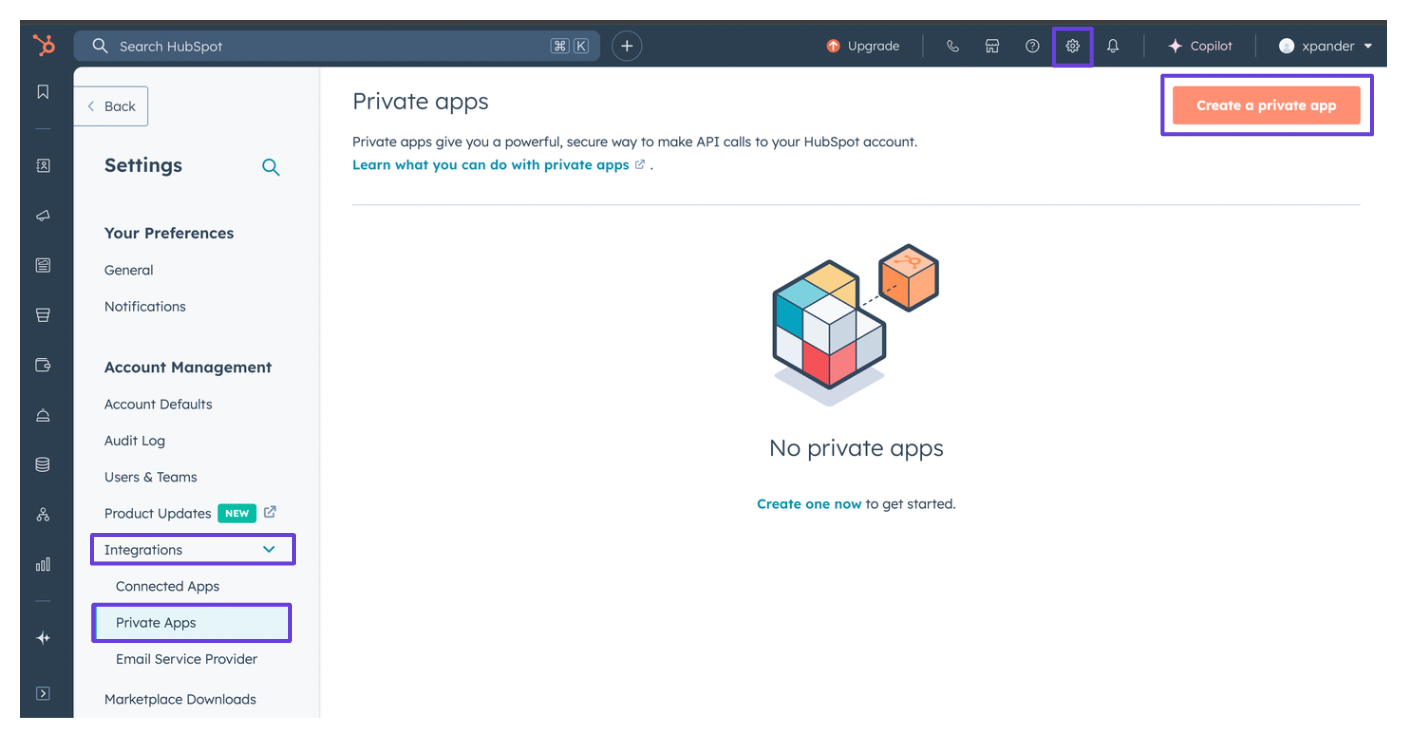 5. Give your app a name, then go to the **Scopes** tab and click **Add new scope**.
6. Under the **Other** section, check the box for `content`.\\
5. Give your app a name, then go to the **Scopes** tab and click **Add new scope**.
6. Under the **Other** section, check the box for `content`.\\
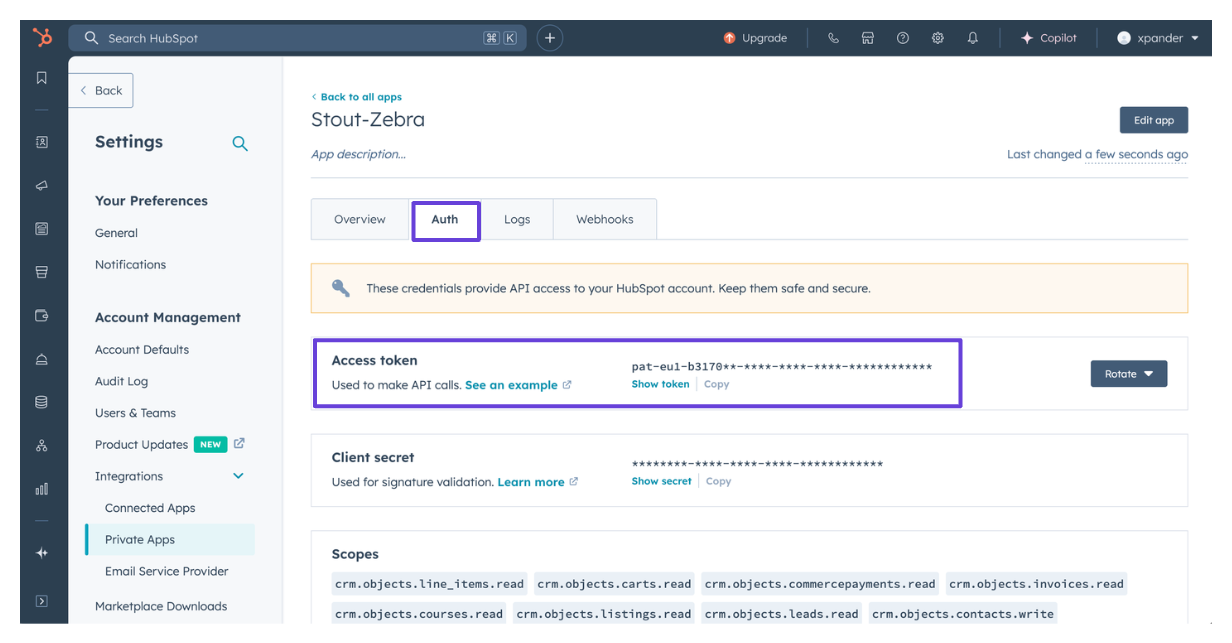
 7. Click **Create App**.
8. Your access token will be available in the **Auth** tab of your newly created private app.\\
7. Click **Create App**.
8. Your access token will be available in the **Auth** tab of your newly created private app.\\
 ### Connect HubSpot Blogs in xpander
1. In Xpander Chat, open the agent's settings and click **Add skill**.
2. Search for **HubSpot Blogs** and select it.
3. Click **Other auth options**.
4. Enter a **connection name**, e.g., "xpander-hubspot-blogs".
5. Choose **Organization** access (one shared account) or **Personal** (your own account, so the agent acts with your permissions where systems allow). On an agent other people use, a personal connection runs their requests as you unless the binding requires each person's own sign-in; see [whose credential a shared agent uses](/use/agents/permissions#whose-credential-a-shared-agent-uses).
6. Select **API Key** as the authentication method.
7. Paste the HubSpot access token into the provided field.
8. Choose **Bearer** as the **Type**.
9. Click **Connect**.
### Give an agent the HubSpot Blogs skill
Once HubSpot Blogs is connected, any agent you can edit may be given the skill: open the agent's settings, click **Add skill**, and choose **HubSpot Blogs**. The skill panel lists the HubSpot Blogs actions by group. Enable only the groups the agent needs, and mark the actions that should wait for a named person's sign-off under **These actions need approval**. Which skills exist for your organization, and who may add them, is decided by your admins; see [Skills](/use/skills).
## HubSpot CRM: connect and authenticate
### Authentication Options
The simplest way to connect HubSpot CRM is by using xpander's built-in authentication:
1. In Xpander Chat, open the agent's settings and click **Add skill**.
2. Search for **HubSpot CRM** and select it.
3. Click **Sign in with HubSpot CRM**.
4. Choose the account you want to connect and grant xpander permission to access it.
5. HubSpot CRM is now ready to use.
### Generate a HubSpot CRM API Key
1. Log in to your [HubSpot CRM account](https://www.hubspot.com/products/crm).
2. Click on **Settings** (the gear icon) in the top bar of your dashboard.
3. In the sidebar, click on **Integration**.
4. Select **Private Apps**, then click **Create Private App**.\\
### Connect HubSpot Blogs in xpander
1. In Xpander Chat, open the agent's settings and click **Add skill**.
2. Search for **HubSpot Blogs** and select it.
3. Click **Other auth options**.
4. Enter a **connection name**, e.g., "xpander-hubspot-blogs".
5. Choose **Organization** access (one shared account) or **Personal** (your own account, so the agent acts with your permissions where systems allow). On an agent other people use, a personal connection runs their requests as you unless the binding requires each person's own sign-in; see [whose credential a shared agent uses](/use/agents/permissions#whose-credential-a-shared-agent-uses).
6. Select **API Key** as the authentication method.
7. Paste the HubSpot access token into the provided field.
8. Choose **Bearer** as the **Type**.
9. Click **Connect**.
### Give an agent the HubSpot Blogs skill
Once HubSpot Blogs is connected, any agent you can edit may be given the skill: open the agent's settings, click **Add skill**, and choose **HubSpot Blogs**. The skill panel lists the HubSpot Blogs actions by group. Enable only the groups the agent needs, and mark the actions that should wait for a named person's sign-off under **These actions need approval**. Which skills exist for your organization, and who may add them, is decided by your admins; see [Skills](/use/skills).
## HubSpot CRM: connect and authenticate
### Authentication Options
The simplest way to connect HubSpot CRM is by using xpander's built-in authentication:
1. In Xpander Chat, open the agent's settings and click **Add skill**.
2. Search for **HubSpot CRM** and select it.
3. Click **Sign in with HubSpot CRM**.
4. Choose the account you want to connect and grant xpander permission to access it.
5. HubSpot CRM is now ready to use.
### Generate a HubSpot CRM API Key
1. Log in to your [HubSpot CRM account](https://www.hubspot.com/products/crm).
2. Click on **Settings** (the gear icon) in the top bar of your dashboard.
3. In the sidebar, click on **Integration**.
4. Select **Private Apps**, then click **Create Private App**.\\
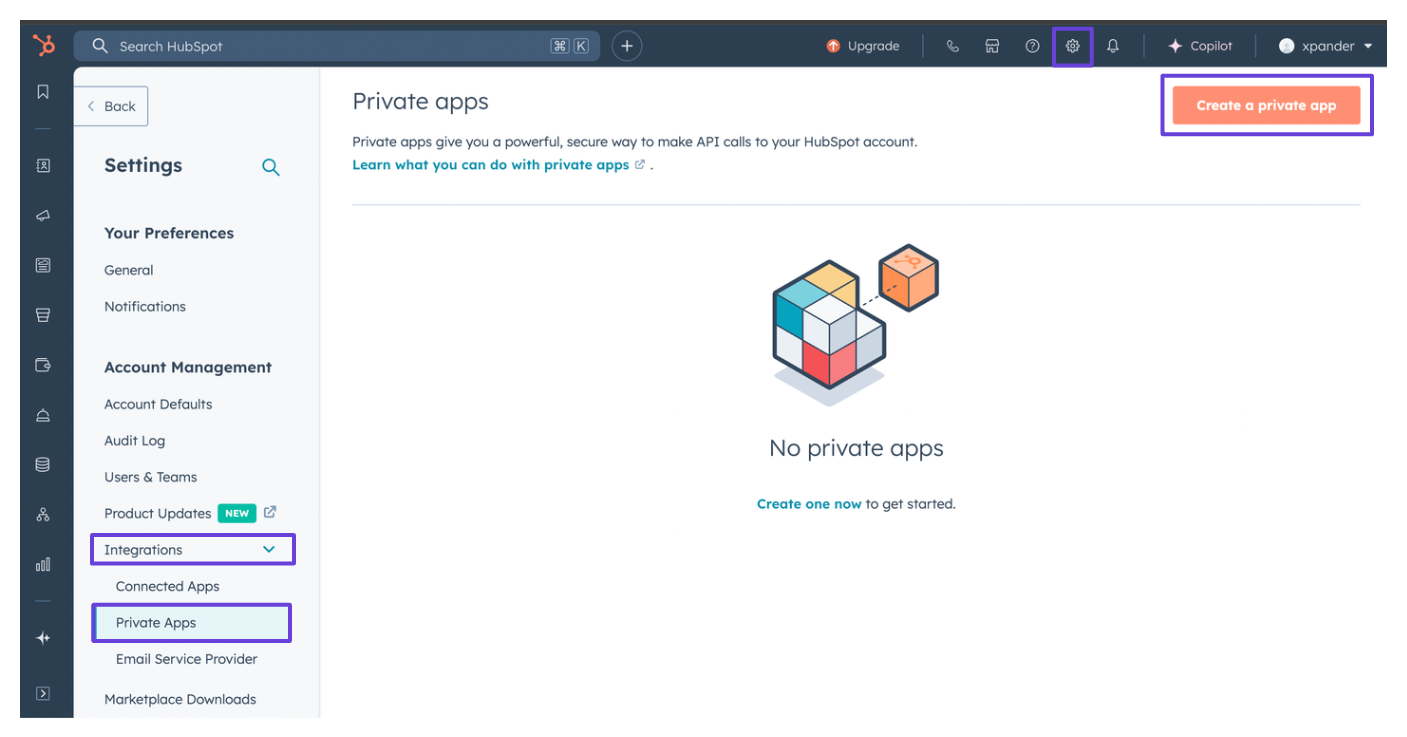 5. Enter a name for your app. In the **Scopes** tab, click **Add new scope** and grant the app access to the CRM services appropriate for your use case.\\
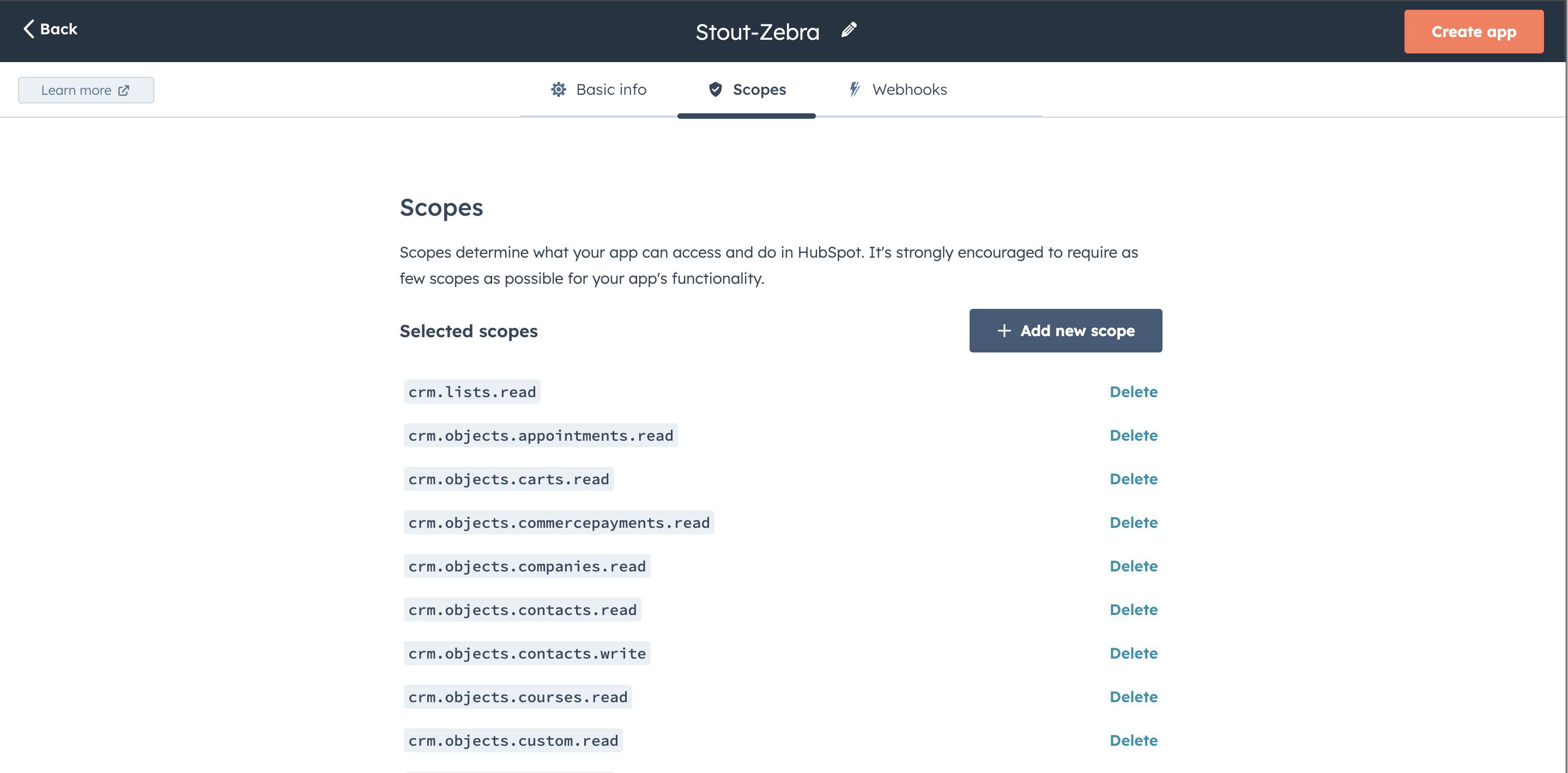 6. Click **Create App**.
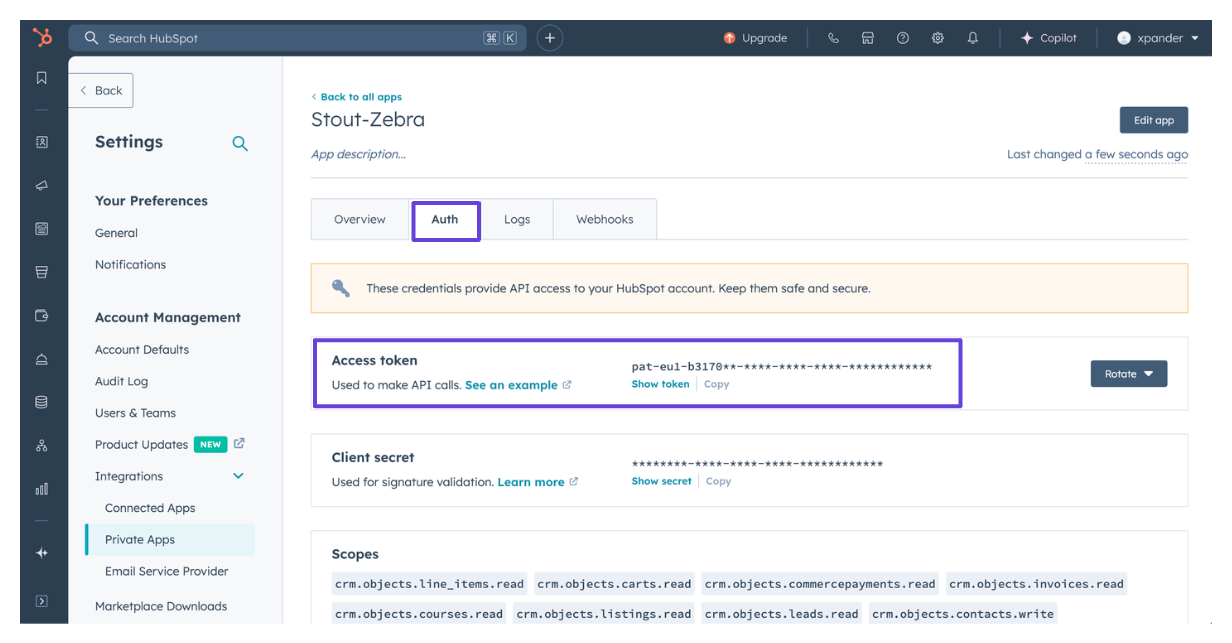
7. Your access token will be available in the **Auth** tab of the newly created private app.\\
6. Click **Create App**.
7. Your access token will be available in the **Auth** tab of the newly created private app.\\
 ### Connect HubSpot CRM in xpander
1. In Xpander Chat, open the agent's settings and click **Add skill**.
2. Search for **HubSpot CRM** and select it.
3. Click **Other auth options**.
4. Enter a **connection name**, e.g., "xpander-hubspot-crm".
5. Choose **Organization** access (one shared account) or **Personal** (your own account, so the agent acts with your permissions where systems allow). On an agent other people use, a personal connection runs their requests as you unless the binding requires each person's own sign-in; see [whose credential a shared agent uses](/use/agents/permissions#whose-credential-a-shared-agent-uses).
6. Select **API Key** as the authentication method.
7. Paste the HubSpot access token into the provided field.
8. Choose **Bearer** as the **Type**.
9. Click **Connect**.
### Give an agent the HubSpot CRM skill
Once HubSpot CRM is connected, any agent you can edit may be given the skill: open the agent's settings, click **Add skill**, and choose **HubSpot CRM**. The skill panel lists the HubSpot CRM actions by group. Enable only the groups the agent needs, and mark the actions that should wait for a named person's sign-off under **These actions need approval**. Which skills exist for your organization, and who may add them, is decided by your admins; see [Skills](/use/skills).
### Connect HubSpot CRM in xpander
1. In Xpander Chat, open the agent's settings and click **Add skill**.
2. Search for **HubSpot CRM** and select it.
3. Click **Other auth options**.
4. Enter a **connection name**, e.g., "xpander-hubspot-crm".
5. Choose **Organization** access (one shared account) or **Personal** (your own account, so the agent acts with your permissions where systems allow). On an agent other people use, a personal connection runs their requests as you unless the binding requires each person's own sign-in; see [whose credential a shared agent uses](/use/agents/permissions#whose-credential-a-shared-agent-uses).
6. Select **API Key** as the authentication method.
7. Paste the HubSpot access token into the provided field.
8. Choose **Bearer** as the **Type**.
9. Click **Connect**.
### Give an agent the HubSpot CRM skill
Once HubSpot CRM is connected, any agent you can edit may be given the skill: open the agent's settings, click **Add skill**, and choose **HubSpot CRM**. The skill panel lists the HubSpot CRM actions by group. Enable only the groups the agent needs, and mark the actions that should wait for a named person's sign-off under **These actions need approval**. Which skills exist for your organization, and who may add them, is decided by your admins; see [Skills](/use/skills).