> ## Documentation Index
> Fetch the complete documentation index at: https://docs.xpander.ai/llms.txt
> Use this file to discover all available pages before exploring further.
# Supabase Database
> Learn how to integrate AI agents with Supabase Database using xpander.ai. Create intelligent applications where agents can query, update, and respond to real-time data events using Supabase’s PostgreSQL backend.
## About Supabase Database
Supabase database is a fully managed PostgreSQL instance enriched with real-time capabilities and developer-friendly tools, making it a robust solution for modern application development.
Key features include:
* **Full PostgreSQL Access**: Each Supabase project includes a dedicated PostgreSQL database, providing developers with the full power and flexibility of Postgres, including advanced data types, indexing, and SQL support.
* **Realtime Capabilities**: Supabase extends PostgreSQL with real-time functionality using its Realtime Server. This allows applications to listen to database changes (INSERT, UPDATE, DELETE) and respond instantly, enabling features like live dashboards and collaborative tools.
* **Row Level Security (RLS)**: Supabase leverages PostgreSQL's RLS to provide fine-grained access control, ensuring that users can only access data they're authorized to see.
* **Built-in Table Editor**: The Supabase Dashboard offers a user-friendly table editor, allowing developers to create and manage tables without writing SQL, making database management more accessible.
* **Database Backups**: Supabase automatically manages database backups, providing peace of mind and data safety without manual intervention.
* **Extensions Support**: Developers can enhance their databases by enabling PostgreSQL extensions directly from the Supabase Dashboard, adding functionalities like full-text search, GIS support, and more.
## Authentication Options
Below are possible authentication options you can choose:
### Generate a Supabase Database API Key
1. Log in to your [Supabase account](https://supabase.com) and open your desired project.
2. Navigate to **Project Settings** in the sidebar, then click on **Data API**.
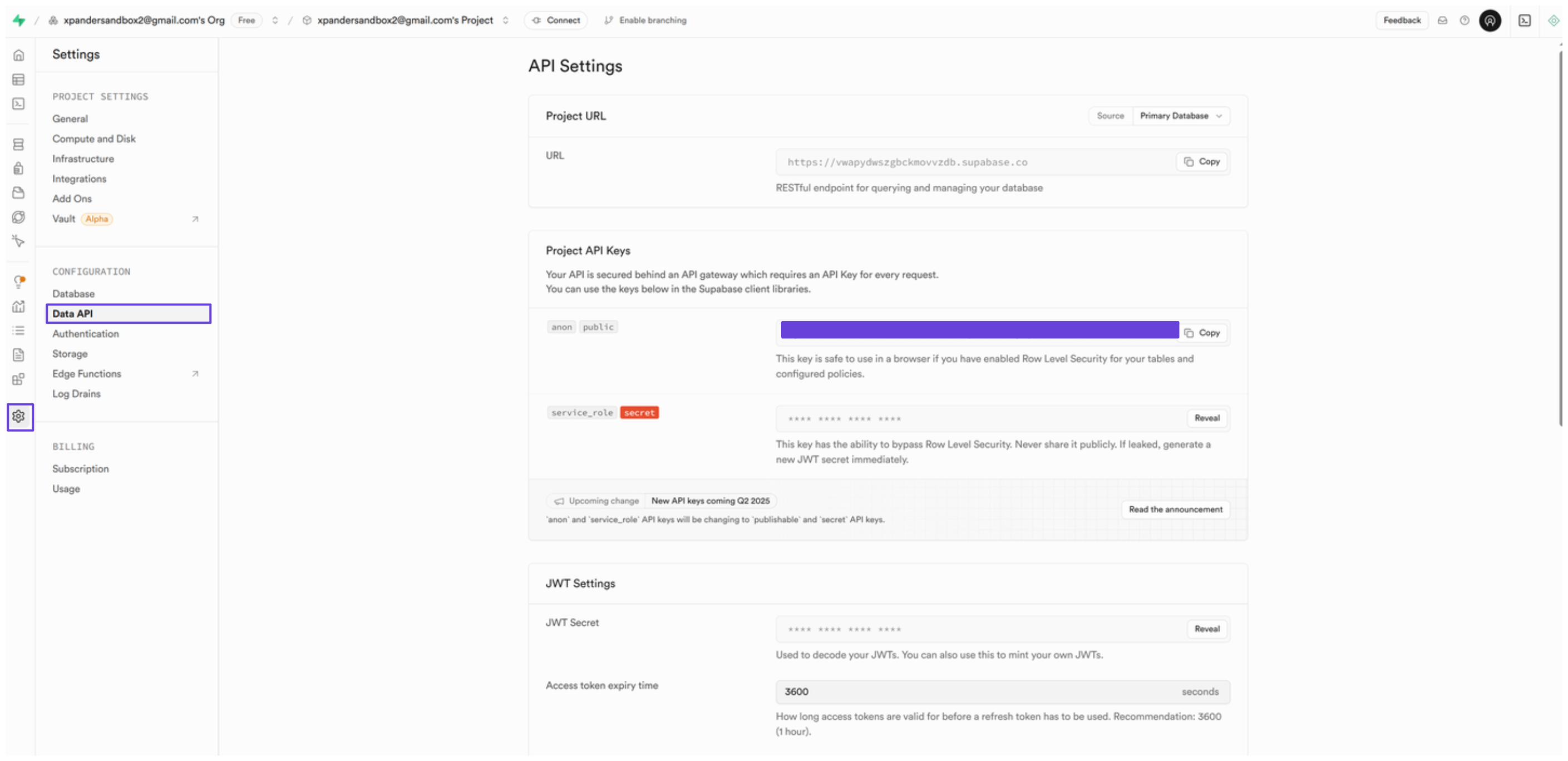 3. In the **Project API Keys** section, you'll see your project API key—copy it somewhere safe.
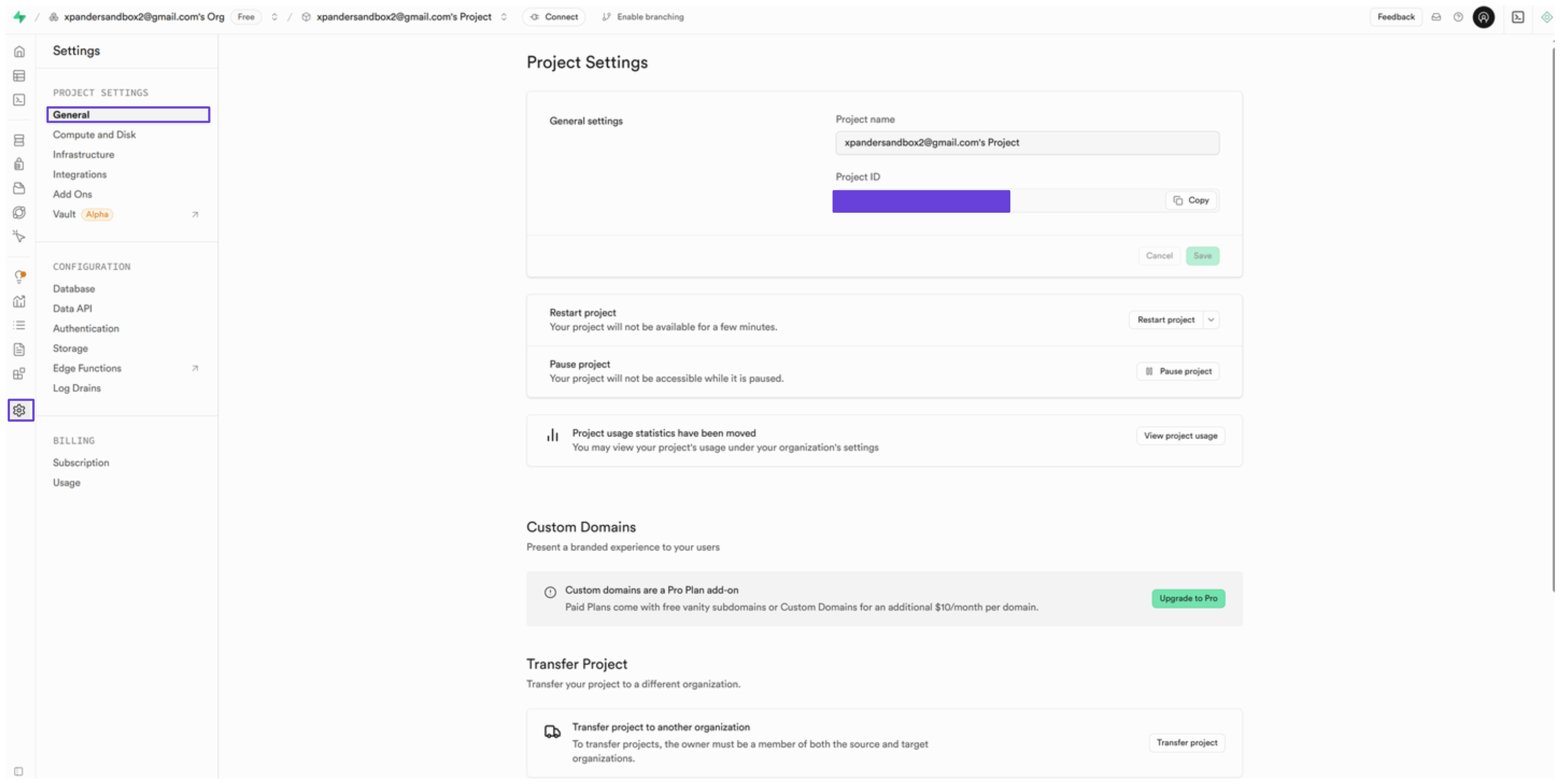
4. Next, you'll also need the project ID to use the Supabase Database API. To find it, go to **General** in the sidebar.
5. Under **General settings**, you'll see your project ID—save this ID for later use.
3. In the **Project API Keys** section, you'll see your project API key—copy it somewhere safe.
4. Next, you'll also need the project ID to use the Supabase Database API. To find it, go to **General** in the sidebar.
5. Under **General settings**, you'll see your project ID—save this ID for later use.
 ### Integrate Supabase Database into xpander.ai
1. Go to the **Connectors** section in the sidebar of your xpander.ai dashboard.
2. Select **Supabase Database API** from the available integrations.
3. Click **Enable**.
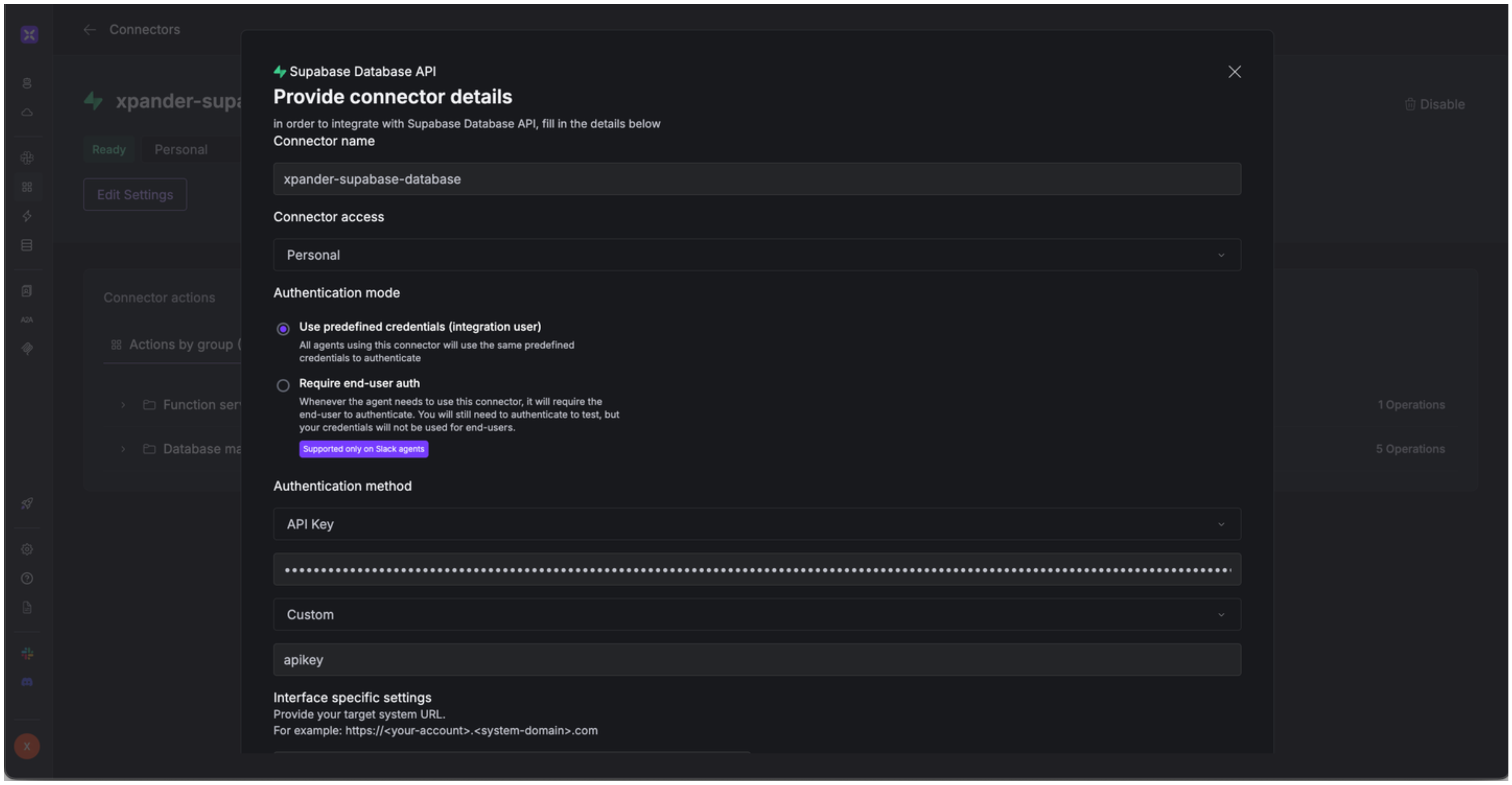
4. Enter a **connector name**, e.g., "xpander-supabase-database".
5. Choose **Integration User** as the authentication mode.
6. Select **API Key** as the authentication method.
7. Paste the Supabase project API key into the provided field.
8. Set the **Auth Type** to **Custom**.
9. In the **Custom header name** field, type: `apikey`
10. In the **Interface specific settings** section, enter your Supabase project ID in the following format:\
`https://.supabase.co/rest/v1`
11. Save the configuration.
### Integrate Supabase Database into xpander.ai
1. Go to the **Connectors** section in the sidebar of your xpander.ai dashboard.
2. Select **Supabase Database API** from the available integrations.
3. Click **Enable**.
4. Enter a **connector name**, e.g., "xpander-supabase-database".
5. Choose **Integration User** as the authentication mode.
6. Select **API Key** as the authentication method.
7. Paste the Supabase project API key into the provided field.
8. Set the **Auth Type** to **Custom**.
9. In the **Custom header name** field, type: `apikey`
10. In the **Interface specific settings** section, enter your Supabase project ID in the following format:\
`https://.supabase.co/rest/v1`
11. Save the configuration.
 ## Integration of Supabase Database into AI Agent
Once you've configured your Supabase Database account with the authentication option(s) described above, you can integrate it into your AI agent with xpander.ai:
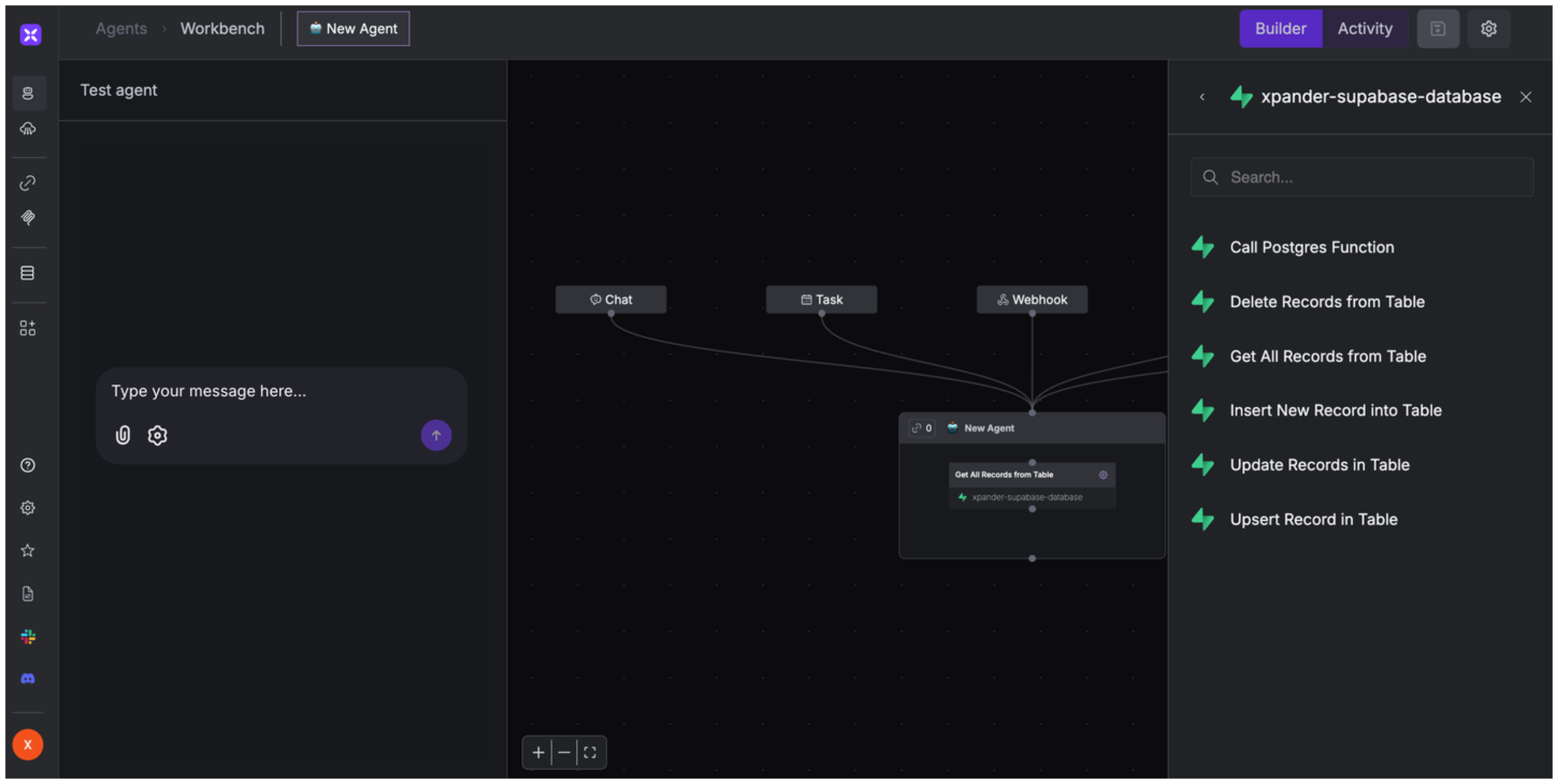
1. In your xpander.ai dashboard, go to the **Agent Configuration** tab and select **Tools**, then click **Add Tools**.
2. Select **Connectors**.
3. Choose **Supabase Database** with the same **connector name** you configured in the previous section (e.g., xpander-supabase-database).
4. Select the available Datadog operations that suit your use case.
## Integration of Supabase Database into AI Agent
Once you've configured your Supabase Database account with the authentication option(s) described above, you can integrate it into your AI agent with xpander.ai:
1. In your xpander.ai dashboard, go to the **Agent Configuration** tab and select **Tools**, then click **Add Tools**.
2. Select **Connectors**.
3. Choose **Supabase Database** with the same **connector name** you configured in the previous section (e.g., xpander-supabase-database).
4. Select the available Datadog operations that suit your use case.
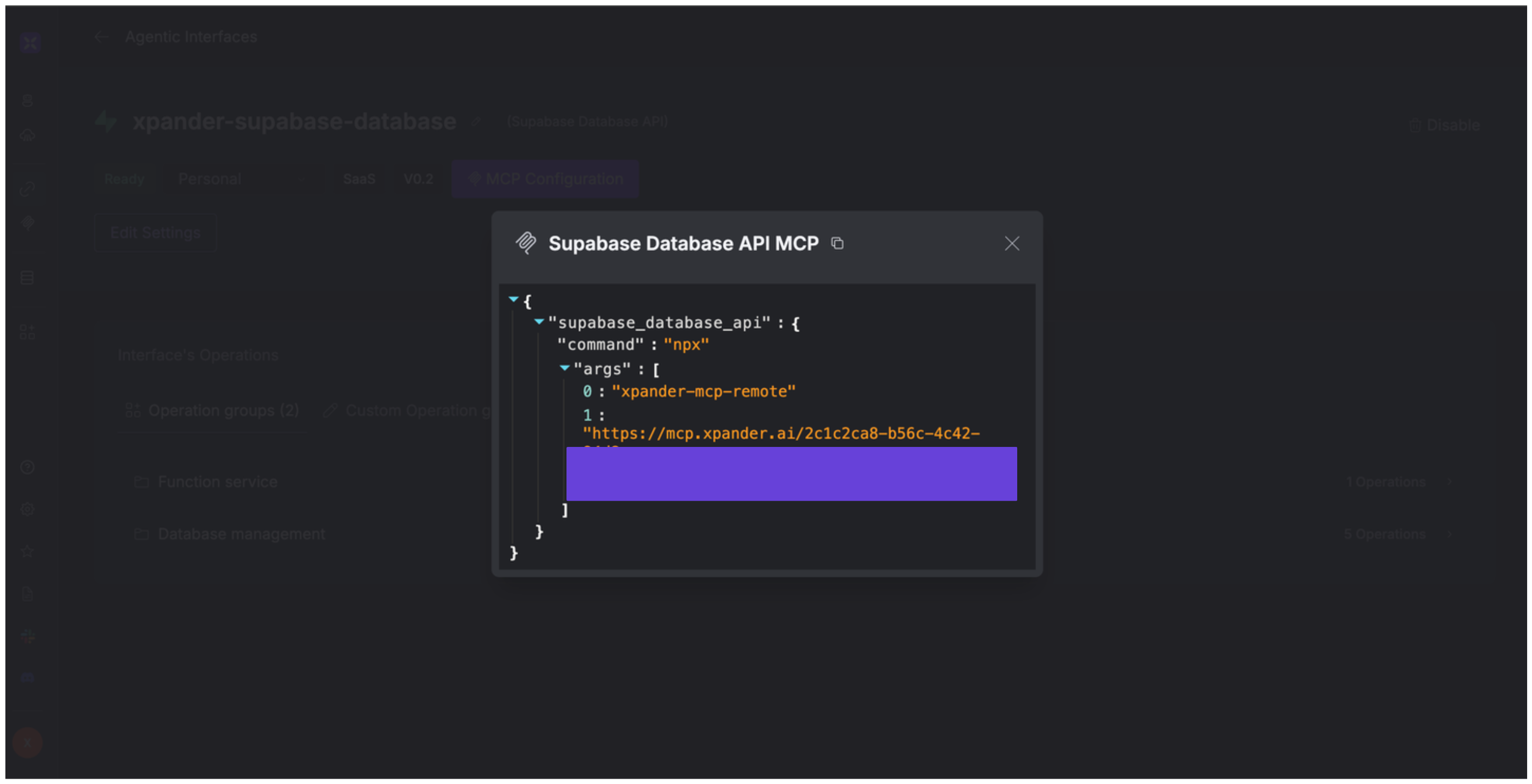
 ## Expose Supabase Database as MCP Server
Alternatively, you can also expose your Supabase Database account as an MCP server. To do so:
1. Go to the **Connectors** section in the sidebar of your xpander.ai dashboard.
2. Select **Supabase Database** with the same **connector name** you configured in the previous section (e.g., xpander-supabasse-database).
3. Click **MCP Configuration**.
4. Enter the MCP configuration into the appropriate settings of the client app you want to use (e.g., Cursor, Windsurf, Claude Desktop, etc.).
## Expose Supabase Database as MCP Server
Alternatively, you can also expose your Supabase Database account as an MCP server. To do so:
1. Go to the **Connectors** section in the sidebar of your xpander.ai dashboard.
2. Select **Supabase Database** with the same **connector name** you configured in the previous section (e.g., xpander-supabasse-database).
3. Click **MCP Configuration**.
4. Enter the MCP configuration into the appropriate settings of the client app you want to use (e.g., Cursor, Windsurf, Claude Desktop, etc.).
 ## AI Agent Supabase Database Prompt Library
Below are possible prompts or use cases you can try after integrating Supabase Database into your xpander AI agent:
```
Could you retrieve all active projects from our database?
```
```
Can you delete the product listing for {product_name} that was discontinued?
```
```
Can you retrieve all payments made by customer {customer_id} in the last month?
```
```
Can you remove all tasks assigned to {employee_name} who is no longer with the company?
```
## Related Resources
* [Understanding Model Context Protocol (MCP)](/guides/deploy/mcp)
* [Supabase API Documentation](https://supabase.com/docs/guides/api)
## AI Agent Supabase Database Prompt Library
Below are possible prompts or use cases you can try after integrating Supabase Database into your xpander AI agent:
```
Could you retrieve all active projects from our database?
```
```
Can you delete the product listing for {product_name} that was discontinued?
```
```
Can you retrieve all payments made by customer {customer_id} in the last month?
```
```
Can you remove all tasks assigned to {employee_name} who is no longer with the company?
```
## Related Resources
* [Understanding Model Context Protocol (MCP)](/guides/deploy/mcp)
* [Supabase API Documentation](https://supabase.com/docs/guides/api)