> ## Documentation Index
> Fetch the complete documentation index at: https://docs.xpander.ai/llms.txt
> Use this file to discover all available pages before exploring further.
# Use Pre-built Connectors
> How connectors selected in Agent Studio show up as tools in code, and how to invoke them
xpander.ai ships 2,000+ pre-built connectors (Slack, Gmail, GitHub, Salesforce, and more). You select which ones an agent can use in [Agent Studio](https://app.xpander.ai); the SDK then exposes them as ready-to-call functions on the loaded `Agent`. No manual fetching, no schema conversion, no client setup.
## Prerequisites
* **Complete the [Quickstart](/developers/quickstart)** so the CLI, SDK, and `xpander login` are already set up.
* **Python 3.12+** for the local handler.
## 1. Set up connectors in Agent Studio
Setup is a one-time UI flow: pick a connector, authenticate, attach the actions you want to your agent. Once published, the connector's actions are live on every loaded `Agent` instance and reachable from any framework you bind them into.
Pick a connector, authenticate, attach actions to your agent.
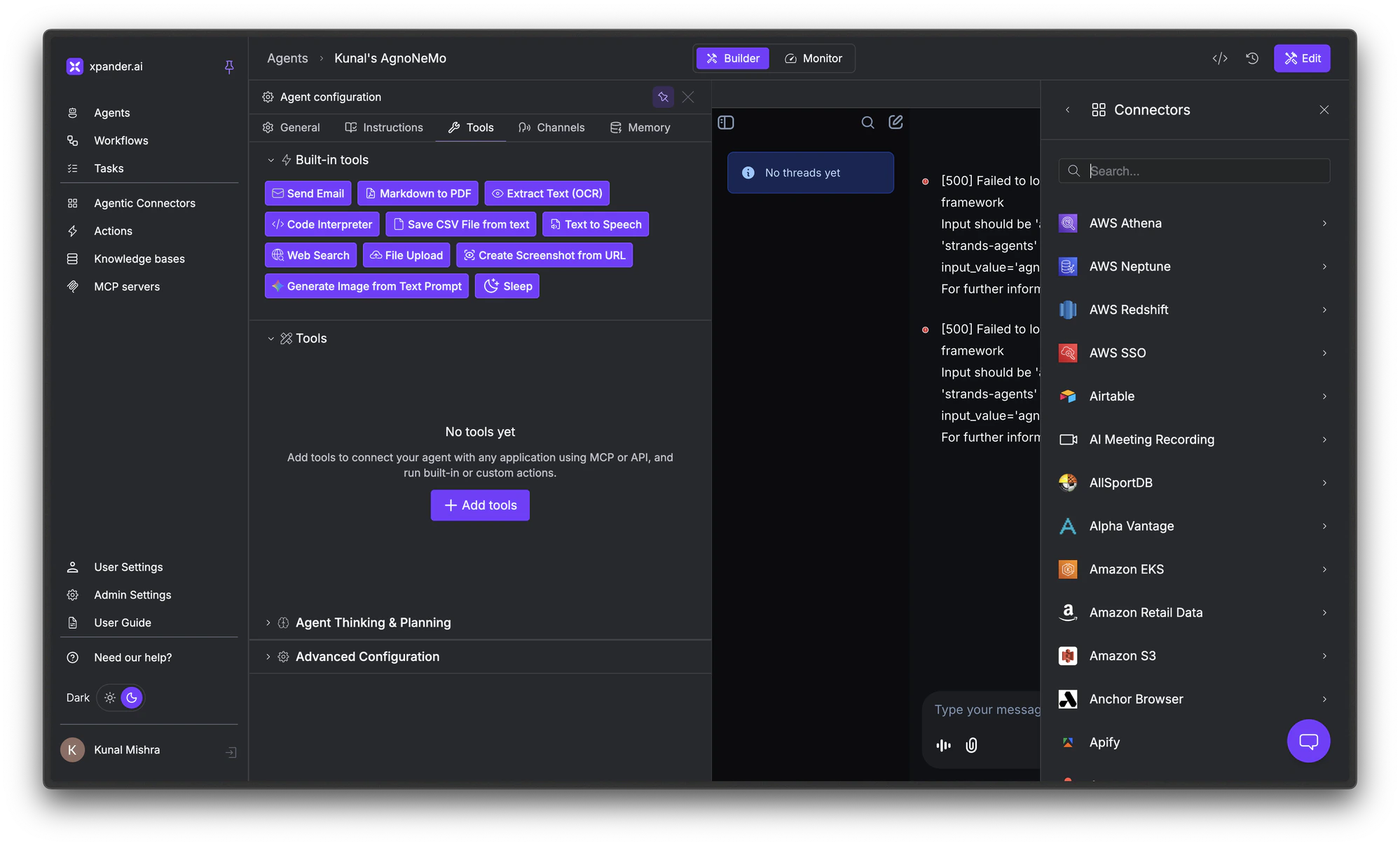 Everything below assumes you've done this and your agent has at least one connector attached.
## 2. List all available tools
Once a connector is attached, your agent has access to three types of tools:
* **Connector tools**: every action you selected from a pre-built connector (Slack, Gmail, GitHub, etc.)
* **Custom tools**: Python functions you decorated with `@register_tool`
* **MCP tools**: tools from any MCP server you've attached
Use `agent.tools.list` to enumerate all of them:
```python theme={"dark"}
from xpander_sdk import Agents
agent = await Agents().aget(agent_id="agt_01H...")
# Every tool the agent can call, mixed sources
for tool in agent.tools.list:
print(tool.name, tool.is_local, tool.description[:80])
```
This is what you'd use to:
* Build a UI that shows the user which capabilities an agent has before they prompt it.
* Sanity-check after a publish that the connector you just attached actually shows up.
* Filter the tool list at runtime (e.g. drop write-actions when running in a read-only context).
### Inspect individual tools
If you want to inspect the exact shape that's about to be handed to the framework (debugging "are my FunctionTools correct?", "did the LangChain callables get their docstrings?"), enumerate the framework-specific list instead:
The args dict from `Backend.aget_args()` carries the resolved tools list. Iterate `args["tools"]` to see exactly what Agno will receive:
```python theme={"dark"}
from xpander_sdk import Backend
backend = Backend()
args = await backend.aget_args(agent_id="agt_01H...", task=task)
for tool in args["tools"]:
print(tool.__name__, tool.__doc__[:80] if tool.__doc__ else "")
```
`agent.openai_agents_sdk_tools` returns `FunctionTool` objects ready for the OpenAI runner:
```python theme={"dark"}
from xpander_sdk import Agents
xpander_agent = await Agents().aget(agent_id="agt_01H...")
for tool in xpander_agent.openai_agents_sdk_tools:
# FunctionTool exposes .name and .description
print(tool.name, tool.description[:80])
```
`agent.tools.functions` returns plain Python callables with `payload: ` parameters and LLM-friendly docstrings:
```python theme={"dark"}
from xpander_sdk import Agents
xpander_agent = await Agents().aget(agent_id="agt_01H...")
for fn in xpander_agent.tools.functions:
print(fn.__name__, (fn.__doc__ or "")[:80])
```
`agent.strands_tools` returns the list ready for Strands' `tools=` arg:
```python theme={"dark"}
from xpander_sdk import Agents
xpander_agent = await Agents().aget(agent_id="agt_01H...")
for tool in xpander_agent.strands_tools:
print(tool.__name__, (tool.__doc__ or "")[:80])
```
Three properties you'll reach for most often:
| Property | Returns | What it's for |
| ----------------------------------------------------------- | ---------------- | -------------------------------------------------------------------------------------------------------------------------------------------------------------------------------------------------------------- |
| `agent.tools.list` | `list[Tool]` | Canonical enumeration. Each `Tool` carries `id`, `name`, `description`, `parameters` (raw JSON schema), and a Pydantic `schema`. |
| `agent.tools.functions` | `list[Callable]` | Normalized callables, one per tool, with a `payload: ` parameter and an LLM-friendly docstring. Bind them straight into LangChain, OpenAI Agents SDK, or any "plain Python function" framework. |
| `agent.tools.get_tool_by_id(id)` / `get_tool_by_name(name)` | `Tool` | Look up a single tool when you want to invoke it by hand. |
## 3. Bind tools into the framework
Listing tools tells you what the agent can do. Binding them is what gets the LLM to actually call them. Every framework wants tools in its own shape, and the xpander Agent exposes one property per supported framework, computed off the same underlying tool list:
```python xpander_handler.py highlight={10,12} theme={"dark"}
from dotenv import load_dotenv
load_dotenv()
from xpander_sdk import on_task, Task, Backend
from agno.agent import Agent
@on_task
async def handler(task: Task) -> Task:
backend = Backend(configuration=task.configuration)
agno_args = await backend.aget_args(task=task)
agno_agent = Agent(**agno_args)
result = await agno_agent.arun(
input=task.to_message(),
files=task.get_files(),
images=task.get_images(),
)
task.result = result.content
return task
```
See the [Agno page](/developers/frameworks/agno) for the full walkthrough.
```python xpander_handler.py highlight={16} theme={"dark"}
from dotenv import load_dotenv
load_dotenv()
from xpander_sdk import on_task, Task, Agents
from agents import Agent as OpenAIAgent, Runner
@on_task
async def handler(task: Task) -> Task:
xpander_agent = await Agents(configuration=task.configuration).aget(
agent_id=task.agent_id
)
oa_agent = OpenAIAgent(
name=xpander_agent.name,
instructions=xpander_agent.instructions.full,
tools=xpander_agent.openai_agents_sdk_tools,
model=xpander_agent.model_name,
)
result = await Runner.run(oa_agent, input=task.to_message())
task.result = result.final_output
return task
```
See the [OpenAI Agents SDK page](/developers/frameworks/openai-agents) for the full walkthrough.
```python xpander_handler.py highlight={16} theme={"dark"}
from dotenv import load_dotenv
load_dotenv()
from xpander_sdk import on_task, Task, Agents
from langchain_openai import ChatOpenAI
from langgraph.prebuilt import create_react_agent
@on_task
async def handler(task: Task) -> Task:
xpander_agent = await Agents(configuration=task.configuration).aget(
agent_id=task.agent_id
)
react = create_react_agent(
model=ChatOpenAI(model=xpander_agent.model_name),
tools=xpander_agent.tools.functions,
state_modifier=xpander_agent.instructions.full,
)
response = await react.ainvoke({
"messages": [("user", task.to_message())],
})
task.result = response["messages"][-1].content
return task
```
See the [LangChain page](/developers/frameworks/langchain) for the full walkthrough.
```python xpander_handler.py highlight={16} theme={"dark"}
from dotenv import load_dotenv
load_dotenv()
from xpander_sdk import on_task, Task, Agents
from strands.agent import Agent as StrandsAgent
@on_task
async def handler(task: Task) -> Task:
xpander_agent = await Agents(configuration=task.configuration).aget(
agent_id=task.agent_id
)
strands_agent = StrandsAgent(
name=xpander_agent.name,
system_prompt=xpander_agent.instructions.full,
tools=xpander_agent.strands_tools,
model=xpander_agent.model_name,
)
result = await strands_agent.ainvoke_async(task.to_message())
task.result = str(result)
return task
```
See the [AWS Strands page](/developers/frameworks/aws-strands) for the full walkthrough.
## 4. Invoke a tool yourself (optional)
Most of the time the framework decides when to call a connector. But you can also reach in and call one directly.
Use this to:
* Run an admin or migration script that calls a connector once (send a Slack announcement, archive a Salesforce record) without standing up a full agent loop.
* Backfill or batch-process by iterating over a queue of inputs and firing the same tool against each.
* Test a connector's payload shape end-to-end before exposing it to the LLM.
```python theme={"dark"}
from xpander_sdk import Agents
agent = await Agents().aget(agent_id="agt_01H...")
email_tool = agent.tools.get_tool_by_id(
"XpanderEmailServiceSendEmailWithHtmlOrTextContent"
)
result = await agent.ainvoke_tool(
tool=email_tool,
payload={
"body_params": {
"subject": "Hello from xpander",
"body_html": "
Everything below assumes you've done this and your agent has at least one connector attached.
## 2. List all available tools
Once a connector is attached, your agent has access to three types of tools:
* **Connector tools**: every action you selected from a pre-built connector (Slack, Gmail, GitHub, etc.)
* **Custom tools**: Python functions you decorated with `@register_tool`
* **MCP tools**: tools from any MCP server you've attached
Use `agent.tools.list` to enumerate all of them:
```python theme={"dark"}
from xpander_sdk import Agents
agent = await Agents().aget(agent_id="agt_01H...")
# Every tool the agent can call, mixed sources
for tool in agent.tools.list:
print(tool.name, tool.is_local, tool.description[:80])
```
This is what you'd use to:
* Build a UI that shows the user which capabilities an agent has before they prompt it.
* Sanity-check after a publish that the connector you just attached actually shows up.
* Filter the tool list at runtime (e.g. drop write-actions when running in a read-only context).
### Inspect individual tools
If you want to inspect the exact shape that's about to be handed to the framework (debugging "are my FunctionTools correct?", "did the LangChain callables get their docstrings?"), enumerate the framework-specific list instead:
The args dict from `Backend.aget_args()` carries the resolved tools list. Iterate `args["tools"]` to see exactly what Agno will receive:
```python theme={"dark"}
from xpander_sdk import Backend
backend = Backend()
args = await backend.aget_args(agent_id="agt_01H...", task=task)
for tool in args["tools"]:
print(tool.__name__, tool.__doc__[:80] if tool.__doc__ else "")
```
`agent.openai_agents_sdk_tools` returns `FunctionTool` objects ready for the OpenAI runner:
```python theme={"dark"}
from xpander_sdk import Agents
xpander_agent = await Agents().aget(agent_id="agt_01H...")
for tool in xpander_agent.openai_agents_sdk_tools:
# FunctionTool exposes .name and .description
print(tool.name, tool.description[:80])
```
`agent.tools.functions` returns plain Python callables with `payload: ` parameters and LLM-friendly docstrings:
```python theme={"dark"}
from xpander_sdk import Agents
xpander_agent = await Agents().aget(agent_id="agt_01H...")
for fn in xpander_agent.tools.functions:
print(fn.__name__, (fn.__doc__ or "")[:80])
```
`agent.strands_tools` returns the list ready for Strands' `tools=` arg:
```python theme={"dark"}
from xpander_sdk import Agents
xpander_agent = await Agents().aget(agent_id="agt_01H...")
for tool in xpander_agent.strands_tools:
print(tool.__name__, (tool.__doc__ or "")[:80])
```
Three properties you'll reach for most often:
| Property | Returns | What it's for |
| ----------------------------------------------------------- | ---------------- | -------------------------------------------------------------------------------------------------------------------------------------------------------------------------------------------------------------- |
| `agent.tools.list` | `list[Tool]` | Canonical enumeration. Each `Tool` carries `id`, `name`, `description`, `parameters` (raw JSON schema), and a Pydantic `schema`. |
| `agent.tools.functions` | `list[Callable]` | Normalized callables, one per tool, with a `payload: ` parameter and an LLM-friendly docstring. Bind them straight into LangChain, OpenAI Agents SDK, or any "plain Python function" framework. |
| `agent.tools.get_tool_by_id(id)` / `get_tool_by_name(name)` | `Tool` | Look up a single tool when you want to invoke it by hand. |
## 3. Bind tools into the framework
Listing tools tells you what the agent can do. Binding them is what gets the LLM to actually call them. Every framework wants tools in its own shape, and the xpander Agent exposes one property per supported framework, computed off the same underlying tool list:
```python xpander_handler.py highlight={10,12} theme={"dark"}
from dotenv import load_dotenv
load_dotenv()
from xpander_sdk import on_task, Task, Backend
from agno.agent import Agent
@on_task
async def handler(task: Task) -> Task:
backend = Backend(configuration=task.configuration)
agno_args = await backend.aget_args(task=task)
agno_agent = Agent(**agno_args)
result = await agno_agent.arun(
input=task.to_message(),
files=task.get_files(),
images=task.get_images(),
)
task.result = result.content
return task
```
See the [Agno page](/developers/frameworks/agno) for the full walkthrough.
```python xpander_handler.py highlight={16} theme={"dark"}
from dotenv import load_dotenv
load_dotenv()
from xpander_sdk import on_task, Task, Agents
from agents import Agent as OpenAIAgent, Runner
@on_task
async def handler(task: Task) -> Task:
xpander_agent = await Agents(configuration=task.configuration).aget(
agent_id=task.agent_id
)
oa_agent = OpenAIAgent(
name=xpander_agent.name,
instructions=xpander_agent.instructions.full,
tools=xpander_agent.openai_agents_sdk_tools,
model=xpander_agent.model_name,
)
result = await Runner.run(oa_agent, input=task.to_message())
task.result = result.final_output
return task
```
See the [OpenAI Agents SDK page](/developers/frameworks/openai-agents) for the full walkthrough.
```python xpander_handler.py highlight={16} theme={"dark"}
from dotenv import load_dotenv
load_dotenv()
from xpander_sdk import on_task, Task, Agents
from langchain_openai import ChatOpenAI
from langgraph.prebuilt import create_react_agent
@on_task
async def handler(task: Task) -> Task:
xpander_agent = await Agents(configuration=task.configuration).aget(
agent_id=task.agent_id
)
react = create_react_agent(
model=ChatOpenAI(model=xpander_agent.model_name),
tools=xpander_agent.tools.functions,
state_modifier=xpander_agent.instructions.full,
)
response = await react.ainvoke({
"messages": [("user", task.to_message())],
})
task.result = response["messages"][-1].content
return task
```
See the [LangChain page](/developers/frameworks/langchain) for the full walkthrough.
```python xpander_handler.py highlight={16} theme={"dark"}
from dotenv import load_dotenv
load_dotenv()
from xpander_sdk import on_task, Task, Agents
from strands.agent import Agent as StrandsAgent
@on_task
async def handler(task: Task) -> Task:
xpander_agent = await Agents(configuration=task.configuration).aget(
agent_id=task.agent_id
)
strands_agent = StrandsAgent(
name=xpander_agent.name,
system_prompt=xpander_agent.instructions.full,
tools=xpander_agent.strands_tools,
model=xpander_agent.model_name,
)
result = await strands_agent.ainvoke_async(task.to_message())
task.result = str(result)
return task
```
See the [AWS Strands page](/developers/frameworks/aws-strands) for the full walkthrough.
## 4. Invoke a tool yourself (optional)
Most of the time the framework decides when to call a connector. But you can also reach in and call one directly.
Use this to:
* Run an admin or migration script that calls a connector once (send a Slack announcement, archive a Salesforce record) without standing up a full agent loop.
* Backfill or batch-process by iterating over a queue of inputs and firing the same tool against each.
* Test a connector's payload shape end-to-end before exposing it to the LLM.
```python theme={"dark"}
from xpander_sdk import Agents
agent = await Agents().aget(agent_id="agt_01H...")
email_tool = agent.tools.get_tool_by_id(
"XpanderEmailServiceSendEmailWithHtmlOrTextContent"
)
result = await agent.ainvoke_tool(
tool=email_tool,
payload={
"body_params": {
"subject": "Hello from xpander",
"body_html": "Hi there!
",
"to": ["recipient@example.com"],
},
"path_params": {},
"query_params": {},
},
)
print(result.is_success, result.result)
```
What this means in practice:
1. **`agent.tools.get_tool_by_id(...)`** looks up the connector tool by its stable identifier. Use `get_tool_by_name(...)` if you have the human-readable name instead.
2. **The `payload` mirrors the tool's JSON schema.** Connector tools typically have `body_params`, `path_params`, and `query_params` as the top-level keys, mapping to the underlying API's request shape. Inspect `tool.parameters` if you need the schema.
3. **`ToolInvocationResult`** comes back with `is_success` (bool) and `result` (the raw response). Check `is_success` before consuming `result`.
The sync form `agent.invoke_tool(...)` exists with the same signature.
## 5. Pass per-request context to every tool call
When the same agent definition serves many tenants, customers, or users, you usually need to stamp something onto every connector call (a tenant ID, a customer ID, a request ID, an OAuth token override) without putting it in the prompt or hardcoding it on the agent. That's what `tool_call_payload_extension` is for. It deep-merges into every tool call's payload for the lifetime of the task:
```python theme={"dark"}
task = await agent.acreate_task(
prompt="Summarize this customer's recent activity",
# Every connector call inside this task gets tenant_id merged into body_params.
tool_call_payload_extension={"body_params": {"tenant_id": "acme-corp"}},
)
```
Common shapes:
* **Multi-tenant**: stamp the tenant ID on every downstream call so connector requests scope correctly.
* **Per-user OAuth**: pass a user-scoped token override into `body_params` or a custom auth header.
* **Traceability**: add a request ID to every connector call so you can follow a single user's actions across systems.
The same dict surface is accepted on three call sites, scoped differently:
| Where you pass it | Argument | Scope | When to use |
| ---------------------------- | ---------------------------------------------------- | ----------------------------------------------------------------- | ----------------------------------------------------------------------------------------------------- |
| `agent.acreate_task(...)` | `tool_call_payload_extension: Optional[dict] = None` | Every tool call inside the task. | The default. Stamping context that's the same for the whole task (tenant ID, request ID, user token). |
| `Backend.ainvoke_agent(...)` | `tool_call_payload_extension: Optional[dict] = None` | Every tool call inside the task implicitly created by the invoke. | When you're invoking an agent through `Backend` rather than creating a task explicitly. |
| `agent.ainvoke_tool(...)` | `payload_extension: Optional[Dict] = {}` | One tool invocation. | Reaching past the LLM to call a specific tool by hand and you only want to stamp this call. |
The merge is deep, not shallow. Mirror the tool's payload shape (`body_params`, `path_params`, `query_params`) when extending, otherwise the keys land at the wrong level and the connector ignores them.
## Troubleshooting
The agent has no connectors attached, or the connectors you attached aren't published yet. Open the agent in [Agent Studio](https://app.xpander.ai), check the **Tools** tab for at least one entry, and click **Publish** if you see a "Deploy changes" banner. Then reload the agent: `agent = await Agents().aget(agent_id=...)`.
The payload doesn't match the connector's expected shape. Inspect `tool.parameters` (raw JSON schema) and confirm `body_params`, `path_params`, and `query_params` line up with the underlying API. The Pydantic `tool.schema` is also useful for type-checking the payload before sending.
The extension is deep-merged, so it only adds keys at the same path. If you pass `{"body_params": {"tenant_id": "..."}}`, it merges into the tool's `body_params`; it won't appear in `query_params`. Mirror the tool's payload structure when extending.
## Next steps
Add your own Python functions alongside connectors with `@register_tool`.
Observe, log, and rewrite every tool call across the agent's lifetime.
How large tool responses get filtered before reaching the LLM.
Browse all 2,000+ pre-built integrations.
The UI walkthrough: connections, OAuth, attaching actions.
How `agent.tools.functions`, `openai_agents_sdk_tools`, and `strands_tools` map onto each framework.