> ## Documentation Index
> Fetch the complete documentation index at: https://docs.xpander.ai/llms.txt
> Use this file to discover all available pages before exploring further.
# Memory & State
> Control what your agent remembers within conversations, about users, and across all interactions
Memory is what separates a useful agent from a frustrating one. Without it, every message is a blank slate. The agent forgets what you said 30 seconds ago. With the right memory configuration, your agent maintains conversation context, learns user preferences, and builds organizational knowledge over time.
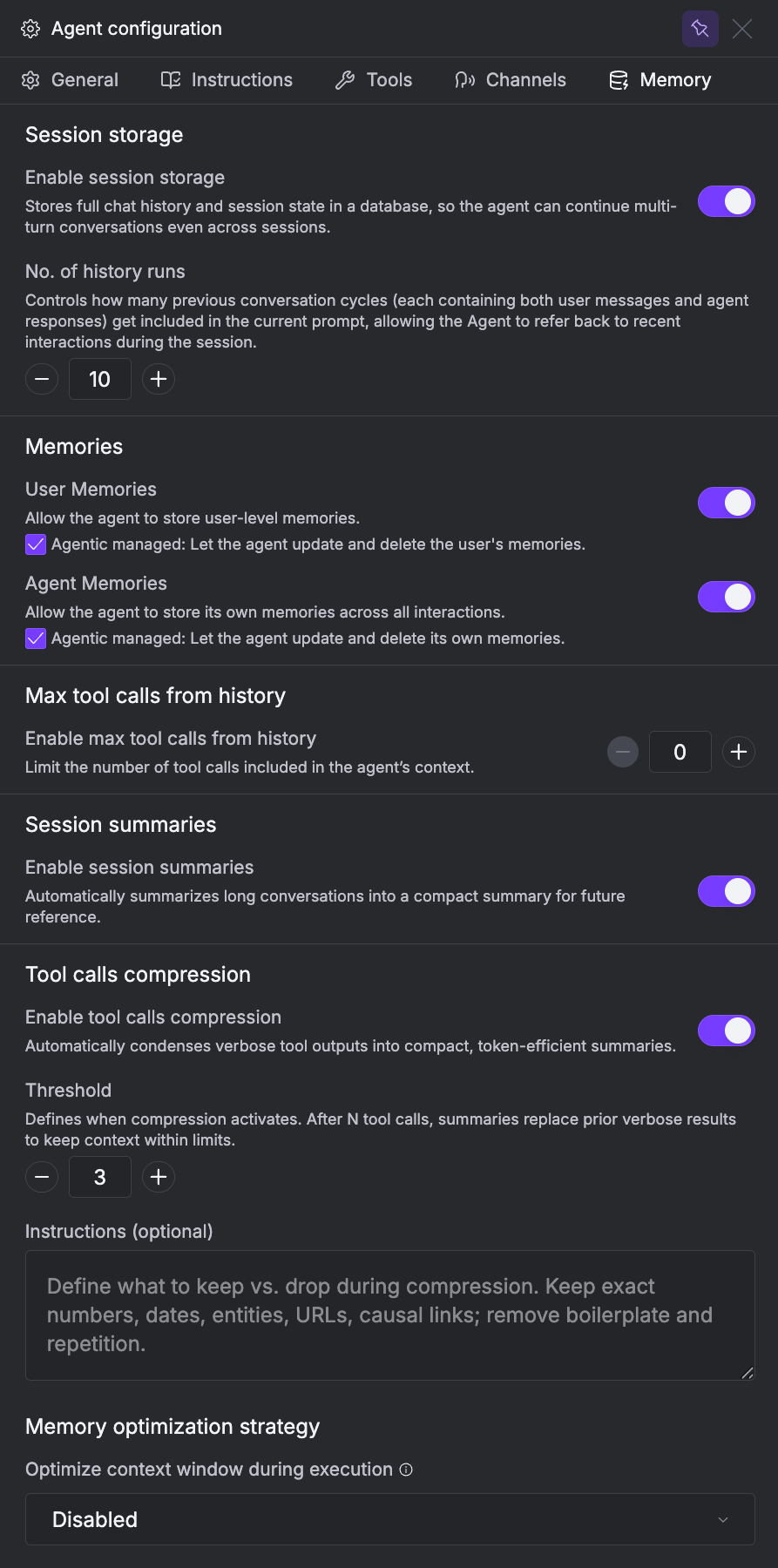
Xpander gives you three types of memory, each serving a different purpose. Configure them in the **Memory** tab of the Agent Studio.
 This page covers:
* [Session Storage](#session-storage): conversation history within a thread
* [User Memories](#user-memories): personal facts about each user that persist across all conversations
* [Agent Memories](#agent-memories): global knowledge that applies to all users
## Session Storage
Session storage is short-term memory. It keeps the conversation history within a single thread so the agent remembers what was said earlier in the same conversation.
Every conversation thread has its own history. As long as messages are in the same thread, the agent sees the full history up to the configured limit. Starting a new thread means a clean slate. The agent won't remember what was said in a previous conversation.
Multiple users can share the same thread (e.g., a support ticket where Alice opens the conversation and Bob follows up). Both see the same conversation history, but the thread is still self-contained. Nothing carries over to other threads.
Each session storage is associated with one thread. Every session connects a user and the agent, and gets its own isolated storage right beside it.
```mermaid theme={"dark"}
graph LR
Alice
Bob
subgraph SG1[" "]
direction TB
S1["Session 1"]
DB1[("Session Storage")]
S1 --- DB1
end
subgraph SG2[" "]
direction TB
S2["Session 2"]
DB2[("Session Storage")]
S2 --- DB2
end
subgraph SG3[" "]
direction TB
S3["Session 3"]
DB3[("Session Storage")]
S3 --- DB3
end
Agent["Support Bot"]
Alice --- S1
Alice --- S2
Bob --- S3
S1 ------ Agent
S2 ------ Agent
S3 ------ Agent
style SG1 fill:none,stroke:none
style SG2 fill:none,stroke:none
style SG3 fill:none,stroke:none
```
| Setting | What it does | Recommendation |
| ----------------------- | ------------------------------------------------------------------------------------------------------------------------------------------------------------------------------------------- | ----------------------------------------------------------------------- |
| **No. of history runs** | How many past runs the agent can see. A *run* is one full agent loop that begins with a user message and ends when the LLM finishes its response. A single run can include many tool calls. | 3–5 for most use cases. 10 if conversations are long and context-heavy. |
xpander manages the context window automatically. When usage reaches 80%, the conversation is compacted automatically. Tool call payloads that exceed the context window (or 8k tokens) are auto-truncated.
## User Memories
User memories store personal facts about individual users that persist across *all* conversations. When Alice tells your agent "I prefer metric units" in Thread 1, the agent remembers that when she starts Thread 2, Thread 3, or any future conversation. User memories are scoped to `user_id`. They follow the user, not the thread.
Each user's memories are completely isolated. Alice's preferences never leak into Bob's conversations, even when they interact with the same agent. This makes user memories safe for multi-tenant environments where personalization matters but privacy is critical.
User memory is associated with the user, not with any session or agent. Every session connects a user and the agent, but the memory sits right beside the user and follows them across all sessions.
```mermaid theme={"dark"}
graph LR
AM[("Alice's User Memory")] --- Alice
BM[("Bob's User Memory")] --- Bob
Alice --- S1["Session 1"]
Alice --- S2["Session 2"]
Bob --- S3["Session 3"]
S1 --- Agent["Support Bot"]
S2 --- Agent
S3 --- Agent
```
| Setting | What it does |
| ------------------------ | ----------------------------------------------------------------------------------------------------------------------------------------------------------------------------------------- |
| **Enable User Memories** | Turns the feature on or off. |
| **Agentic managed** | When enabled, the agent decides what to remember automatically. When disabled, memories must be created manually via the `update_user_memory` tool (actions: add, update, delete, clear). |
User memories store personal data. Never allow agents to store passwords, API keys, SSNs, or credit card numbers. Memories persist until explicitly deleted.
## Agent Memories
Agent memories work like dynamic prompt management. When turned ON, xpander tells the agent to manage memories across each session using markdown files saved in the sandbox environment. This is useful for agent-specific memories that are helpful for all conversations with that agent. For example, "our support hours are 9-5 EST" or "the billing API was updated last week."
Agent memory is associated with the agent itself. Every session connects a user and the agent, and the memory sits right beside the agent, shared across every session.
```mermaid theme={"dark"}
graph LR
Alice --- S1["Session 1"]
Alice --- S2["Session 2"]
Bob --- S3["Session 3"]
S1 --- Agent["Support Bot"]
S2 --- Agent
S3 --- Agent
Agent --- GM[("Agent Memory")]
```
| Setting | What it does |
| ------------------- | ---------------------------------------------------------------------------------------------------------------------- |
| **Agentic Managed** | When on, the agent manages its own memories as markdown files in the workspace. When off, agent memories are disabled. |
Because agent memories affect every user, a single interaction can change behavior for everyone. Not recommended for production, compliance-heavy, or multi-tenant systems without a regular review and rollback strategy.
## Agentic vs. Manual Memory
You have two choices for how memories get created and maintained.
| | **Agentic Managed** | **Manual** |
| ---------------------------- | -------------------------------------------------------- | --------------------------------------------------------------------- |
| **How memories are created** | Agent decides what to save automatically | You (or your team) create memories manually |
| **Maintenance** | Self-updating, less work for you | Full control, more maintenance |
| **Best for** | Internal tools, single-tenant use cases, rapid iteration | Production systems, compliance environments, multi-tenant deployments |
| **Risk** | Agent may save inaccurate or unwanted information | Slower to learn, requires ongoing attention |
Start with agentic management during development to see what the agent naturally wants to remember, then switch to manual for production with curated memories.
## Memory Optimization
These settings help you manage token usage and performance for tool-heavy agents. They appear in the Memory tab in the order listed below.
### Max Tool Calls from History
**Deprecated.** xpander now manages tool call retention automatically. This setting will be removed in a future version.
Limits how many past tool call results are included when loading conversation history. Set to 0 (disabled) for most cases. Only enable if you're consistently hitting token limits.
### Session Summaries
**Deprecated.** This feature will be removed in a future version.
Automatically summarizes long conversations into a compact summary for future reference. This does **not** affect the agent's context window. It's metadata for monitoring and observability dashboards.
### Tool Calls Compression
**Deprecated.** Tool call compression now happens automatically. You no longer need to configure it. This setting will be removed in a future version.
When your agent makes many tool calls in a single conversation, the raw outputs pile up in context and eat through tokens. Tool calls compression condenses verbose outputs after a threshold number of calls.
| Setting | What it does | Default |
| ---------------------------- | -------------------------------------------------------------------------------------------------------------------------------------------------------- | ------- |
| **Enable compression** | Turns on automatic compression of tool outputs. | Off |
| **Threshold** | Number of tool calls before compression kicks in. After N tool calls, summaries replace prior verbose results to keep context within limits. | 3 |
| **Compression instructions** | Optional guidance on what to keep vs. drop when compressing. Keep exact numbers, dates, entities, URLs, causal links; remove boilerplate and repetition. | - |
### Memory Optimization Strategy
**Deprecated.** This setting will be removed in a future version.
Controls how the agent manages its context window during long executions. This is especially useful for agents that handle extended conversations or make many tool calls in a single session.
| Mode | What it does |
| ----------------- | --------------------------------------------------------------------------------------------------------------------------------------------------------------------------------------------------------------- |
| **Disabled** | No optimization. The full conversation history (up to the configured history runs) is included as-is. This is the default. |
| **Summarization** | Condenses older messages while preserving key points and tool call results. Reduces token usage while retaining the important context from earlier in the conversation. |
| **Context** | Retains the initial instructions and the most recent messages, summarizing everything in between. Best for long-running executions where the beginning (task definition) and end (recent progress) matter most. |
## Troubleshooting
Make sure you're passing the same `session_id` for all messages in the thread. Increase history runs to 3+.
Verify `user_id` is being passed consistently. Check that User Memories is toggled on.
Reduce history runs. Enable tool calls compression. Lower max tool calls from history.
Review and delete the memory. Consider switching from agentic to manual management.
Agent memories are global. Move user-specific facts to User Memories instead.
## Next Steps
Model selection, planning mode, and reasoning mode
Give your agent searchable document knowledge
Test memory behavior in the built-in chat
Full overview of all Agent Studio settings
This page covers:
* [Session Storage](#session-storage): conversation history within a thread
* [User Memories](#user-memories): personal facts about each user that persist across all conversations
* [Agent Memories](#agent-memories): global knowledge that applies to all users
## Session Storage
Session storage is short-term memory. It keeps the conversation history within a single thread so the agent remembers what was said earlier in the same conversation.
Every conversation thread has its own history. As long as messages are in the same thread, the agent sees the full history up to the configured limit. Starting a new thread means a clean slate. The agent won't remember what was said in a previous conversation.
Multiple users can share the same thread (e.g., a support ticket where Alice opens the conversation and Bob follows up). Both see the same conversation history, but the thread is still self-contained. Nothing carries over to other threads.
Each session storage is associated with one thread. Every session connects a user and the agent, and gets its own isolated storage right beside it.
```mermaid theme={"dark"}
graph LR
Alice
Bob
subgraph SG1[" "]
direction TB
S1["Session 1"]
DB1[("Session Storage")]
S1 --- DB1
end
subgraph SG2[" "]
direction TB
S2["Session 2"]
DB2[("Session Storage")]
S2 --- DB2
end
subgraph SG3[" "]
direction TB
S3["Session 3"]
DB3[("Session Storage")]
S3 --- DB3
end
Agent["Support Bot"]
Alice --- S1
Alice --- S2
Bob --- S3
S1 ------ Agent
S2 ------ Agent
S3 ------ Agent
style SG1 fill:none,stroke:none
style SG2 fill:none,stroke:none
style SG3 fill:none,stroke:none
```
| Setting | What it does | Recommendation |
| ----------------------- | ------------------------------------------------------------------------------------------------------------------------------------------------------------------------------------------- | ----------------------------------------------------------------------- |
| **No. of history runs** | How many past runs the agent can see. A *run* is one full agent loop that begins with a user message and ends when the LLM finishes its response. A single run can include many tool calls. | 3–5 for most use cases. 10 if conversations are long and context-heavy. |
xpander manages the context window automatically. When usage reaches 80%, the conversation is compacted automatically. Tool call payloads that exceed the context window (or 8k tokens) are auto-truncated.
## User Memories
User memories store personal facts about individual users that persist across *all* conversations. When Alice tells your agent "I prefer metric units" in Thread 1, the agent remembers that when she starts Thread 2, Thread 3, or any future conversation. User memories are scoped to `user_id`. They follow the user, not the thread.
Each user's memories are completely isolated. Alice's preferences never leak into Bob's conversations, even when they interact with the same agent. This makes user memories safe for multi-tenant environments where personalization matters but privacy is critical.
User memory is associated with the user, not with any session or agent. Every session connects a user and the agent, but the memory sits right beside the user and follows them across all sessions.
```mermaid theme={"dark"}
graph LR
AM[("Alice's User Memory")] --- Alice
BM[("Bob's User Memory")] --- Bob
Alice --- S1["Session 1"]
Alice --- S2["Session 2"]
Bob --- S3["Session 3"]
S1 --- Agent["Support Bot"]
S2 --- Agent
S3 --- Agent
```
| Setting | What it does |
| ------------------------ | ----------------------------------------------------------------------------------------------------------------------------------------------------------------------------------------- |
| **Enable User Memories** | Turns the feature on or off. |
| **Agentic managed** | When enabled, the agent decides what to remember automatically. When disabled, memories must be created manually via the `update_user_memory` tool (actions: add, update, delete, clear). |
User memories store personal data. Never allow agents to store passwords, API keys, SSNs, or credit card numbers. Memories persist until explicitly deleted.
## Agent Memories
Agent memories work like dynamic prompt management. When turned ON, xpander tells the agent to manage memories across each session using markdown files saved in the sandbox environment. This is useful for agent-specific memories that are helpful for all conversations with that agent. For example, "our support hours are 9-5 EST" or "the billing API was updated last week."
Agent memory is associated with the agent itself. Every session connects a user and the agent, and the memory sits right beside the agent, shared across every session.
```mermaid theme={"dark"}
graph LR
Alice --- S1["Session 1"]
Alice --- S2["Session 2"]
Bob --- S3["Session 3"]
S1 --- Agent["Support Bot"]
S2 --- Agent
S3 --- Agent
Agent --- GM[("Agent Memory")]
```
| Setting | What it does |
| ------------------- | ---------------------------------------------------------------------------------------------------------------------- |
| **Agentic Managed** | When on, the agent manages its own memories as markdown files in the workspace. When off, agent memories are disabled. |
Because agent memories affect every user, a single interaction can change behavior for everyone. Not recommended for production, compliance-heavy, or multi-tenant systems without a regular review and rollback strategy.
## Agentic vs. Manual Memory
You have two choices for how memories get created and maintained.
| | **Agentic Managed** | **Manual** |
| ---------------------------- | -------------------------------------------------------- | --------------------------------------------------------------------- |
| **How memories are created** | Agent decides what to save automatically | You (or your team) create memories manually |
| **Maintenance** | Self-updating, less work for you | Full control, more maintenance |
| **Best for** | Internal tools, single-tenant use cases, rapid iteration | Production systems, compliance environments, multi-tenant deployments |
| **Risk** | Agent may save inaccurate or unwanted information | Slower to learn, requires ongoing attention |
Start with agentic management during development to see what the agent naturally wants to remember, then switch to manual for production with curated memories.
## Memory Optimization
These settings help you manage token usage and performance for tool-heavy agents. They appear in the Memory tab in the order listed below.
### Max Tool Calls from History
**Deprecated.** xpander now manages tool call retention automatically. This setting will be removed in a future version.
Limits how many past tool call results are included when loading conversation history. Set to 0 (disabled) for most cases. Only enable if you're consistently hitting token limits.
### Session Summaries
**Deprecated.** This feature will be removed in a future version.
Automatically summarizes long conversations into a compact summary for future reference. This does **not** affect the agent's context window. It's metadata for monitoring and observability dashboards.
### Tool Calls Compression
**Deprecated.** Tool call compression now happens automatically. You no longer need to configure it. This setting will be removed in a future version.
When your agent makes many tool calls in a single conversation, the raw outputs pile up in context and eat through tokens. Tool calls compression condenses verbose outputs after a threshold number of calls.
| Setting | What it does | Default |
| ---------------------------- | -------------------------------------------------------------------------------------------------------------------------------------------------------- | ------- |
| **Enable compression** | Turns on automatic compression of tool outputs. | Off |
| **Threshold** | Number of tool calls before compression kicks in. After N tool calls, summaries replace prior verbose results to keep context within limits. | 3 |
| **Compression instructions** | Optional guidance on what to keep vs. drop when compressing. Keep exact numbers, dates, entities, URLs, causal links; remove boilerplate and repetition. | - |
### Memory Optimization Strategy
**Deprecated.** This setting will be removed in a future version.
Controls how the agent manages its context window during long executions. This is especially useful for agents that handle extended conversations or make many tool calls in a single session.
| Mode | What it does |
| ----------------- | --------------------------------------------------------------------------------------------------------------------------------------------------------------------------------------------------------------- |
| **Disabled** | No optimization. The full conversation history (up to the configured history runs) is included as-is. This is the default. |
| **Summarization** | Condenses older messages while preserving key points and tool call results. Reduces token usage while retaining the important context from earlier in the conversation. |
| **Context** | Retains the initial instructions and the most recent messages, summarizing everything in between. Best for long-running executions where the beginning (task definition) and end (recent progress) matter most. |
## Troubleshooting
Make sure you're passing the same `session_id` for all messages in the thread. Increase history runs to 3+.
Verify `user_id` is being passed consistently. Check that User Memories is toggled on.
Reduce history runs. Enable tool calls compression. Lower max tool calls from history.
Review and delete the memory. Consider switching from agentic to manual management.
Agent memories are global. Move user-specific facts to User Memories instead.
## Next Steps
Model selection, planning mode, and reasoning mode
Give your agent searchable document knowledge
Test memory behavior in the built-in chat
Full overview of all Agent Studio settings