> ## Documentation Index
> Fetch the complete documentation index at: https://docs.xpander.ai/llms.txt
> Use this file to discover all available pages before exploring further.
# Models and Memory
> Choose the model that powers an agent’s reasoning and manage the context it can carry across work.
Models and Memory control how an agent reasons and what context it can use while working. The model determines the agent’s reasoning quality, speed, and cost profile. Memory and context help the agent stay grounded in the workflow, reuse relevant information, and continue work with less repeated explanation.
Choose the model that best fits the work: fast and efficient for simple tasks, or more capable for complex reasoning, research, writing, and multi-step workflows.
## Provider, model, and tier
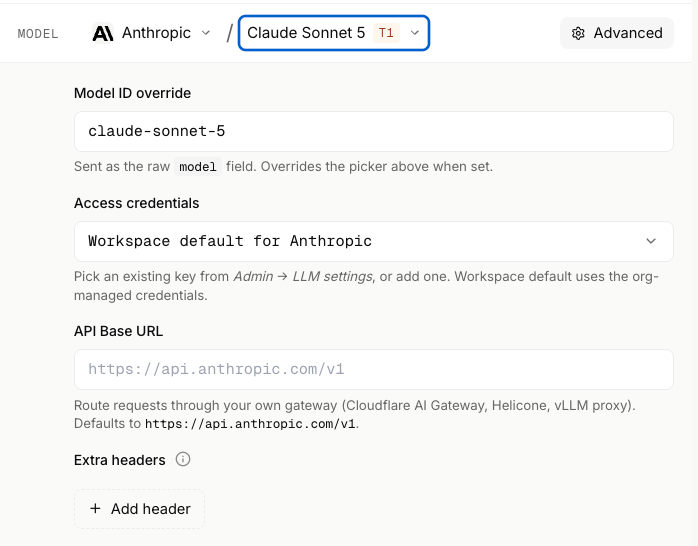
The provider is the model platform behind the agent, and Omni supports multiple providers so teams can choose based on quality, speed, cost, availability, and enterprise requirements. The model is the specific LLM the agent uses: pick more capable models for multi-step reasoning, careful analysis, research synthesis, high-quality writing, or sensitive, high-context decisions, and lighter models for simple routing, formatting, classification, or repetitive tasks. The model tier gives a quick signal of the selected model’s class, so you can compare options across capability, performance, and cost at a glance.
 ## Advanced model settings
Advanced model settings give teams more control when the workflow needs it.
Use them to refine how the agent reasons, responds, and works with tools.
## Memory and context
Memory and context help an agent keep useful information available across tasks and workflow steps. Use them when an agent needs to remember project details, reusable instructions, prior outputs, workspace files, or other context that improves future runs.
Keep memory focused on information that helps the agent do better work. Avoid storing sensitive, temporary, or unnecessary details unless the workflow requires them and the right access controls are in place.
For more detail on how memory works, refer to [Memory & State](/guides/agents/memory-state) under Building Agents in Platform Guides.
## Advanced model settings
Advanced model settings give teams more control when the workflow needs it.
Use them to refine how the agent reasons, responds, and works with tools.
## Memory and context
Memory and context help an agent keep useful information available across tasks and workflow steps. Use them when an agent needs to remember project details, reusable instructions, prior outputs, workspace files, or other context that improves future runs.
Keep memory focused on information that helps the agent do better work. Avoid storing sensitive, temporary, or unnecessary details unless the workflow requires them and the right access controls are in place.
For more detail on how memory works, refer to [Memory & State](/guides/agents/memory-state) under Building Agents in Platform Guides.