> ## Documentation Index
> Fetch the complete documentation index at: https://docs.xpander.ai/llms.txt
> Use this file to discover all available pages before exploring further.
# Custom Agents
> Powered by Agno. Governed agents scoped to one system or job, limited to approved operations, individually debuggable, improving over time.
Giving AI raw access to enterprise APIs is risky. A single misconfigured prompt could let a model delete records, modify permissions, or query data it shouldn't see.
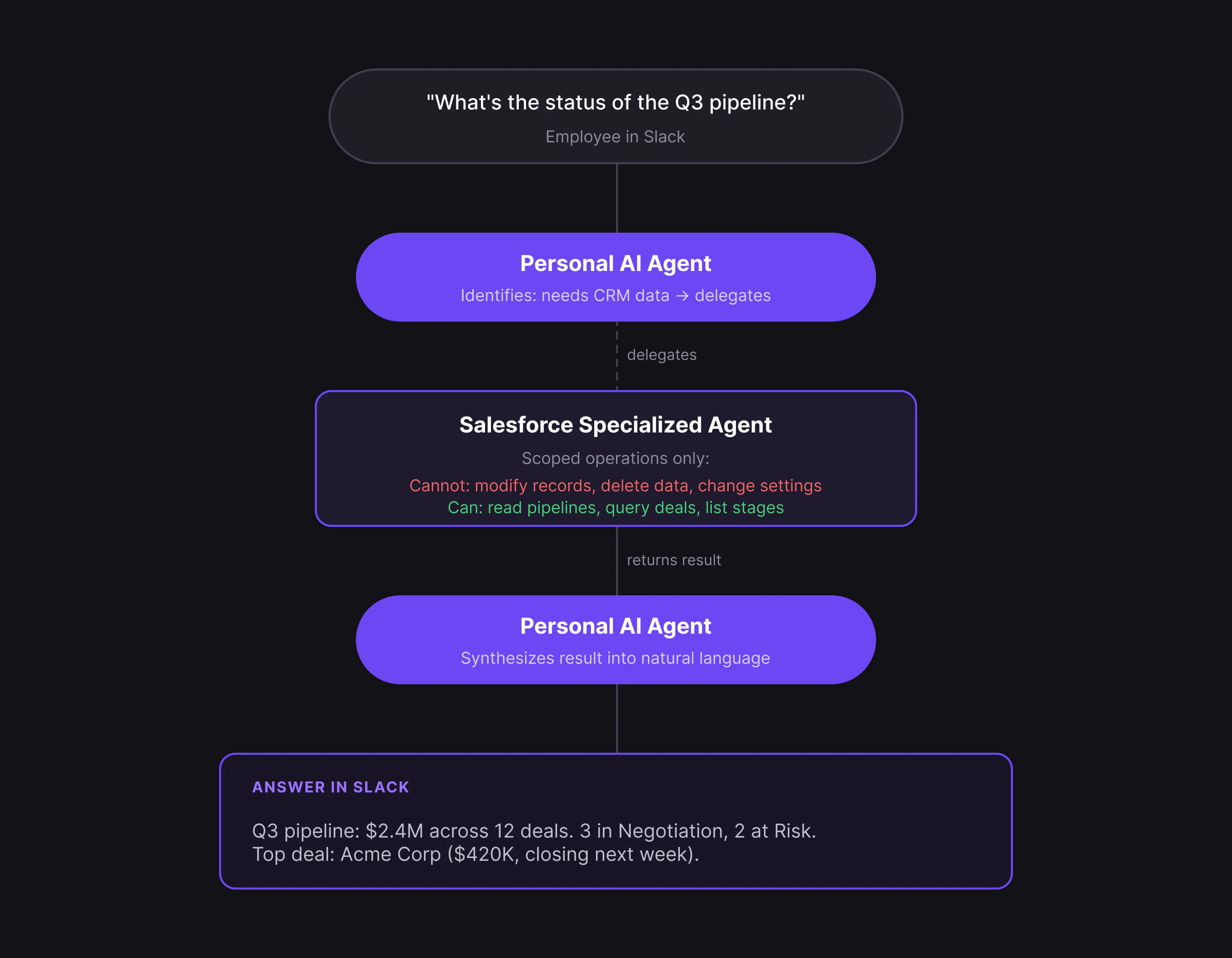
Custom Agents solve this by wrapping each enterprise system in a governed, scoped agent. xpander ships pre-built Custom Agents for common systems (Salesforce, Jira, Snowflake, GitHub, and many more), and you can configure your own for a specific job. Each one is restricted to only the operations you approve and is fully observable. For a pre-built agent, you authenticate once, the agent auto-configures, and it's ready to use.
This page explains Custom Agents as a platform building block: what they are and why they are governed this way. For how to work with Custom Agents inside Omni, with examples and configuration, see [Custom Agents in the User Guide](/guides/omni/types-of-agents/custom-agents).
**When to use:** You want governed AI access to enterprise systems without building anything custom. If the pre-built agents don't cover your use case, configure your own in [Omni](/guides/omni/manage-agents/agent-configuration) or build one in [Agent Studio](/overview/agent-studio).
## Why not just use a raw connector?
A raw connector gives AI full API access, every endpoint, including destructive operations. A Custom Agent wraps that access in governance.
| | Raw connector | Custom Agent |
| ----------------- | ------------------------------------- | ------------------------------------------------------- |
| **Access** | Full API surface | Scoped to approved operations only |
| **Constraints** | Prompt-based (model can ignore) | Structural (operations not in tool surface) |
| **Observability** | Raw API logs | Intent → plan → execution → outcome per action |
| **Debugging** | Trace global reasoning | Isolate one bounded agent |
| **Cost** | Model explores all options at runtime | Pre-structured tool chains, step limits, prompt caching |
**Example:** A GitHub agent for PR triage can read PRs, add labels, and post comments, but it structurally cannot modify org settings, create repos, or touch secrets. Those operations don't exist in its tool surface.
## How it works
Setting up a pre-built Custom Agent takes minutes, not days:
1. **Authenticate** with OAuth, API key, or service account (one-time)
2. **Auto-configure** as the agent discovers schemas, objects, and capabilities, then constrains its operation surface to approved operations only
3. **Route automatically** as users ask [Omni](/guides/omni/what-is-omni), and the right Custom Agent handles it
4. **Improve over time** as the agent learns your company's patterns and terminology
 ## Observability
When something goes wrong with an AI agent, raw API logs tell you *what* calls were made but not *why*. Custom Agents log every action with four fields that capture the full reasoning chain:
| Field | What it captures |
| ------------- | -------------------------------- |
| **Intent** | What was asked |
| **Plan** | How the agent decided to respond |
| **Execution** | What it did |
| **Outcome** | What changed |
For example, if a Salesforce agent returns unexpected results, you can see that it intended to query open deals, planned to use the pipeline endpoint, executed a filtered query, and returned 3 results instead of the expected 12.
The gap between plan and outcome tells you exactly where to look.
## Available agents
xpander includes pre-built Custom Agents for Salesforce, Jira, GitHub, Snowflake, BigQuery, Redshift, Datadog, Google Workspace, HubSpot, Slack, and many more. Each one is pre-configured for its system and ready to connect in minutes.
The full catalog covers data and analytics, development, project management, productivity, monitoring, CRM, and communication.
When you need something beyond the pre-built set, like combining multiple systems, custom escalation policies, or internal APIs, configure your own Custom Agent in [Omni](/guides/omni/manage-agents/agent-configuration) or build one in [Agent Studio](/overview/agent-studio).
## What's next
Examples, what a Custom Agent includes, and how it powers an Agentic Application.
Build your own agents when the pre-built set isn't enough.
Configure authentication and connector settings.
## Observability
When something goes wrong with an AI agent, raw API logs tell you *what* calls were made but not *why*. Custom Agents log every action with four fields that capture the full reasoning chain:
| Field | What it captures |
| ------------- | -------------------------------- |
| **Intent** | What was asked |
| **Plan** | How the agent decided to respond |
| **Execution** | What it did |
| **Outcome** | What changed |
For example, if a Salesforce agent returns unexpected results, you can see that it intended to query open deals, planned to use the pipeline endpoint, executed a filtered query, and returned 3 results instead of the expected 12.
The gap between plan and outcome tells you exactly where to look.
## Available agents
xpander includes pre-built Custom Agents for Salesforce, Jira, GitHub, Snowflake, BigQuery, Redshift, Datadog, Google Workspace, HubSpot, Slack, and many more. Each one is pre-configured for its system and ready to connect in minutes.
The full catalog covers data and analytics, development, project management, productivity, monitoring, CRM, and communication.
When you need something beyond the pre-built set, like combining multiple systems, custom escalation policies, or internal APIs, configure your own Custom Agent in [Omni](/guides/omni/manage-agents/agent-configuration) or build one in [Agent Studio](/overview/agent-studio).
## What's next
Examples, what a Custom Agent includes, and how it powers an Agentic Application.
Build your own agents when the pre-built set isn't enough.
Configure authentication and connector settings.