> ## Documentation Index
> Fetch the complete documentation index at: https://docs.xpander.ai/llms.txt
> Use this file to discover all available pages before exploring further.
# Custom Agents
> Powered by Agno. Pre-built, governed agents for enterprise systems, scoped to approved operations, individually debuggable, improving over time.
Giving AI raw access to enterprise APIs is risky. A single misconfigured prompt could let a model delete records, modify permissions, or query data it shouldn't see.
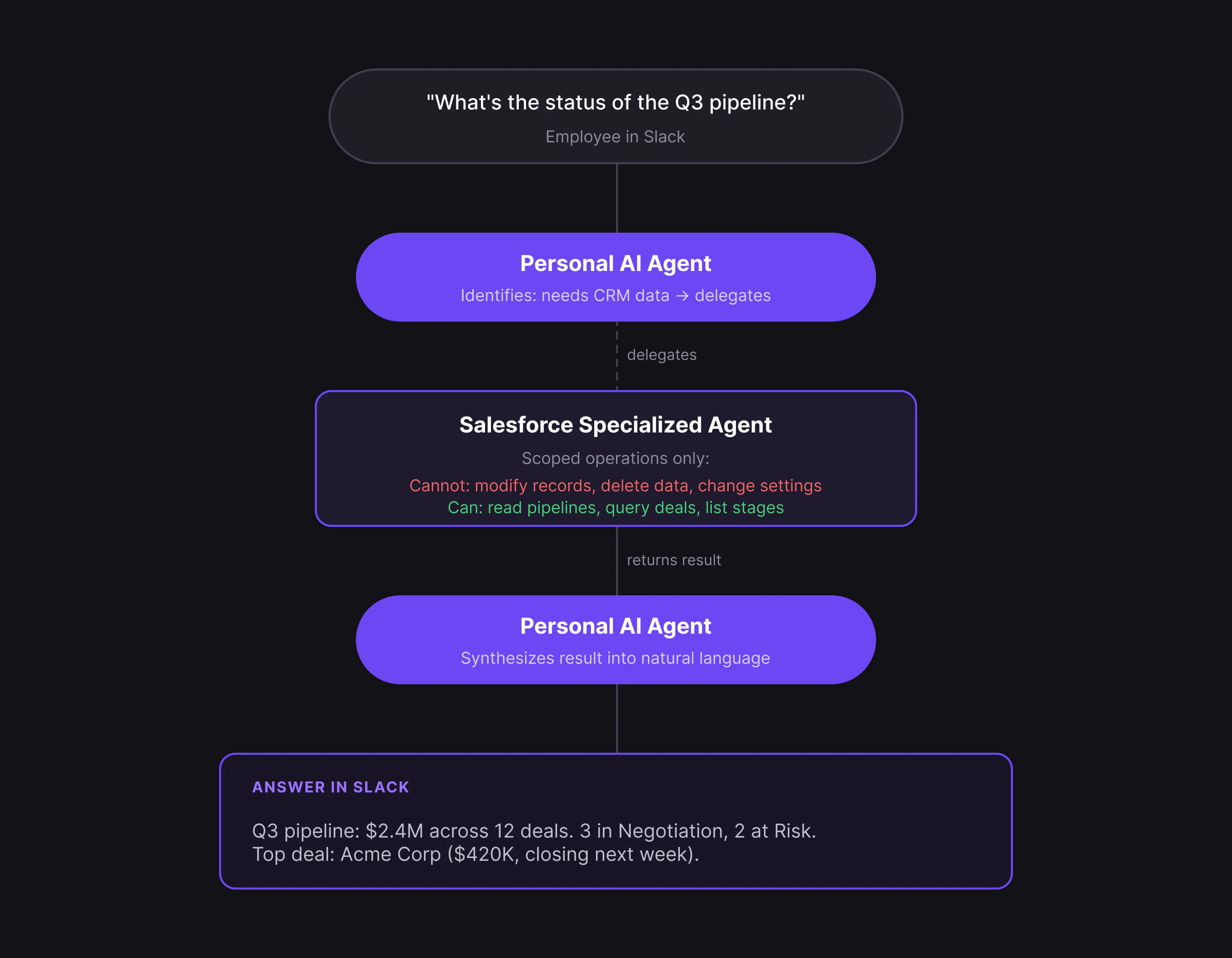
Specialized agents solve this by wrapping each enterprise system in a governed, scoped agent. Each one is pre-built for a specific system (Salesforce, Jira, Snowflake, GitHub, and many more), restricted to only the operations you approve, and fully observable. You authenticate once, the agent auto-configures, and it's ready to use.
**When to use:** You want governed AI access to enterprise systems without building anything custom. If the predefined agents don't cover your use case, use [Agent Studio](/overview/agent-studio).
## Why not just use a raw connector?
A raw connector gives AI full API access, every endpoint, including destructive operations. A specialized agent wraps that access in governance.
| | Raw connector | Specialized agent |
| ----------------- | ------------------------------------- | ------------------------------------------------------- |
| **Access** | Full API surface | Scoped to approved operations only |
| **Constraints** | Prompt-based (model can ignore) | Structural (operations not in tool surface) |
| **Observability** | Raw API logs | Intent → plan → execution → outcome per action |
| **Debugging** | Trace global reasoning | Isolate one bounded agent |
| **Cost** | Model explores all options at runtime | Pre-structured tool chains, step limits, prompt caching |
**Example:** A GitHub agent for PR triage can read PRs, add labels, and post comments, but it structurally cannot modify org settings, create repos, or touch secrets. Those operations don't exist in its tool surface.
## How it works
Setting up a specialized agent takes minutes, not days:
1. **Authenticate** with OAuth, API key, or service account (one-time)
2. **Auto-configure** as the agent discovers schemas, objects, and capabilities, then constrains its operation surface to approved operations only
3. **Route automatically** as users ask their [Personal AI Agent](/overview/personal-ai-agents), and the right specialist handles it
4. **Improve over time** as the agent learns your company's patterns and terminology
 ## Observability
When something goes wrong with an AI agent, raw API logs tell you *what* calls were made but not *why*. Specialized agents log every action with four fields that capture the full reasoning chain:
| Field | What it captures |
| ------------- | -------------------------------- |
| **Intent** | What was asked |
| **Plan** | How the agent decided to respond |
| **Execution** | What it did |
| **Outcome** | What changed |
For example, if a Salesforce agent returns unexpected results, you can see that it intended to query open deals, planned to use the pipeline endpoint, executed a filtered query, and returned 3 results instead of the expected 12.
The gap between plan and outcome tells you exactly where to look.
## Available agents
xpander includes specialized agents for Salesforce, Jira, GitHub, Snowflake, BigQuery, Redshift, Datadog, Google Workspace, HubSpot, Slack, and many more. Each one is pre-configured for its system and ready to connect in minutes.
The full catalog covers data and analytics, development, project management, productivity, monitoring, CRM, and communication.
When you need something beyond the pre-built set, like combining multiple systems, custom escalation policies, or internal APIs, you can build custom agents in [Agent Studio](/overview/agent-studio).
## What's next
Build custom agents when the predefined set isn't enough.
Configure authentication and connector settings.
## Observability
When something goes wrong with an AI agent, raw API logs tell you *what* calls were made but not *why*. Specialized agents log every action with four fields that capture the full reasoning chain:
| Field | What it captures |
| ------------- | -------------------------------- |
| **Intent** | What was asked |
| **Plan** | How the agent decided to respond |
| **Execution** | What it did |
| **Outcome** | What changed |
For example, if a Salesforce agent returns unexpected results, you can see that it intended to query open deals, planned to use the pipeline endpoint, executed a filtered query, and returned 3 results instead of the expected 12.
The gap between plan and outcome tells you exactly where to look.
## Available agents
xpander includes specialized agents for Salesforce, Jira, GitHub, Snowflake, BigQuery, Redshift, Datadog, Google Workspace, HubSpot, Slack, and many more. Each one is pre-configured for its system and ready to connect in minutes.
The full catalog covers data and analytics, development, project management, productivity, monitoring, CRM, and communication.
When you need something beyond the pre-built set, like combining multiple systems, custom escalation policies, or internal APIs, you can build custom agents in [Agent Studio](/overview/agent-studio).
## What's next
Build custom agents when the predefined set isn't enough.
Configure authentication and connector settings.