> ## Documentation Index
> Fetch the complete documentation index at: https://docs.xpander.ai/llms.txt
> Use this file to discover all available pages before exploring further.
# What is xpander.ai?
> The all-in-one platform for building AI agents that connect to your enterprise systems. Deploy to your k8s or ours.
xpander.ai is a platform for building AI agents that connect to your enterprise systems. It handles the hard parts of putting agents into production: governed access to APIs, memory, knowledge bases, observability, and deployment to any channel.
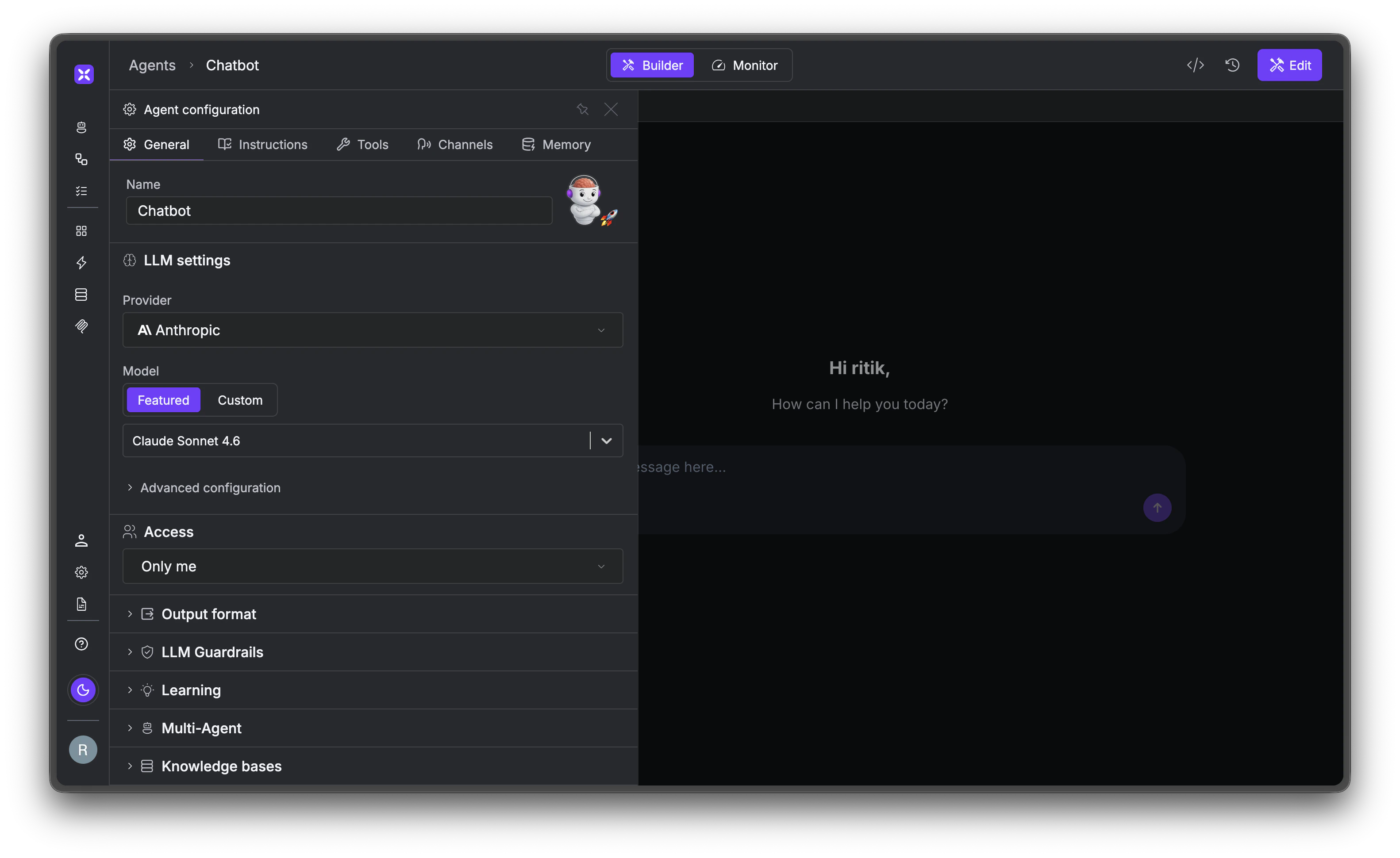 The platform is made up of four building blocks. Three are specific products you can use out of the box, and one is the builder for creating your own agents from scratch.
## Four building blocks
### Personal AI Agents
Powered by OpenClaw
An AI assistant that lives where your employees already work: Slack, Teams, and voice. It builds memory about each person's projects, preferences, and patterns over time. When it needs to reach into an enterprise system, it delegates to a specialized agent with the right permissions. IT deploys it once, and every employee in the workspace gets a personalized agent automatically.
The platform is made up of four building blocks. Three are specific products you can use out of the box, and one is the builder for creating your own agents from scratch.
## Four building blocks
### Personal AI Agents
Powered by OpenClaw
An AI assistant that lives where your employees already work: Slack, Teams, and voice. It builds memory about each person's projects, preferences, and patterns over time. When it needs to reach into an enterprise system, it delegates to a specialized agent with the right permissions. IT deploys it once, and every employee in the workspace gets a personalized agent automatically.
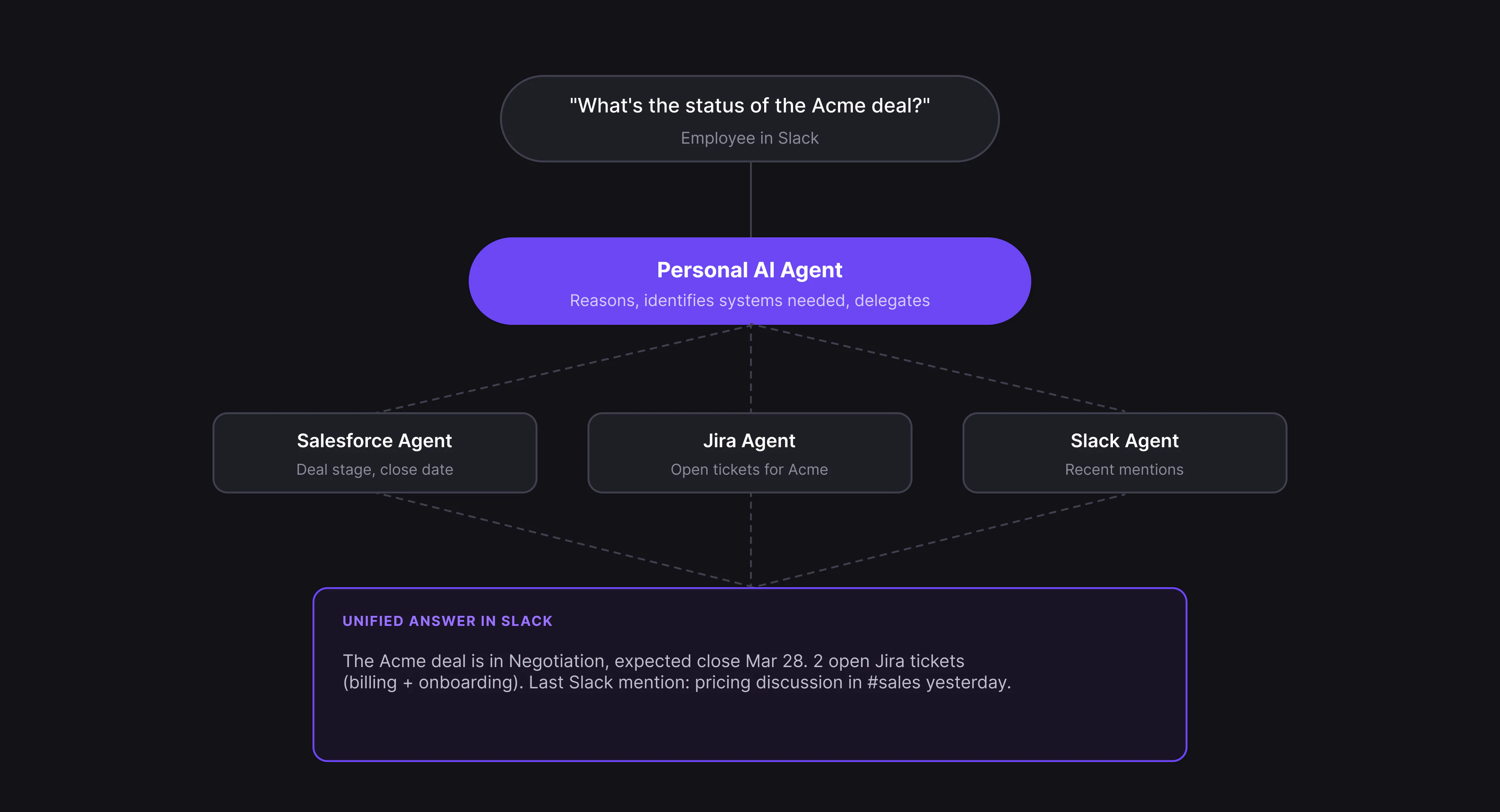 **When to use:** You want every employee to have an AI assistant without building anything custom. [Learn more →](/overview/personal-ai-agents)
### Specialized Agents
Powered by Agno
Pre-built agents for enterprise systems like Salesforce, Jira, Snowflake, and GitHub. Each one is scoped to only the operations you approve. Unlike raw API connectors where constraints are prompt-based, specialized agents enforce access structurally.
**When to use:** You want every employee to have an AI assistant without building anything custom. [Learn more →](/overview/personal-ai-agents)
### Specialized Agents
Powered by Agno
Pre-built agents for enterprise systems like Salesforce, Jira, Snowflake, and GitHub. Each one is scoped to only the operations you approve. Unlike raw API connectors where constraints are prompt-based, specialized agents enforce access structurally.
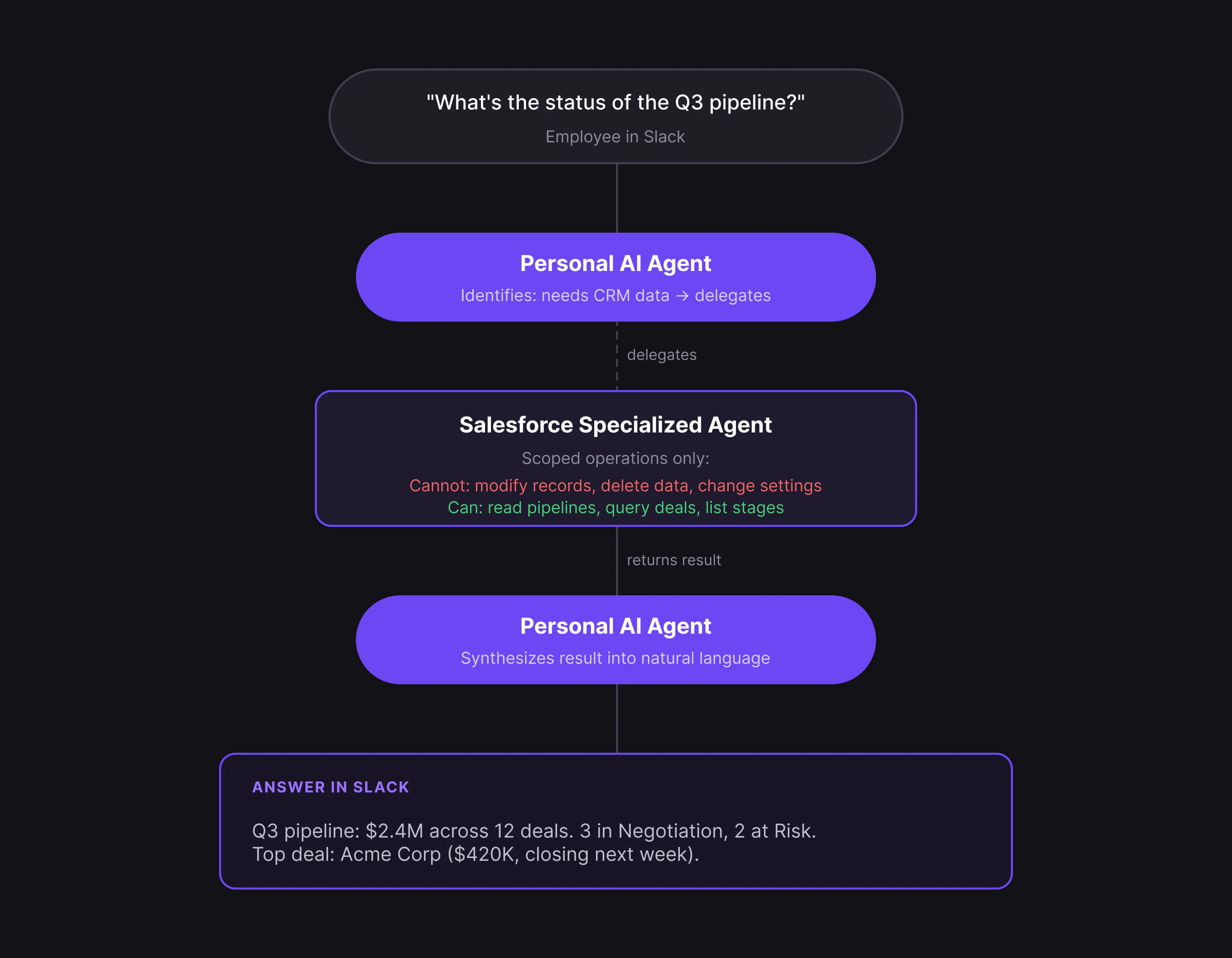 **When to use:** Governed AI access to specific systems without building anything custom. [Learn more →](/overview/specialized-agents)
### Agentic Automation
Powered by Agno Workflows
Backend workflow automation where AI handles data mapping between systems at runtime. Traditional automations (Zapier, n8n, Power Automate) break when an API changes because every field is manually wired. Agentic automation describes what each step should *do* in natural language, so it adapts to schema changes instead of breaking. Build on a no-code canvas or with the Python/JS SDK.
**When to use:** Backend automation triggered by events (webhooks, schedules, emails) across multiple systems. [Learn more →](/overview/agentic-automation)
### Agent Studio
Powered by Agno
A visual builder for custom agents. When the pre-built options don't cover your use case, Agent Studio lets you combine any of the 2,000+ tools, add your own documents as knowledge bases, and deploy to any channel.
**When to use:** The predefined agents don't cover your use case, and you need a custom mix of tools, knowledge, and behavior. [Learn more →](/overview/agent-studio)
## How it fits together
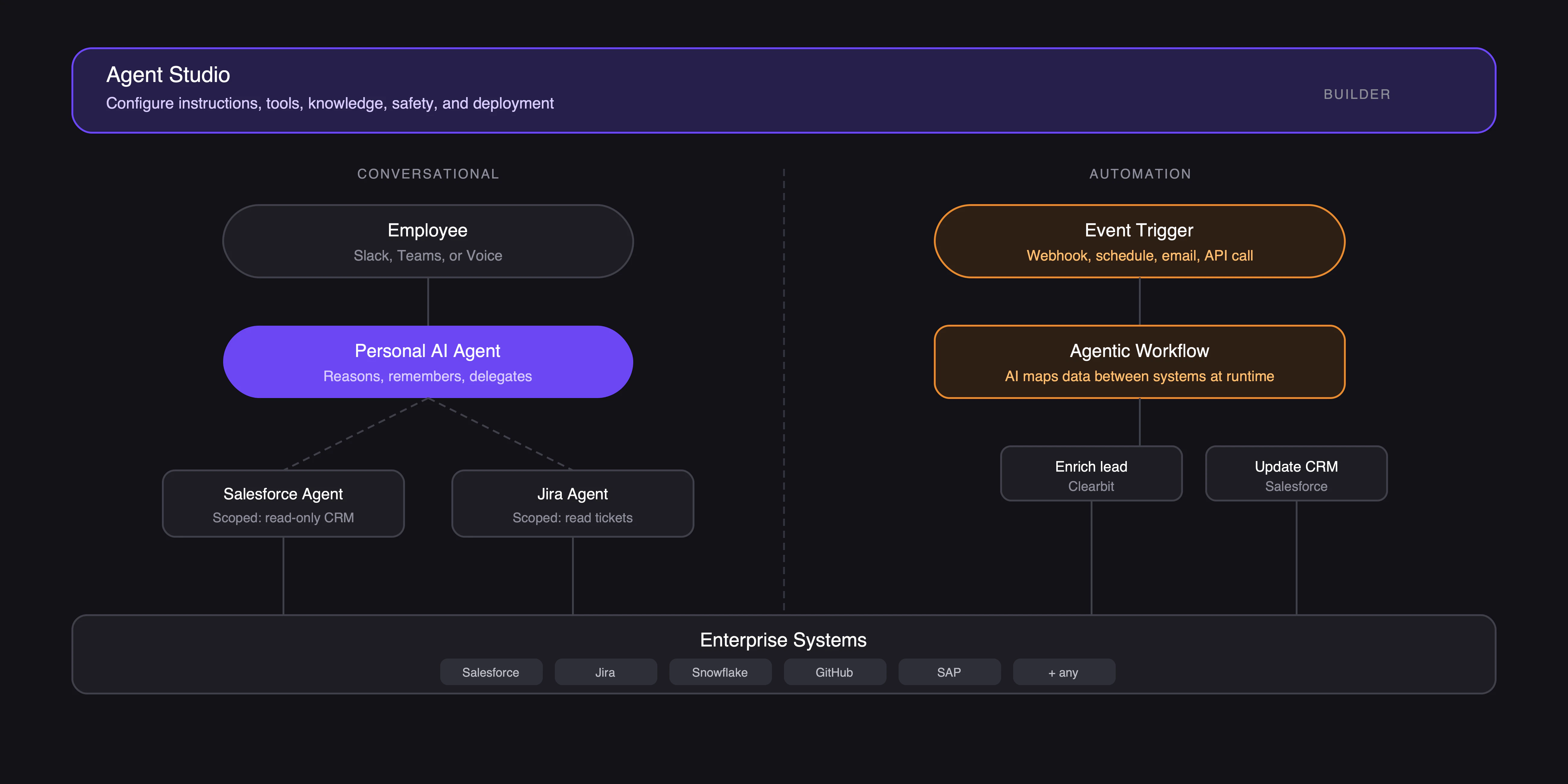
Agent Studio is where you configure everything: agent instructions, tool connections, knowledge bases, safety controls, and deployment channels.
Once deployed, Personal Agents handle conversations and delegate to Specialized Agents for governed system access. Agentic Automations run separately in the background, triggered by events, handling multi-step processes that don't need a conversation. Everything is also accessible through the [Python SDK and REST API](/api-reference/sdk).
**When to use:** Governed AI access to specific systems without building anything custom. [Learn more →](/overview/specialized-agents)
### Agentic Automation
Powered by Agno Workflows
Backend workflow automation where AI handles data mapping between systems at runtime. Traditional automations (Zapier, n8n, Power Automate) break when an API changes because every field is manually wired. Agentic automation describes what each step should *do* in natural language, so it adapts to schema changes instead of breaking. Build on a no-code canvas or with the Python/JS SDK.
**When to use:** Backend automation triggered by events (webhooks, schedules, emails) across multiple systems. [Learn more →](/overview/agentic-automation)
### Agent Studio
Powered by Agno
A visual builder for custom agents. When the pre-built options don't cover your use case, Agent Studio lets you combine any of the 2,000+ tools, add your own documents as knowledge bases, and deploy to any channel.
**When to use:** The predefined agents don't cover your use case, and you need a custom mix of tools, knowledge, and behavior. [Learn more →](/overview/agent-studio)
## How it fits together
Agent Studio is where you configure everything: agent instructions, tool connections, knowledge bases, safety controls, and deployment channels.
Once deployed, Personal Agents handle conversations and delegate to Specialized Agents for governed system access. Agentic Automations run separately in the background, triggered by events, handling multi-step processes that don't need a conversation. Everything is also accessible through the [Python SDK and REST API](/api-reference/sdk).
 ## Deployment
All three options run identical software.
Managed, SOC 2, auto-scaling. Free tier available.
Your AWS, GCP, or Azure. Self-hosted Kubernetes with Helm.
On-prem hardware. Air-gapped, rack-mountable, pre-loaded models.
## What's next
AI teammates for every employee.
Governed agents for enterprise systems.
Build custom agents.
AI-native workflow automation.
## Deployment
All three options run identical software.
Managed, SOC 2, auto-scaling. Free tier available.
Your AWS, GCP, or Azure. Self-hosted Kubernetes with Helm.
On-prem hardware. Air-gapped, rack-mountable, pre-loaded models.
## What's next
AI teammates for every employee.
Governed agents for enterprise systems.
Build custom agents.
AI-native workflow automation.