> ## Documentation Index
> Fetch the complete documentation index at: https://docs.xpander.ai/llms.txt
> Use this file to discover all available pages before exploring further.
# Policies
> Which license models people may use, how long new API keys may live, how long requests are kept, and which groups have prompt and response text saved (all of them, unless you turn one off).
[Policies](https://platform.xpander.ai/governance/policies) (**Platform > AI governance > Policies**) holds the rules that apply to every model call in the organization. Changes reach the LLM Gateway within seconds.
The page has two cards. **Policies** lists access policies attached to users, groups and API keys. **Settings** lists the organization-wide settings this page describes:
| Setting | What it controls |
| - | - |
| **License models** | Which ways of paying for model calls people may use, the default, and what happens when someone's own plan hits its limit |
| **Longest API key lifetime** | The longest expiry a person may give a new API key |
| **Request retention** | How long request records are kept |
| **Saved prompt text** | Which groups have prompt and response text saved |
| **Allow public links** | Whether shared links open without signing in |
To change one, open its row's menu and choose **Change setting…**, or select the row. If your role may view policies but not change them, the page shows **Your role lets you see the policies, not change them.** and every control is read-only. Every change is written to the [Audit log](https://platform.xpander.ai/governance/audit) with who made it.
## License model
**License model** decides which ways of paying for model calls people may use. Each one has a switch:
| License model | Who pays |
| - | - |
| **Bring your own subscription** | The person, on their own Claude plan, where xpander has enabled it for your organization. Nothing is billed to you, and it counts toward no budget. |
| **Bring your own key** | Your organization, on a provider key you stored ([Providers and keys](/run/llm-gateway/providers-and-keys)). The provider bills you. |
| **Included with xpander** | xpander's key; xpander bills the usage in credits. xpander cloud only. |
The last license model that is on stays on, and shows the note **Stays on: calls fall back to it.**
* **Default license model** appears when both **Bring your own key** and **Included with xpander** are on. With **Bring your own key**, a call uses your key when one is stored for the provider, and otherwise xpander's key, billed. With **Included with xpander**, a call always uses xpander's key, billed, and stored keys are not used.
* **When someone's plan hits its limit** appears when **Bring your own subscription** is on. **Fall back to company models** (the default) moves their calls to company models until the plan resets. **Pause** holds their calls until the plan resets, and people can't choose to continue.
* **Exceptions** lists groups and agents that may use fewer license models than the organization.
The full order the gateway follows on every call is on [Licenses and who pays](/run/llm-gateway/which-key-pays).
On a Hybrid install, **Included with xpander** is not offered for anything that runs on your install or on your people's computers. On an Air-Gapped install, **Bring your own key** is the only license model, so this section does not show.
## Key lifetime
**Longest lifetime for a new API key** caps the expiry people may pick for keys they create in [AI models & keys](https://chat.xpander.ai/?settings=my-gateway): **30 days**, **90 days**, **180 days**, **1 year** or **No limit**. With a cap set, the key form says *Your organization allows up to ...* and does not offer **Never**. Keys already issued keep their expiry.
## Retention
**Keep requests for** sets how long [request records](/run/llm-gateway/requests-and-costs) are kept: **30 days**, **90 days**, **180 days**, **1 year**, or **Default** (90 days on xpander cloud). On a self-hosted install the last option is **No limit**, and records are kept until you set one. Saved text is deleted with its request.
## Prompt and response text
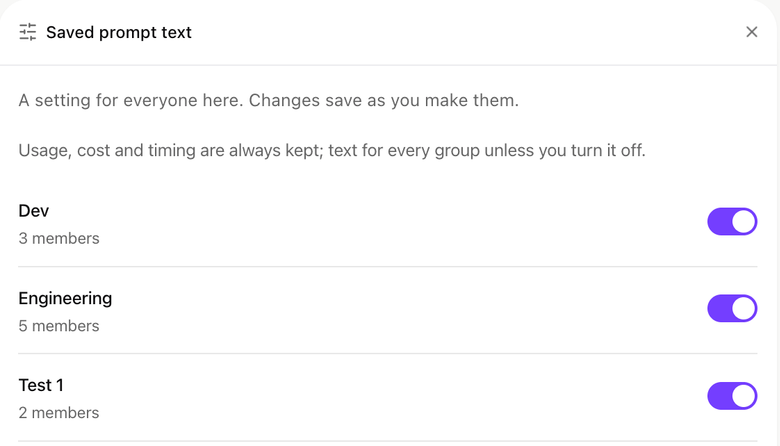 Usage, cost and timing are always kept. By default, prompt and response text is kept for everyone in the account: every group, groups you add later, and people who are in no group. Saved text can include personal data, so check your privacy obligations.
Open **Saved prompt text** in the **Settings** card:
* **All users in the account** is the switch for everyone. Turn it off to save no text at all. While it is off, the group switches below it are held off.
* Each group has its own switch, and every switch starts on. Turn off the switch next to a group to stop saving its text. Search with **Search groups** when you have many.
Turning a switch back on asks you to confirm and says how long the text will be kept.
* **Which calls.** A call is saved when the person making it, or the person who started the agent run, belongs to a group with the switch on, or belongs to no group while **All users in the account** is on. A main account can turn saving off for all of its accounts.
* **What is kept.** The prompt (instructions, the conversation and the names of the skills offered to the model) and the final answer. Keys, headers, images and files are never kept, and anything that looks like a secret is removed. Very long text is cut, with a note saying so.
* **Where and how long.** The text is encrypted with a key unique to your organization and stored next to its request in your organization's own database. It is deleted with its request after the **Keep requests for** period.
* **Who can read it.** Anyone whose role may view usage, in the request's **Prompt and response** section in [Logs](https://platform.xpander.ai/governance/logs). Every opened request is recorded in the [Audit log](https://platform.xpander.ai/governance/audit).
* **Turning it off.** Saving stops from the next call. Text already saved stays until its request is deleted.
On a Hybrid install, these switches apply to agents in your own environment. Tools on your people's computers connect to xpander cloud, which never saves their text.
## Accounts
When your organization runs several accounts from a main account, **License models** and **Saved text** have an **Accounts** row that decides which accounts are held to the main account's setting. Inside an account, a section the main account set shows a **set by** badge.
This documentation is built and hosted on [Mintlify](https://mintlify.com), a developer documentation platform.
Usage, cost and timing are always kept. By default, prompt and response text is kept for everyone in the account: every group, groups you add later, and people who are in no group. Saved text can include personal data, so check your privacy obligations.
Open **Saved prompt text** in the **Settings** card:
* **All users in the account** is the switch for everyone. Turn it off to save no text at all. While it is off, the group switches below it are held off.
* Each group has its own switch, and every switch starts on. Turn off the switch next to a group to stop saving its text. Search with **Search groups** when you have many.
Turning a switch back on asks you to confirm and says how long the text will be kept.
* **Which calls.** A call is saved when the person making it, or the person who started the agent run, belongs to a group with the switch on, or belongs to no group while **All users in the account** is on. A main account can turn saving off for all of its accounts.
* **What is kept.** The prompt (instructions, the conversation and the names of the skills offered to the model) and the final answer. Keys, headers, images and files are never kept, and anything that looks like a secret is removed. Very long text is cut, with a note saying so.
* **Where and how long.** The text is encrypted with a key unique to your organization and stored next to its request in your organization's own database. It is deleted with its request after the **Keep requests for** period.
* **Who can read it.** Anyone whose role may view usage, in the request's **Prompt and response** section in [Logs](https://platform.xpander.ai/governance/logs). Every opened request is recorded in the [Audit log](https://platform.xpander.ai/governance/audit).
* **Turning it off.** Saving stops from the next call. Text already saved stays until its request is deleted.
On a Hybrid install, these switches apply to agents in your own environment. Tools on your people's computers connect to xpander cloud, which never saves their text.
## Accounts
When your organization runs several accounts from a main account, **License models** and **Saved text** have an **Accounts** row that decides which accounts are held to the main account's setting. Inside an account, a section the main account set shows a **set by** badge.
This documentation is built and hosted on [Mintlify](https://mintlify.com), a developer documentation platform.