> ## Documentation Index
> Fetch the complete documentation index at: https://docs.xpander.ai/llms.txt
> Use this file to discover all available pages before exploring further.
# Create and customize an agent
> Instructions, harness and model, skills, approval rules and gated commands, secrets, output format, runtime environment and budgets on one agent, and how to rehearse a skill with mock data.
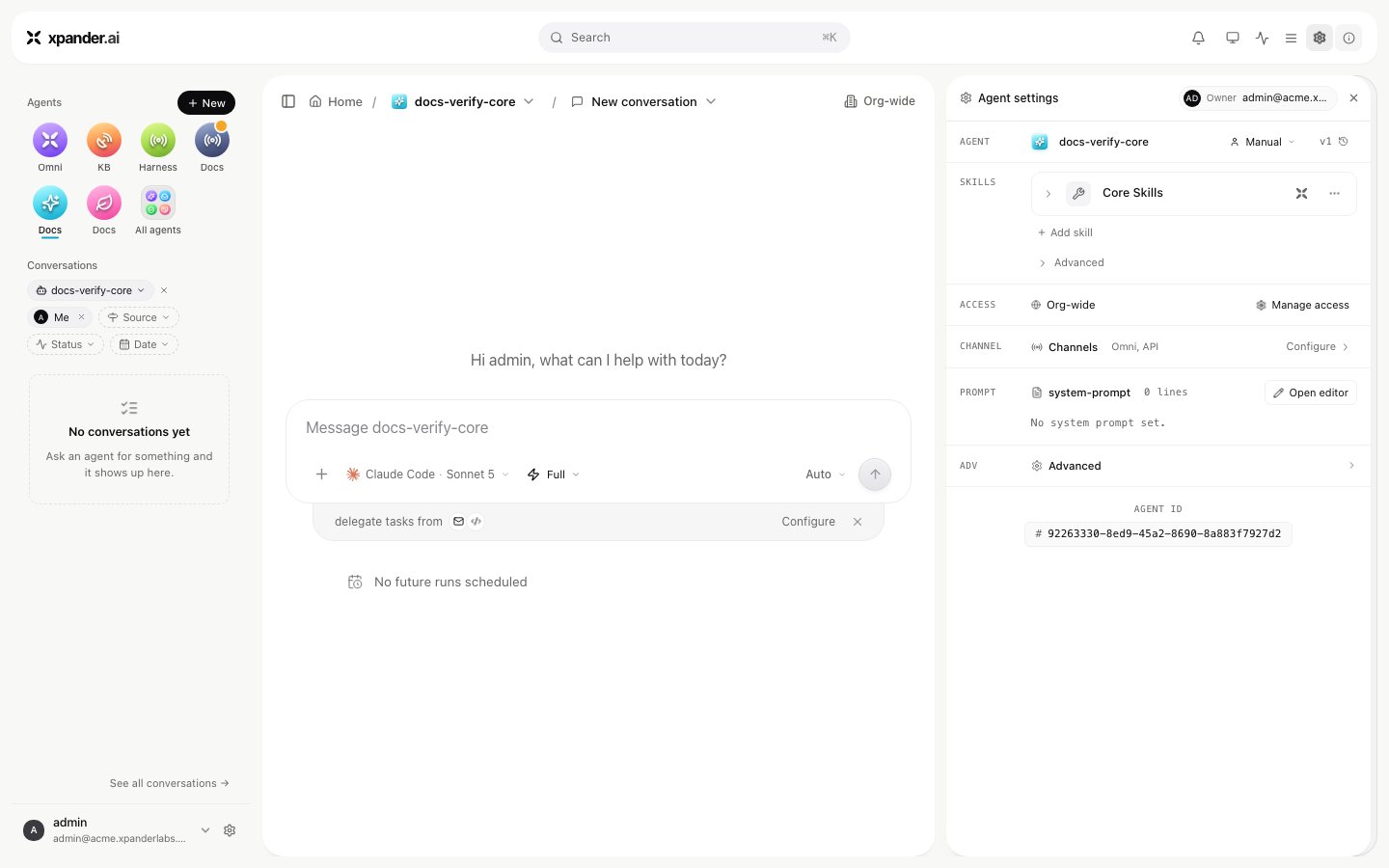
**New** in the left column creates an agent. You can also describe one to Omni, the built-in agent, and review what it assembled. Everything below lives in **Agent settings**, opened from the gear in the conversation header; each row names its field.
 ## Instructions
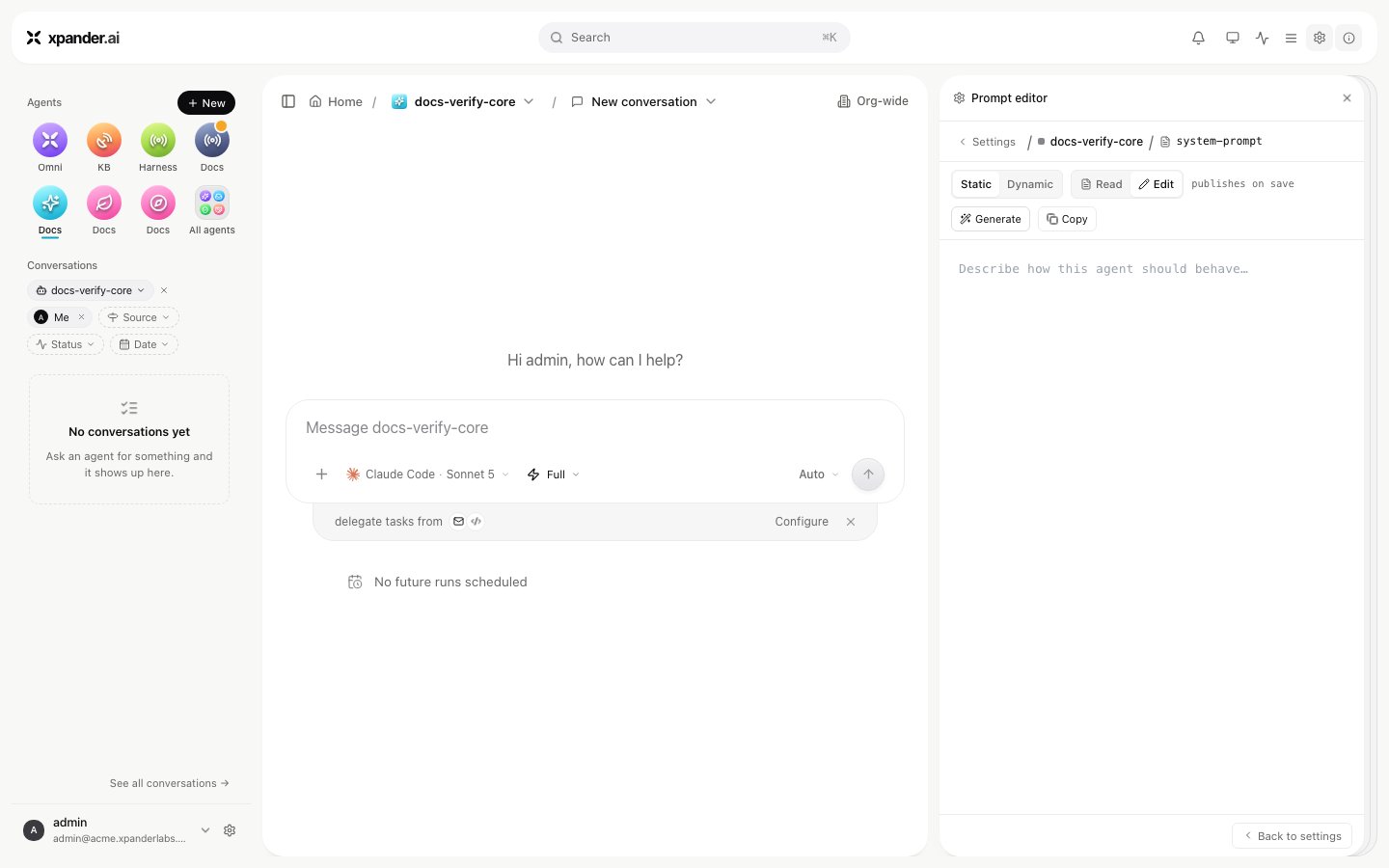
`PROMPT` opens the prompt editor. **Static** is a freeform text box for the agent's instructions; **Generate** drafts a starting point from a short description you type. **Dynamic** is a Python function, `xpander_dynamic_prompt()`, that runs fresh on every turn and adds its return value before or after the static prompt, with the workspace's secrets available as `os.environ`; use it for instructions that depend on the moment the turn runs. Write the static prompt as a contract, the sections or fields an answer must always have, when the agent should answer the same way every time. For a machine-readable answer use the output format below instead. The agent's description is shown on its card and read by Omni when it decides which agent a request belongs to.
## Instructions
`PROMPT` opens the prompt editor. **Static** is a freeform text box for the agent's instructions; **Generate** drafts a starting point from a short description you type. **Dynamic** is a Python function, `xpander_dynamic_prompt()`, that runs fresh on every turn and adds its return value before or after the static prompt, with the workspace's secrets available as `os.environ`; use it for instructions that depend on the moment the turn runs. Write the static prompt as a contract, the sections or fields an answer must always have, when the agent should answer the same way every time. For a machine-readable answer use the output format below instead. The agent's description is shown on its card and read by Omni when it decides which agent a request belongs to.
 ## Harness and model
The composer's **Harness and model** picker shows which of Claude Code, Codex or OpenCode the agent starts on and which model it uses, grouped by the providers your admins enabled under Settings > LLM settings. A choice made there before any conversation exists sets the agent's default; a choice inside a running conversation overrides it for that conversation only. An agent-level credential can also set the agent's own provider key or endpoint. Stored in the Vault, it outranks the organization's key at the moment of a call, and calls on a key you brought are measured but not charged in credits.
## Skills
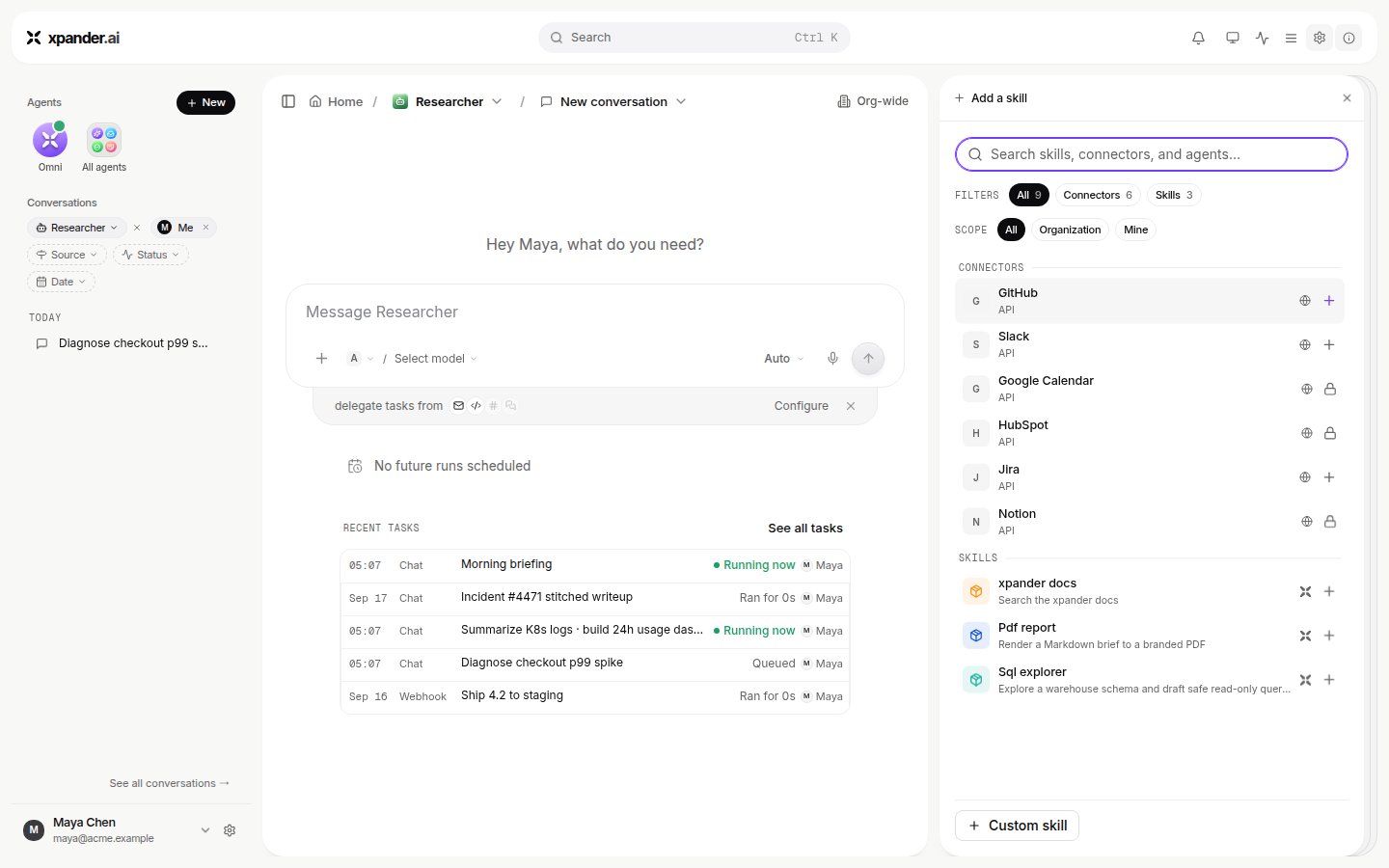
`SKILLS` lists what the agent may reach. **Add skill** offers the four kinds your organization approved (API connectors, MCP connectors, Markdown skills and custom actions); a skill's own menu removes it. Which groups of actions are enabled and which wait for approval is set per skill. Steps for each kind are on [Add a skill](/connectors/add-a-skill). Whether you may add or manage skills at all is a user-group switch under Settings > User groups.
## Harness and model
The composer's **Harness and model** picker shows which of Claude Code, Codex or OpenCode the agent starts on and which model it uses, grouped by the providers your admins enabled under Settings > LLM settings. A choice made there before any conversation exists sets the agent's default; a choice inside a running conversation overrides it for that conversation only. An agent-level credential can also set the agent's own provider key or endpoint. Stored in the Vault, it outranks the organization's key at the moment of a call, and calls on a key you brought are measured but not charged in credits.
## Skills
`SKILLS` lists what the agent may reach. **Add skill** offers the four kinds your organization approved (API connectors, MCP connectors, Markdown skills and custom actions); a skill's own menu removes it. Which groups of actions are enabled and which wait for approval is set per skill. Steps for each kind are on [Add a skill](/connectors/add-a-skill). Whether you may add or manage skills at all is a user-group switch under Settings > User groups.
 ## Approval rules
Three places make an action wait for a named person:
* **Per action.** In a skill's panel, **These actions need approval** lists the actions that wait, and **WHO APPROVES** names people or groups. Any one of the named approvers settles a request. **Self approve** adds you to that set and is off by default.
* **By kind of action.** An API connector's approval policy can hold every action that creates, changes or deletes something, or every read.
* **Gated commands.** Literal text fragments such as `rm -rf`, `terraform apply` or the name of a deploy script. Any shell command containing one waits, in either permission mode, whoever runs the agent, on schedules too. Each entry takes an optional exception (`unless`), a note shown on the approval card, named approvers and notification channels. With no approvers named, the agent's owner is asked, so a run in the middle of the night parks and notifies rather than proceeding. Matching is a case-insensitive substring over the whole command, not a pattern language; an agent imported with destructive scripts gets them gated by default.
## Approval rules
Three places make an action wait for a named person:
* **Per action.** In a skill's panel, **These actions need approval** lists the actions that wait, and **WHO APPROVES** names people or groups. Any one of the named approvers settles a request. **Self approve** adds you to that set and is off by default.
* **By kind of action.** An API connector's approval policy can hold every action that creates, changes or deletes something, or every read.
* **Gated commands.** Literal text fragments such as `rm -rf`, `terraform apply` or the name of a deploy script. Any shell command containing one waits, in either permission mode, whoever runs the agent, on schedules too. Each entry takes an optional exception (`unless`), a note shown on the approval card, named approvers and notification channels. With no approvers named, the agent's owner is asked, so a run in the middle of the night parks and notifies rather than proceeding. Matching is a case-insensitive substring over the whole command, not a pattern language; an agent imported with destructive scripts gets them gated by default.
 A held call parks the run; approving runs it within seconds; declining covers that call alone. Permission modes, hold windows and what the approver sees are on [Permissions](/use/agents/permissions) and [Approvals](/use/approvals).
## Secrets
A skill's credential is entered when the skill is connected and stored in the Vault; the agent uses it at the moment of a call and never sees it. Under **Advanced**, **Workspace secrets** holds the agent's own secrets: environment variables for its sessions, stored in the vault, delivered as one variable per key and refreshed before every turn. The agent reads them as `$NAME`; it cannot add or change them, and its instructions forbid printing a value. When a run needs a credential it does not have, the agent raises an **Ask for secret** card; what you type goes to the vault, not to the model. Details on [Credentials](/use/agents/credentials).
## Output format
**Output format** offers **Default** (free-form textual content), **Markdown** (rich text formatted as Markdown) and **Structured output** (a predefined, schema-validated JSON format). Structured output takes a JSON Schema; a starter with `success` and `result` is seeded, and **Generate with AI** drafts one from a description. The agent's answer is validated against the schema, repaired when it can be, and returned by the API as the task's `result`. In Slack and the other chat channels a structured answer is rendered as prose; the record keeps the JSON. Getting the same shape every time, over every channel, is on [API and structured output](/use/agents/api#structured-output).
## Runtime environment
**Runtime environment**, under **Advanced**, attaches one of the organization's runtime environments: the agent's computer, with the CLIs, packages, config files, setup scripts and standing context it finds installed on every run. It is per agent, not per session, and follows the agent to any location. What goes into one and how it reaches the agent is on [Runtime environments](/use/agents/runtime-environments).
## Budgets and limits
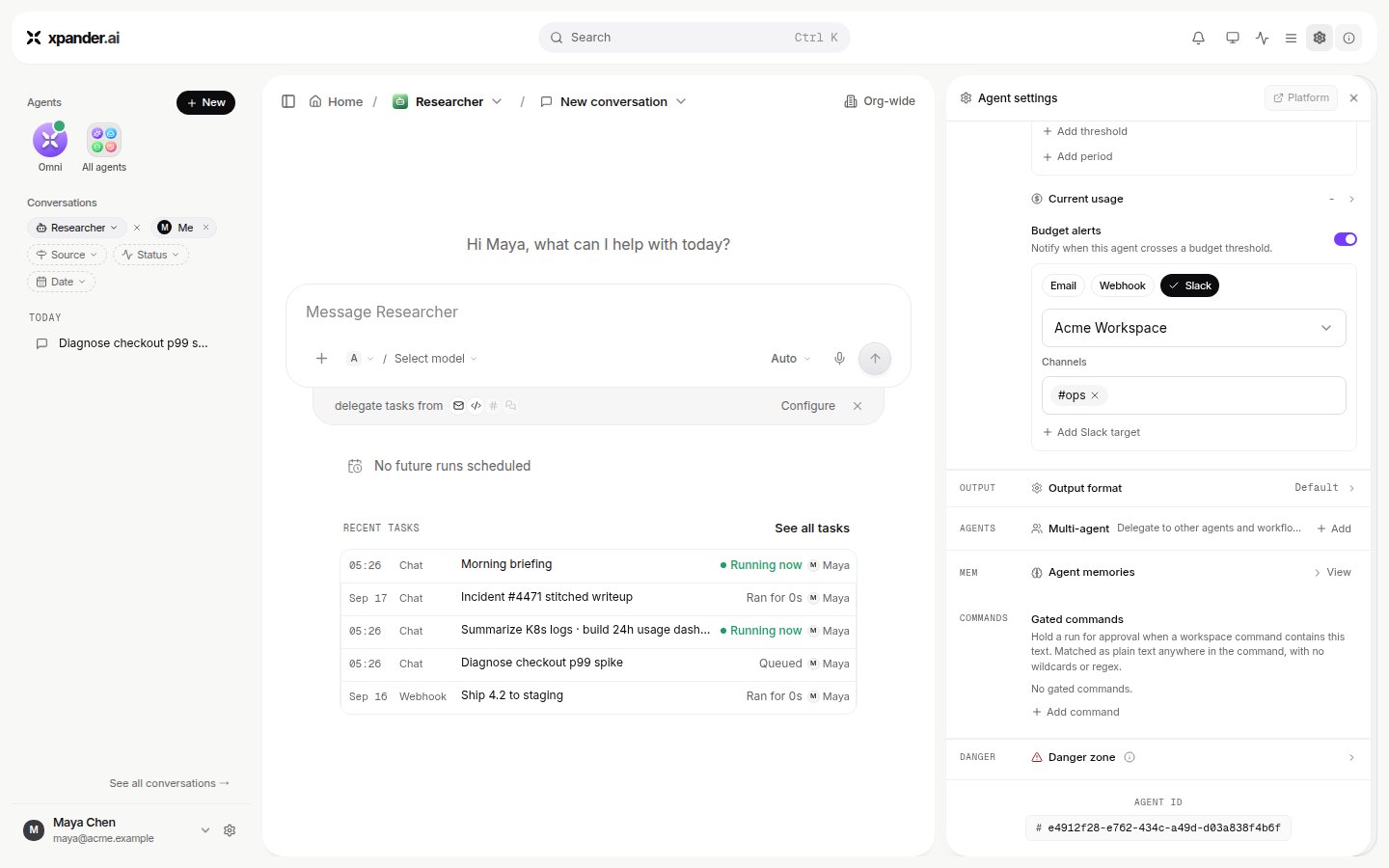
**Per-agent budget**, under Agent settings > **Advanced**, sets a recurring cap for the agent. A cap can be daily, weekly or monthly, and several can run at once. **Per-task budget**, next to it, halts a single task once its spend crosses the cap. The same **Advanced** pane holds Runtime environment, Live surface sharing, Self scheduling, Stage before publishing to live, Output format, Agent memories, Gated commands and the Danger zone. Each cap carries percentage thresholds that warn or stop. Details are on [Budgets and usage](/use/agents/budgets).
## Rehearse with mock data
Each connection on a skill has a **Live / Mock** switch. In Mock, xpander answers the agent's calls with generated data that matches the operation's documented response shape instead of calling the system, and caches it so the same call returns the same data. Nothing reaches the vendor and no credential is resolved. Use it to rehearse an agent against a system you have not connected yet or must not touch. There is no whole-agent dry run: a run with mocked skills still uses the model and is recorded as a task.
## Publish
Changes apply to the agent's next turn. An agent in production can be set to **Stage before publishing to live**. When on, Publish commits changes to a staging copy first. That staging copy is invokable by the API with `?version=draft`. The live agent keeps serving the previous version until you explicitly **Promote to live**. Sharing the agent, and who may edit it, is on [Permissions](/use/agents/permissions#on-an-agent-access-and-sharing).
A held call parks the run; approving runs it within seconds; declining covers that call alone. Permission modes, hold windows and what the approver sees are on [Permissions](/use/agents/permissions) and [Approvals](/use/approvals).
## Secrets
A skill's credential is entered when the skill is connected and stored in the Vault; the agent uses it at the moment of a call and never sees it. Under **Advanced**, **Workspace secrets** holds the agent's own secrets: environment variables for its sessions, stored in the vault, delivered as one variable per key and refreshed before every turn. The agent reads them as `$NAME`; it cannot add or change them, and its instructions forbid printing a value. When a run needs a credential it does not have, the agent raises an **Ask for secret** card; what you type goes to the vault, not to the model. Details on [Credentials](/use/agents/credentials).
## Output format
**Output format** offers **Default** (free-form textual content), **Markdown** (rich text formatted as Markdown) and **Structured output** (a predefined, schema-validated JSON format). Structured output takes a JSON Schema; a starter with `success` and `result` is seeded, and **Generate with AI** drafts one from a description. The agent's answer is validated against the schema, repaired when it can be, and returned by the API as the task's `result`. In Slack and the other chat channels a structured answer is rendered as prose; the record keeps the JSON. Getting the same shape every time, over every channel, is on [API and structured output](/use/agents/api#structured-output).
## Runtime environment
**Runtime environment**, under **Advanced**, attaches one of the organization's runtime environments: the agent's computer, with the CLIs, packages, config files, setup scripts and standing context it finds installed on every run. It is per agent, not per session, and follows the agent to any location. What goes into one and how it reaches the agent is on [Runtime environments](/use/agents/runtime-environments).
## Budgets and limits
**Per-agent budget**, under Agent settings > **Advanced**, sets a recurring cap for the agent. A cap can be daily, weekly or monthly, and several can run at once. **Per-task budget**, next to it, halts a single task once its spend crosses the cap. The same **Advanced** pane holds Runtime environment, Live surface sharing, Self scheduling, Stage before publishing to live, Output format, Agent memories, Gated commands and the Danger zone. Each cap carries percentage thresholds that warn or stop. Details are on [Budgets and usage](/use/agents/budgets).
## Rehearse with mock data
Each connection on a skill has a **Live / Mock** switch. In Mock, xpander answers the agent's calls with generated data that matches the operation's documented response shape instead of calling the system, and caches it so the same call returns the same data. Nothing reaches the vendor and no credential is resolved. Use it to rehearse an agent against a system you have not connected yet or must not touch. There is no whole-agent dry run: a run with mocked skills still uses the model and is recorded as a task.
## Publish
Changes apply to the agent's next turn. An agent in production can be set to **Stage before publishing to live**. When on, Publish commits changes to a staging copy first. That staging copy is invokable by the API with `?version=draft`. The live agent keeps serving the previous version until you explicitly **Promote to live**. Sharing the agent, and who may edit it, is on [Permissions](/use/agents/permissions#on-an-agent-access-and-sharing).