> ## Documentation Index
> Fetch the complete documentation index at: https://docs.xpander.ai/llms.txt
> Use this file to discover all available pages before exploring further.
# Credentials
> The Vault, your own credentials and workspace secrets: how agents use credentials they never see, where the values live, and who may reach them.
An agent that talks to an outside system needs a credential for it. On xpander the agent references the credential by name, and the value is injected at the moment of use. Nothing in the agent's prompt, files or record holds it. By the end of this page you will have:
* a secret in the Vault with an access level
* an agent reading it as an environment variable
* your own source-control token kept to your conversations alone
* if your organization runs Azure Key Vault, its secret names imported with the values staying where they are
The places involved:
| Place | Who uses it | What it holds |
| --------------------------------- | ------------------- | ------------------------------------------------------------------------------------- |
| **Settings > Vault** | Organization admins | Environment secrets, environment files and credentials shared across the organization |
| **My connections > Credentials** | Every user | Your own GitHub, GitLab or Bitbucket token, used only in your conversations |
| **Workspace secrets** on an agent | The agent's owner | Values scoped to that one agent, injected into its workspace |
## The Vault
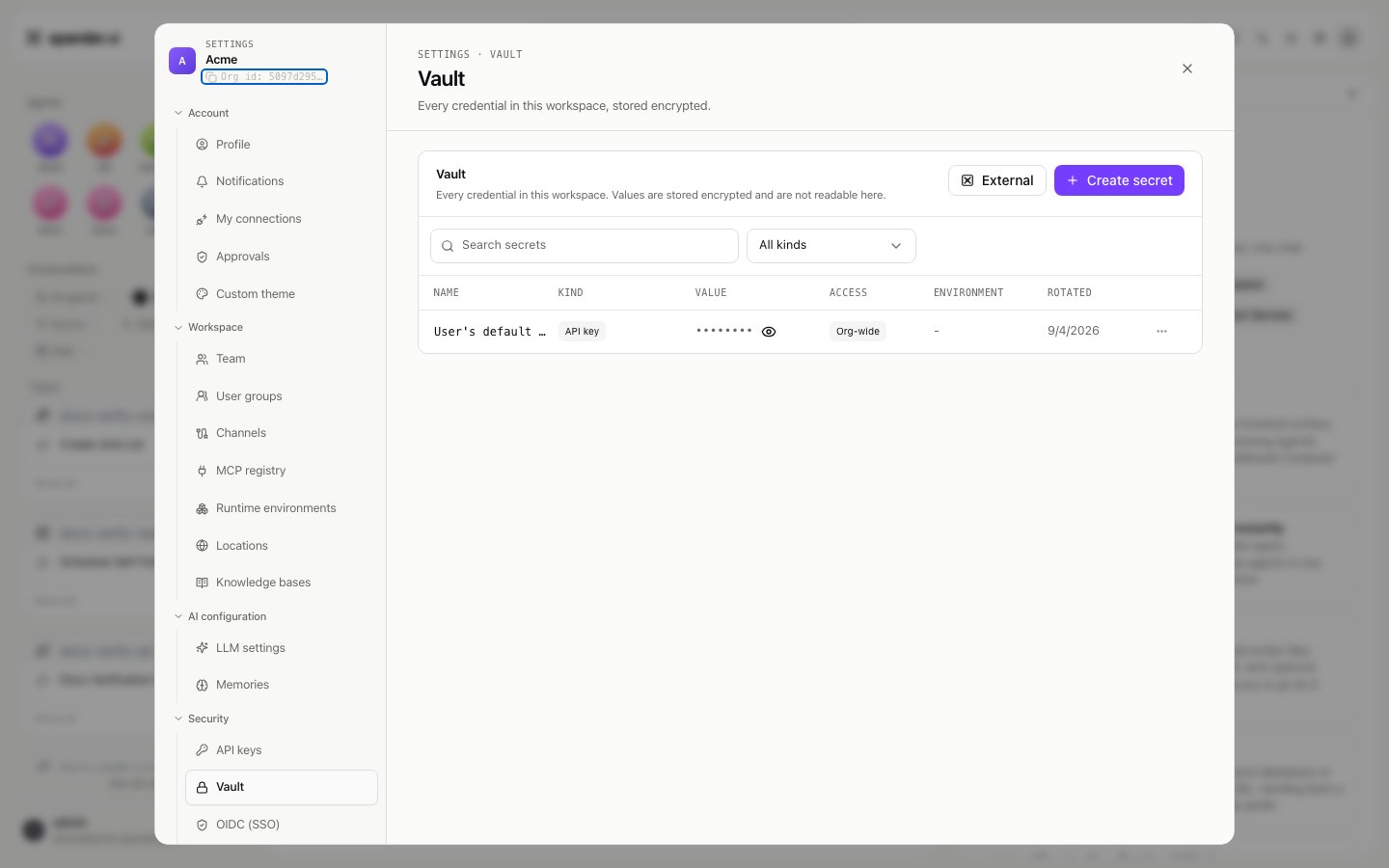
**Settings > Vault** (admins) lists every credential in the workspace; as the header says, values are stored encrypted and are not readable here. The table shows each secret's name, kind, a masked value, its access, its location, and when it was last rotated.
The kind decides how an agent sees the value:
| Kind | Use it for | How an agent sees it |
| ---------------------- | ---------------------------------------------------------------------------- | ------------------------------------------------------------------------------- |
| **Environment secret** | A single value: an API key, a token, a connection string | One environment variable |
| **Environment file** | A whole `.env`-style block, or any multi-line value such as a certificate | One environment variable holding the full text |
| **Credential** | A token for a known vendor (GitHub, GitLab, Bitbucket or a generic provider) | One environment variable with a vendor default name, for example `GITHUB_TOKEN` |
Agents receive values as environment variables at run time and never see the Vault itself.
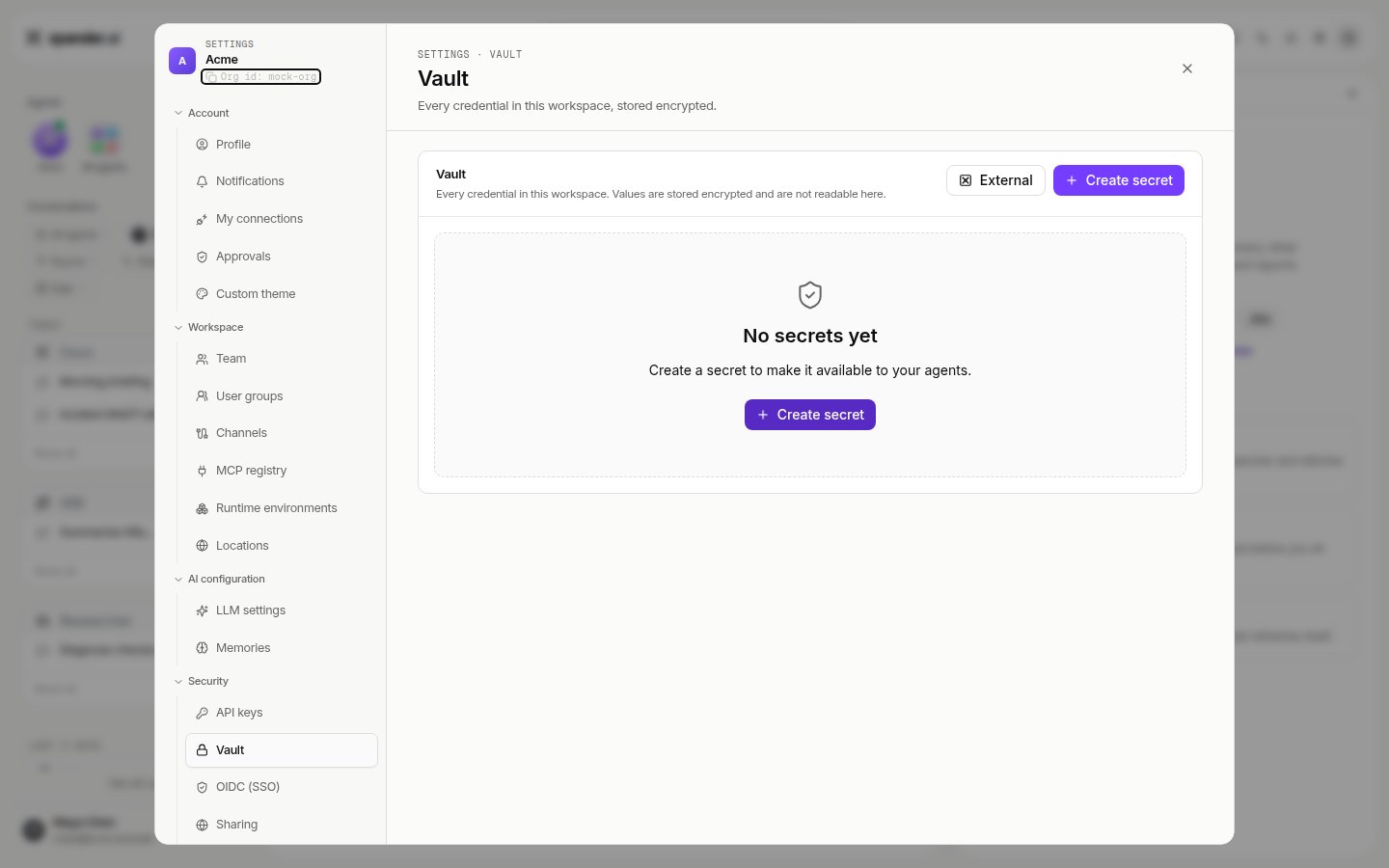
 ### Create a secret
1. Click **Create secret**.
2. **Name**: uppercase letters and underscores. Agents read the secret under this exact name, so name it the way the code expects, for example `STRIPE_API_KEY`.
3. **Value**: paste it. The dialog states that the value cannot be read back after saving.
4. **Environment**: shown only when your organization has more than one location, so the target is explicit.
5. **Description** is optional.
### Actions on a secret
Each row has a menu:
* **Replace value** writes a new value. The existing one cannot be shown and is overwritten. The Rotated column updates.
* **Manage access**: `Org-wide` (everyone in the workspace), `Groups and people` (only those you pick), or `Private` (only admins and the owner). Changing access never reveals or moves the value.
* **View activity** lists everything recorded for that secret; values are never logged.
* **Delete** removes it. The confirmation says agents using this secret will stop receiving it.
Credentials that other settings own also appear in the list: sign-ins for skills, messaging bot credentials, the SSO client secret, organization API keys, webhook secrets and model provider keys. Where another tab owns the row, a `Manage` action takes you there. Provider keys live under **Settings > LLM settings** and are held by the runtime's model proxy, never by an agent's workspace.
## An external vault
If your organization already runs a vault, xpander can import the secret names and leave the values there. Click **External**. Azure Key Vault is available today; other providers appear in the dialog marked `Soon`.
### Create a secret
1. Click **Create secret**.
2. **Name**: uppercase letters and underscores. Agents read the secret under this exact name, so name it the way the code expects, for example `STRIPE_API_KEY`.
3. **Value**: paste it. The dialog states that the value cannot be read back after saving.
4. **Environment**: shown only when your organization has more than one location, so the target is explicit.
5. **Description** is optional.
### Actions on a secret
Each row has a menu:
* **Replace value** writes a new value. The existing one cannot be shown and is overwritten. The Rotated column updates.
* **Manage access**: `Org-wide` (everyone in the workspace), `Groups and people` (only those you pick), or `Private` (only admins and the owner). Changing access never reveals or moves the value.
* **View activity** lists everything recorded for that secret; values are never logged.
* **Delete** removes it. The confirmation says agents using this secret will stop receiving it.
Credentials that other settings own also appear in the list: sign-ins for skills, messaging bot credentials, the SSO client secret, organization API keys, webhook secrets and model provider keys. Where another tab owns the row, a `Manage` action takes you there. Provider keys live under **Settings > LLM settings** and are held by the runtime's model proxy, never by an agent's workspace.
## An external vault
If your organization already runs a vault, xpander can import the secret names and leave the values there. Click **External**. Azure Key Vault is available today; other providers appear in the dialog marked `Soon`.
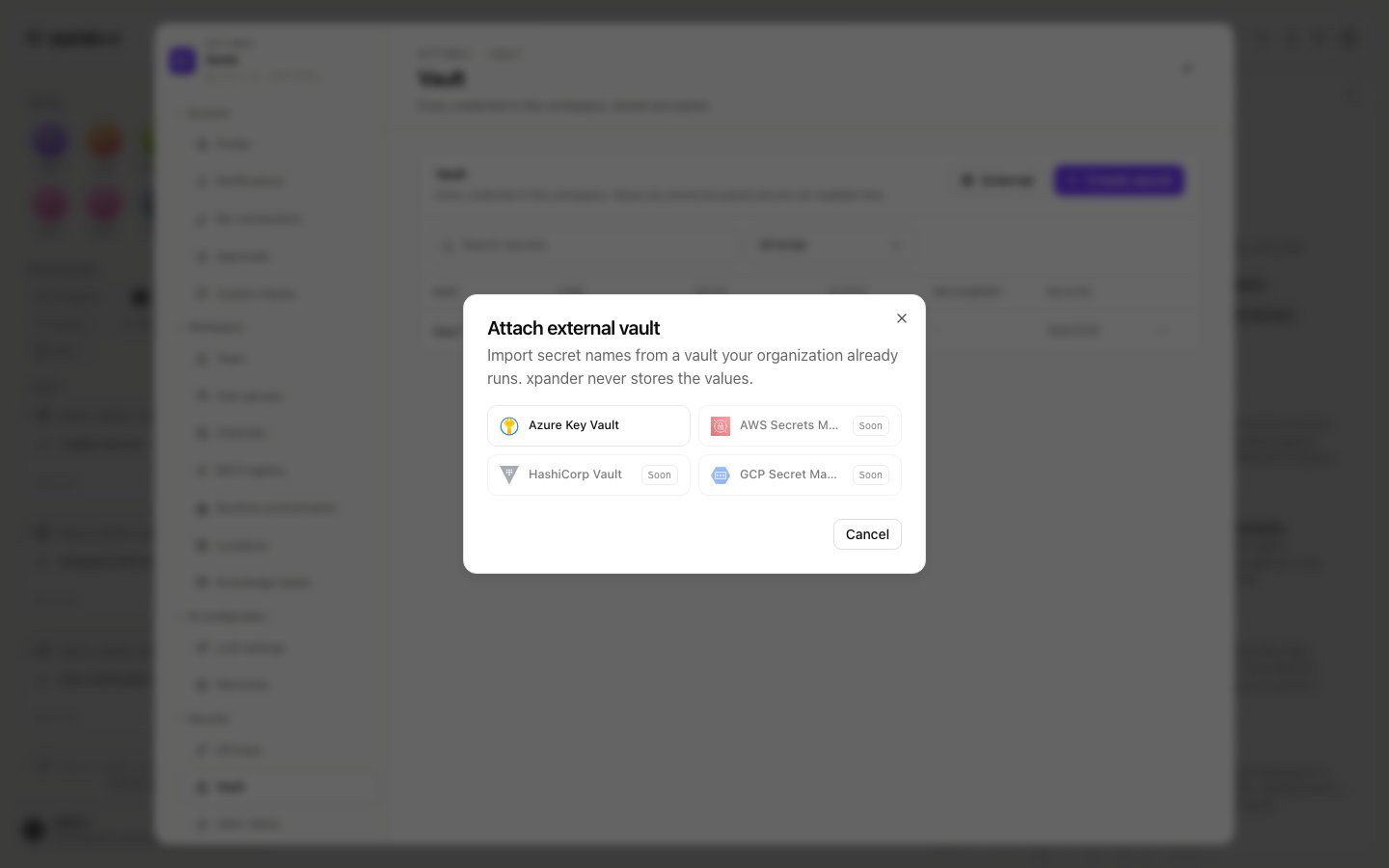 For Azure Key Vault you enter the vault URL, the tenant ID, the client ID and client secret of a service principal that has the `Get` and `List` secret permissions, an optional expiry date for that client secret, and a display name. **Connect and import names** does exactly that: the names arrive with access off until you grant it, and values stay in your vault, pulled at use time.
The attached vault then sits above the table with its status and last sync. Its menu offers **Refresh secret names**, **Update credential** (after you rotate the service principal's secret in Entra) and **Detach vault**, which removes the imported names and stops them resolving without touching the vault. Imported rows show `Stored in Azure Key Vault` instead of a masked value, and the expiry you entered lets the Vault warn before the credential lapses.
## Your own credentials
A personal credential for an outside system is entered when you connect a skill with **Personal** access; it is stored in the Vault under your name, used for your requests only, and never shown again. Where a skill's binding requires each person's own sign-in, you are asked for it the first time the agent needs it.
## What an agent declares
An agent can declare the secrets it needs: "this agent needs `GITHUB_TOKEN`". A declaration is a fact about the agent, versioned on its working draft with its skills and instructions, and it lets teammates see what an agent needs before they run it and lets the agent ask for exactly the right thing when a value is missing. Each requirement carries:
| Field | Meaning |
| ------------------------ | ------------------------------------------------------------------------------------------------------------------------------ |
| **Environment variable** | The name the agent reads, in upper case with underscores (for example `SLACK_BOT_TOKEN`) |
| **Kind** | Environment secret, environment file or credential |
| **Scope** | **Shared**: one value serves everyone who uses the agent. **Per user**: each person brings their own value from My connections |
| **Required** | Whether the agent can do useful work without it |
| **Description** | What the value is for, shown to whoever is asked to provide it |
For the person looking at an agent, every requirement has one of three states. **Satisfied for everyone** means a shared secret is bound under this name. **Satisfied for you** means your own credential is bound under this name. **Missing** means the agent will ask when it needs the value. A shared requirement is satisfied by a Vault secret bound to the agent under the variable name it reads. This lets one Vault entry serve two agents under different names; an agent exports each name once, so a second secret under a name already in use is refused. A per-user requirement is satisfied by a personal credential from My connections. The agent owner never binds one for someone else.
The per-agent **Secrets** section, where an owner reviews declared requirements and binds Vault entries to the agent by hand, is not switched on in every organization yet. Where it is off, the Vault's access levels, the secret card below and workspace secrets are how an agent gets its values, and the bindings described here are made by the secret card.
## Workspace secrets on an agent
Workspace secrets are scoped to one agent: stored in the Vault and injected into that agent's workspace at run time, never held in the agent's prompt or record. Open the agent's workspace (the Agent workspace card in the conversation header), open its menu and choose **Workspace settings**, then the Secrets view.
* **Key**: uppercase letters, digits and underscores. Prefixes the runtime reserves are refused.
* **Value**: a literal, or a reference to an external-vault secret written as `${ext:NAME}`. A reference shows the provider's mark instead of a masked value and holds no credential itself; the value is pulled when the workspace starts.
An agent reads its secrets fresh each turn, so saving or removing a key needs no restart.
## When a secret is missing
Nothing breaks when an agent reaches work that needs a value it does not have. The agent asks in a structured way rather than in plain text: a **secret card** in the conversation, or a single-use link that opens a `Provide secrets` page.
1. The card names the secret (for example `GITHUB_TOKEN`), explains what it is for, and offers a masked field.
2. You type or paste the value into the card. The value goes straight to the Vault or the agent's workspace; the agent never sees it and the conversation transcript never contains it.
3. The card reports the outcome per name: saved and bound to the agent, saved but not bound (the value is in the Vault and can be bound without entering it again), or not saved, each with the reason. A **Saved** chip confirms the names that were stored, and the agent continues on its next turn with the values in place.
Where the value lands depends on what the agent declared:
* A **shared** requirement becomes a Vault environment secret bound to the agent, so the next person who uses the agent finds it satisfied.
* A **per user** requirement becomes a personal credential of the person who filled in the card, bound for them alone. A teammate who uses the agent later gets their own card.
* A name the agent did not declare is stored in the agent's workspace secrets.
If you already hold a matching entry in the Vault or in My connections, the requirement is satisfied by it and no card is raised.
### Which value wins
When the same variable name is available from more than one place, the agent receives, in this order: your personal credential, then a secret bound to the agent, then the agent's workspace secrets. Variables the runtime owns can never be overridden by a secret.
## For administrators: which secrets reach an agent
Historically, every environment secret in the Vault reached every agent in the organization, whether the agent used it or not. Binding secrets per agent narrows that, one agent at a time:
* An agent with no bound secret still receives the organization's whole set of environment secrets at run time.
* An agent with at least one bound secret receives only the secrets bound to it.
* Bindings are made by the secret card when someone fills it in, or by hand in the agent's **Secrets** section where that section is switched on.
Every use of a secret is recorded as a `use_secret` event in **Settings > Audit logs**. An administrator can read there which agents still rely on the whole set, and bind those secrets to them directly.
Workspace secrets and external vault references are unaffected either way.
## Good practices
* Declare requirements on every agent you publish, with a description, so a teammate who is asked for a value knows what to provide.
* Use **per user** scope for anything that acts in a person's name where the system allows it (source control, calendars, ticketing). Use **shared** scope for service accounts and third-party API keys.
* Keep the environment variable name the vendor's command-line programs expect (`GITHUB_TOKEN`, `GITLAB_TOKEN`), so they pick the value up inside the agent without extra configuration.
* Rotate a credential from My connections when it expires; the next conversation uses the new value with no change to the agent.
* Review the audit log: every import, binding, requirement change and toggle change is recorded by name, never by value.
## What is governed and recorded
* **Access** on a Vault secret decides which people and groups may use it in their agents. Admins always retain access.
* **Location**: a secret belongs to one location, shown in its Environment column.
* **Group toggles** in **Settings > User groups** decide who sees workspace secrets on an agent at all.
* **Settings > Audit logs**, Vault category: a `.env` import lands as one entry naming the secrets added; per-secret events are `Secret Created`, `Secret Updated`, `Secret Deleted`, `Secret Read`, `Secret Used`, `Secret Moved to Vault`, `Workspace Secrets Updated` and `LLM Secrets Changed`, each with who did it. The same events power a secret's **View activity**.
Where a skill signs in with a person's own account rather than a stored secret, the agent acts with that person's permissions where systems allow. The wider organization controls are on [Govern](/run/govern).
For Azure Key Vault you enter the vault URL, the tenant ID, the client ID and client secret of a service principal that has the `Get` and `List` secret permissions, an optional expiry date for that client secret, and a display name. **Connect and import names** does exactly that: the names arrive with access off until you grant it, and values stay in your vault, pulled at use time.
The attached vault then sits above the table with its status and last sync. Its menu offers **Refresh secret names**, **Update credential** (after you rotate the service principal's secret in Entra) and **Detach vault**, which removes the imported names and stops them resolving without touching the vault. Imported rows show `Stored in Azure Key Vault` instead of a masked value, and the expiry you entered lets the Vault warn before the credential lapses.
## Your own credentials
A personal credential for an outside system is entered when you connect a skill with **Personal** access; it is stored in the Vault under your name, used for your requests only, and never shown again. Where a skill's binding requires each person's own sign-in, you are asked for it the first time the agent needs it.
## What an agent declares
An agent can declare the secrets it needs: "this agent needs `GITHUB_TOKEN`". A declaration is a fact about the agent, versioned on its working draft with its skills and instructions, and it lets teammates see what an agent needs before they run it and lets the agent ask for exactly the right thing when a value is missing. Each requirement carries:
| Field | Meaning |
| ------------------------ | ------------------------------------------------------------------------------------------------------------------------------ |
| **Environment variable** | The name the agent reads, in upper case with underscores (for example `SLACK_BOT_TOKEN`) |
| **Kind** | Environment secret, environment file or credential |
| **Scope** | **Shared**: one value serves everyone who uses the agent. **Per user**: each person brings their own value from My connections |
| **Required** | Whether the agent can do useful work without it |
| **Description** | What the value is for, shown to whoever is asked to provide it |
For the person looking at an agent, every requirement has one of three states. **Satisfied for everyone** means a shared secret is bound under this name. **Satisfied for you** means your own credential is bound under this name. **Missing** means the agent will ask when it needs the value. A shared requirement is satisfied by a Vault secret bound to the agent under the variable name it reads. This lets one Vault entry serve two agents under different names; an agent exports each name once, so a second secret under a name already in use is refused. A per-user requirement is satisfied by a personal credential from My connections. The agent owner never binds one for someone else.
The per-agent **Secrets** section, where an owner reviews declared requirements and binds Vault entries to the agent by hand, is not switched on in every organization yet. Where it is off, the Vault's access levels, the secret card below and workspace secrets are how an agent gets its values, and the bindings described here are made by the secret card.
## Workspace secrets on an agent
Workspace secrets are scoped to one agent: stored in the Vault and injected into that agent's workspace at run time, never held in the agent's prompt or record. Open the agent's workspace (the Agent workspace card in the conversation header), open its menu and choose **Workspace settings**, then the Secrets view.
* **Key**: uppercase letters, digits and underscores. Prefixes the runtime reserves are refused.
* **Value**: a literal, or a reference to an external-vault secret written as `${ext:NAME}`. A reference shows the provider's mark instead of a masked value and holds no credential itself; the value is pulled when the workspace starts.
An agent reads its secrets fresh each turn, so saving or removing a key needs no restart.
## When a secret is missing
Nothing breaks when an agent reaches work that needs a value it does not have. The agent asks in a structured way rather than in plain text: a **secret card** in the conversation, or a single-use link that opens a `Provide secrets` page.
1. The card names the secret (for example `GITHUB_TOKEN`), explains what it is for, and offers a masked field.
2. You type or paste the value into the card. The value goes straight to the Vault or the agent's workspace; the agent never sees it and the conversation transcript never contains it.
3. The card reports the outcome per name: saved and bound to the agent, saved but not bound (the value is in the Vault and can be bound without entering it again), or not saved, each with the reason. A **Saved** chip confirms the names that were stored, and the agent continues on its next turn with the values in place.
Where the value lands depends on what the agent declared:
* A **shared** requirement becomes a Vault environment secret bound to the agent, so the next person who uses the agent finds it satisfied.
* A **per user** requirement becomes a personal credential of the person who filled in the card, bound for them alone. A teammate who uses the agent later gets their own card.
* A name the agent did not declare is stored in the agent's workspace secrets.
If you already hold a matching entry in the Vault or in My connections, the requirement is satisfied by it and no card is raised.
### Which value wins
When the same variable name is available from more than one place, the agent receives, in this order: your personal credential, then a secret bound to the agent, then the agent's workspace secrets. Variables the runtime owns can never be overridden by a secret.
## For administrators: which secrets reach an agent
Historically, every environment secret in the Vault reached every agent in the organization, whether the agent used it or not. Binding secrets per agent narrows that, one agent at a time:
* An agent with no bound secret still receives the organization's whole set of environment secrets at run time.
* An agent with at least one bound secret receives only the secrets bound to it.
* Bindings are made by the secret card when someone fills it in, or by hand in the agent's **Secrets** section where that section is switched on.
Every use of a secret is recorded as a `use_secret` event in **Settings > Audit logs**. An administrator can read there which agents still rely on the whole set, and bind those secrets to them directly.
Workspace secrets and external vault references are unaffected either way.
## Good practices
* Declare requirements on every agent you publish, with a description, so a teammate who is asked for a value knows what to provide.
* Use **per user** scope for anything that acts in a person's name where the system allows it (source control, calendars, ticketing). Use **shared** scope for service accounts and third-party API keys.
* Keep the environment variable name the vendor's command-line programs expect (`GITHUB_TOKEN`, `GITLAB_TOKEN`), so they pick the value up inside the agent without extra configuration.
* Rotate a credential from My connections when it expires; the next conversation uses the new value with no change to the agent.
* Review the audit log: every import, binding, requirement change and toggle change is recorded by name, never by value.
## What is governed and recorded
* **Access** on a Vault secret decides which people and groups may use it in their agents. Admins always retain access.
* **Location**: a secret belongs to one location, shown in its Environment column.
* **Group toggles** in **Settings > User groups** decide who sees workspace secrets on an agent at all.
* **Settings > Audit logs**, Vault category: a `.env` import lands as one entry naming the secrets added; per-secret events are `Secret Created`, `Secret Updated`, `Secret Deleted`, `Secret Read`, `Secret Used`, `Secret Moved to Vault`, `Workspace Secrets Updated` and `LLM Secrets Changed`, each with who did it. The same events power a secret's **View activity**.
Where a skill signs in with a person's own account rather than a stored secret, the agent acts with that person's permissions where systems allow. The wider organization controls are on [Govern](/run/govern).