> ## Documentation Index
> Fetch the complete documentation index at: https://docs.xpander.ai/llms.txt
> Use this file to discover all available pages before exploring further.
# Permissions
> Permission modes and approvals on a run, who may use, edit and share an agent, who can see a conversation, how skills are scoped, whose credential a shared agent uses, and what roles and user groups control.
Permissions apply at five levels:
* the run: what an agent may do without a person
* the agent: who may use it
* the conversation: who may read and continue it
* the skill: which agents may hold it
* the credential: whose account a call uses
Roles and user groups sit above all five. Agent access, conversation rules, approvals and credential modes are enforced by xpander; user-group switches shape what Xpander Chat shows.
## On a run: permission mode and approvals
Each conversation runs in one of two modes, chosen in the composer with its first message and fixed for that conversation:
| Mode | What runs unheld | What waits |
| ---------------------------- | --------------------------------------------------------- | ------------------------------------------------------------------------------------------------------------------------ |
| **Full** (the agent default) | Every action the harness decides on | Shell commands matching one of the agent's gated commands; skill actions marked to need approval |
| **Gated** | Reads and searches, and skill actions that are not marked | Every shell command and every file change, web fetches and searches on Claude Code and OpenCode, plus the marked actions |
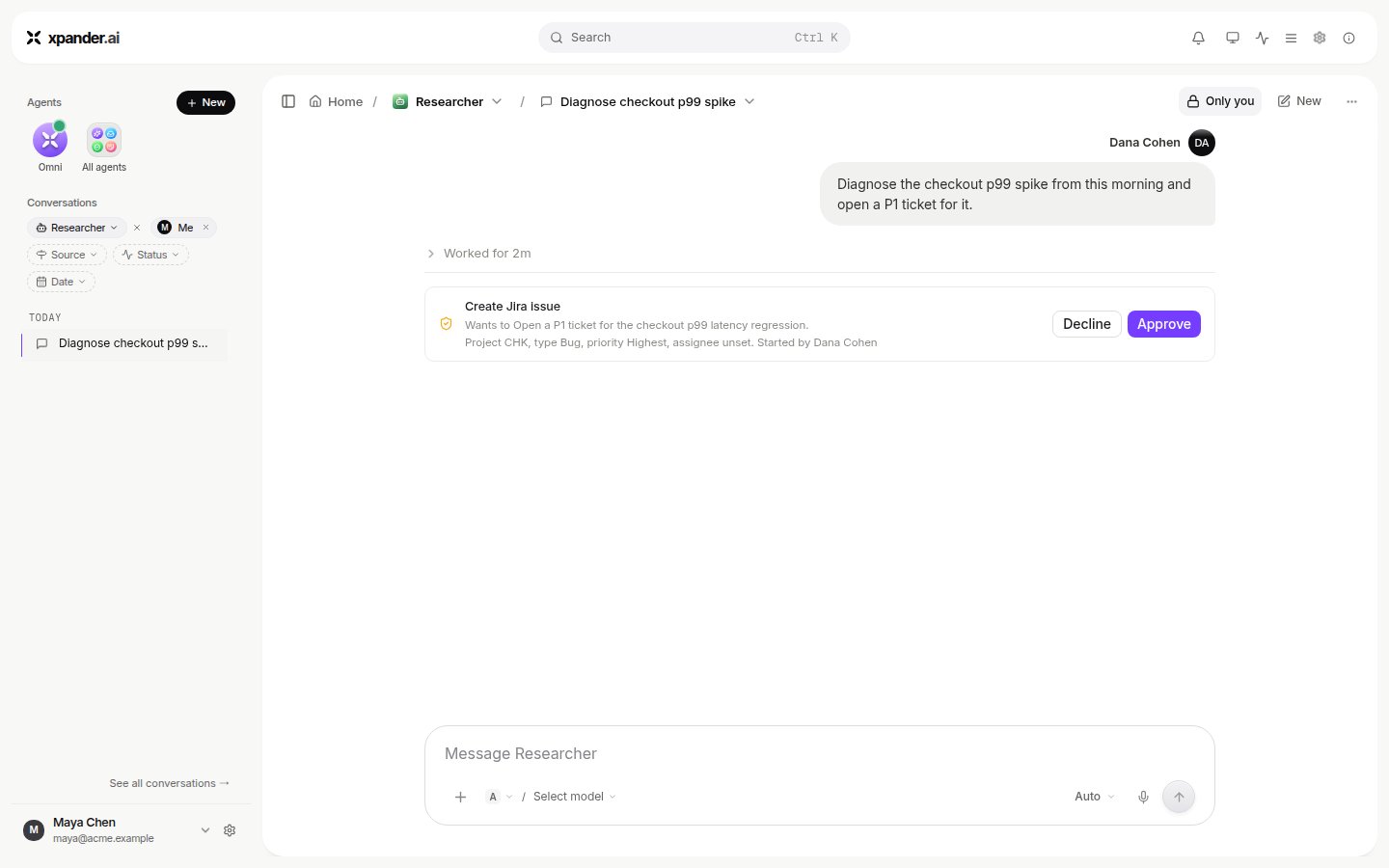
A held action shows a card in the conversation with a sentence about the action (never its raw arguments), who started the run and who may decide. In Gated mode the card is headed **bash (gated mode)**, says what the command does in one sentence, and offers **Decline** and **Approve**. It goes to the people or groups named on the rule, or to the agent's owner when none are named; **any one** of them settles it. The approver can allow this exact call, the rest of this run, this kind of call for a few minutes, or until revoked. A decline covers only this call, and the run continues with that knowledge unless the rule says stop. A gated command waits until someone decides; a marked skill action waits for the agent's approval hold window, 4 hours by default, then expires and the run resumes with "Not answered in time." Decisions are made in Xpander Chat, from the email link, or in Slack, Telegram or WhatsApp; each is recorded in the task and in Settings > Audit logs. While a gated command waits, `GET /v1/tasks/{id}` still reports `status: executing` and carries no approval request, so a gated command cannot be decided over the API. A question card is different: it is answered with `POST /v1/agents/{id}/gateway/conversations/{id}/answers`. See [Approvals](/use/approvals).
 ## On an agent: access and sharing
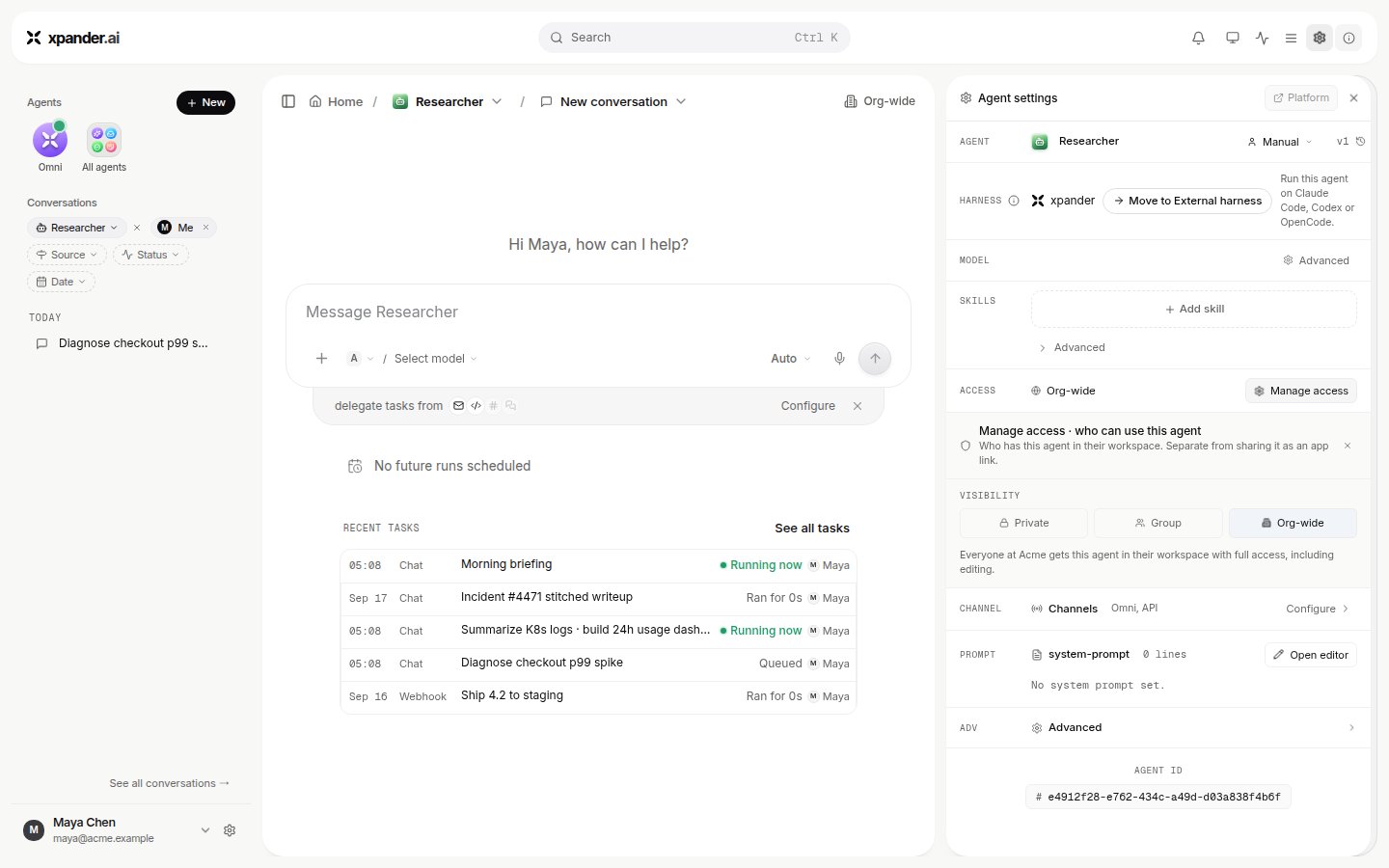
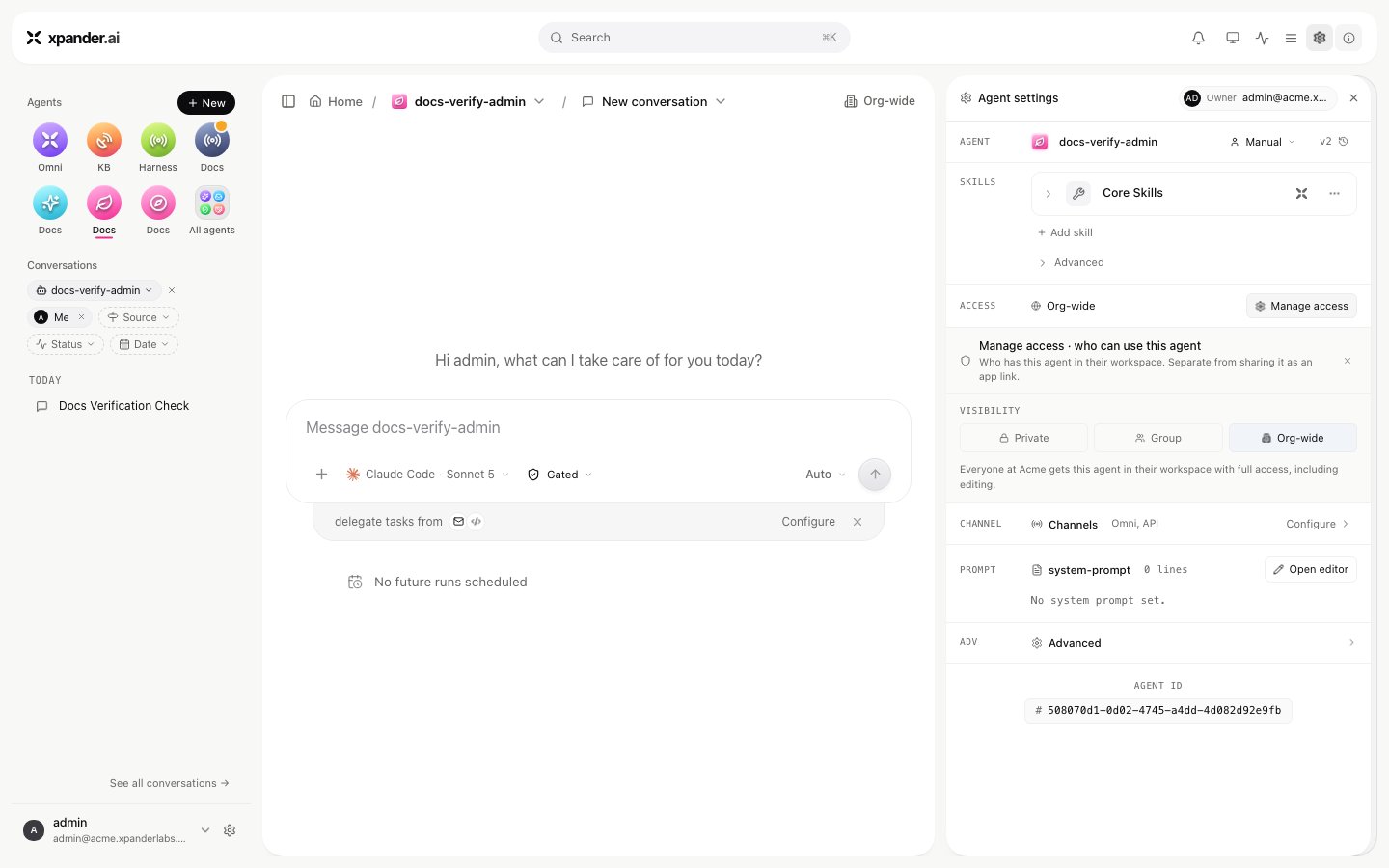
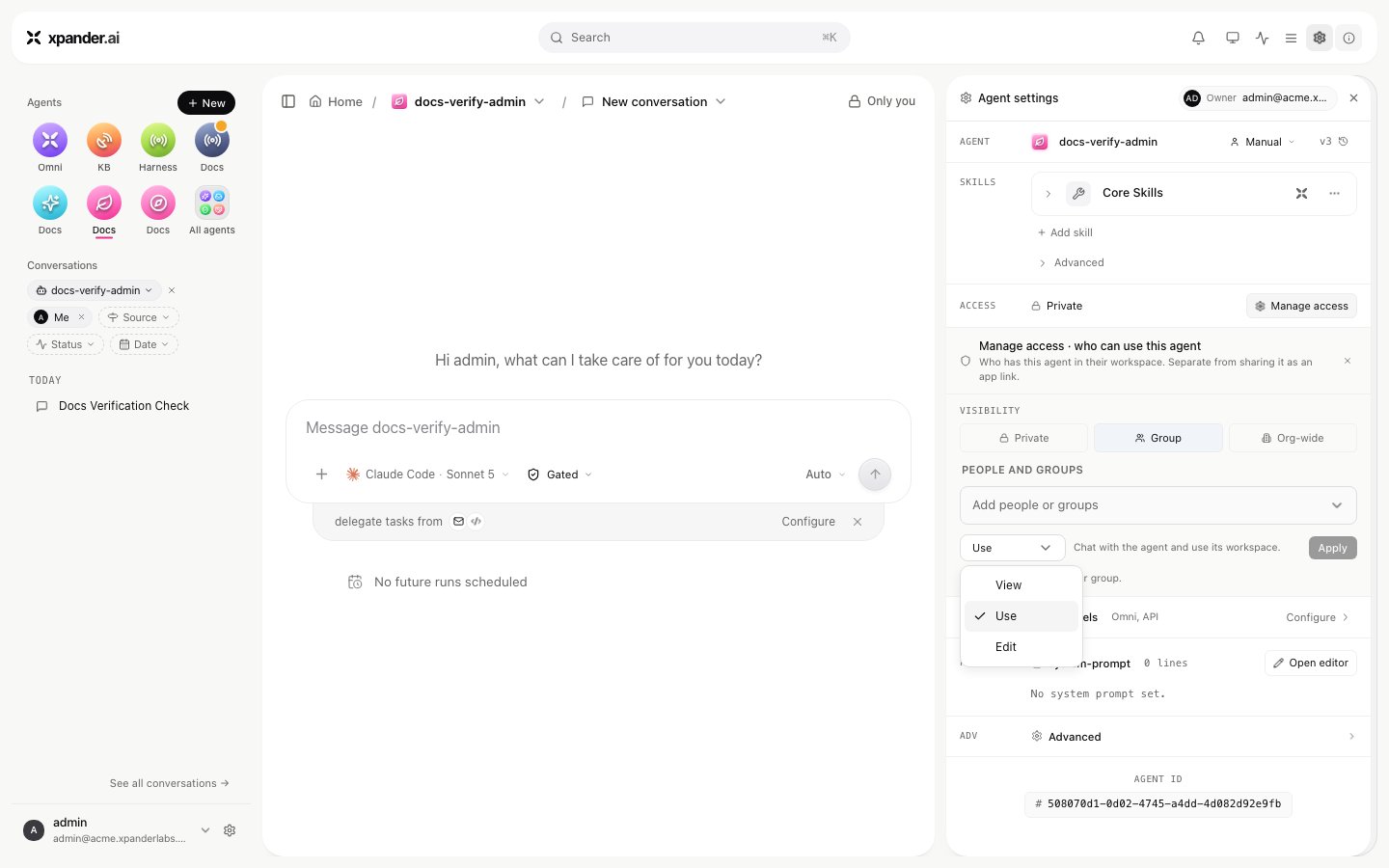
`ACCESS` on the agent is **Org-wide**, the default, where every member of your organization can use it, or restricted through **Manage access** to named people and groups. A restricted agent is invisible to everyone else; a link to it reads "not found" rather than revealing it. **Share** grants an audience one of three permissions:
| Permission | Allows |
| ---------- | -------------------------------------------------------------------------------- |
| **View** | Read the agent's card, its shared conversations and live surfaces; cannot run it |
| **Use** | View, plus start conversations and use the agent's skills and files |
| **Edit** | Use, plus change instructions, skills, secrets and settings |
Group grants follow the group's membership. Whether a person may create, duplicate, delete or share agents at all is a user-group switch.
## On an agent: access and sharing
`ACCESS` on the agent is **Org-wide**, the default, where every member of your organization can use it, or restricted through **Manage access** to named people and groups. A restricted agent is invisible to everyone else; a link to it reads "not found" rather than revealing it. **Share** grants an audience one of three permissions:
| Permission | Allows |
| ---------- | -------------------------------------------------------------------------------- |
| **View** | Read the agent's card, its shared conversations and live surfaces; cannot run it |
| **Use** | View, plus start conversations and use the agent's skills and files |
| **Edit** | Use, plus change instructions, skills, secrets and settings |
Group grants follow the group's membership. Whether a person may create, duplicate, delete or share agents at all is a user-group switch.
 ## On a conversation
You can read a conversation when it is yours, when you own the agent, or when the agent is org-wide. Renaming, deleting or sharing it is the author's alone. **Share conversation** adds an audience: only you, your organization, named people or groups, or anyone with the link where Settings > Sharing allows public links. **Allow replies** lets a viewer continue in a copy of their own; the original is untouched. Live surfaces in a shared conversation follow the share.
## On a skill
A skill's **VISIBILITY** is **Org-wide**, the default, where everyone can see the skill and attach it to their agents; **Private**, where only you can; or restricted to named people and groups you add. **Manage access** on the skill sets the scope; someone outside it cannot see the skill or attach it to an agent. Who may add API connectors, MCP connectors, custom actions or generate skills at all is a user-group switch. See [Skills](/use/skills).
## Whose credential a shared agent uses
Each skill on an agent is bound to a **connection**: an organization account that anyone may use, or a personal one. The binding also carries an **auth mode**:
* **Autonomous**, the default. Every call uses the connection's own credential, whoever asked. If you attached your personal Slack account to an org-wide agent, a teammate's request runs as you. Attach organization connections to shared agents.
* **Ask for approval.** As above, and every call waits for a named person first.
* **User authentication.** Each person signs in to the system once; their token is stored per connection and person, and a call runs as the person who asked, where the system allows. Nobody's token is ever lent to someone else. An unattended run, from a schedule or a webhook with no signed-in person, is refused unless the credential's policy allows it.
A Vault secret can raise a binding's mode, never lower it. Every call records which mode and whose credential were used, in the task's action entry and as a `use_secret` event in the audit log. MCP connectors have the same choice, plus two switches per binding: whether a person's token is shared across the agents they use, and whether callers without a sign-in of their own may run on the connection.
## Roles and user groups
| Role | May |
| --------------- | ------------------------------------------------------------------------------------------------ |
| **Team member** | Use the agents shared with them; create agents where their group allows |
| **Admin** | Everything under Settings: team, groups, models, budgets, vault, channels, audit; invite members |
**Settings > User groups** carries dozens of switches per group. These cover adding and managing skills; creating, duplicating, deleting and sharing agents; each section of the agent settings; each Settings tab; workspace file actions; and the channels an agent may be bound to. A feature is hidden when every group a person belongs to disables it. Groups can also follow your identity provider's groups; see [Identity providers](/run/integrations/identity-providers).
## On a conversation
You can read a conversation when it is yours, when you own the agent, or when the agent is org-wide. Renaming, deleting or sharing it is the author's alone. **Share conversation** adds an audience: only you, your organization, named people or groups, or anyone with the link where Settings > Sharing allows public links. **Allow replies** lets a viewer continue in a copy of their own; the original is untouched. Live surfaces in a shared conversation follow the share.
## On a skill
A skill's **VISIBILITY** is **Org-wide**, the default, where everyone can see the skill and attach it to their agents; **Private**, where only you can; or restricted to named people and groups you add. **Manage access** on the skill sets the scope; someone outside it cannot see the skill or attach it to an agent. Who may add API connectors, MCP connectors, custom actions or generate skills at all is a user-group switch. See [Skills](/use/skills).
## Whose credential a shared agent uses
Each skill on an agent is bound to a **connection**: an organization account that anyone may use, or a personal one. The binding also carries an **auth mode**:
* **Autonomous**, the default. Every call uses the connection's own credential, whoever asked. If you attached your personal Slack account to an org-wide agent, a teammate's request runs as you. Attach organization connections to shared agents.
* **Ask for approval.** As above, and every call waits for a named person first.
* **User authentication.** Each person signs in to the system once; their token is stored per connection and person, and a call runs as the person who asked, where the system allows. Nobody's token is ever lent to someone else. An unattended run, from a schedule or a webhook with no signed-in person, is refused unless the credential's policy allows it.
A Vault secret can raise a binding's mode, never lower it. Every call records which mode and whose credential were used, in the task's action entry and as a `use_secret` event in the audit log. MCP connectors have the same choice, plus two switches per binding: whether a person's token is shared across the agents they use, and whether callers without a sign-in of their own may run on the connection.
## Roles and user groups
| Role | May |
| --------------- | ------------------------------------------------------------------------------------------------ |
| **Team member** | Use the agents shared with them; create agents where their group allows |
| **Admin** | Everything under Settings: team, groups, models, budgets, vault, channels, audit; invite members |
**Settings > User groups** carries dozens of switches per group. These cover adding and managing skills; creating, duplicating, deleting and sharing agents; each section of the agent settings; each Settings tab; workspace file actions; and the channels an agent may be bound to. A feature is hidden when every group a person belongs to disables it. Groups can also follow your identity provider's groups; see [Identity providers](/run/integrations/identity-providers).