> ## Documentation Index
> Fetch the complete documentation index at: https://docs.xpander.ai/llms.txt
> Use this file to discover all available pages before exploring further.
# Schedules
> Recurring cron schedules and the one-off re-checks an agent books for itself: where they are set and listed, how a scheduled run reports, how it fails, and what an unattended run may use.
Two kinds of schedule start a turn with no person present. Both run on the same executors and land in the agent's own conversation, so a scheduled run has the conversation's memory and shows up where the agent's other work does.
## Recurring schedules
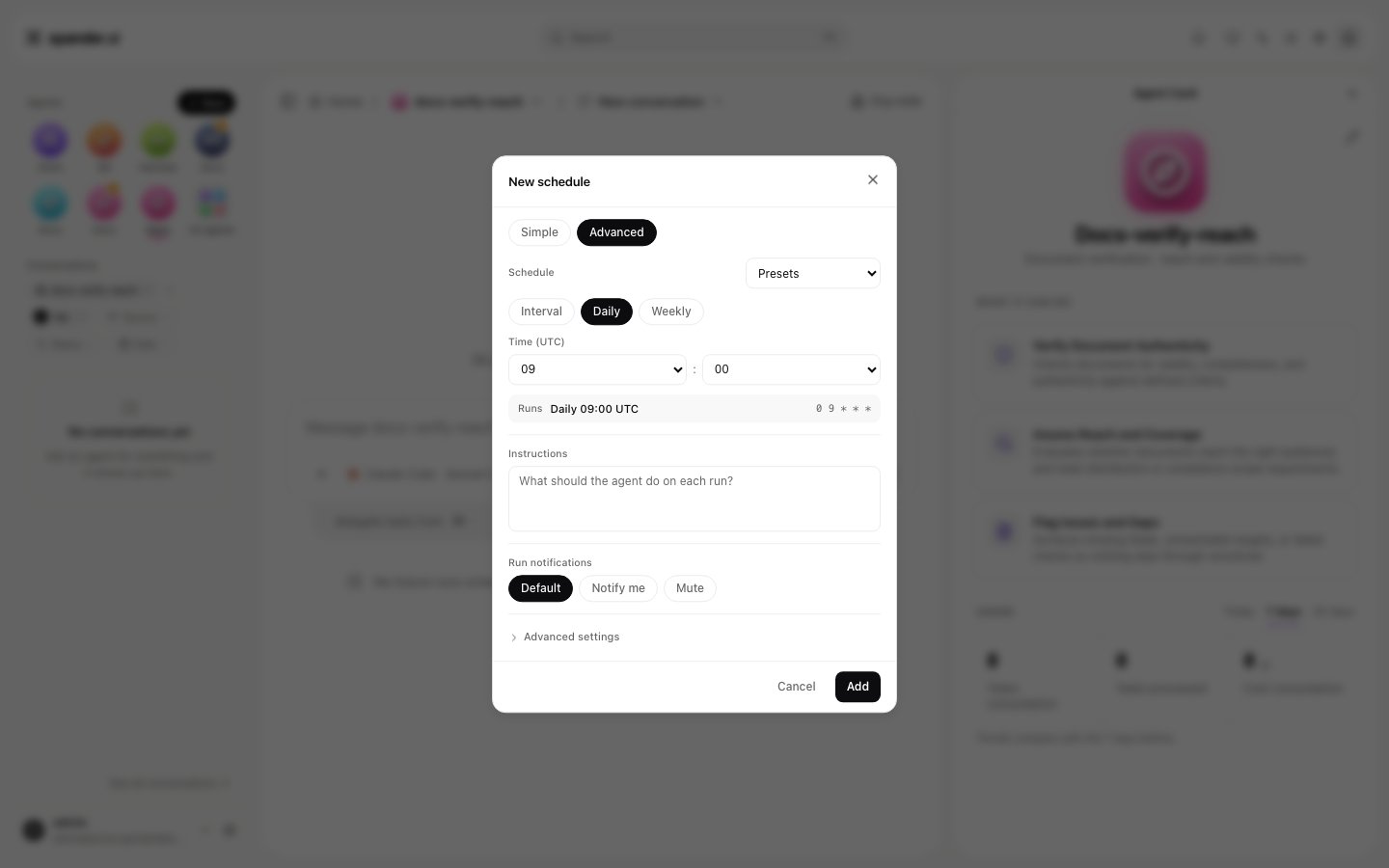
A schedule is a cron expression in UTC with a prompt. **Schedules** on the agent's home lists them, and **Add schedule** opens a dialog with a **Simple** tab (describe the task in a sentence and generate a schedule) and an **Advanced** tab holding **Interval**, **Daily** and **Weekly** modes plus a read-only preview of the resulting cron expression. The shortest interval is five minutes, and the default is `0 9 * * *`, nine in the morning UTC. There is no per-schedule time zone: convert local times to UTC. Each row shows its human-readable cadence and the next run. Every edit publishes; a schedule fires only once it is live.
 Over the API the same rows are `GET`, `POST`, `PATCH` and `DELETE` under `/v1/agents/{agent_id}/scheduled-tasks`, with `POST /{task_id}/run` to fire one immediately and `enabled: false` to pause it; a schedule has `cron`, `prompt`, `title`, `enabled` and, optionally, a model for that schedule.
Some agents carry **managed** schedules xpander owns, such as a heartbeat; you can pause them or run them now, but not edit or delete them.
## Re-checks the agent books itself
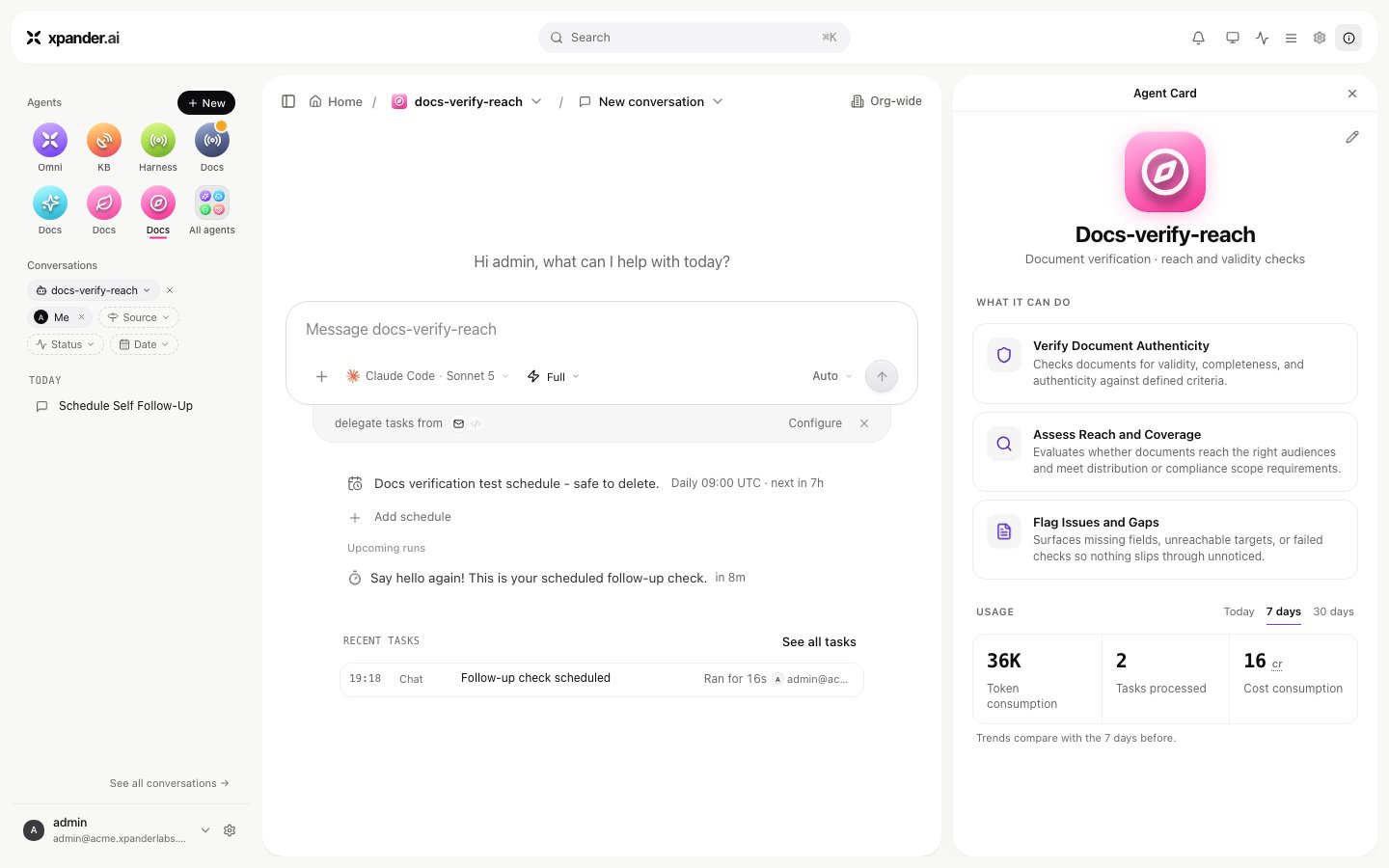
When an agent should look again later ("check again in five minutes", "follow up after the deploy"), it books a one-off run for itself. Booked runs are listed under **Upcoming runs** in the agent's Schedules section, and under **Scheduled** in Xpander Chat's conversation filters. Each also shows in the conversation as a scheduled-run line with the time. A booked run can be cancelled there, or over `DELETE /v1/agents/{agent_id}/self-schedules/{schedule_id}`. The capability is a per-agent switch with a cap on how many pending runs one task may hold, three by default. A recurring re-check is therefore a chain of one-off runs the agent renews, rather than a loop it cannot leave.
Over the API the same rows are `GET`, `POST`, `PATCH` and `DELETE` under `/v1/agents/{agent_id}/scheduled-tasks`, with `POST /{task_id}/run` to fire one immediately and `enabled: false` to pause it; a schedule has `cron`, `prompt`, `title`, `enabled` and, optionally, a model for that schedule.
Some agents carry **managed** schedules xpander owns, such as a heartbeat; you can pause them or run them now, but not edit or delete them.
## Re-checks the agent books itself
When an agent should look again later ("check again in five minutes", "follow up after the deploy"), it books a one-off run for itself. Booked runs are listed under **Upcoming runs** in the agent's Schedules section, and under **Scheduled** in Xpander Chat's conversation filters. Each also shows in the conversation as a scheduled-run line with the time. A booked run can be cancelled there, or over `DELETE /v1/agents/{agent_id}/self-schedules/{schedule_id}`. The capability is a per-agent switch with a cap on how many pending runs one task may hold, three by default. A recurring re-check is therefore a chain of one-off runs the agent renews, rather than a loop it cannot leave.
 ## How a scheduled run reports
A fire is a turn in the agent's conversation: its actions, result and cost appear in the Task Manager with the source **Schedule**, and the conversation shows the run under a scheduled-run line. A schedule created from a Slack channel binding replies in that channel with the channel's format. A fire that fails is not retried; the next scheduled fire is the retry. Notifications on success or failure follow the agent's notification settings, and a schedule can opt in to its own.
## What an unattended run may use
Nobody is signed in when a schedule fires, so the run acts as the agent's background user. Skills bound to an organization connection work as usual. A skill whose binding requires each person's own sign-in is refused on an unattended run unless the credential's policy allows it, and a gated command with no named approver parks the run and notifies the agent's owner. Budgets and approval hold windows apply as on any run; see [Permissions](/use/agents/permissions).
## How a scheduled run reports
A fire is a turn in the agent's conversation: its actions, result and cost appear in the Task Manager with the source **Schedule**, and the conversation shows the run under a scheduled-run line. A schedule created from a Slack channel binding replies in that channel with the channel's format. A fire that fails is not retried; the next scheduled fire is the retry. Notifications on success or failure follow the agent's notification settings, and a schedule can opt in to its own.
## What an unattended run may use
Nobody is signed in when a schedule fires, so the run acts as the agent's background user. Skills bound to an organization connection work as usual. A skill whose binding requires each person's own sign-in is refused on an unattended run unless the credential's policy allows it, and a gated command with no named approver parks the run and notifies the agent's owner. Budgets and approval hold windows apply as on any run; see [Permissions](/use/agents/permissions).