> ## Documentation Index
> Fetch the complete documentation index at: https://docs.xpander.ai/llms.txt
> Use this file to discover all available pages before exploring further.
# Skills registry
> Your organization's library of skill bundles: create or import one, decide who may attach it, and keep every agent picking from the same reviewed set.
A skill bundle is a `SKILL.md` document, with any scripts and files it points to, that tells an agent when and how to do one job. The skills registry is where your organization keeps them. Badges on every skill tell you who provided it, so a reviewer can tell a private draft from something the whole organization relies on.
## Where the registry shows up
Open an agent's settings and use **Add skill**. The panel lists everything the agent may reach; under `FILTERS`, the `Skills` chip narrows it to skill bundles, and under `SCOPE`, `All`, `Organization` and `Mine` split the library into what is shared with you and what you created. A small icon on each row is its provenance; hover it for the meaning:
| Badge | Meaning |
| ---------------------- | ------------------------------------------ |
| **Private** | Only you can see and use this. |
| **Shared** | Shared with specific people. |
| **Group** | Shared with a group in your organization. |
| **Organization** | Shared with everyone in your organization. |
| **Powered by Xpander** | Built in and maintained by xpander. |
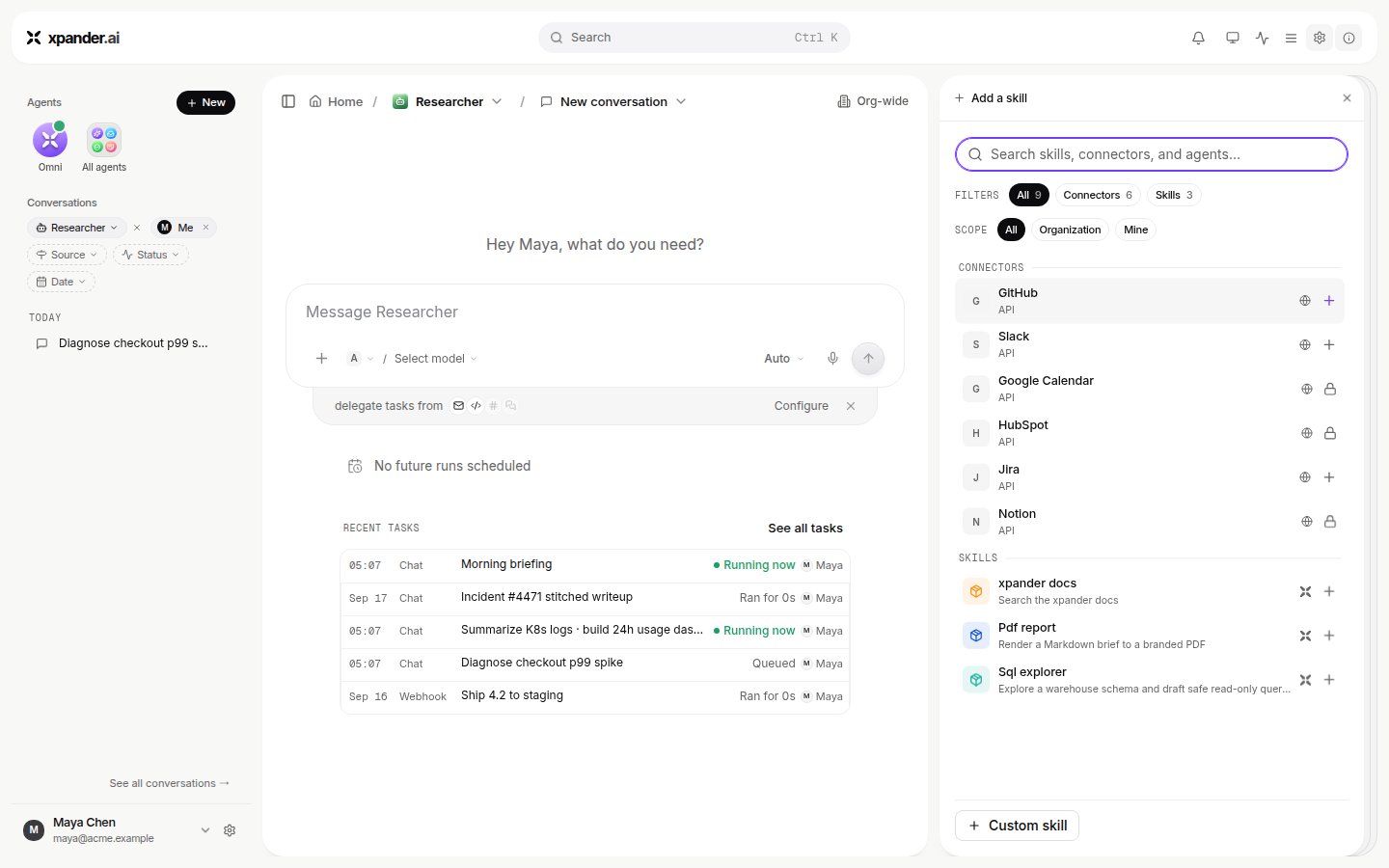 Skills provided by xpander install in one click. A skill from your organization's registry opens a preview of its `SKILL.md` first, so you read what it does before adding it. Search covers names and descriptions.
## Create a skill
At the bottom of the panel choose **Custom skill**, then **Skill**. (When the `Skills` view is empty the same flow is offered as **Create a skill**.) The `New skill` card opens beside the agent's settings:
1. **SKILL**: the name. Lowercase letters and digits separated by single hyphens. Names are unique within the organization, and the words `anthropic` and `claude` are not allowed in them.
2. **ABOUT**: a one-line description. If you leave it empty the first line of the document is used.
3. **SKILL.md**: the document itself. Typing a `name:` or `description:` in its front matter fills the rows above, and editing the rows writes back into the document. Keep it short: the panel notes that `SKILL.md` is loaded fully into the agent at runtime, so longer procedures belong in bundled scripts and files it points to.
**Save** creates the skill at version `1.0.0` and attaches it to the agent you started from.
### Import instead of writing
The same card has two import paths:
* **Import file or zip**: a `.md` file, or a zip that contains `SKILL.md` and any other files. Files beyond `SKILL.md` can only arrive this way; the editor opens `SKILL.md` alone.
* **From URL**: a link to a `SKILL.md` or to a bundle zip that contains one.
An import that needed adjusting shows an `Imported with warnings` banner listing what changed. Skills you already wrote for Claude Code use the same format, and Omni can import them for you from Claude; see [Start here: you have Claude Code](/use).
## Manage a skill you created
Expand the skill's row in the agent's skills list, or open it from the panel. What you can do depends on whether you created it:
* **Rename** and edit the description inline; changes save when you leave the field.
* **Edit** `SKILL.md`. **Save** bumps the patch version, and the version badge on the row updates.
* **Access**: `Private`, `Group` or `Org-wide`, changed through **Manage access**. `Group` opens a picker of people and groups; the drawer notes that they can attach the skill to their agents. `Org-wide` means everyone in your organization can see and attach it.
* **Skill contents** lists every file in the bundle with its size. **Download** fetches the bundle as a zip.
* **Delete skill** removes it from the registry for everyone. The confirmation says it plainly: agents using this skill will lose it, and it cannot be undone from Xpander Chat.
Skills provided by xpander install in one click. A skill from your organization's registry opens a preview of its `SKILL.md` first, so you read what it does before adding it. Search covers names and descriptions.
## Create a skill
At the bottom of the panel choose **Custom skill**, then **Skill**. (When the `Skills` view is empty the same flow is offered as **Create a skill**.) The `New skill` card opens beside the agent's settings:
1. **SKILL**: the name. Lowercase letters and digits separated by single hyphens. Names are unique within the organization, and the words `anthropic` and `claude` are not allowed in them.
2. **ABOUT**: a one-line description. If you leave it empty the first line of the document is used.
3. **SKILL.md**: the document itself. Typing a `name:` or `description:` in its front matter fills the rows above, and editing the rows writes back into the document. Keep it short: the panel notes that `SKILL.md` is loaded fully into the agent at runtime, so longer procedures belong in bundled scripts and files it points to.
**Save** creates the skill at version `1.0.0` and attaches it to the agent you started from.
### Import instead of writing
The same card has two import paths:
* **Import file or zip**: a `.md` file, or a zip that contains `SKILL.md` and any other files. Files beyond `SKILL.md` can only arrive this way; the editor opens `SKILL.md` alone.
* **From URL**: a link to a `SKILL.md` or to a bundle zip that contains one.
An import that needed adjusting shows an `Imported with warnings` banner listing what changed. Skills you already wrote for Claude Code use the same format, and Omni can import them for you from Claude; see [Start here: you have Claude Code](/use).
## Manage a skill you created
Expand the skill's row in the agent's skills list, or open it from the panel. What you can do depends on whether you created it:
* **Rename** and edit the description inline; changes save when you leave the field.
* **Edit** `SKILL.md`. **Save** bumps the patch version, and the version badge on the row updates.
* **Access**: `Private`, `Group` or `Org-wide`, changed through **Manage access**. `Group` opens a picker of people and groups; the drawer notes that they can attach the skill to their agents. `Org-wide` means everyone in your organization can see and attach it.
* **Skill contents** lists every file in the bundle with its size. **Download** fetches the bundle as a zip.
* **Delete skill** removes it from the registry for everyone. The confirmation says it plainly: agents using this skill will lose it, and it cannot be undone from Xpander Chat.
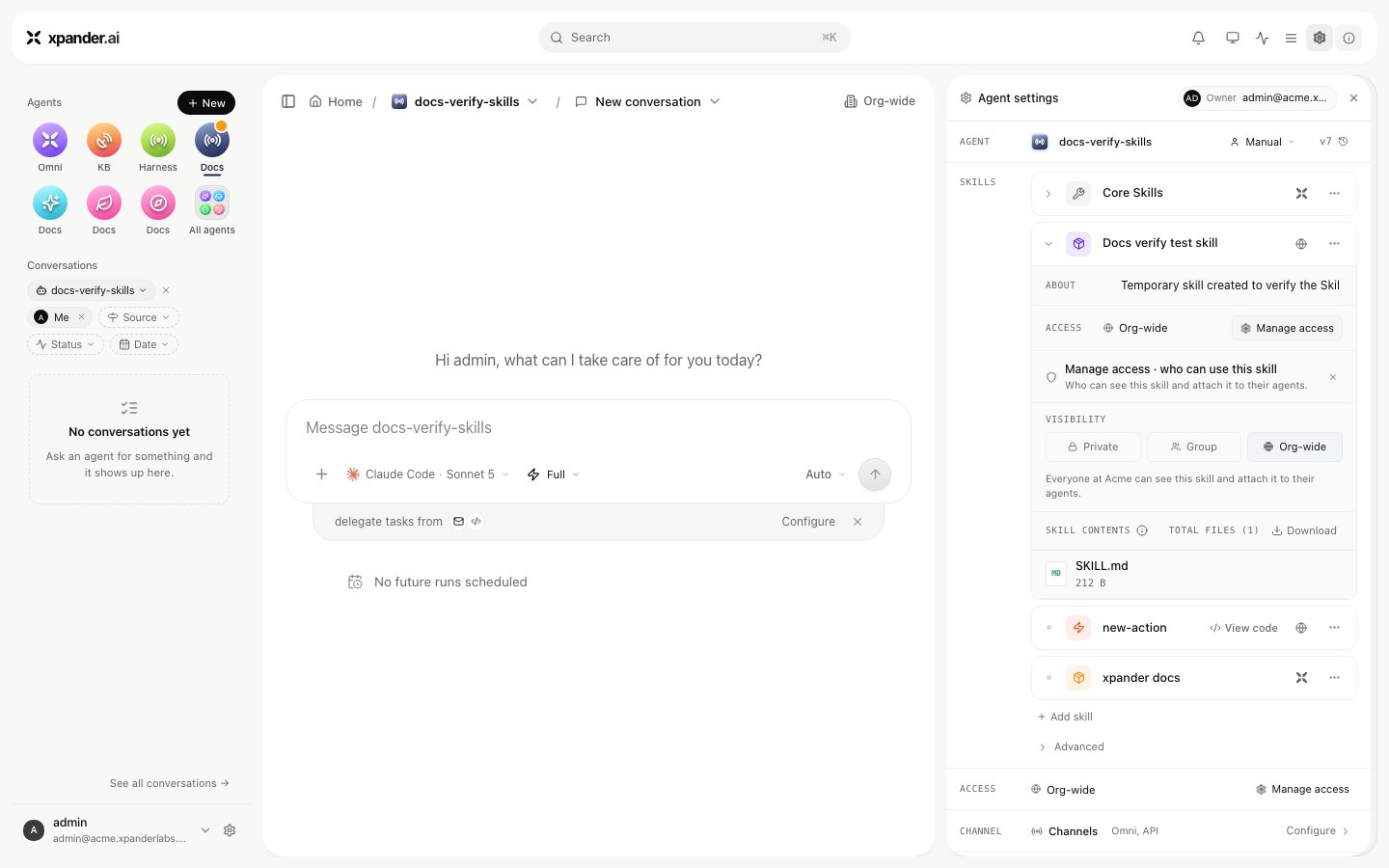 Someone who attached a skill they did not create gets **Remove from agent** only; the skill itself stays in the registry.
## What is governed and recorded
* **Who may use a skill** is the access level above. A private skill is invisible to everyone else; a group skill is visible to the people and groups named on it; an org-wide skill is visible to the whole organization. Separately, a skill published from a repository can carry an agent allowlist (`restricted`) or belong to one agent (`agent`); Xpander Chat refuses to attach such a skill to an agent outside its scope.
* **Who may add or manage skills at all** is set per user group in **Settings > User groups**, with the `Add skills` and `Manage skills` toggles.
* **Every skill carries its version** and the badge of who provided it, so an agent's skills list reads as a bill of materials.
* **Settings > Audit logs** records `Skill Created` and `Skill Added` events under the Agent category, with the person who did it. The task record shows each skill call an agent made; see [Permissions and access](/use/agents/permissions).
Skills that need approval before an action runs, and connected accounts for the systems a skill reaches, are covered on [Permissions and access](/use/agents/permissions) and [Credentials](/use/agents/credentials).
Someone who attached a skill they did not create gets **Remove from agent** only; the skill itself stays in the registry.
## What is governed and recorded
* **Who may use a skill** is the access level above. A private skill is invisible to everyone else; a group skill is visible to the people and groups named on it; an org-wide skill is visible to the whole organization. Separately, a skill published from a repository can carry an agent allowlist (`restricted`) or belong to one agent (`agent`); Xpander Chat refuses to attach such a skill to an agent outside its scope.
* **Who may add or manage skills at all** is set per user group in **Settings > User groups**, with the `Add skills` and `Manage skills` toggles.
* **Every skill carries its version** and the badge of who provided it, so an agent's skills list reads as a bill of materials.
* **Settings > Audit logs** records `Skill Created` and `Skill Added` events under the Agent category, with the person who did it. The task record shows each skill call an agent made; see [Permissions and access](/use/agents/permissions).
Skills that need approval before an action runs, and connected accounts for the systems a skill reaches, are covered on [Permissions and access](/use/agents/permissions) and [Credentials](/use/agents/credentials).