> ## Documentation Index
> Fetch the complete documentation index at: https://docs.xpander.ai/llms.txt
> Use this file to discover all available pages before exploring further.
# Skills on an agent
> Give your agents the skills your workflow needs.
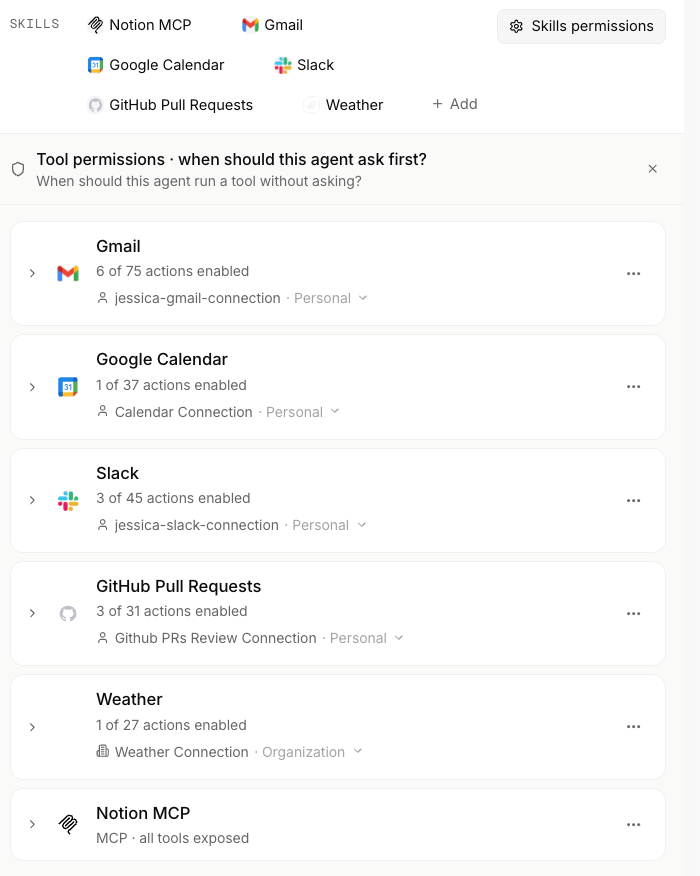
A skill is one outside system an agent can act in, with each of that system's operations available as an action. Admins decide which skills exist for the organization; you add them to an agent with **Add skill**.
 ## Add a skill
Use **Add skill** in the agent's settings to give an agent a skill. The panel filters by kind: `Connectors` for both API and MCP connectors, and `Skills` for Markdown skill bundles together with the built-in skills the runtime ships with (marked with a **Powered by Xpander** badge).
For the full catalog of skills you can add within xpander, see the [skills catalog](/connectors).
### Skill visibility
| Visibility | Who can see and attach it |
| ------------ | ------------------------------------------------------------------------------------------ |
| `org` | Everyone in the organization. The skill is in the org catalog and any agent can attach it. |
| `restricted` | An allowlist of agents. Only the agents on the list can hold the skill. |
| `agent` | One owner agent. The skill exists for that agent alone. |
**Manage access** on a skill offers **Private**, **Group** (named people and groups) and **Org-wide**. The `restricted` and `agent` scopes are set when a skill is published from a repository with `xpander.yaml`; Xpander Chat shows such a skill to the agents on its allowlist and refuses to attach it to any other.
As a builder you see the org catalog plus the skills scoped to agents you manage. A skill scoped to agents you do not manage stays out of your catalog. Attaching a skill to an agent that is not on its allowlist is refused, so add the agent under Manage access first, or ask the skill's creator or an org admin to do it.
Who may change a scope, how the runtime enforces it, and which audit events it writes are on [Skill visibility](/resources/security-compliance/access-control#skill-visibility). To publish skills from a repository with their scope set in `xpander.yaml`, see [Publish Skills](/api-reference/v1/skills/publish).
## Add a skill
Use **Add skill** in the agent's settings to give an agent a skill. The panel filters by kind: `Connectors` for both API and MCP connectors, and `Skills` for Markdown skill bundles together with the built-in skills the runtime ships with (marked with a **Powered by Xpander** badge).
For the full catalog of skills you can add within xpander, see the [skills catalog](/connectors).
### Skill visibility
| Visibility | Who can see and attach it |
| ------------ | ------------------------------------------------------------------------------------------ |
| `org` | Everyone in the organization. The skill is in the org catalog and any agent can attach it. |
| `restricted` | An allowlist of agents. Only the agents on the list can hold the skill. |
| `agent` | One owner agent. The skill exists for that agent alone. |
**Manage access** on a skill offers **Private**, **Group** (named people and groups) and **Org-wide**. The `restricted` and `agent` scopes are set when a skill is published from a repository with `xpander.yaml`; Xpander Chat shows such a skill to the agents on its allowlist and refuses to attach it to any other.
As a builder you see the org catalog plus the skills scoped to agents you manage. A skill scoped to agents you do not manage stays out of your catalog. Attaching a skill to an agent that is not on its allowlist is refused, so add the agent under Manage access first, or ask the skill's creator or an org admin to do it.
Who may change a scope, how the runtime enforces it, and which audit events it writes are on [Skill visibility](/resources/security-compliance/access-control#skill-visibility). To publish skills from a repository with their scope set in `xpander.yaml`, see [Publish Skills](/api-reference/v1/skills/publish).