

Agents and conversations
The left column lists Agents: the agents shared with you, Omni (the built-in agent), and New to assemble one. Below it, Conversations are grouped under Today, Last week and Older, with Show all to expand a group. Filters narrow them by agent, by user (All users shows teammates’ conversations you have access to), Source (where the run started), Status and Date. Status includes Scheduled, for runs that have not happened yet. See all conversations opens the full list.A conversation
The header names the agent and the conversation, and shows who can see it: Only you, a group, or the organization, changed with Manage access. Several people can write in the same conversation; every message carries its author’s name and every action is recorded under the person who asked for it. The composer shows the harness and model the next message will run on, for exampleClaude Code · Fable 5.1, and the permission mode:
- Full runs every command the agent decides on. Only the agent’s gated commands wait for approval.
- Gated holds every shell command, file edit and web fetch for approval; reads, searches and skills that are not themselves gated run unheld.
Tasks and the execution log
Every run is recorded as a task. The task panel shows the execution log: a counter of steps and actions, then one row per action with its status and time, such asWebFetch, WebSearch, a skill call, a shell command or Task output. Failed steps are marked. A stop button ends the run. Task Details opens the summary: status, files created, token usage, cost and the final answer. Task Manager lists every task for an agent, filtered by This agent, Date, Status or Source, and searchable by title or id. See Tasks.
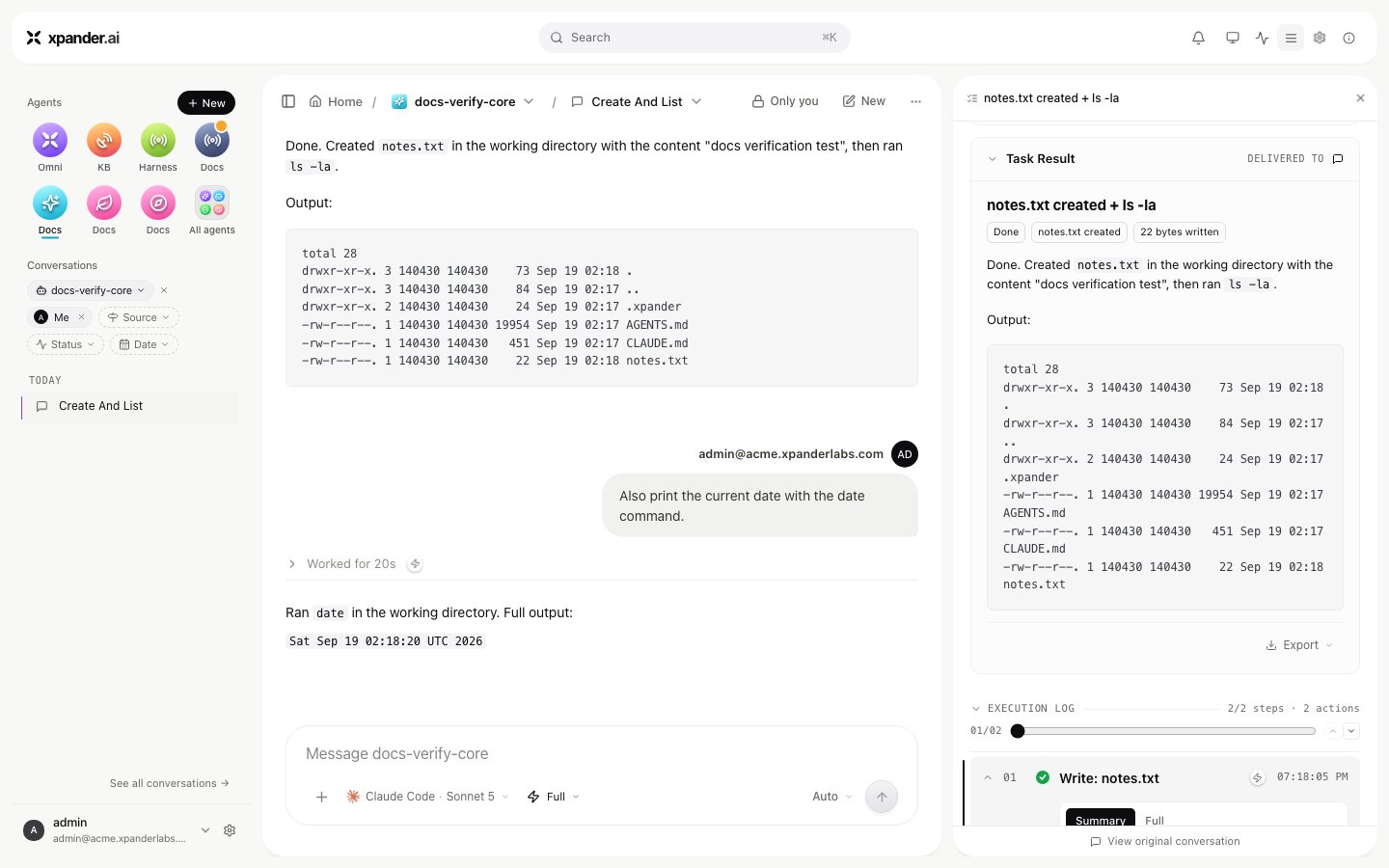
Task Details: status, tokens, steps, duration, cost and the execution log for one task.
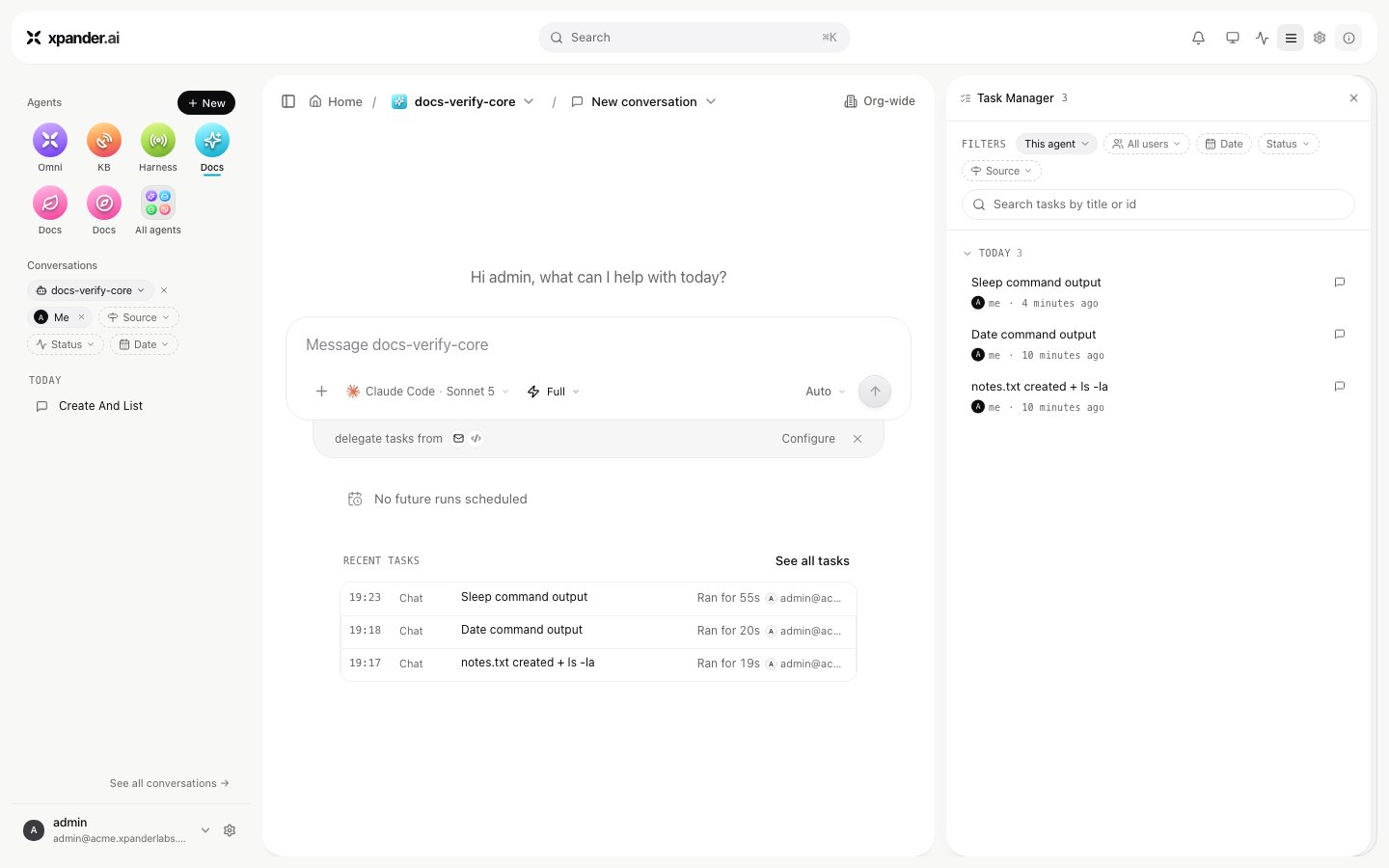
Task Manager: every task for an agent, filtered by This agent, Date, Status or Source, and searchable by title or id.
Approvals
When an agent reaches an action that needs sign-off, the conversation shows a card with the action, its parameters and who started the run, with Approve and Decline. Settings > Approvals lists everything waiting for you across all agents. Held runs wait four hours by default, then stop. See Approvals and Permissions and access.Results, live surfaces and sharing
Files an agent creates are in its Agent workspace. Make live on a file turns it into a live surface: a page the agent keeps up to date on each run, listed on the agent’s Live surfaces card. Share on a conversation offers the audience Only you, Specific people or groups, Everyone at your organization, or Public, and whether viewers may reply. Sharing the agent itself, with view, use or edit permission, is done from the agent’s Manage access. Public links exist only if an admin allows them under Settings > Sharing.Omni, the built-in agent
Omni is an agent that ships with xpander, one row in every organization’s agent list. Ask it to find an agent or a skill, run a task, explain what a run did, or assemble a new agent from approved skills. It answers in Xpander Chat, in Slack, in Teams and by email, and it serves the MCP endpoint your own client connects to (see Start here). It is one agent among yours, not a separate product. Each user has their own Omni. To reach yours from code, call Get Omni Agent with a personal API key; it returns Omni’s agent id, which works with every agent route of the API.Search and settings
Search (⌘K) sits at the top of every screen. The bell shows notifications, including approvals waiting for you. The gear opens Settings. An admin sees tabs grouped as:
- Account: Profile, Notifications, My connections, Approvals, Custom theme
- Workspace: Team, User groups, Channels, MCP registry, Runtime environments, Locations, Knowledge bases
- AI configuration: LLM settings, Memories
- Security: API keys, Vault, OIDC, Sharing, Audit logs
- Billing: License and Usage, on a licensed installation