

Three Views
Threads
Conversation history grouped by session_id
Metrics
Token usage, latency, and throughput
Tasks
Individual executions with status and logs
Threads
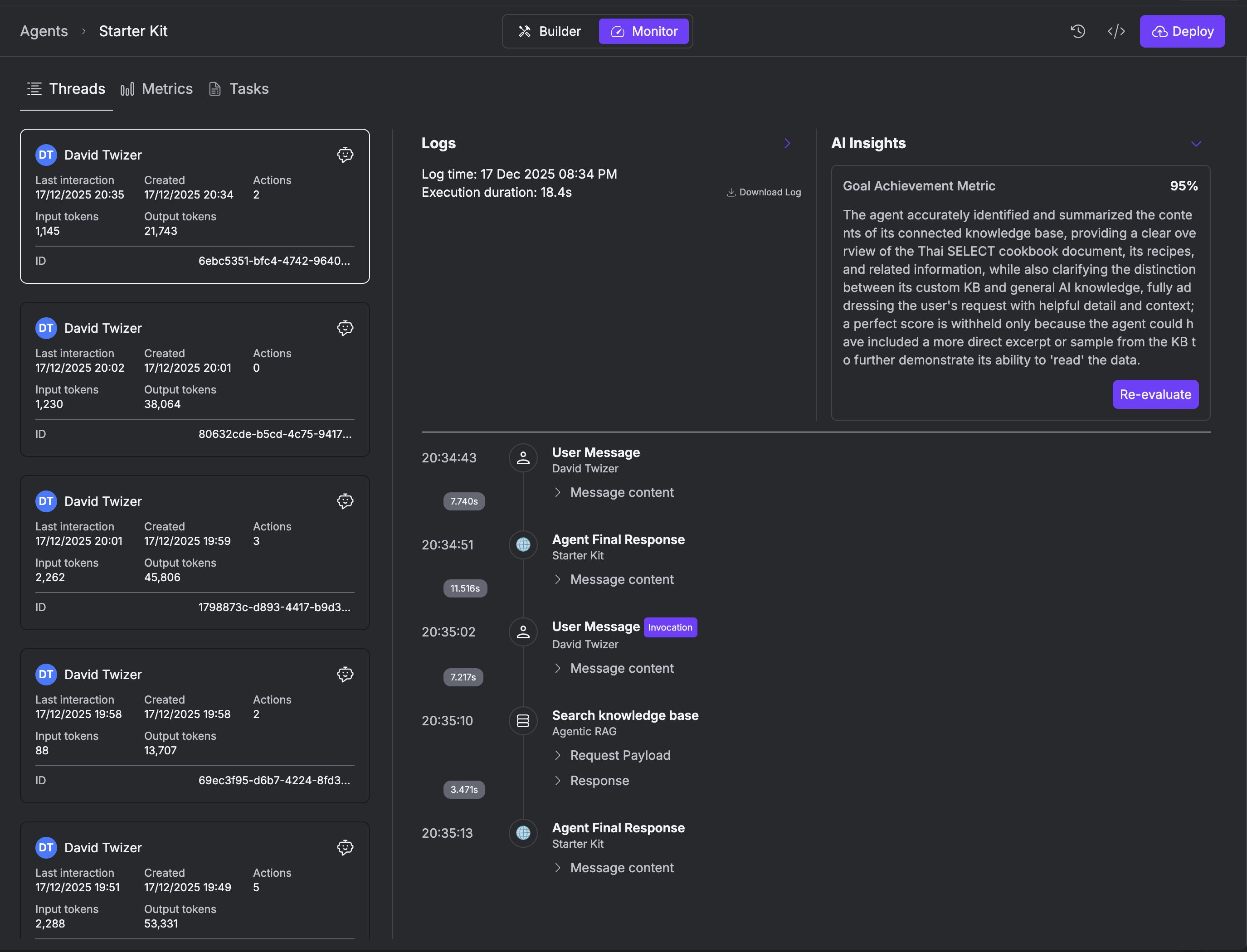
View all conversation threads (grouped bysession_id). Each thread shows:
- User information (name, email, ID)
- Last interaction timestamp
- Created timestamp
- Input/output token counts
- Thread ID
Thread Details
When you open a thread, you see: Logs Panel:- Log time and execution duration
- Downloadable JSON with full conversation
- Message timeline with user/agent exchanges
- Tool calls with payloads and responses
- Goal Achievement Metric (%)
- Summary of conversation
- Re-evaluate button to refresh analysis
Download Thread JSON
Click Download Log to get full thread data:Tasks
View all agent executions (individual task runs). Multiple tasks can belong to the same thread. Task List Columns:| Column | Description |
|---|---|
| ID | Unique task identifier (8 characters) |
| Created At | Task creation timestamp |
| Updated At | Last update timestamp |
| Status | Completed, Stopped, or Running |
| Internal Status | Internal execution state |
- Completed - Task finished successfully
- Stopped - Task was interrupted or failed
- Running - Task currently executing
Multiple Tasks Per Thread
A single thread (conversation) can have multiple task executions:session_id).
Metrics
Real-time performance metrics for your agent: Token Usage:- Input tokens per thread
- Output tokens per thread
- Total tokens across all executions
- Average execution duration
- Actions/tool calls per thread
- Success rate
Using the SDK
Debug Mode
Enable debug mode to see detailed logs during development:- Local
- Kubernetes
Related
Agent Memory
Session storage and user memories
Tasks API
Task management API reference