xpander Built-in Keys
Use xpander’s pre-configured models with pay-as-you-go billing
Bring Your Own Keys
Connect your own API keys from OpenAI, Anthropic, AWS, Google, etc.
AI Gateway
Route through Helicone, OpenRouter, or your custom AI Gateway
Supported Models & Providers
xpander integrates with a wide range of LLM providers and models. Below is a comprehensive matrix of supported providers and their available models.OpenAI
OpenAI
Available with xpander AI built-in keys (pay-as-you-go) or bring your own OpenAI API key
- GPT-5.2, GPT-5.1, GPT-5, GPT-5 Mini, GPT-5 Nano
- GPT-4.1, GPT-4.1-mini
- GPT-4o, GPT-4o Mini, GPT-4 Turbo
- GPT-3.5 Turbo
Anthropic
Anthropic
Available with xpander AI built-in keys (pay-as-you-go) or bring your own Anthropic API key
- Claude Opus 4.5, Claude Opus 4
- Claude Sonnet 4.5, Claude Sonnet 4, Claude Sonnet 3.7, Claude Sonnet 3.5
- Claude Haiku 3.5
Amazon Bedrock
Amazon Bedrock
Bring your own AWS credentials with Bedrock access
- Claude Opus 4, Claude Sonnet 4.5, Claude Sonnet 4, Claude Sonnet 3.7, Claude Sonnet 3.5
- Claude Haiku 3.5
- Amazon Titan Text Express
Google AI Studio
Google AI Studio
Bring your own Google AI Studio API key
- Gemini 3 Pro (Preview)
- Gemini 2.5 Pro
- Gemini 2.0 Flash, Gemini 2.0 Flash Lite
NVIDIA NIM
NVIDIA NIM
Bring your own NVIDIA API keyMeta Llama Models:
- Llama 4 Scout 17B, Llama 4 Maverick 17B
- Llama 3.3 70B, Llama 3.1 405B, Llama 3.1 70B, Llama 3.1 8B
- Llama 3.2 3B, Llama 3.2 1B
- Mistral Small 3.2 24B, Mistral 7B Instruct v0.3
- Nemotron Ultra 253B, Nemotron Nano 8B, Nemotron Nano 4B
Fireworks AI
Fireworks AI
Bring your own Fireworks AI API key
- GLM-4.6
- Kimi K2 Instruct
- DeepSeek V3.1
- OpenAI gpt-oss-120b, gpt-oss-20b
- Qwen3 235B A22B (Thinking & Instruct modes)
Helicone (AI Gateway)
Helicone (AI Gateway)
Bring your own Helicone API keyHelicone provides access to models from multiple providers through a unified AI gateway with observability, caching, and rate limiting features.Supported Providers:
- Anthropic Claude (Opus, Sonnet, Haiku - all versions)
- OpenAI (GPT-5, GPT-4.1, GPT-4o, o1, o3, o4 series)
- Google Gemini (2.5 Pro, Flash, Lite & 3 Pro Preview)
- xAI Grok (3, 4, Code Fast)
- Meta Llama (4, 3.3, 3.1)
OpenRouter (Multi-Provider Gateway)
OpenRouter (Multi-Provider Gateway)
Bring your own OpenRouter API keyOpenRouter provides unified access to 200+ models with automatic fallback, load balancing, and unified pricing.Frontier Models:
- Anthropic Claude (Opus 4.5, Sonnet 4.5, Haiku 4.5)
- OpenAI (GPT-5.1, GPT-5.1 Chat/Codex, o3/o4 Deep Research)
- Google Gemini (3 Pro Preview, 2.5 Flash Image)
- xAI Grok (4, 4.1 Fast)
- DeepSeek (V3.1, V3.2)
- Qwen3 (Max, Coder Plus, VL Thinking)
- Amazon Nova Premier
- AllenAI OLMo 3, Prime Intellect INTELLECT-3, Liquid LFM2
Nebius Token Factory
Nebius Token Factory
Bring your own Nebius API keyNebius provides high-performance inference for open-source models.Meta Llama:
- Llama 3.3 70B, Llama 3.1 8B, Llama Guard 3 8B
- Nemotron Ultra 253B, Nemotron Nano V2 12B
- Qwen3 235B (Instruct & Thinking), Qwen3 32B
- Qwen2.5 Coder 7B, Qwen2.5 VL 72B, Qwen3 Embedding 8B
- DeepSeek R1, DeepSeek V3
- Gemma 3 27B, Gemma 2 9B, Gemma 2 2B
- Moonshot Kimi K2 (Instruct & Thinking)
- GLM 4.5, GLM 4.5 Air
- OpenAI gpt-oss-120b, gpt-oss-20b
- Black Forest Labs FLUX (Dev & Schnell)
Azure AI Foundry
Azure AI Foundry
Bring your own Azure AI Foundry credentialsAzure AI Foundry provides access to OpenAI models through Azure’s infrastructure with enterprise-grade security and compliance.GPT-5 Series:
- GPT-5.2 (100K context, 8K output)
- GPT-5.1 (100K context, 8K output)
- GPT-5 (1M context, 32K output)
- GPT-5 Mini (500K context, 16K output)
- GPT-5 Nano (100K context, 8K output)
- GPT-4.1 (1M context, 32K output, function calling)
- GPT-4.1-mini (1M context, 32K output, function calling)
- GPT-4o (128K context, 16K output, multimodal)
- GPT-4o Mini (128K context, 16K output, multimodal)
- GPT-4 Turbo (128K context, 4K output)
- GPT-3.5 Turbo (16K context, 4K output)
- API Base URL:
https://your-resource.openai.azure.com/openai/deployments/gpt-4o - Model Name:
gpt-4o - API Key:
AZURE_API_KEY
Using Custom Models: The models listed above are featured models that have been tested with xpander. To use a different model from your provider, select “Custom” in the model dropdown and enter the model name exactly as specified by your provider (e.g.,
fireworks/custom-120b, anthropic/custom-model-id). This is particularly useful for:- Private or fine-tuned models only you have access to
- Newly released models not yet in the dropdown
- Provider-specific model variants with custom endpoints
How to change AI Model and Provider
Configure your AI model from the Workbench General → LLM Settings panel.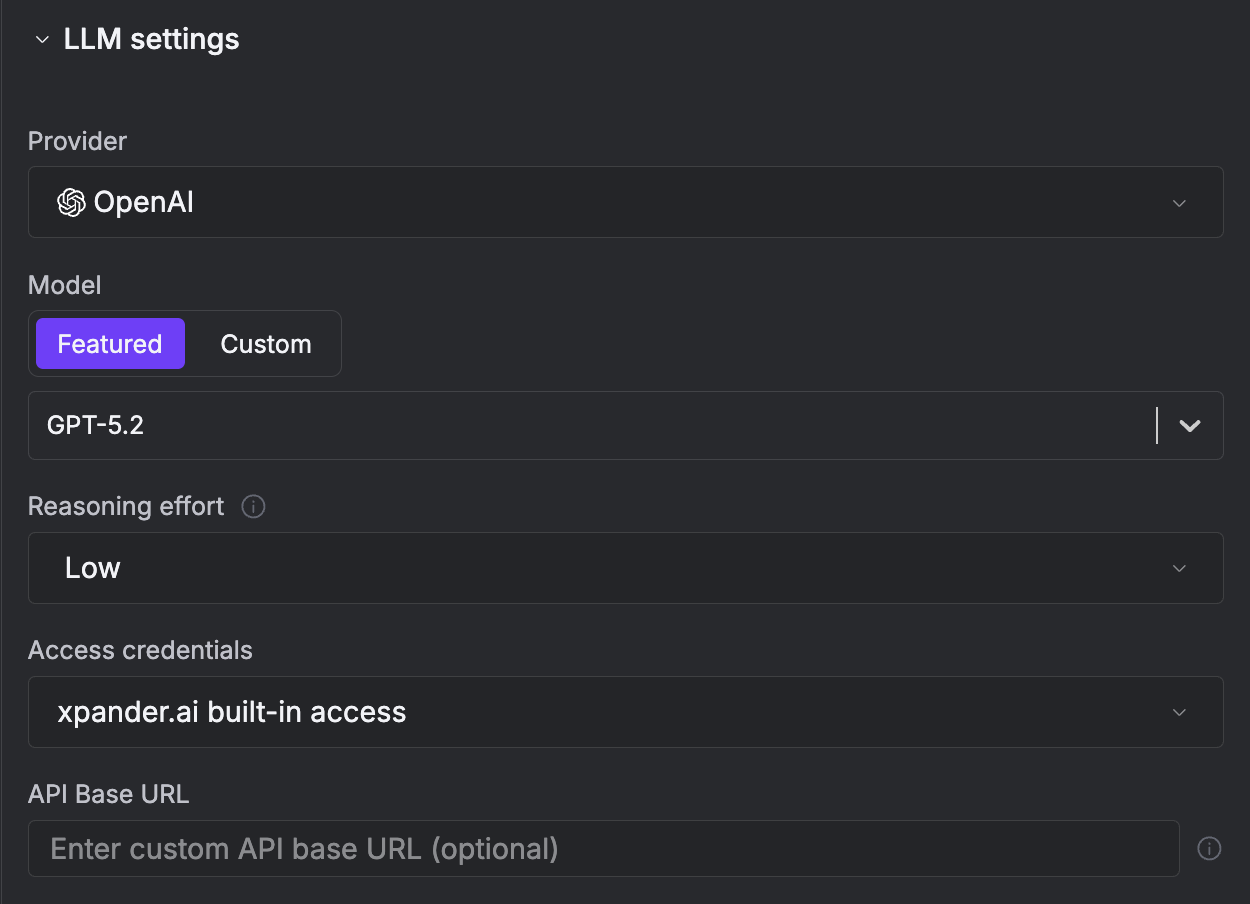
Bring Your Own Keys
You can bring your own LLM API keys and use your own AI Gateway through the configuration panel.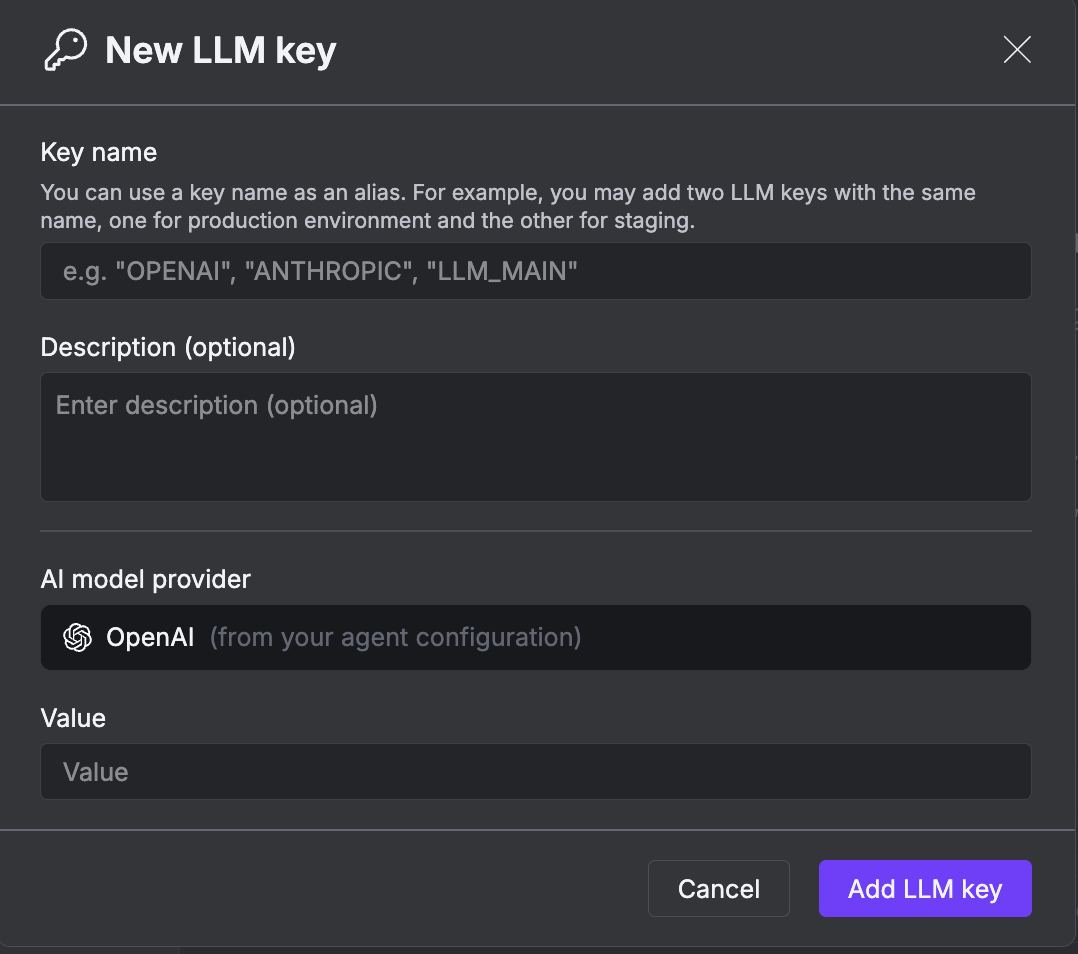
- Model Provider - Select from supported providers (OpenAI, Anthropic, Azure, AWS Bedrock, etc.)
- API Key - Your provider’s API key for authentication
- API Base URL - Custom AI Gateway endpoint (e.g.,
ai.your-company.com) - Model Name - Specific model version to use
- Extra Headers - Custom HTTP headers to include in LLM requests (see below)
If your AI Gateway is behind a private subnet or firewall, make sure to run xpander in the same network with access to those models.
LLM Extra Headers
You can configure custom HTTP headers to be sent with every LLM request. This is useful for:- Sending custom authentication tokens to AI Gateways
- Adding tracking or metadata headers (e.g.,
X-Request-ID,X-Organization-ID) - Passing compliance or security headers required by your infrastructure
- Integration with observability platforms like Helicone, LangSmith, or custom proxies
- Organization Default Headers - Set default headers at the organization level in Admin Settings → LLM Settings (http://app.xpander.ai/admin_settings#llm_settings) that apply to all agents
- Agent-Specific Override - Override organization defaults with agent-specific headers in the Workbench General → LLM Settings panel
Supported Providers: Extra headers are currently supported for OpenAI, Helicone, Nebius, OpenRouter, Fireworks, and NVIDIA NIM providers. For Anthropic, headers are sent as
default_headers. Google AI Studio and Amazon Bedrock don’t support custom headers.Helicone Observability Integration
Helicone Observability Integration
Track and monitor all LLM requests through Helicone:
Organization Headers (Admin Settings)
Agent Headers (Workbench)
Custom AI Gateway Authentication
Custom AI Gateway Authentication
Route requests through your internal AI Gateway with authentication:
Organization Headers
Request Tracking and Compliance
Request Tracking and Compliance
Add tracking and compliance headers for audit logs:
Organization Headers
Multi-Environment Setup
Multi-Environment Setup
Differentiate between development and production environments:Production Org Headers:Dev Agent Override:
Setting Organization Default Headers
Organization admins can set default LLM extra headers that apply to all agents:- Navigate to Admin Settings in the platform (http://app.xpander.ai/admin_settings#llm_settings)
- Go to LLM Settings section
- Add your default headers as JSON key-value pairs
- Save the settings
Setting Agent-Specific Headers
Override organization defaults for individual agents:- Open your agent in the Workbench
- Navigate to General → LLM Settings
- Add custom headers in the Extra Headers field
- Save the agent configuration
Organization Default Headers (Admin Settings)
Agent Override Headers (Workbench LLM Settings)
X-Environment was overridden from "production" to "staging" by the agent-level configuration.
Using the SDK
How Backend Configuration Works
By default, theBackend object automatically fetches the LLM configuration from the Workbench:
- Model Provider - The LLM provider selected in the Workbench
- API Keys - Securely retrieved from the platform vault at runtime
- Base URL - Custom AI Gateway endpoint (if configured)
- Model Name - The specific model version to use
When to Override the Model
Override the model in your code only when you need to:- Test with different models without changing Workbench settings
- Use different models for different agent instances
- Switch models dynamically based on runtime conditions
- Run local models (Ollama) for development
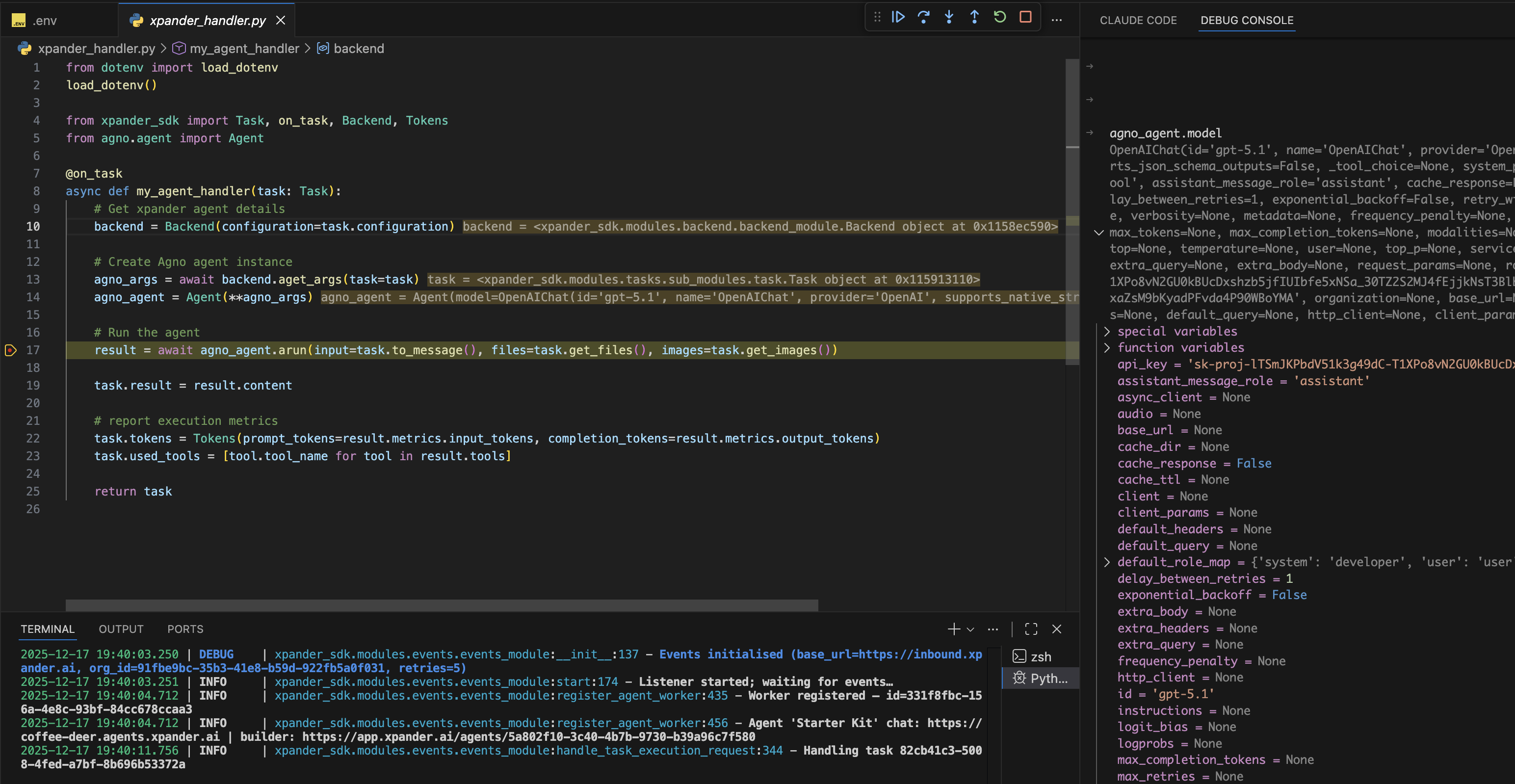
How to use SDK model overrides in production
When running the agent in production, you will use the@on_task decorator to stream events to the agent. Learn more about the Backend class in the API reference
xpander_handler.py
task object will come with the AI Model configured inside it. You can override the parameters in two ways:
Option 1: Override the model directly after agent creation
aget_args()
Using Extra Headers in SDK
When using the SDK, extra headers are automatically included from both organization defaults and agent-specific configuration. The headers are merged and passed to the LLM provider.Agent with Extra Headers
Orchestration Classifier with Extra Headers
task object automatically includes the configured LLM client with credentials from your Workbench settings.