

What runs where
- In your environment: the web UI, control plane, a self-hosted Supabase stack (auth, storage, edge functions) and the data tier (PostgreSQL, Redis Stack, MongoDB), as one Helm release in one namespace. Agent skill calls (including MCP) and agent workspaces run there too.
- Sent to xpander: nothing. No heartbeats, no catalog sync, no telemetry.
- Your choice: your LLM endpoint, cloud services such as Bedrock, S3 or SES, and the registry you mirror from at install time.
- MCP clients (Claude, ChatGPT, Cursor) reach Omni once you set
global.mcp.publicUrl. Until then, withui.env.VITE_OMNI_MCP_URLempty too, Platform > Agents > Channels shows Not offered on this install, and the License page’s Capabilities card shows the value to add. - Private mode needs
global.network.internetEgress: false. Withtrue, built-in skills that use public APIs (for example arXiv and HackerNews) call them from the cluster. Withfalse, those skills do not work.
Air-Gapped Security Architecture
Three things define an air-gapped install
- The license is the identity. Two sealed files (
install.jsonandactivation.json, formatxpander-license/v2) plus the organization id you pass with--org. No console IDs and no API key. Older single-filelicense.json(v1) installs carry the org id inside. The installer generates the environment id and the first install creates your organization in-cluster. Single-tenant: one license, one organization. - Images come from your own registry mirror. xpander delivers them through the gated
xpanderaihubDocker Hub org with a per-customer read token. The installer mirrors them, or you mirror them yourself on a sealed network. - Image tags are pinned per release. The chart refuses unpinned images, and an upgrade needs the new bundle mirrored first.
--edition airgap: a checklist, license validation, mirroring when needed, and a live watch over the install.
What talks to what
Outbound. Nothing to xpander at run time. These are the connections you choose (full table: Air-Gapped Security Architecture):Prerequisites
- The executor fleet (where Claude Code, Codex and OpenCode turns run) adds to these numbers and needs a namespace that admits PodSecurity
baseline, Landlock on its nodes (orglobal.fleet.landlock.enabled: false) and XFS withprjquota. No privileged container or node preparation. See Node prerequisites. - The LLM Gateway is always on, and agents’ model calls go through it. It adds its pods (0.5 vCPU / 1 GiB requested each, up to 1 vCPU / 4 GiB) and the
llm-gwimage. See LLM Gateway on a self-hosted install.
prjquota for its 500 GiB per-executor volume:
replicas: 0, annotated xpander.ai/fleet-idle-reason, so an --atomic install never waits on a volume that cannot bind. Create the class and the next upgrade starts it. Sizing tiers: Sizing and requirements.
Install in three steps
Receive the license files and pull token by email
Run the one-liner
kubectl access to the cluster:--license-file ./license.json instead of the three flags.The wizard runs preflight checks, installs with Helm and seeds an admin login. It prompts for:- Registry
- Chart source (OCI pull or local path)
- Data tier
- Admin email
- Organization display name
- StorageClass
- Agent code execution (
--code-execution/--no-code-execution). The runner embeds dockerd, so its pod is privileged, and a restricted PodSecurity policy refuses it - A base domain for the public hosts
- LLM provider keys, for any hosted providers your egress policy allows
Sign in as the seeded admin
bash install.sh --edition airgap --manual prints a personalized runbook and runs nothing: see Advanced: review-first / manual install.
What happens when you run the installer
Steps 1–6 take a few minutes. Step 7 takes 10–20 minutes. Each phase prints a[N/8] name: ... line for scripts to grep (Automation & CI).
FIX: line and a RERUN: line that resumes the install.Resolve: load the latest release
llm-gw and tool-repo-seed. The installer passes those pins to Helm. To repeat a release or install offline, pass --release-manifest ./release-manifest.json. A missing or invalid manifest stops the run. How releases work.Checklist: preconditions verified before anything changes
/v2/ (401 counts as up), agent-controller and deployment-manager exist at their pinned tags, an RWO StorageClass exists, the image pins are in place, --org-name and --admin-email are set, and a chart source exists. Any failure stops here with nothing to clean up.License: validated locally, applied as a Secret
xpander-license/v2 envelopes, one kind: install and one kind: activation, bound to --org (a legacy v1 file: envelope, expiry and org id). They become the xpander-license Secret. The Ed25519 signature is verified in the preflight hook and again at deployment-manager boot.Chart: pulled over OCI
xpander-airgap chart comes from the gated OCI registry, your own mirror, or a .tgz via --chart-path.Values: secrets never touch the command line
Install: helm, without --atomic on purpose
--atomic, because --wait would hold the seed hooks that the api and agent-controller pods are waiting on. The smoke hook is the readiness gate. Upgrades always run with --atomic, so a failed upgrade rolls back and the previous revision keeps serving.Pipeline: the cluster comes up, hook by hook (10–20 min)
Summary: URLs, password, logs
https://chat.<domain>, https://api.<domain>, https://supabase.<domain>), the bootstrap admin password, and how to read it later:~/.xpander/logs/, with latest.log pointing at the last run.Releases
The release manifest supplies xpander image versions and digests to Helm. Helm still deploys. By default, the installer and mirror script use the latest release. A manifest names every xpander image: the services (includingbilling, openapi-spec-generator and llm-gw), the agent runtime images, and the artifacts (UI, migrations, edge functions, skills, catalog specs and tool-repo-seed). Logos ship in the UI image.
- Latest release: omit
--release-manifeston a connected machine. - Repeat a release: pass the same
--release-manifest FILEto both scripts, so a new release between mirroring and installing changes nothing. - Invalid release: stops the run. It never falls back to
latestor guesses tags. - Consistency: tag flags must match the manifest, and its pins override conflicting image values. Registry, infrastructure and secrets stay yours.
agent-harness, openapi-spec-generator, the third-party data-tier and Supabase images, and charts/xpander-airgap. image_sync.sh creates missing ECR repositories itself.
Tracking pre-release builds (staging only): set XPANDER_IMAGE_STREAM=dev for the installer and pass --stream dev to image_sync.sh. Otherwise an air-gapped install refuses development overrides.
Per-artifact tag flags:
--manifest-out <file> writes the copied tags as a values file (pass it last with --values). --release-candidate selects a candidate. Credentials: image_sync.sh --source-user xpanderaihub --source-token <token> (and --dest-user / --dest-token), installer --xpander-registry-token <token>. --icon-pack-tag no longer exists, and image_sync.sh refuses unknown flags.
Publishing a release does not upgrade clusters. Your Helm, GitOps or upgrade schedule decides when.
Existing Helm and GitOps pipelines
When the mirror is empty, the wizard offers to fill it
Choose Mirror them now, give the xpander pull credentials and any destination credentials, and let the copy finish. ECR repositories are created when your AWS credentials allow. Non-interactively:--mirror now|guide|skip (now needs the credentials). Sealed networks use the archive flow below.
Sealed / manual mirroring
Mirror with the currentimage_sync.sh: it includes llm-gw and tool-repo-seed, and stops on a release without the gateway image. It needs skopeo and Python 3. The Docker pull/tag/push fallback does not preserve release digests.
On a connected workstation, download the manifest once and use that file for both the copy and the upgrade:
--dry-run prints the plan. Keep the JSON manifest: a single --tag or a legacy service-only manifest is not a complete release.
Fully sealed network? Archive outside, carry the whole directory in, import inside:
install.sh, image_sync.sh and their release_manifest.py with the bundle. Get the validator from the immutable release_manifest-<sha256>.py URL in the scripts and save it as release_manifest.py beside them. The scripts verify its checksum. Import validates the full image set and digests first. Complete an incomplete archive on the connected side. Legacy archives need the previous importer.
The chart is an OCI artifact. Mirror it with the images (--chart-version <X.Y.Z> --chart-source registry-1.docker.io/xpanderaihub/xpander-airgap, landing at oci://<your-registry>/xpander/charts/xpander-airgap), or hand-carry the .tgz:
Using Nexus, Artifactory, or Harbor
Using Nexus, Artifactory, or Harbor
--registry, and fill it with the wizard or image_sync.sh. --dest-user / --dest-token handle Basic auth:--registry nexus.corp.example:5000/xpander.Pull-through proxy, no mirror step. Create a Docker proxy repository upstream of Docker Hub (https://registry-1.docker.io) with the xpander read token as its upstream credentials, and keep the org path in the registry value:xpanderaihub segment: the chart builds <registry>/<name>, so <proxy-repo>/xpanderaihub/agent-controller maps to xpanderaihub/agent-controller upstream. A fully sealed network cannot use a proxy: use the archive flow into a hosted repository.Data tier: in-cluster or external
Choose carefully: moving from chart-managed StatefulSets to a managed service later is a migration. The wizard asks per store. Both default to in-cluster.- In-cluster (default)
- External (RDS / MemoryDB)
- PostgreSQL 16: history, memory and per-agent databases
- Redis Stack (
redis-stack-server): queues, cache and knowledge-base vectors. Not plain Redis: knowledge bases use RediSearch (FT.*) - MongoDB: catalog and monitoring
- Supabase ships its own pinned PostgreSQL 15 (it needs extensions managed services lack)
--storage-class <name> picks a non-default class.Local LLM inference
xpander speaks the OpenAI-compatible API, so any local runtime that exposes it plugs in:global.llm.gateway.{provider,model,apiBase}). Each install or upgrade converges the organization’s defaults to the chart’s declaration only when that declaration changed, so defaults an admin edited in the UI survive upgrades.
global.llm.bedrock.bearerTokenSecret empty and set global.llm.bedrock.region.- The pod role needs
bedrock:InvokeModel,bedrock:InvokeModelWithResponseStream,bedrock:Converseandbedrock:ConverseStreamon*(theglobal.*profiles route across regions), bound to bothdefaultandagent-controllerServiceAccounts. No second role is assumed. - The account must be opted in to Bedrock data retention for those models in every region a
global.profile spans. A sealed network needs VPC endpoints forbedrock-runtime,stsandeks-auth. - A Bedrock API key in
bearerTokenSecretis the alternative. - The “IAM role” method under Platform > AI governance > Models applies to the Claude Code leg only. If such an entry exists and chat fails, remove it and restart
agent-controller,agent-worker,agents,actionsandfunctions.
bearerTokenSecret and assumeRoleArn unset, put the Bedrock permissions on the role the pods run as (xpander-sa-role there), bind it to default and agent-controller, and upgrade. No separate Bedrock role is needed.
Claude Code on Bedrock: the CLI calls the in-cluster LLM Gateway directly, and the gateway gets the Bedrock credential from the Agent Controller, the only place assume-role applies: global.llm.bedrock.assumeRoleArn (plus assumeRoleExternalId), or with no token and no role, the pod’s own credentials. global.llm.bedrock.baseUrl points it at your VPC endpoint. Fable- and Mythos-class models also need the per-region data-retention opt-in. See AI vendors.
Summaries around agent work (thread titles, context compaction, evaluation judges) use the org default model, backed by the install’s other providers. None dials a public endpoint on a sealed install.
A worked vLLM setup on EKS Auto Mode
Checked end to end on an Air-Gapped install: vLLM serving a small instruct model on a T4, registered as a custom provider. The cluster side is yours. xpander needs only the address. GPU capacity. ANodePool limited to g4dn with a nvidia.com/gpu taint gets a T4 node in about two minutes, exposing nvidia.com/gpu: 1 with no device plugin. It needs nodeClassRef group: eks.amazonaws.com, kind: NodeClass, name: default. Keep weights on a PersistentVolumeClaim mounted as HF_HOME (pre-loaded on a sealed network).
Five things that stop vLLM:
- A Service named
vllminjectsVLLM_PORT=tcp://...and vLLM refuses to start (VLLM_PORT ... appears to be a URI). SetenableServiceLinks: falseor rename the Service. - A T4 needs
--dtype=half. vLLM 0.11 crash-loops on a T4.vllm/vllm-openai:v0.9.2works. - Pass the key as
VLLM_API_KEY, not--api-key(which logs it). It guards only/v1./health,/metricsand/tokenizeanswer without it, so keep port 8000 on aClusterIPService, never an ingress or load balancer. - Start with
--enable-auto-tool-choice --tool-call-parser=hermes, or Add provider marks the model as unable to run agents. - Leave room above the composed prompt.
--max-model-len=8192failed with400 This model's maximum context length is 8192 tokens. However, you requested 8298 tokens, shown as Unknown model error (controller log:Non-retryable model provider error: Unknown model errornext to[prompt-budget] system_message_tok=...).--max-model-len=32768ran. Custom models also logunknown model.id ... defaulting to 128,000 window.
Register the endpoint in xpander
- Platform > AI governance > Models, Add provider.
- Name is free text, and ID (used in API calls) derives from it and is fixed. Protocol: OpenAI-compatible. Base URL: the address the pods reach, for example
http://vllm.<namespace>.svc.cluster.local:8000/v1. In-cluster addresses work on Hybrid and Air-Gapped. xpander cloud accepts only a publichttpsaddress. - API key: No key (local or unauthenticated server), Use an existing key, or Create a new key with a Key name and the API key (the
VLLM_API_KEYvalue). - Test connection shows Reachable and the served models. A
toolsbadge marks models that accept function calls. Add the model, with an optional Display name. - Click Add provider.
- In the provider’s Keys and models…, tick the models the organization may use. Prices (USD per 1M tokens, via Edit model) track spend and are never charged. Who may use it… sets access. New models wait under New models unless Approve new models automatically is on. Agent readiness shows, from the last Test model, which harnesses work with each model.
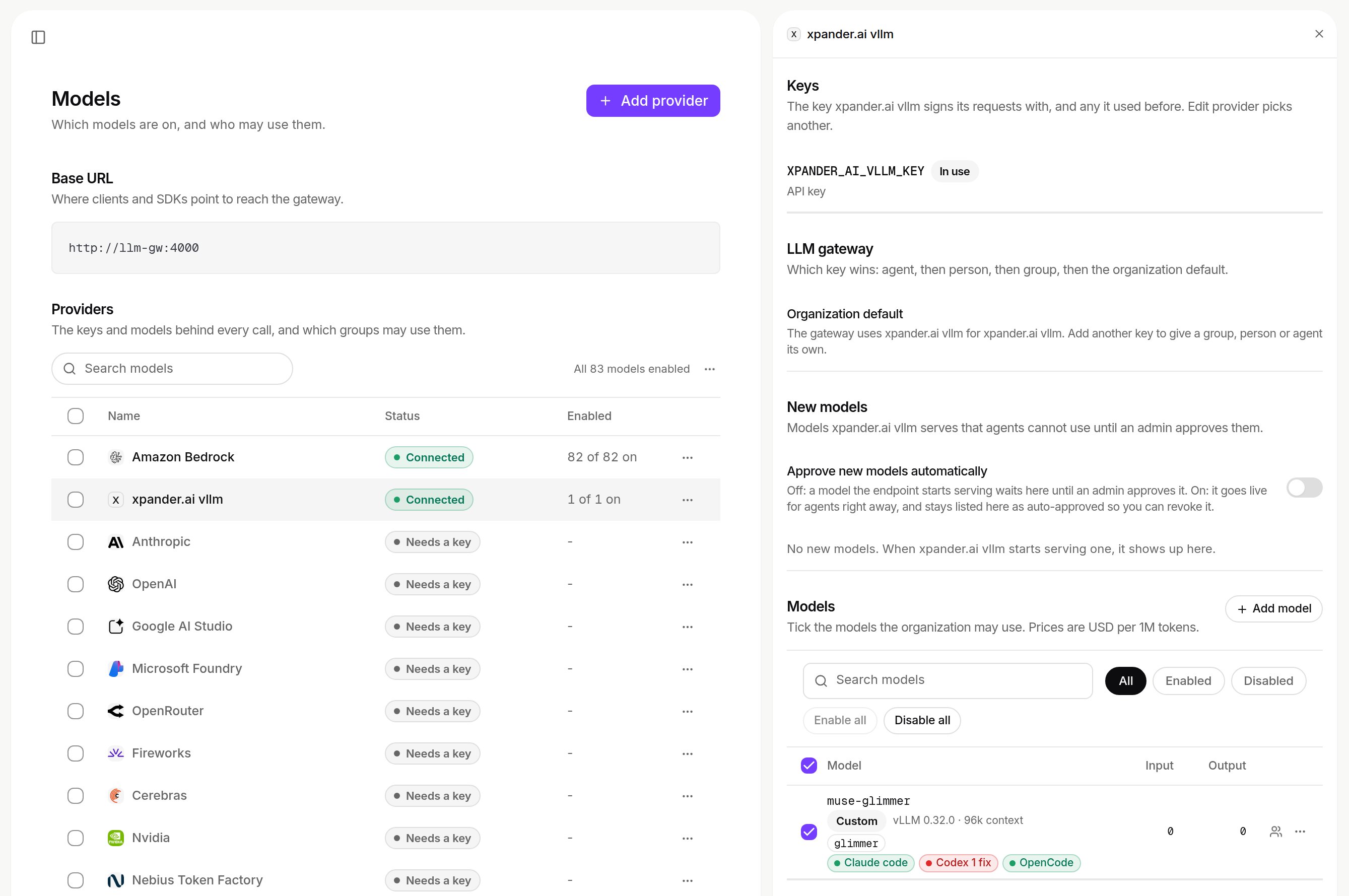
Keys and models on a custom provider: the key in use, New models waiting for approval, the models the organization may use with their prices. Shown with sample data and a different model than the one deployed above.
POST /v1/agents accepts only built-in providers in model_provider (a custom ID gets 422). Pick a custom provider per conversation in Harness and model. The header then reads, for example, OpenCode · Qwen2.5 1.5B (lab T4), the controller logs gateway turn start with model=<host>:<port>/<model id>, and vLLM logs POST /v1/chat/completions 200.
The executor fleet on Air-Gapped
Agent turns on Claude Code, Codex and OpenCode run on the executor fleet. Sizing: Sizing and requirements. On Air-Gapped, also set:AI skill generation
Upload an OpenAPI spec (Connectors → Create connector) and the openapi-spec-generator service turns it into a full skill in the background: grouping, naming, descriptions, summaries and validation. You can delete generated skills or upload a new spec version over one. The air-gap license carries the entitlement (Custom connectors), and the image is in the standard mirrored set.
The generator uses exactly one LLM provider, chosen at install: Bedrock if configured, else OpenAI if a key was given. It refuses runs without that provider’s credentials. With neither, it is not installed and skill creation is spec-only, with no enrichment (VITE_CONNECTOR_AI_ENRICHMENT is set for you).
It writes specs to an object store bucket, set on both catalog and openapi-spec-generator, with versioning enabled (it lists object versions). Without the bucket, upload fails.
Custom actions and code execution
Custom actions and code run in short-lived jobs from theactions service. To let them reach internal systems, give them the cluster’s resolver:
api.env.SANDBOX_IMAGE overrides it for a development stream.
The license
New installs use two sealed files (install.json + activation.json, xpander-license/v2): see Two-File Licensing for caps, expiry and renewal. The installer validates both and creates the xpander-license Secret:
global.license.publicKey, and deployment-manager refuses to start on a bad one.
- Your own
--valuesfile displaces the installer’s license block: also pass--set global.license.installKey=install.json --set global.license.activationKey=activation.json --set global.license.publicKey=<license public key>. - Renewing replaces only
activation.jsonand redeploys. See Renewing: re-activate. - Expired activation: the installer warns and preflight refuses a fresh install. A running install degrades in stages.
GET /v1/license/statusreturnsvalid,expiring,graceorexpired. Alert on anything pastexpiring. - Single-tenant: one license, one organization.
- Legacy single file (
xpander-license/v1):--license-file ./license.jsoncreates a Secret with onelicense.jsonkey, wired throughglobal.license.key. Renew by replacing that file and redeploying.
Domains, ingress & DNS
One--domain (for example xpander.acme.internal) names every public host:
app. (UI), auth. (Supabase), api., chat. (agent-controller), hooks. (webhook), links. (short links, the functions Service), actions., client-auth., and dm.internal. for deployment-manager on a second, internal ingress class (deployment-manager.ingress.className), reached over a backchannel.
Set each with <name>.ingress.host (the UI also with --ui-host), and move the matching knobs in the same change:
<name>.ingress.enabled: false keeps one private, and global.ingress.enabled: false suppresses all. The domain also sets the UI’s runtime origins: without it, or ui.env overrides, browsers on a sealed network get unreachable origins.
--ingress-scheme https|http(defaulthttps) feeds every derived URL. Usehttponly without certificates.- No ingress controller is assumed: set
<name>.ingress.className/annotations, orglobal.ingress.className/global.ingress.annotations.
tls: block, per component (<name>.ingress.tls) or via global.ingress.tls. A wildcard *.xpander.acme.internal covers the derived set. dm.internal.<domain> needs its own wildcard:
tls:. A wildcard covers one level only: *.xpander.acme.example does not cover *.staging.xpander.acme.example. On EKS Auto Mode, put the group in an IngressClassParams (Auto Mode ignores alb.ingress.kubernetes.io/group.name). The load balancer appears after the first Ingress, so DNS aliases are a second pass.
Making the hosts resolve
- Internal DNS zone
- VPN + internal load balancer
- Local test: port-forward + /etc/hosts
Signing in
The summary box prints the URLs and the bootstrap admin password.helm get notes xpander -n xpander repeats the commands.
-
Bootstrap password (default): open
https://chat.<domain>/login-passwordwith your--admin-email. Read the password again with: -
Email OTP without SMTP: codes are not sent. Get one with
scripts/get_login_code.sh <email> <namespace>. Withglobal.smtp.*set, codes arrive by email. On Amazon SES in the sandbox, invitations reach only verified identities, and the SMTP IAM policy must list each verified recipient identity ARN: request production access first (Email). Agent mailbox replies use the same relay:INBOUND_EMAIL_REPLY_DOMAINsets the From domain, and the SMTP identity must be allowed to send as the agents’ mailbox subdomain. -
SSO (OIDC): configured in xpander Chat under Platform > Organization > Access and served by
client-auth. See SSO with your identity provider. Google and GitHub buttons stay GoTrue providers (supabase.auth.extraEnv).
supabase.db.jwtExpiry, default 86400), renewed through the rotating refresh token. The one value feeds GoTrue, PostgREST and the database. Older tokens keep their expiry until refresh, and the migrations hook re-applies it on every upgrade, so installs that started on the one-hour default converge.
Upgrading an Air-Gapped install
Slack handle management compatibility
For releases with administrator-authorized Slack agent handles, mirror the matching Supabase migrations and bots images before upgrading the chart. The migrations image must include20260910231402 and 20260911192635, and the chart’s post-migration check requires get_slack_handle_authorization, save_slack_handle_authorization and complete_slack_handle_authorization. Never upgrade the chart alone before those images are in your mirror.
Add usergroups:write to your Slack app’s User Token Scopes, then complete administrator consent in Platform > Agents > Channels, on the Slack row. The token is encrypted in the local Supabase Vault. Slack needs explicitly allowed connectivity, and this upgrade does not turn it on.
Release v2026.10.22 (chart xpander-airgap 0.17.2)
Carries the changes of Hybrid chart 0.22.5 (Hybrid: Upgrading to the current chart). Before you upgrade:
- The LLM Gateway is always on and
llm-gw.enabledis ignored. If you had it off, mirrorllm-gw, give every provider your agents use a key, and open its network paths (LLM Gateway on a self-hosted install). - In-cluster Postgres moves to the pgvector build of PostgreSQL 16.15. Mirror
pgvector/pgvector, and snapshot the Postgres volume or setpostgres.upgradeGuard.backup.pvcName. Postgres restarts once. A pinnedpostgres.imagemust stay on a pgvector build of the same major version. - Per-agent MCP URLs are gone. Use
https://api.<your domain>/mcp/. There is no per-person library endpoint on air-gap, and Omni over MCP needsglobal.mcp.publicUrl. BRAIN_INGEST_API_KEYis added to the generated secret automatically.
<namespace>, <your-registry> and <xpander-token>, Helm 3.14+):
Release v2026.10.15 (chart xpander-airgap 0.16.2)
Carries the changes of Hybrid chart 0.22.0 (Hybrid: Upgrading to the current chart):
- Mirror with the current
image_sync.sh(addsllm-gwandtool-repo-seed, drops--icon-pack-tag). - The LLM Gateway is on by default. Its generated keys are kept on every upgrade. Never rotate the content key. Every provider your agents use needs a key, or calls are refused naming the missing key. Check
kubectl -n <namespace> get pods -l app=llm-gw: twollm-gwpods (one on a single-nodeinstall.shcluster),1/1Running. See LLM Gateway on a self-hosted install. - Key names and endpoints: env-var key names matching the install’s own credentials read as no key, and metadata-address endpoints are refused (details).
- Helm 3.14+ for
--reset-then-reuse-values. Migrations run automatically.
Upgrade procedure
Check the latest release. Two steps, in this order:Mirror the new bundle FIRST
ImagePullBackOff. Re-run image_sync.sh (curl -fsSLO https://charts.xpander.ai/image_sync.sh) for the target release as in Sealed / manual mirroring, and carry the new chart .tgz if needed.Run the upgrade
helm get values), loads the release pins over them, and stops if the manifest is invalid. It runs --atomic. Migrations stay forward-only. Pipelines should use the declarative re-install instead.Declarative re-install for CI
A pipeline should inherit nothing from the release it upgrades. Runbash install.sh --edition airgap ... on every deploy with all values files, the release manifest and mirror pins, the license flags and --org, as on day one. Against a deployed release the installer adds --atomic itself. (install.sh upgrade once let a stored digest ride along and ran a stale image on staging for four days.)
-
--helm-timeout 20m(default30m). The--atomicrollback waits the same time again, so budget twice the value plus hooks within your job’s credential lifetime. A one-hour OIDC session cannot host a 30-minute timeout. -
Heal first. The installer refuses a release in
pending-install,pending-upgradeorfailed. Checkhelm history xpander -n xpander, thenhelm rollback xpander <last deployed revision> -n xpander, orhelm uninstall xpander -n xpanderwhen none deployed (xpander-generated-keyssurvives). Delete Failed pods and failed hook Jobs first. -
Pin the environment id. After the first install, pass
--env <existing default environment id>: the default location’s runtime environment cannot move to a new id. Read it first: -
Wait for Helm’s verdict. The stage watcher exits on the first failed hook pod, even an evicted one whose Job then succeeds. If
install.shexits non-zero whilehelm upgrade --install xpanderstill runs, do not kill Helm (it strands the release inpending-upgrade). Wait and read the release status. -
global.upgradeStrategy: replaceon clusters that provision nodes on demand, so a surge upgrade does not trigger provisioning waves that outlive the timeout.
--atomic. A running harness turn holds the roll: on SIGTERM an executor drains for up to global.fleet.executor.drainSeconds (3600 s). The installer’s timeout covers it. On a hand-driven helm upgrade, set --timeout to at least the drain window, or upgrade when quiet. A turn still running at the deadline stops with “The executor is restarting; send the message again to continue where it left off.” and resumes when the user sends again. An idle executor (zero replicas, xpander.ai/fleet-idle-reason) is skipped and never stalls an upgrade.
What survives what:
- Generated keys survive every upgrade and rollback (lookup-preserve, and the Secret is Job-created, never Helm-rendered).
helm rollback xpander <N>restores any prior revision, except the database schema: migrations are forward-only, so a schema rollback means restore-from-backup.- The one-day token lifetime (
supabase.db.jwtExpiry) is re-applied by the migrations hook on every upgrade.
Automation & CI
- Every prompt has a flag.
--non-interactivereads nothing from the terminal, exits 2 with the usage and a rerun line when a value is missing, and implies--yesand--on-probe-failure abort. - Stable progress lines such as
[3/8] license: ok.--quietprints phases and the outcome only. Color only on a terminal. statusis a read-only health report (edition, chart, release, hooks, readiness, URLs).--jsonemits one object.
--mirror now --xpander-registry-token <token>. Without a --mirror answer, an empty mirror exits 2.
Poll until healthy:
Reference values file
A complete production values file. Hosts, buckets and endpoints are placeholders from your infrastructure outputs. Pass passwords with--set, and the mirror manifest last for image pins.
orgSeed, generated passwords, image pins): extra values files merge last and override them.
CI/CD & GitOps
Jenkins (or any CI): watch the releases feed, mirror, upgrade
Jenkins (or any CI): watch the releases feed, mirror, upgrade
status. The agent needs cluster access, Helm 3.13+, skopeo and Python 3.1 (upgrade failed, already rolled back by --atomic), 2 (usage) and 4 (preflight). status fails on 1 (degraded, with reasons) and 3 (not installed). status --json emits one object if you prefer to parse.ArgoCD: the chart as Helm OCI from your registry
ArgoCD: the chart as Helm OCI from your registry
--release-manifest ./release-manifest.json --values-out xpander/values.yaml. It writes xpander/values.yaml and xpander/values.yaml.release.json (Helm values, not the manifest). Keep the manifest for your record and pass both files, release values last:- Values: regenerate per release, review with the chart version, and add no image overrides after the release values. Direct Helm does not run the installer’s checks. Strip secrets (LLM keys, DSNs) into your secret manager before committing.
- Bootstrap secrets: create
xpander-license(and any pull secret) once out-of-band (The License), or with SealedSecrets / External Secrets Operator. - Hooks: Argo CD maps the chart’s hook pipeline onto sync phases and waves. The chart is not certified under Argo CD: verify the hook ordering on your Argo version.
install.shis the certified path.
Skill credentials on Air-Gapped
Built-in skills that call a third-party service need a credential, or they fail with a 401:- RapidAPI skills (for example Google News, Company Insights and Social Media): set
global.network.toolKeys.RAPID_API_KEY, or calls return401 Invalid API key. - Skills with their own sign-in (for example BigQuery and Figma): create the connection with valid credentials.
- AWS skills (Redshift, S3, Athena, EKS): the IAM role and its permissions on AWS Operator Setup.
- Public skills need internet egress, and do not work with
global.network.internetEgress: false.
Backups
The chart creates no backup job. Back up these volumes yourself, for example with AWS Backup or EBS snapshots:Monitoring
No metrics stack orServiceMonitor ships. The xpander-smoke Job logs smoke passed: every required component serves when all components answer, and bash install.sh status gives a read-only verdict. Scrape the services with your own stack for metrics.
Troubleshooting
Every failure printsFIX: (the repair) and RERUN: (your non-interactive one-liner, secrets as placeholders). The installer is idempotent: fix, paste the rerun line, and it resumes. The checklist stops most problems before anything changes. Scripts read the exit code (Automation & CI), and bash install.sh status gives a read-only verdict.
Mirroring and registries
Mirror push fails: name unknown, 'The repository ... does not exist' (ECR)
Mirror push fails: name unknown, 'The repository ... does not exist' (ECR)
image_sync.sh creates them (with AWS CLI credentials). Refresh your copy:Mirror push fails: authentication required at the destination
Mirror push fails: authentication required at the destination
authentication required even though docker login works: skopeo cannot read Docker Desktop’s credential store. The current image_sync.sh logs in to ECR itself (aws ecr get-login-password | skopeo login --username AWS --password-stdin). For other registries, pass credentials:401 from Docker Hub when resolving or mirroring
401 from Docker Hub when resolving or mirroring
401 from auth.docker.io (incorrect username or password): the credential is the organization username xpanderaihub plus the token from your email, not a personal username. Re-run with --xpander-registry-user xpanderaihub --xpander-registry-token <token>. Still refused? Ask xpander to re-issue the token with repository-read and image-pull access.Pods can't pull: manifest unknown at your pinned tag
Pods can't pull: manifest unknown at your pinned tag
manifest unknown, or the checklist reports:image_sync.sh), then check the exact coordinate:Cluster and network
Nodes time out pulling from docker.io (dial tcp ... i/o timeout)
Nodes time out pulling from docker.io (dial tcp ... i/o timeout)
docker.io instead of your mirror. Install with --registry <your-mirror>/<path>, and make sure the nodes reach the mirror (on an ECR-only sealed VPC: ecr.api + ecr.dkr endpoints, the S3 gateway endpoint, ECR read on the node role). Find the reference:Preflight: no node with a supported architecture (Graviton/ARM)
Preflight: no node with a supported architecture (Graviton/ARM)
exec format error.) xpander images are amd64-only, so ARM/Graviton (t4g, m7g, c7g, …) cannot run them. Add an amd64 node group. Only for genuinely arm64 images: --set 'preflight.allowedArchitectures[0]=arm64'.LoadBalancer Service stuck <pending>: could not find any suitable subnets
LoadBalancer Service stuck <pending>: could not find any suitable subnets
kubectl -n xpander port-forward svc/ui 8080:80.External data-tier probe fails: namespaces 'xpander' not found
External data-tier probe fails: namespaces 'xpander' not found
curl -fsSL https://charts.xpander.ai/install.sh) or create the namespace and re-run:Pods stuck in Pending
Pods stuck in Pending
kubectl -n xpander describe pvc) mean no usable RWO StorageClass or too little capacity for the footprint. Check kubectl get storageclass, pass --storage-class <name>, and look for FailedScheduling in kubectl -n xpander get events --sort-by=.lastTimestamp.UI loads blank: Missing or invalid environment variables
UI loads blank: Missing or invalid environment variables
bash install.sh upgrade, or set ui.env (VITE_SUPABASE_URL, VITE_CHAT_BACKEND_URL, …) yourself.Only the UI host resolves. Other subdomains 404 or NXDOMAIN
Only the UI host resolves. Other subdomains 404 or NXDOMAIN
chat.<domain> opens but sign-in or API calls fail: only one of the published hosts has a record. Add a wildcard *.<domain>, or records for chat, api, agent-controller, supabase, webhook, client-auth and actions (or your <name>.ingress.host values). Check what is published:Install and upgrade
Release stuck in pending-install / pending-upgrade / failed
Release stuck in pending-install / pending-upgrade / failed
install.sh upgrade needs deployed. Recover first:RERUN: line. pending-install (an interrupted first install) is fixed with helm uninstall. xpander-generated-keys survives it, so the reinstall keeps the same keys.'images are unpinned' / chart refuses to render
'images are unpinned' / chart refuses to render
License expired or rejected
License expired or rejected
xpander-license/v2 files (or the legacy v1 file) and the --org binding. Preflight repeats it with the Ed25519 signature, and deployment-manager repeats it at boot. GET /v1/license/status answers valid, expiring, grace or expired.Expired: the installer warns License expired on <date> - preflight will refuse the install. Replace only activation.json in the Secret with the renewed file and redeploy:install.sh upgrade or your pipeline’s re-install (the Secret checksum rolls the services). Keep the --set global.license.installKey/activationKey/publicKey flags if you pass your own --values (The License). A legacy v1 install swaps its license.json the same way.An agent answers 500 Failed to build agent details
An agent answers 500 Failed to build agent details
faulty, no spec). The agents pod log shows a pydantic error on ConnectedConnector.open_api_spec_id. Recover from the in-cluster Supabase database:A pipeline stage failed (preflight / keygen / migrations / org-seed / smoke)
A pipeline stage failed (preflight / keygen / migrations / org-seed / smoke)
--org-name and --admin-email whenever Supabase is on. A hand-driven helm upgrade without them fails at render time.Services fail auth after an upgrade with a custom values file
Services fail auth after an upgrade with a custom values file
password: "" beside it overrides the generated password with an empty string. Remove the empty password: key: an absent key is preserved, "" wins.Creating a skill from an OpenAPI spec stops at "Generating the enriched spec", but the skill appears anyway
Creating a skill from an OpenAPI spec stops at "Generating the enriched spec", but the skill appears anyway
Pods in ImagePullBackOff after an upgrade
Pods in ImagePullBackOff after an upgrade
manifest unknown). Mirror the target release and re-run the upgrade. --atomic already rolled back the failed attempt.Edge-runtime crash-looping after upgrading with --reuse-values
Edge-runtime crash-looping after upgrading with --reuse-values
--reuse-values resurrected a stale edge-runtime image pin. Upgrade with your real values files (as install.sh upgrade does), or clear it once:--edge-functions-tag).Release already runs the other deployment's chart
Release already runs the other deployment's chart
--release / --namespace, or helm uninstall xpander -n xpander first.Piped run exits with 'these required flags are missing'
Piped run exits with 'these required flags are missing'
bash, the run is non-interactive and needs --org, --install-license-file and --activation-license-file (or --license-file for v1). It exits with code 2 and a rerun line. For the wizard, download the script and run bash install.sh --edition airgap.Next steps
Review the security architecture
Review the install before you run it
--manual, --values-out and --dry-run..tgz) covers bring-your-own ingress, private CA and proxy, SMTP, internet posture, builtin-skills seeding and Bedrock region pinning.