

Install the Helm Chart.ai on your own infrastructure using Helm charts for Kubernetes. The control plane stays in xpander Cloud — all execution, data, and credentials stay inside your VPC.Documentation Index
Fetch the complete documentation index at: https://docs.xpander.ai/llms.txt
Use this file to discover all available pages before exploring further.
EKS Cluster Setup
Provision a new EKS cluster with VPC, IAM, nodes, and add-ons
Configure PrivateLink
Connect to the deployment manager over AWS private backbone
Install the Helm Chart
SSL, ingress, Helm chart, DNS, API keys, verification, and SDK
Troubleshooting
Diagnose and resolve common deployment issues
Architecture
xpander.ai follows the control plane / data plane separation pattern — the same model used by AWS EKS, Datadog, and other infrastructure platforms:- Control plane (xpander Cloud) — manages environment metadata, agent registration, connector definitions, and event logging. AI engineers use the Agent Workbench to define agents, configure connectors, and validate tasks. The control plane never touches runtime data.
- Data plane (your VPC) — runs all task execution, agent memory, connector credentials, model API keys, and user-facing services. The user’s browser connects directly to the data plane. Chat threads, activity views, and task results are served from the cluster — nothing passes through the cloud.
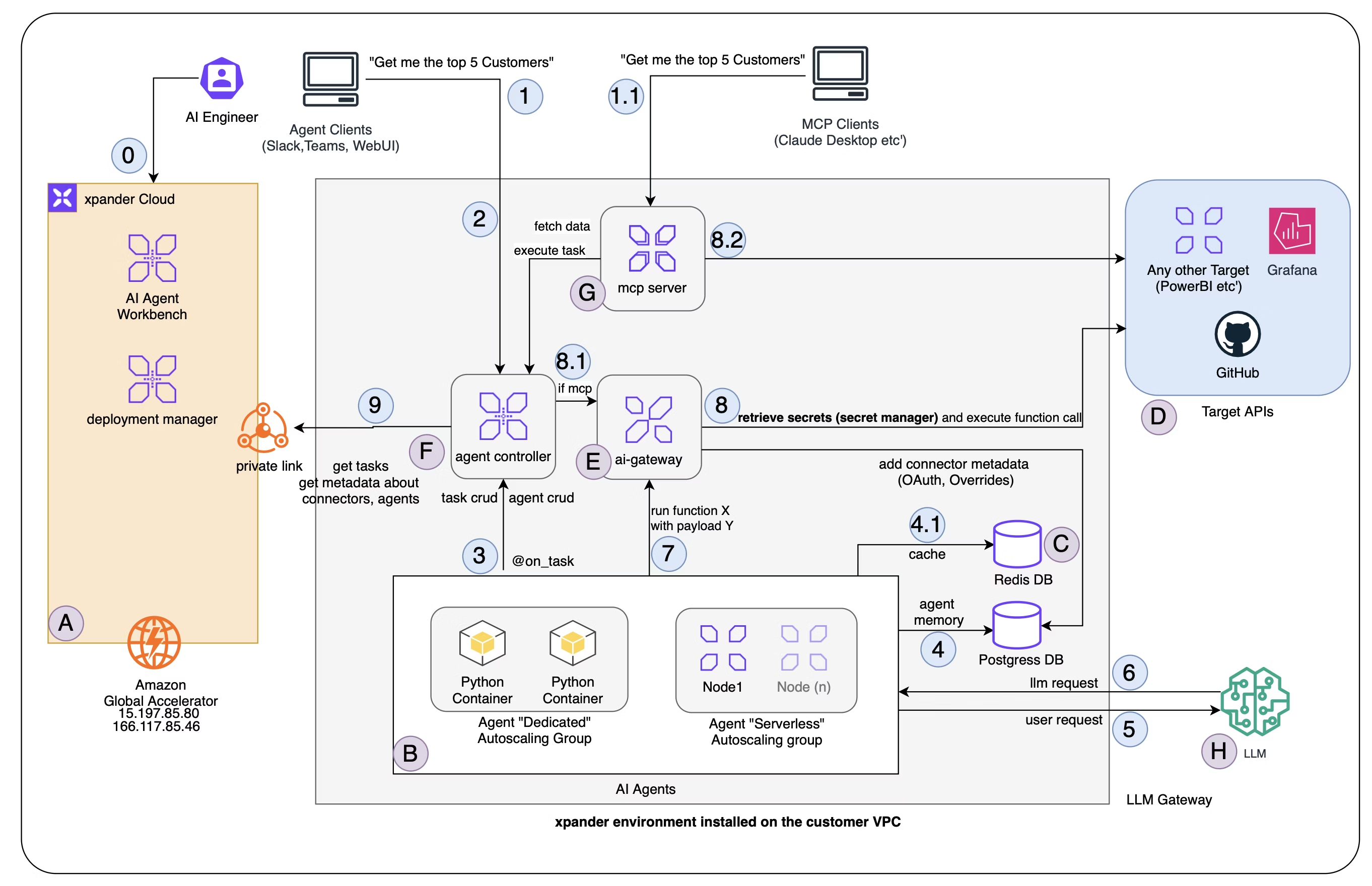
What Gets Deployed
| Component | Description |
|---|---|
| Agent Controller | Task scheduling, queue management, and orchestration |
| Agent Worker | Task execution runtime |
| API Proxy | API endpoint and request routing |
| API | REST API service |
| MCP | Accepts MCP client connections, generates tasks |
| Database | Agent memory, message history, and monitoring (PostgreSQL) |
| Redis | Cache and fast lookups |
| Chat UI | Chat interface with per-thread subdomains |
| Code Runner | Code execution runtime |
| AWS APIs Operator | AWS resource management |
How It Works
Clients connect directly to the Kubernetes cluster in your VPC — Slack, WebUI, MCP clients, other agents, personal agents, containers, and the API. When usingapp.xpander.ai, the cloud UI handles authentication and metadata download (which self-hosted cluster to connect to), then the client opens a direct connection to the cluster. All data flows between the client and the cluster from that point. Chat threads, activity views, task results, and all runtime data are served directly from the on-premises cluster.
Requests route through ingress to the Agent Controller in your VPC. The controller schedules tasks, and Agent Workers execute them — consulting LLMs for each turn, persisting messages in PostgreSQL, and calling external tools through the AI Gateway. Downstream targets (GitHub, Grafana, etc.) are accessed exclusively through the gateway, never directly from agents.
The only connection to xpander Cloud is the Agent Controller syncing outbound for metadata, heartbeats, and downloads connector updates. Agent and connector definitions are authored in the Workbench, but all execution and all user-facing data stays in your VPC.
Deployment Manager
The deployment manager handles communication between your self-hosted environment and xpander Cloud. It authenticates usingorganization_id + environment_id + api_key. Your environment reports heartbeats and pulls commands — connector details, agent details, and MCP configuration.
Networking and Security
xpander.ai self-hosted deployment only makes outbound connections. There is no incoming traffic from xpander Cloud to your cluster.
Outbound Connectivity
| Option | Target | Details |
|---|---|---|
| Global Accelerator | 15.197.85.80, 166.117.85.46 | Public internet, encrypted over TLS |
| PrivateLink | com.amazonaws.vpce.us-west-2.vpce-svc-0101884b32f655197 | AWS private backbone — setup guide |
Data Residency
The user’s browser connects directly to the cluster. No runtime data passes through xpander Cloud.| Feature | Stays in your VPC? |
|---|---|
| Invoking agents (API to agent) | Yes — client connects directly to cluster |
| Chat threads and activity view | Yes — fetched from cluster, not cloud |
| Debugging agents (Monitor tab) | Yes — all data served from cluster |
| Knowledge Base file uploads and queries | Yes — stored and queried in cluster |
| User identity and login | No |
| Agent metadata (agent list) | No |
Security Summary
- Data at rest stays in PostgreSQL and Redis inside your VPC
- Credentials and API keys are Kubernetes secrets, used only by the AI Gateway and Agent Workers
- Control plane sync carries metadata and heartbeats only — user payloads never leave the VPC
Generated Hostnames
When you set adomain, these endpoints are created:
| Service | URL |
|---|---|
| API | https://api.{domain} |
| Chat | https://chat.{domain} |
| AI Gateway | https://ai-gateway.{domain} |
| Agent Controller | https://agent-controller.{domain} |
| Agent Worker | https://agent-worker.{domain} |
| MCP | https://mcp.{domain} |
| Code Runner | https://code-runner.{domain} |
| AWS Operator | https://aws-operator.{domain} |
Deployment Path
Set up your cluster
Need a new cluster? Follow the EKS Cluster Setup guide.
Already have one? Skip to the next step.
Configure deployment manager connectivity
Public TLS requires no setup — just ensure outbound access to the Global Accelerator IPs.
For PrivateLink, follow the Configure PrivateLink guide.
Install the Helm Chart.ai
Follow the Install the Helm Chart guide for SSL, ingress, Helm chart installation, DNS, and verification.
Add integrations
- Manage API keys for AI services (OpenAI, Anthropic, etc.)
- Set up the AWS Operator for Redshift, Athena, Power BI, and other AWS connectors
- Configure the SDK for self-hosted endpoints