

This page is being phased out. For the current approach to choosing a model, see Models and Memory in the User Guide.
- Models: choose a provider, bring your own keys, configure extra headers
- Model Settings: temperature and reasoning effort
- Planning Mode: structured task decomposition and progress tracking
- Reasoning Mode: extended thinking for complex problems
- Multi-Agent Orchestration: delegate tasks to specialized agents
Models
To change what model your agent uses:1
Open the General tab
In the Agent Studio, click the gear icon and go to General → LLM Settings.
2
Choose a provider
Select your provider from the dropdown. If using built-in keys, you’re done. Xpander handles billing. If using your own keys, enter them in the API key field.
3
Select a model
Pick from the Featured models list, or toggle to Custom and enter any model ID your provider supports. Custom mode is useful for fine-tuned models, newly released models, or provider-specific variants.
4
Publish
Click Publish to apply the new model. Your agent will use it for all subsequent conversations.
Supported Providers
OpenAI
OpenAI
Built-in access (pay-as-you-go) or BYOK
- GPT-5.4, GPT-5.3 Chat, GPT-5.2, GPT-5.1, GPT-5 Nano, GPT-5, GPT-5 Mini
- GPT-4.1, GPT-4.1-mini
- GPT-4o, GPT-4o Mini, GPT-4 Turbo
- GPT-3.5 Turbo
Anthropic
Anthropic
Built-in access (pay-as-you-go) or BYOK
- Claude Sonnet 4.6, Claude Opus 4.6
- Claude Sonnet 4.5, Claude Opus 4.5
- Claude Opus 4, Claude Sonnet 4
- Claude Sonnet 3.7, Claude Sonnet 3.5
Amazon Bedrock
Amazon Bedrock
BYOK: a Bedrock API key, or on self-hosted the pods’ own IAM identity (Pod Identity / IRSA) or an IAM role ARN the runtime assumes
- Claude Sonnet 4.6, Claude Opus 4.6
- Claude Sonnet 4.5, Claude Opus 4
- Claude Sonnet 4, Claude Sonnet 3.7, Claude Sonnet 3.5
- Claude Haiku 3.5
- Amazon Titan Text Express
Azure AI Foundry
Azure AI Foundry
BYOK: requires Azure AI Foundry credentialsAzure AI Foundry provides access to OpenAI models through Azure’s infrastructure.
- GPT-5.2, GPT-5.1, GPT-5 Nano, GPT-5, GPT-5 Mini
- GPT-4.1, GPT-4.1-mini
- GPT-4o, GPT-4o Mini
- GPT-4 Turbo, GPT-3.5 Turbo
ByteDance ModelArk
ByteDance ModelArk
BYOK: requires ByteDance ModelArk API keyNo featured models. Custom model identifier only. Access ByteDance’s model inference platform by entering your model ID in Custom mode.
Fireworks AI
Fireworks AI
BYOK: requires Fireworks AI API key
- GLM-4.6
- Kimi K2 Instruct 0905
- OpenAI gpt-oss-120b, OpenAI gpt-oss-20b
- Qwen3 235B A22B Thinking 2507, Qwen3 235B A22B Instruct 2507
Google AI Studio
Google AI Studio
BYOK: requires Google AI Studio API key
- Gemini 2.0 Flash, Gemini 2.0 Flash Lite
- Gemini 2.5 Pro, Gemini 3 Pro
NVIDIA NIM
NVIDIA NIM
BYOK: requires NVIDIA API keyMeta Llama Models:
- Llama 3.1 8B Instruct, Llama 3.1 70B Instruct, Llama 3.1 405B Instruct
- Llama 3.2 1B Instruct, Llama 3.2 3B Instruct
- Llama 3.3 70B Instruct
- Llama 4 Scout 17B, Llama 4 Maverick 17B
- Mistral 7B Instruct v0.3, Mistral Small 3.2 24B Instruct
- Nemotron Nano 4B v1.1, Nemotron Nano 8B v1, Nemotron Ultra 253B v1
Supported Gateways
Cloudflare AI Gateway
Cloudflare AI Gateway
BYOK: requires Cloudflare API key + base URLNo featured models. Requires a custom model identifier, API key, and base URL. Cloudflare AI Gateway provides caching, rate limiting, and observability for LLM requests.
Nebius Token Factory
Nebius Token Factory
BYOK: requires Nebius API keyNebius provides inference for open-source models.Meta Llama:
- Meta-Llama-3.1-8B-Instruct-fast, Meta-Llama-3.1-8B-Instruct, Llama-Guard-3-8B
- Llama-3.1-Nemotron-Ultra-253B-v1, Nemotron-Nano-V2-12b
- gemma-2-2b-it, gemma-2-9b-it-fast, gemma-3-27b-it, gemma-3-27b-it-fast
- Qwen2.5-Coder-7B-fast, Qwen3-235B-A22B-Instruct-2507, Qwen3-235B-A22B-Thinking-2507
- Qwen3-32B, Qwen3-32B-fast, Qwen2.5-VL-72B-Instruct
- Qwen3-Coder-30B-A3B-Instruct, Qwen3-Coder-480B-A35B-Instruct
- Hermes-4-70B, Hermes-4-405B
- INTELLECT-3, Kimi-K2-Thinking
- flux-dev, flux-schnell
OpenRouter
OpenRouter
BYOK: requires OpenRouter API keyOpenRouter provides unified access to 200+ models with automatic fallback, load balancing, and unified pricing.Featured:
- Prime Intellect: INTELLECT-3
- TNG: R1T Chimera (free), TNG: R1T Chimera
- Claude Opus 4.5, Claude Sonnet 4.5, Claude Haiku 4.5, Claude Opus 4.1
- OLMo 3 32B Think, OLMo 3 7B Instruct, OLMo 3 7B Think
- LFM2-8B-A1B, LFM2-2.6B
- Granite 4.0 Micro
- Cogito V2 Preview Llama 405B
- GPT-5 Image Mini, GPT-5 Pro, GPT-4o Audio, gpt-oss-120b, gpt-oss-20b (free), gpt-oss-20b
- Gemini 2.5 Flash Image (Nano Banana), Gemini 2.5 Flash Image Preview (Nano Banana)
- Qwen3 VL 8B Thinking, Qwen3 VL 8B Instruct, Qwen3 VL 30B A3B Thinking, Qwen3 VL 30B A3B Instruct
- Qwen3 Coder 30B A3B Instruct, Qwen3 30B A3B Instruct 2507
- GLM 4.6, GLM 4.6 (exacto)
- Hermes 4 70B, Hermes 4 405B
- Mistral Medium 3.1, Codestral 2508
- ERNIE 4.5 21B A3B, ERNIE 4.5 VL 28B A3B
- Nebulon Alpha
Tzafon LightCone
Tzafon LightCone
BYOK: requires Tzafon LightCone API keyNo featured models. Custom model identifier only. Access models through Tzafon’s LightCone inference platform by entering your model ID in Custom mode.
Bring Your Own Keys
Contact Sales to enable Bring your Own LLM Keys for your organization.
If your AI Gateway is behind a private subnet or firewall, make sure to run Xpander in the same network with access to those models.
Use Custom Models
The models listed above are featured models that have been tested with Xpander. To use a different model from your provider, select “Custom” in the model dropdown and enter the model name exactly as specified by your provider (e.g.,custom-model-id). This is particularly useful for:
- Private or fine-tuned models only you have access to
- Newly released models not yet in the dropdown
- Provider-specific model variants with custom endpoints
Model Settings
Two settings fine-tune how the model generates responses. Configure these in the General tab → LLM Settings panel.LLM Extra Headers
You can configure custom HTTP headers to be sent with every LLM request. This is useful for:- Sending custom authentication tokens to AI Gateways
- Adding tracking or metadata headers (e.g.,
X-Request-ID,X-Organization-ID) - Passing compliance or security headers required by your infrastructure
- Integration with observability platforms like Helicone, LangSmith, or custom proxies
- Organization Default Headers: Set default headers at the organization level in Admin Settings → LLM Settings that apply to all agents
- Agent-Specific Override: Override organization defaults with agent-specific headers in the Agent Studio General → LLM Settings panel
Supported Providers: Extra headers are currently supported for OpenAI, Helicone, Nebius, OpenRouter, Fireworks, and NVIDIA NIM providers. For Anthropic, headers are sent as
default_headers. Google AI Studio and Amazon Bedrock don’t support custom headers.Helicone Observability Integration
Helicone Observability Integration
Track and monitor all LLM requests through Helicone:
Organization Headers (Admin Settings)
Agent Headers (Agent Studio)
Custom AI Gateway Authentication
Custom AI Gateway Authentication
Route requests through your internal AI Gateway with authentication:
Organization Headers
Request Tracking and Compliance
Request Tracking and Compliance
Add tracking and compliance headers for audit logs:
Organization Headers
Multi-Environment Setup
Multi-Environment Setup
Differentiate between development and production environments:Production Org Headers:Dev Agent Override:
Planning Mode
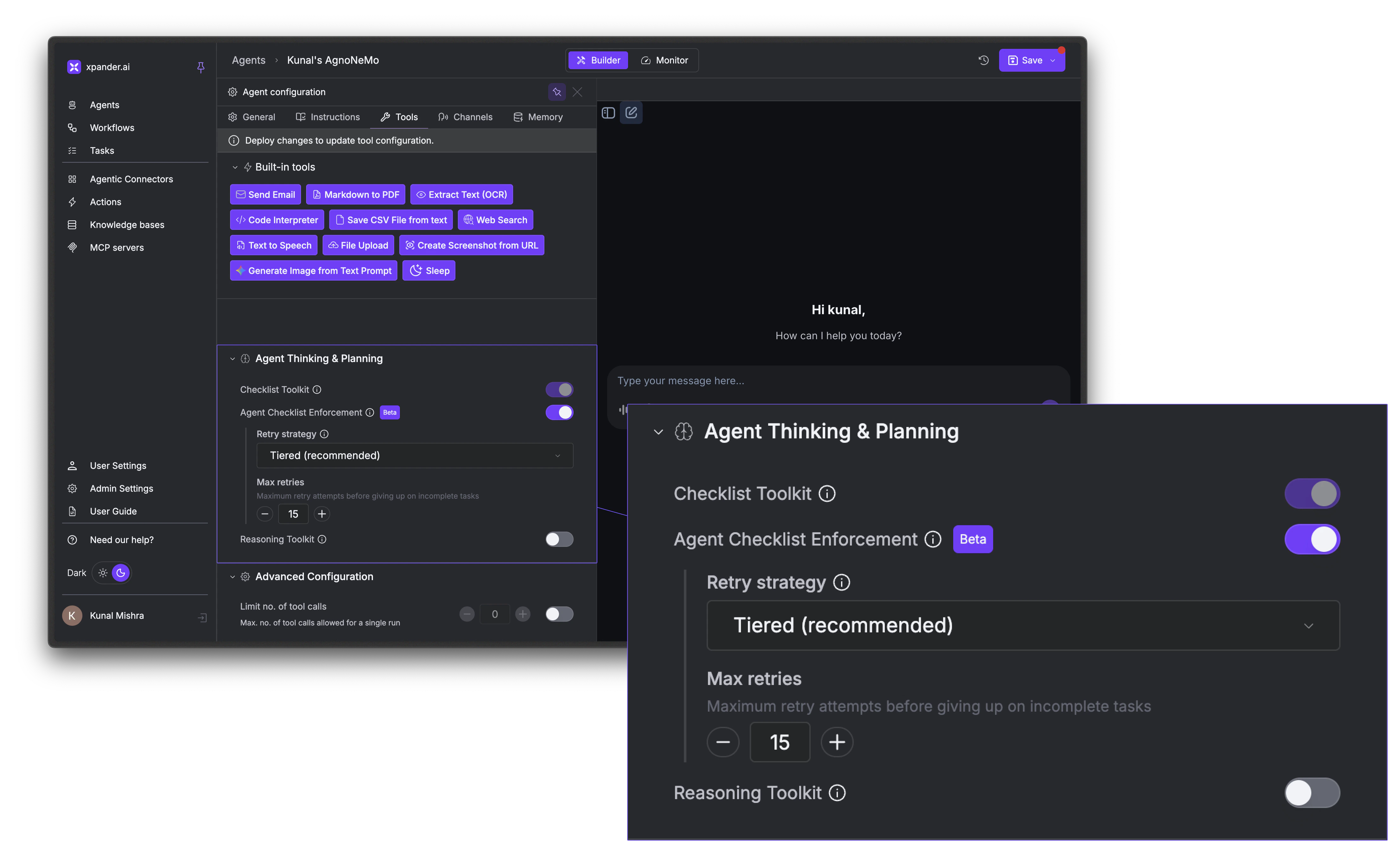
Planning Mode gives your agent the ability to break complex tasks into structured, trackable steps. When enabled, the agent receives a set of to-do list tools and is nudged to create a checklist before starting work. It then works through the items one by one, marking each complete and reporting progress along the way.How to Enable
In the Agent Studio, go to the Tools tab → Agent Thinking & Planning section:- Checklist Toolkit: Toggle this on to give the agent planning tools. The agent will be nudged to create a plan and work through it.
- Agent Checklist Enforcement (Beta): When enabled, execution blocks entirely until the agent creates a plan. Without this, the agent is encouraged to plan but not forced to.
How It Works
Planning Mode gives the agent tools to create, update, and manage a to-do list. The typical flow looks like this:- The agent receives a prompt and creates a checklist of steps it needs to complete
- It works through each item, using its tools and marking tasks done as it goes
- If it discovers new work along the way, it adds items to the list dynamically
- The checklist updates in real-time in both the chat interface and the Monitor tab
- If tasks remain incomplete after a run, the system retries automatically based on the configured retry strategy
Retry Strategies
Planning Mode also nudges the Agent to complete its checklist before finishing its response. If some tasks remain incomplete, it prompts the agent to retry.When to Use Planning Mode
Reasoning Mode
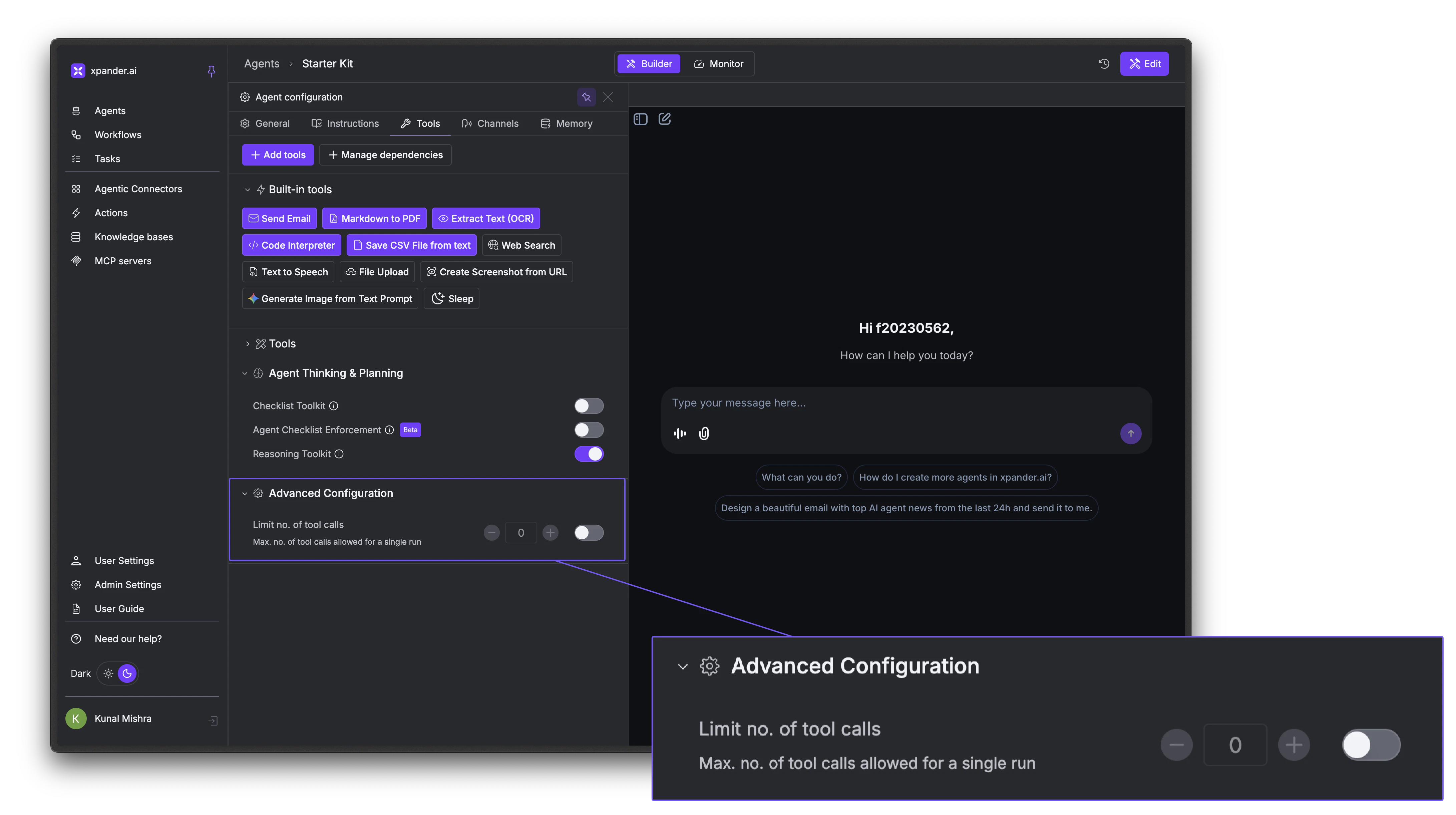
Reasoning Mode exposes athink tool that gives the agent a private scratchpad for extended thinking. Instead of responding immediately, the agent can reason through the problem step-by-step, considering multiple approaches, evaluating tradeoffs, and self-correcting before delivering a final answer.
Reasoning steps are visible in the activity log and the chat interface, and are delivered in real-time as think events when streaming.
To enable it, go to the Tools tab → Agent Thinking & Planning section and toggle on Reasoning Toolkit. No additional configuration is needed.
Multi-Agent Orchestration
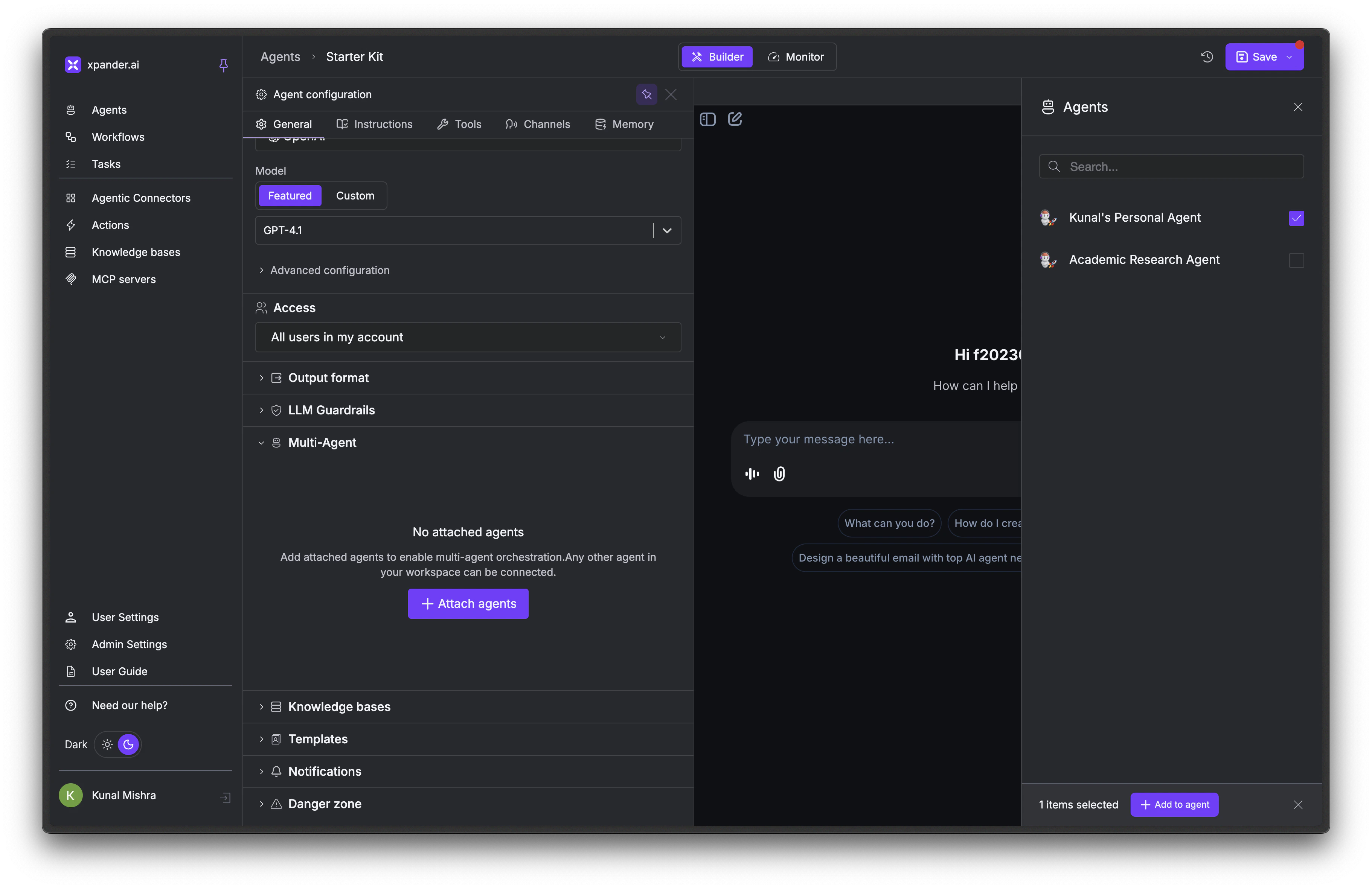
Your agent can call other agents in your workspace to handle specialized tasks. Instead of building one agent that does everything, you can create focused agents and connect them together. For example: create 3 specialized agents: a research agent, a writing agent, a data analysis agent. Each has its own knowledge bases, tool connections, and system prompts. Then create a primary agent that delegates work to whichever specialist is best suited.1
Open the General tab
In the Agent Studio, scroll down to the Multi-Agent section and expand it.
2
Attach agents
Click + Attach agents. A panel opens showing all agents in your workspace. Select the agents you want this agent to be able to call.
3
Click Add to agent
Click + Add to agent to confirm. The attached agents now appear as available tools the primary agent can invoke during execution.
LLM Guardrails
Safety checks applied to user input and model output before and during each run. Configure them under the LLM Guardrails section in the Agent Studio General tab.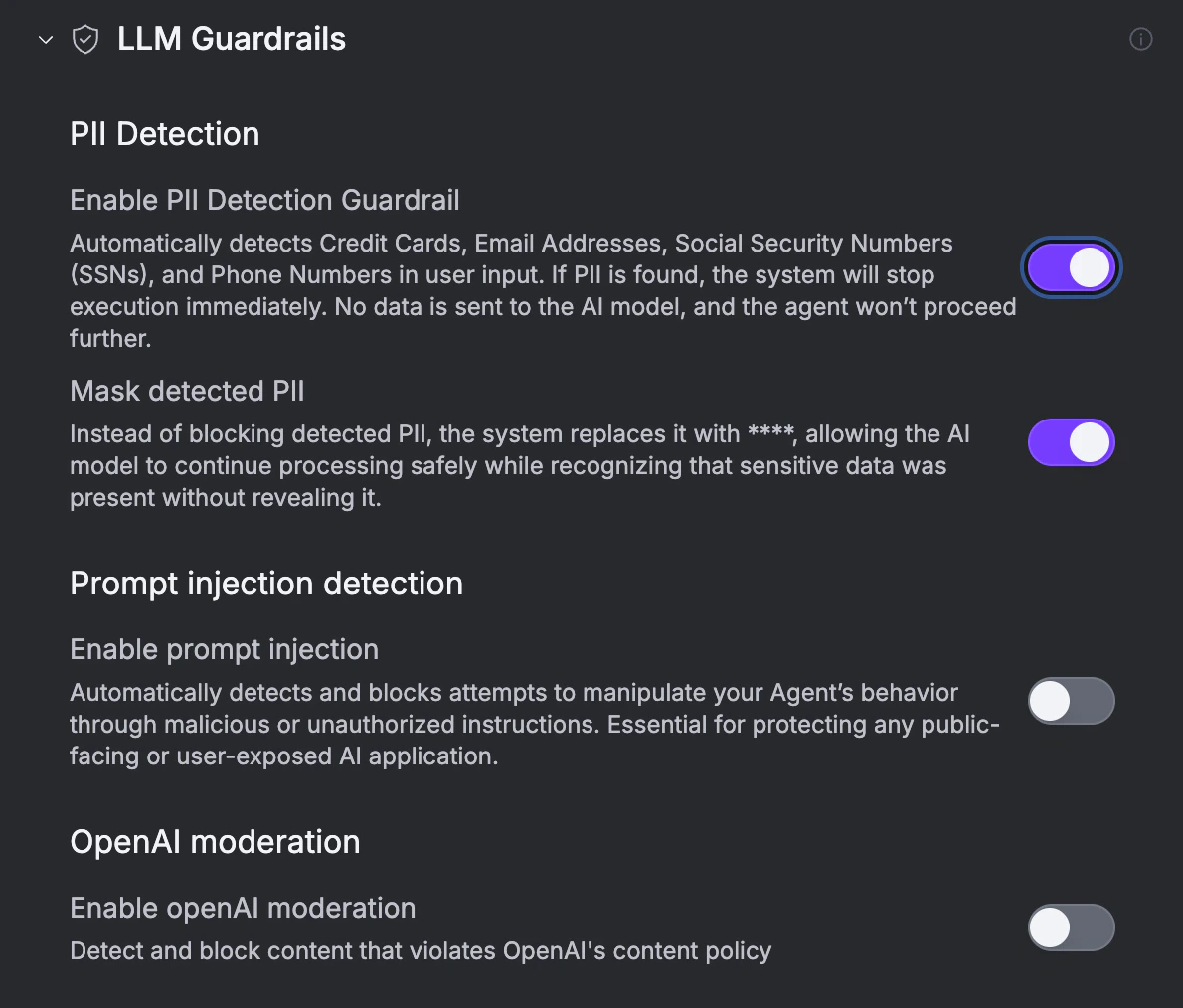
Next Steps
Testing & Chat
Test model behavior and intelligence features
Tools & Connectors
Give your agent actions to take
Memory & State
Configure what your agent remembers
Deploy an Agent
Publish and connect to channels