

What each budget covers
Budgets stack: a person’s budget and their group’s both apply. An agent’s call counts for the agent, the turn and the person who started the run. Every call counts toward the organization limit.
Set the organization limit
In Overview, on Organization limit, choose Set limit (Edit once a limit is set), enter Limit per month (empty for none) and choose Save limit. When it is reached, requests stop. Overview also counts budgets over the limit, near the limit (75-99%) and under 75%. An account run by a main account shows an Account limit card. Only the main account’s admins change it, and the account’s own limit can only be lower.Add a budget
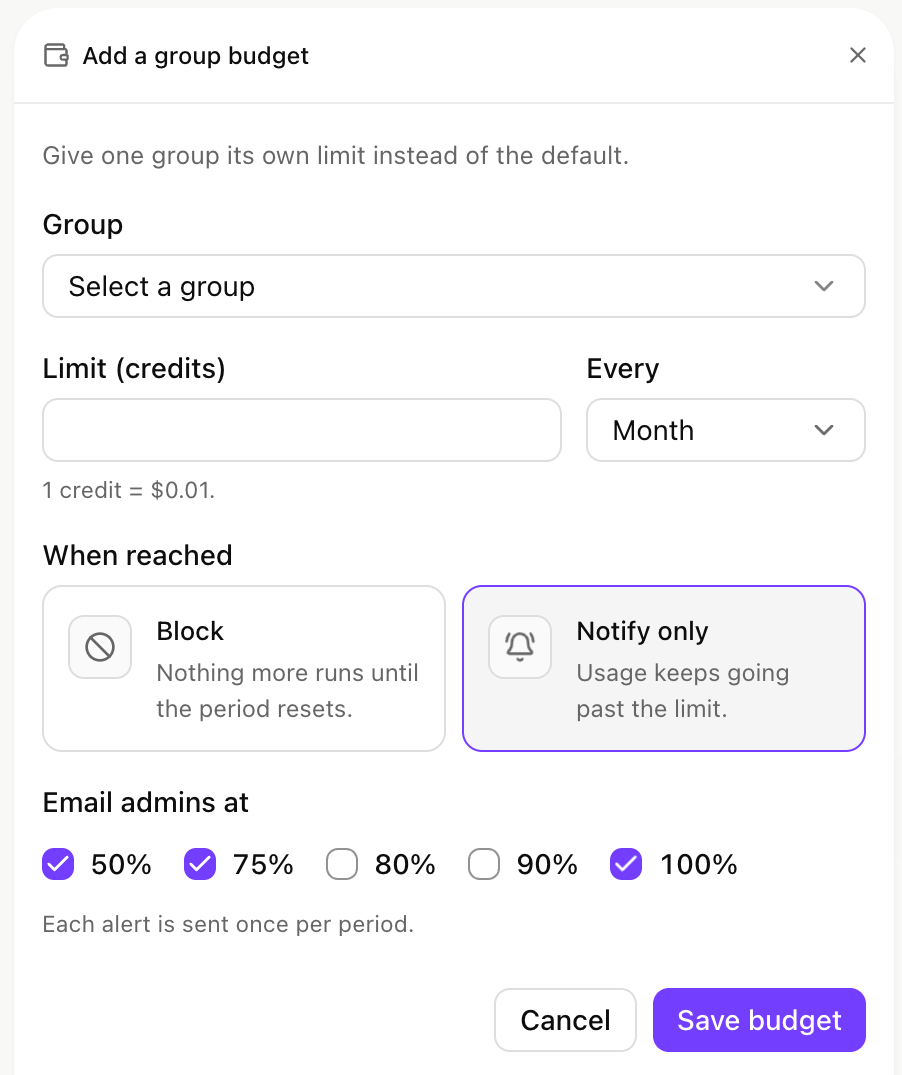
Adding a budget for a group: the limit, the period, what happens when it is reached, and when admins are emailed.
user). Then set:
- Limit and Every (Day, Week or Month).
- When reached: Block stops calls until the period resets. Notify only lets usage continue.
- Email admins at: 50%, 75%, 80%, 90%, 100%, once per period each.
Rate limits
Alongside a budget, a rate limit caps Requests/s, Tokens/s (input and output together) and At once (calls in flight), over a rolling 60 seconds. The minimum is 1 request and 100 tokens a second, and an empty field means no limit. Open it with Rate limit and budget in a row’s menu. Calls over the limit get429 (Errors). If the menu shows only Set budget, rate limits are off for your organization: ask your xpander contact.
Agent and turn budgets
These are set in each agent’s settings, under Advanced. Budget rules, opened from the top of the Budgets page, holds what they share: Maximum agent budget, Enforce agent, turn and member budgets (on by default; off means track only, never block) and Email alerts for agent, turn and member budgets.What people see at a limit
Notify only never refuses a call.
Self-hosted installs
Hybrid and Air-Gapped installs enforce agent, member and organization budgets for agents on the install, with their own counters. A block holds even when the install can’t reach xpander cloud. Calls on your own keys count at the cost the gateway measures, matching Logs. Alert emails are sent from xpander cloud only.- Hybrid: budgets are set in the Platform and reach your install within seconds. Your install reports its spend, so cloud totals include it. People’s coding tools go through xpander cloud and are stopped there.
- Air-Gapped: budgets are set and enforced entirely inside your install.
Next steps
Fix a refused call
What
429 and 402 mean.See what each request cost
Spend per request, person and agent.