

The Models page
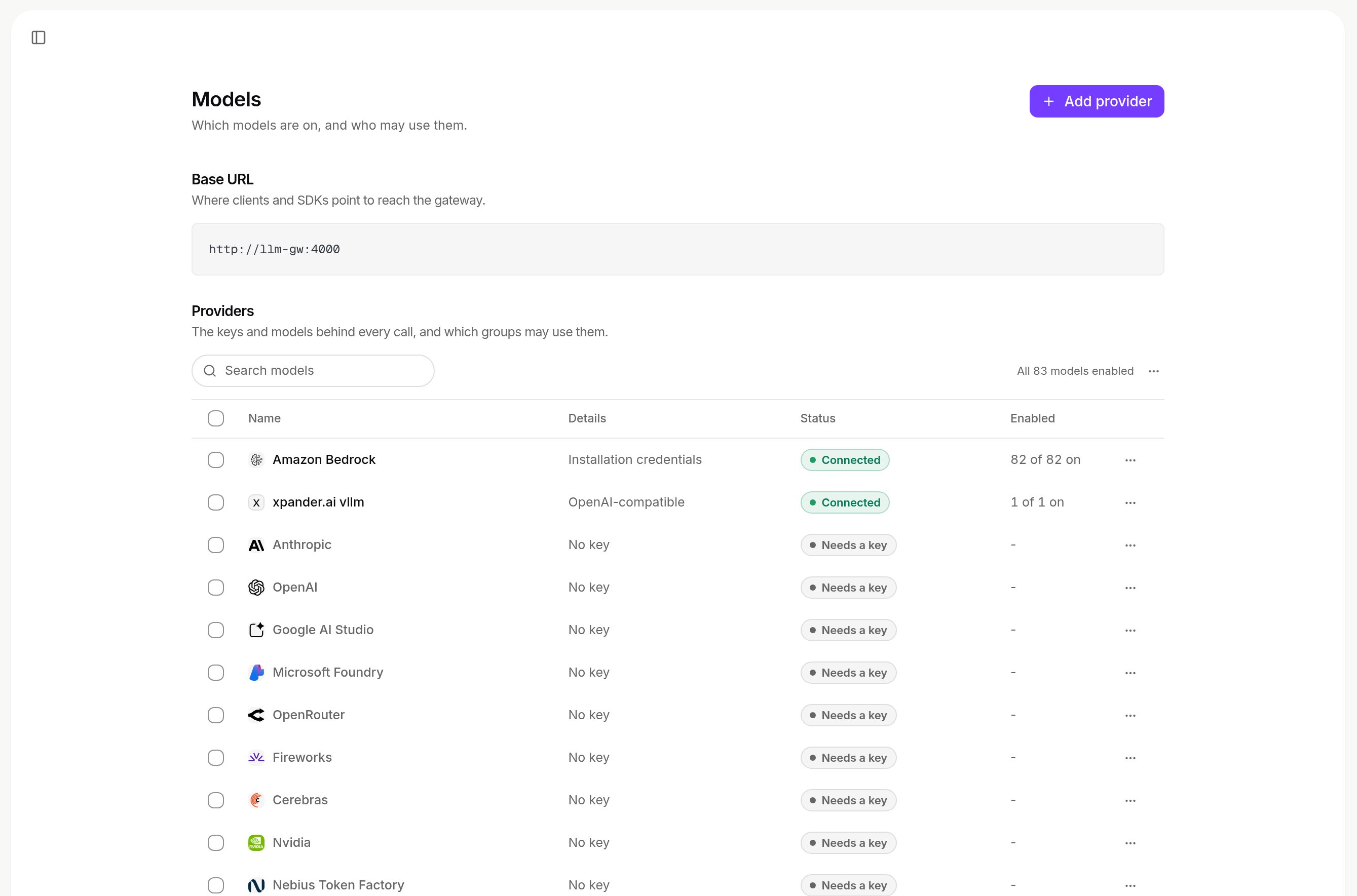
- Base URL: the address clients and SDKs call. On a self-hosted install with no published host, the in-cluster address:
http://llm-gw:4000on Air-Gapped,http://xpander-llm-gw:4000on Hybrid with the release namexpander(release names). - Get started: a checklist, hidden once the required steps are done.
- Providers: each with Connected, Needs a key, All models off or Key error.
- Organization defaults: what new agents start with (below).
- Who can use what: who can call which model (below).
Add a provider
PROD_ANTHROPIC), and choose Add provider. Your own keys need the Enterprise plan; without it the page shows Bring-your-own LLM keys is an Enterprise feature with Contact us.
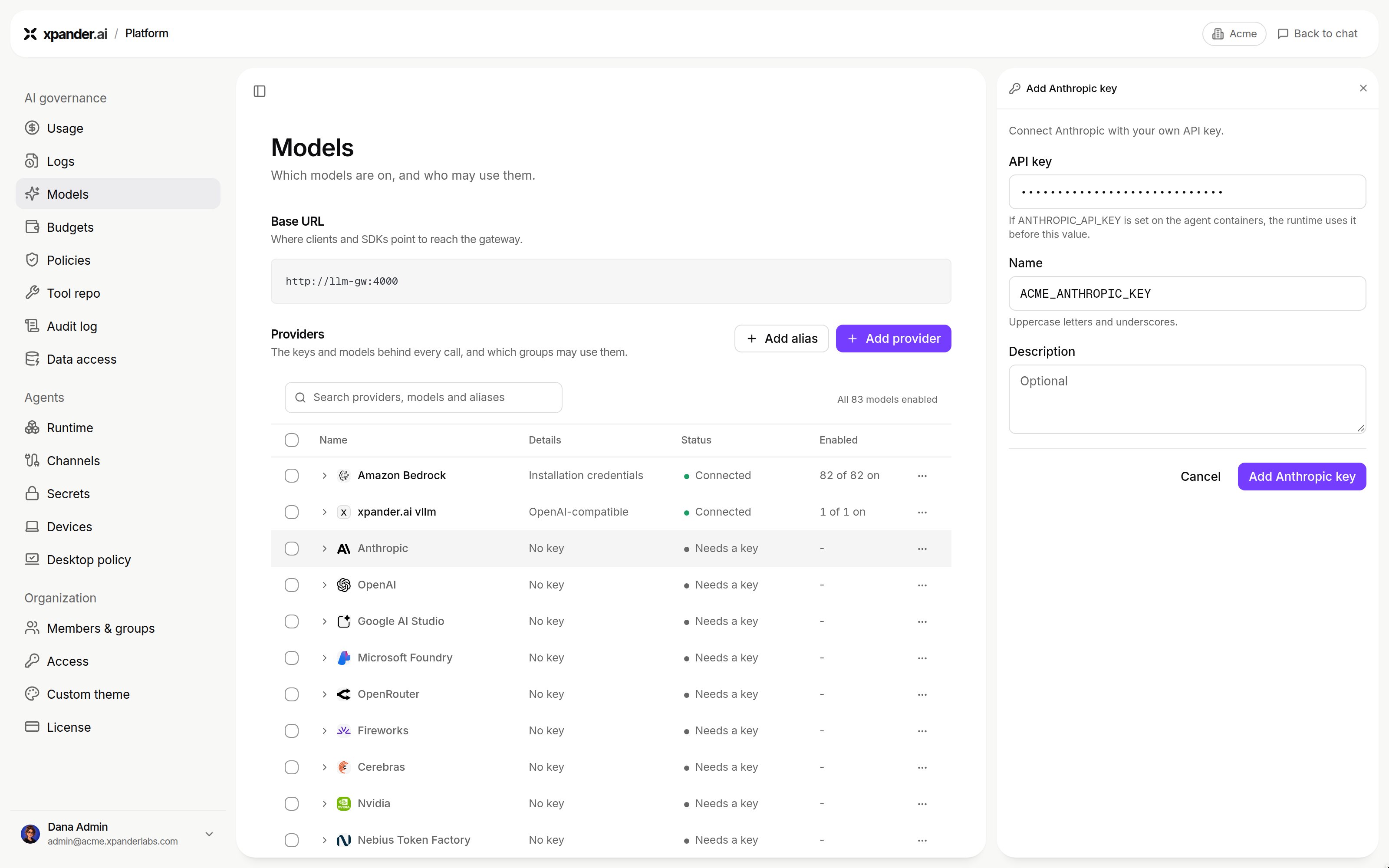
Use your own key on a built-in provider: the API key, its name and an optional description. Shown with sample data.
Providers and their install key names
Providers and their install key names
Amazon Bedrock
Set Credential to IAM role to store no secret: xpander assumes the role for short-lived credentials on each use, with your organization ID as the external ID on xpander cloud. Enter the Role ARN and Region, choose Test connection, then Add role. Full steps: Amazon Bedrock with an IAM role. Fable- and Mythos-class models also need a per-region data-retention opt-in.Data-retention opt-in for Fable- and Mythos-class models
Data-retention opt-in for Fable- and Mythos-class models
- With the default mode, every call fails with
400 data retention mode 'default' is not available for this model. Accepted modes:provider_data_share, oraws_reviewwhere offered. - There is no console switch. Per region, call
PUT https://bedrock.<region>.amazonaws.com/data-retentionwith{"mode": "provider_data_share"}(SigV4-signed, IAM actionbedrock:PutAccountDataRetention), for every region aglobal.inference profile can route to. - The first call after the change can still fail while it propagates. Retry first.
- It applies to whichever AWS account signs the call. An organization’s own stored Bedrock key wins over the install’s credential, so that account needs the opt-in too.
- Older Anthropic models need no opt-in, which is why the error looks model-specific.
Bedrock on a self-hosted install: auth methods and settings
Bedrock on a self-hosted install: auth methods and settings
amazon_bedrock leg. The Agent Controller resolves AWS auth in this order, and no executor sees it:agent-worker service has its own constraint on keyless Bedrock: see Amazon Bedrock: key vs IAM.Azure endpoint
Each Microsoft Foundry key needs its resource’s Azure endpoint (from Keys and Endpoint in the Azure portal, such ashttps://my-resource.openai.azure.com); API version (such as 2024-10-21) is optional. Use Set endpoint or Edit endpoint in the key’s menu. A key without one shows No endpoint and its calls are refused. On a self-hosted install with an Azure endpoint set at install time, a key’s own endpoint is optional.
Custom endpoints
Connect a model server or gateway you run (vLLM, Ollama, NVIDIA NIM, an internal gateway). Any admin who can add provider keys can. Choose Add provider (then Custom endpoint on xpander cloud).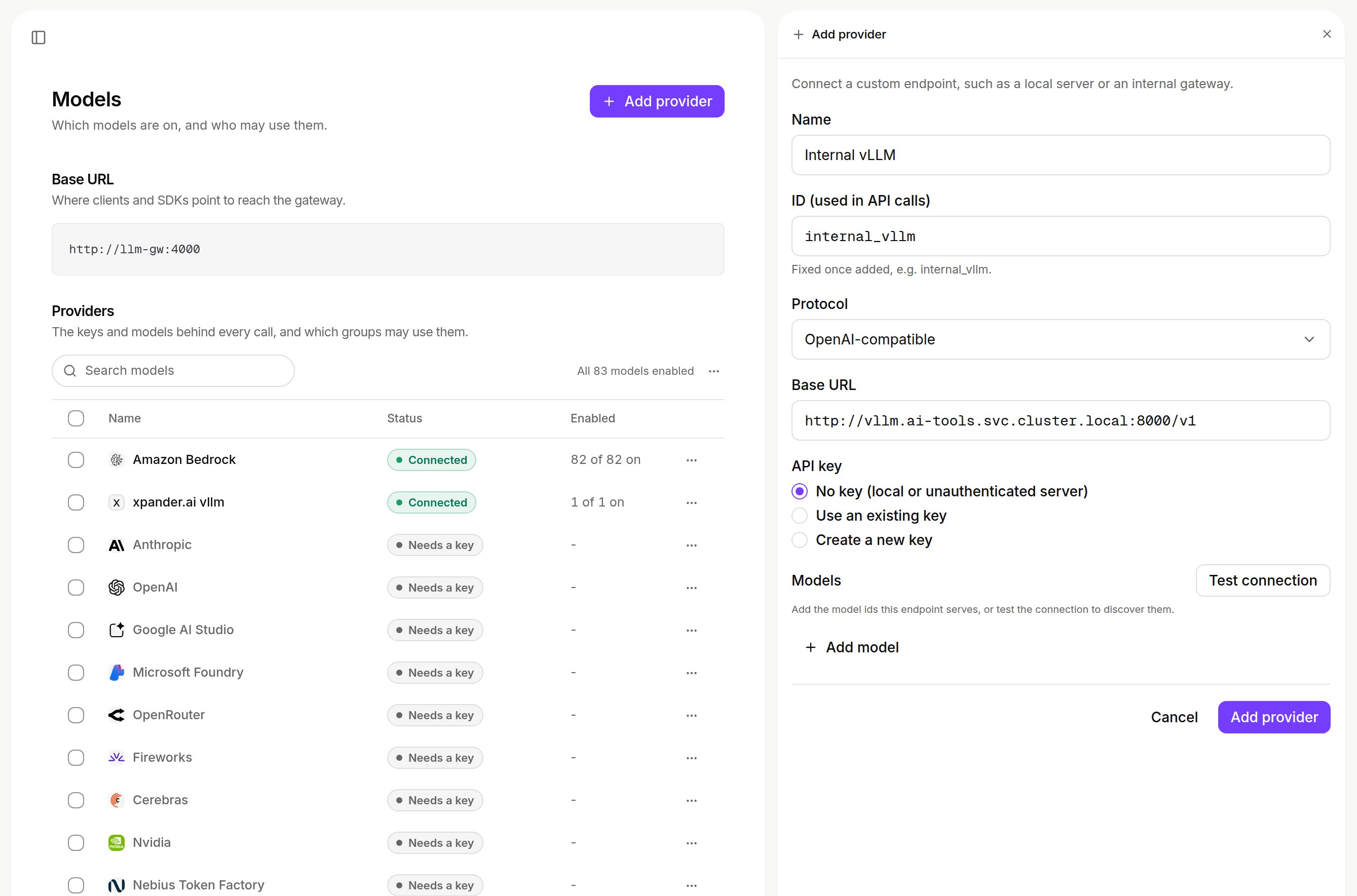
Adding a custom endpoint: name, ID, protocol, base URL, API key and models.
Name it
Pick the protocol and base URL
/v1 path, as the pods reach it: public https on xpander cloud (https://ai-gateway.example.com/v1), inside your network on Hybrid or Air-Gapped (http://vllm.ai-tools.svc.cluster.local:8000/v1). See address rules.Pick a key
List the models and save
tools badge marks function calling), or Add model adds IDs. Choose Add provider. The models are on for your organization at once.Endpoint health checks
Endpoint health checks
How the gateway adapts requests to each model
How the gateway adapts requests to each model
context_length_exceeded for Codex and OpenCode, Anthropic’s “prompt is too long” for Claude Code.Values come from four sources: Family default (built in for a model family), Learned by Test model (a check that found a fix saves it), Set by an admin (wins over the other two), and Discovered (the context length the endpoint reports, used when nothing else sets one). Family defaults: gpt-oss maps effort to reasoning_effort. Qwen, DeepSeek and GLM map it to chat_template_kwargs. Kimi and Nemotron strip thinking and effort, and Kimi accepts at most 128 function definitions. Each model’s context length comes from the endpoint’s model list (/v1/models, the max_model_len field on vLLM). The engine version comes from vLLM (/version), SGLang (/get_server_info) or NVIDIA NIM (/v1/version).A server with no key
A server with no key
<ID>::<model>, such as internal_vllm::llama-3.3-70b. Check now and Test connection still work. Calls show in Logs at the price set with Edit model, and are not charged in credits.Using a custom provider in agents
Using a custom provider in agents
POST /v1/agentsaccepts only built-in providers inmodel_provider. A custom ID gets422.- Pick a custom provider per conversation in the composer’s Harness and model popover (Claude Code, Codex, OpenCode).
- A local model needs a context window well above the prompt xpander composes. Worked example: Air-Gapped: a worked vLLM setup.
- With no
/responsesroute on the endpoint, the gateway sends Codex calls as chat completions.
Model endpoints on xpander cloud
On xpander cloud, a model endpoint must be a publichttps address. On Hybrid or Air-Gapped it can be private, but never link-local or cloud metadata. Both are checked when saved and on every call.
Allowed and refused addresses
Allowed and refused addresses
Turn models on
In a provider’s row (or Keys and models…), tick the models the organization may use. Prices are USD per 1M tokens. Disable provider or Disable model stops it everywhere. A model blocked at the gateway shows Off (No one in the organization can use this model.) until Unblock at the gateway.Who may use which models
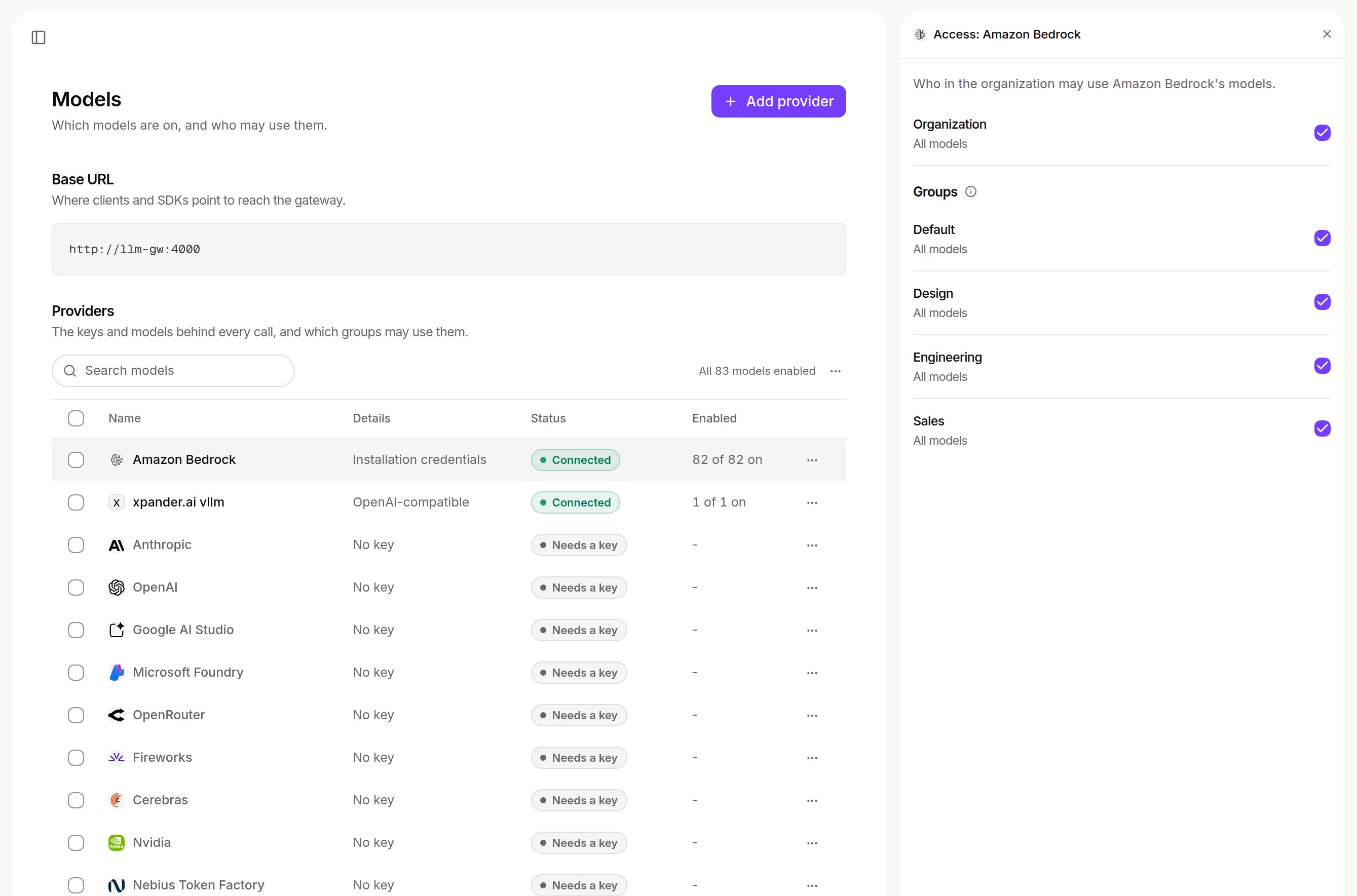
Who may use it: the organization and each group, with which of the provider's models they may use. Shown with sample data.
Aliases and fallbacks
An alias is a model name you define, such asdefault-coding. Clients send it as the model and the gateway calls its target, so changing the target moves every client at once.
Add one with Add alias… in a model’s ⋯ menu. An overload or server error is retried on the same model, then on each fallback in order; a failure that will not change (invalid request, model off, spent budget) is not. Each fallback uses the key assigned for its own provider, and each attempt shows under Routing in Logs. Callers are still limited to the models they may use.
Add an alias: names, target and fallbacks
Add an alias: names, target and fallbacks
Start from a model
Name it and choose the target
Add fallbacks and save
xp- are reserved: Names starting with xp- are xpander’s built-in models; choose another name for: …Read, edit and remove aliases, and where people find them
Read, edit and remove aliases, and where people find them
/v1/models on the gateway address.Whose key pays
A provider can hold several keys, such as one per team. In its card under AI Gateway, set the Organization default (or Automatic), assign keys in Give a group, person or agent its own key, and confirm with Check a person or agent. Each call uses the first key assigned to:- the agent making the call
- the person making the call
- the person’s primary group
- the organization default for that provider
Key labels and rotation details
Key labels and rotation details
- Rejected by the provider marks a key the provider refused. Used by the gateway marks the one in use.
- Calls on keys xpander provides are charged in credits. Calls on a key you brought, agent or organization level, never are.
- A provider with no key of your own shows the xpander key row (Metered in credits.) on xpander cloud, Installation credentials on a self-hosted install with a key in
secrets.static, and Needs a key otherwise. Calls to a provider that needs a key are refused with a message that names it. - A deleted key stops being used from the next call.
Keys on a self-hosted install
The gateway is always on self-hosted, so every provider your agents use needs a key, the organization’s or the install’s, or calls are refused naming it. Hybrid agents never use xpander’s keys.Where an agent's key comes from, and how to set an install key
Where an agent's key comes from, and how to set an install key
secrets.static.<provider>ApiKey or a Kubernetes secret referenced with envFromSecretKeys. The keys a call can use are shown in the Providers table as Connected or Needs a key.--reset-then-reuse-valuesneeds Helm 3.14 or later. It keeps your values and applies the chart’s defaults for the rest.- Provider credentials live only on the Agent Controller. An Anthropic key there egresses to
api.anthropic.com; to use your own gateway, setLLM_PROXY_ANTHROPIC_BASE_URL(Route the controller through your gateway). - A key named by an environment variable on agent-controller (custom provider, agent or organization default model) never reads the install’s own credentials. A name on the reserved list reads as no key (reserved key names).
- Pods restart on their own when a secret changes. The
xpander-staticsecret has a Helm keep policy: if a key is not picked up after an upgrade, patch the secret and restartxpander-agent-worker. Full mapping: Hybrid: managing LLM API keys. - Install-level defaults:
global.llm.defaults.{provider,model}andglobal.llm.gateway.{provider,model,apiBase}in the chart values. Bedrock:global.llm.bedrock(Amazon Bedrock).
Defaults for new agents
The organization’s default provider picks a new agent’s harness, unless the create names one. Changing defaults does not touch existing agents.Which harness and model a new agent gets, and the install knobs
Which harness and model a new agent gets, and the install knobs
-
The organization’s default LLM picks the CLI:
No default, or a provider no CLI runs, falls through.
-
The install’s default knobs (env on the
agentsandagent-controllerservices, the chart values below on Air-Gapped). -
The baked defaults: Claude Code on Anthropic direct with Fable 5.1 (
claude-fable-5-1), Codex ongpt-6-astra, OpenCode onanthropic/claude-opus-5.
global.harness.defaultProviders.claudeCode: amazon_bedrock and global.harness.defaultModels.claudeCode: <Bedrock model id>. Without them, the first turn fails with 503 no anthropic credential configured for harness agents, even when the organization’s default model is on Bedrock.