

Local LLM inference
xpander speaks the OpenAI-compatible API, so any local runtime that exposes it plugs in:
Size the inference pool separately: it is your infrastructure, not part of the chart. Hosted providers also work if your egress allows, with the same LLM provider keys.
Two models are declared at install: the agents’ default and the gateway model that filters requests first (
global.llm.gateway.{provider,model,apiBase}). Each install or upgrade converges the organization’s defaults to the chart’s declaration only when that declaration changed, so defaults an admin edited in the UI survive upgrades.
Summaries around agent work (thread titles, context compaction, evaluation judges) use the org default model, backed by the install’s other providers. None dials a public endpoint on a sealed install.
Amazon Bedrock without a key
In images built after 27 August 2026, chat, tasks and their summaries use the pods’ own AWS identity (EKS Pod Identity or IRSA): leaveglobal.llm.bedrock.bearerTokenSecret empty and set global.llm.bedrock.region.
- The pod role needs
bedrock:InvokeModel,bedrock:InvokeModelWithResponseStream,bedrock:Converseandbedrock:ConverseStreamon*(theglobal.*profiles route across regions), bound to bothdefaultandagent-controllerServiceAccounts. No second role is assumed. - The account must be opted in to Bedrock data retention for those models in every region a
global.profile spans. A sealed network needs VPC endpoints forbedrock-runtime,stsandeks-auth. - A Bedrock API key in
bearerTokenSecretis the alternative. - The “IAM role” method under Platform > AI governance > Models applies to the Claude Code leg only. If such an entry exists and chat fails, remove it and restart
agent-controller,agent-worker,agents,actionsandfunctions.
A working keyless declaration, from a customer install on EKS
A working keyless declaration, from a customer install on EKS
bearerTokenSecret and assumeRoleArn unset, put the Bedrock permissions on the role the pods run as (xpander-sa-role there), bind it to default and agent-controller, and upgrade. No separate Bedrock role is needed.global.llm.bedrock.assumeRoleArn (plus assumeRoleExternalId), or with no token and no role, the pod’s own credentials. global.llm.bedrock.baseUrl points it at your VPC endpoint. Fable- and Mythos-class models also need the per-region data-retention opt-in. See AI vendors.
A worked vLLM setup on EKS Auto Mode
Checked end to end on an Air-Gapped install: vLLM serving a small instruct model on a T4, registered as a custom provider. The cluster side is yours. xpander needs only the address. GPU capacity. ANodePool limited to g4dn with a nvidia.com/gpu taint gets a T4 node in about two minutes, exposing nvidia.com/gpu: 1 with no device plugin. It needs nodeClassRef group: eks.amazonaws.com, kind: NodeClass, name: default. Keep weights on a PersistentVolumeClaim mounted as HF_HOME (pre-loaded on a sealed network).
Five things that stop vLLM:
- A Service named
vllminjectsVLLM_PORT=tcp://...and vLLM refuses to start (VLLM_PORT ... appears to be a URI). SetenableServiceLinks: falseor rename the Service. - A T4 needs
--dtype=half. vLLM 0.11 crash-loops on a T4.vllm/vllm-openai:v0.9.2works. - Pass the key as
VLLM_API_KEY, not--api-key(which logs it). It guards only/v1./health,/metricsand/tokenizeanswer without it, so keep port 8000 on aClusterIPService, never an ingress or load balancer. - Start with
--enable-auto-tool-choice --tool-call-parser=hermes, or Add provider marks the model as unable to run agents. - Leave room above the composed prompt.
--max-model-len=8192failed with400 This model's maximum context length is 8192 tokens. However, you requested 8298 tokens, shown as Unknown model error (controller log:Non-retryable model provider error: Unknown model errornext to[prompt-budget] system_message_tok=...).--max-model-len=32768ran. Custom models also logunknown model.id ... defaulting to 128,000 window.
The manifests: NodePool, PersistentVolumeClaim, Deployment and Service
The manifests: NodePool, PersistentVolumeClaim, Deployment and Service
The manifests, with account-specific values replaced by placeholders:
Register the endpoint in xpander
- Platform > AI governance > Models, Add provider.
- Name is free text, and ID (used in API calls) derives from it and is fixed. Protocol: OpenAI-compatible. Base URL: the address the pods reach, for example
http://vllm.<namespace>.svc.cluster.local:8000/v1. In-cluster addresses work on Hybrid and Air-Gapped. xpander cloud accepts only a publichttpsaddress. - API key: No key (local or unauthenticated server), Use an existing key, or Create a new key with a Key name and the API key (the
VLLM_API_KEYvalue). - Test connection shows Reachable and the served models. A
toolsbadge marks models that accept function calls. Add the model, with an optional Display name. - Click Add provider.
- In the provider’s Keys and models…, tick the models the organization may use. Prices (USD per 1M tokens, via Edit model) track spend and are never charged. Who may use it… sets access. New models wait under New models unless Approve new models automatically is on. Agent readiness shows, from the last Test model, which harnesses work with each model.
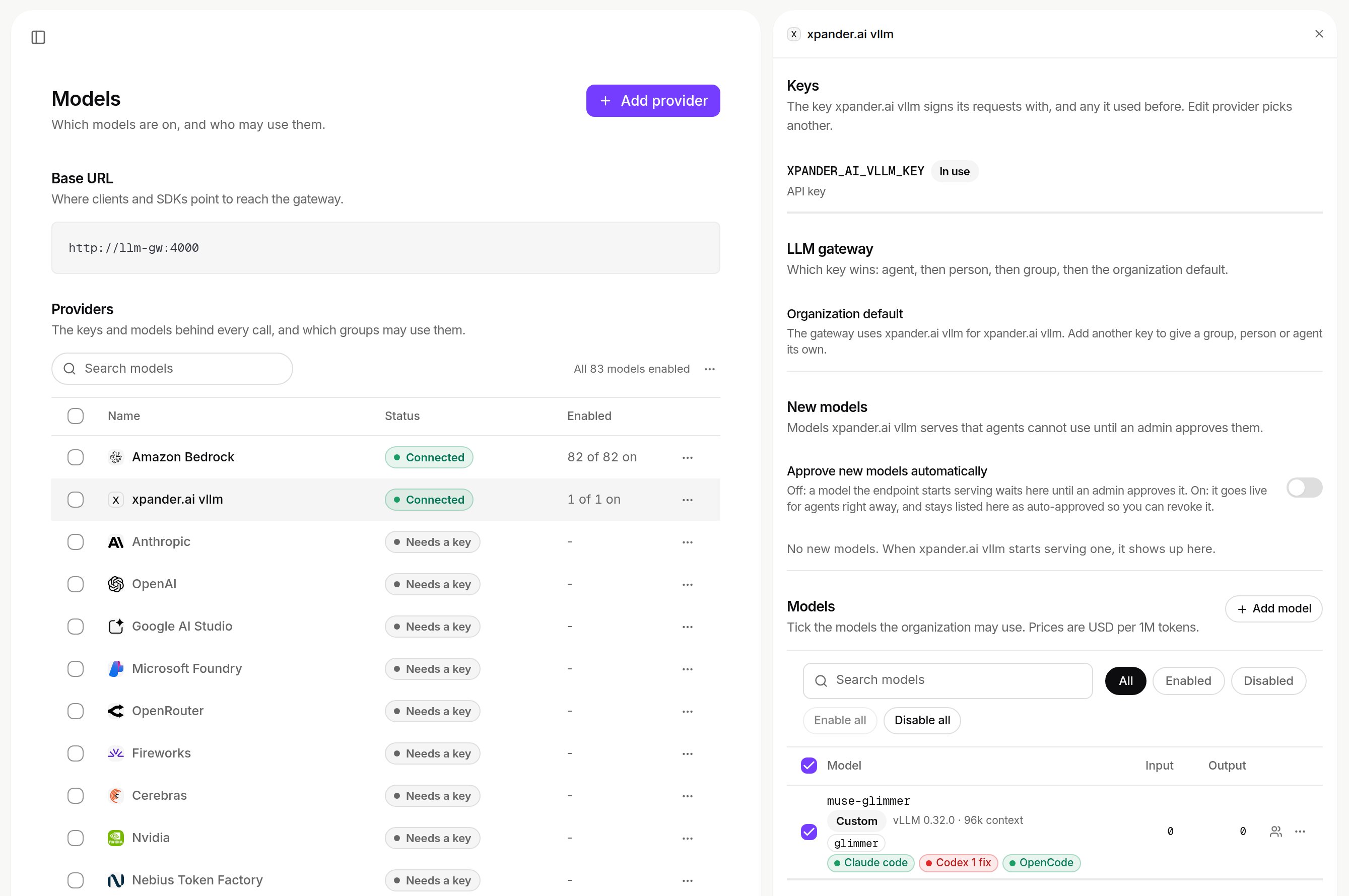
Keys and models on a custom provider: the key in use, New models waiting for approval, the models the organization may use with their prices. Shown with sample data and a different model than the one deployed above.
POST /v1/agents accepts only built-in providers in model_provider (a custom ID gets 422). Pick a custom provider per conversation in Harness and model. The header then reads, for example, OpenCode · Qwen2.5 1.5B (lab T4), the controller logs gateway turn start with model=<host>:<port>/<model id>, and vLLM logs POST /v1/chat/completions 200.