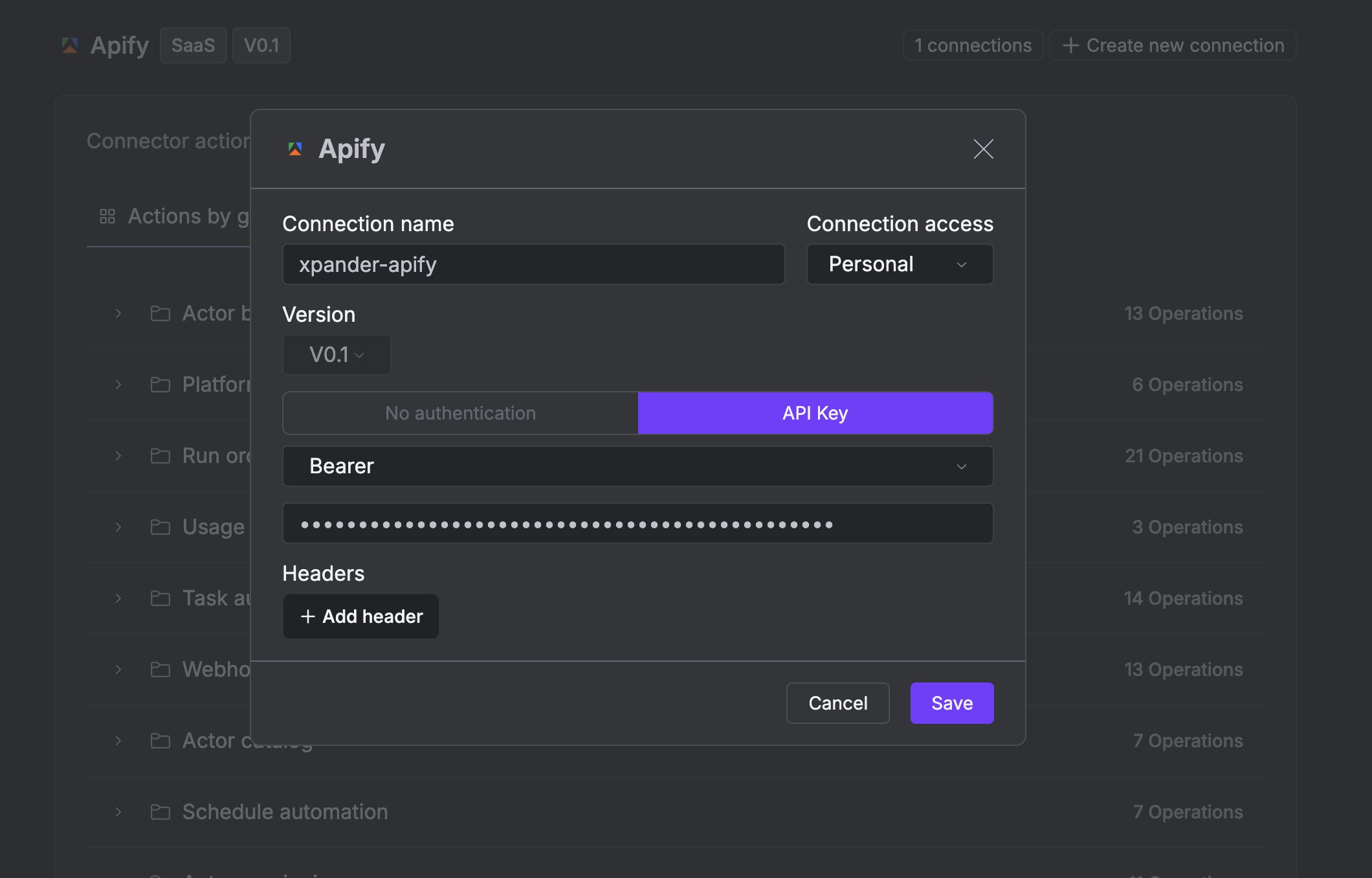
https://api.apify.com and carry the credential the connect dialog asks for.
What the skill can do
API connector: 120 actions, as they appear in the skill panel. 62 of them create, change or delete something in Apify; mark those under These actions need approval when you add the skill to an agent.- Run orchestration (17): Get Run List, Delete Run By Run Id, Update Run By Run Id, Create Run Reboot By Run Id, Create Run Resurrect By Run Id, Abort Run By Run Id, Create Run Metamorph By Run Id, Get Actor Run List By Actor Id, Create Actor Run By Actor Id, Create Run Resurrect By Actor Id Run Id, Get Actor Run Sync Items By Actor Id, Create Run Metamorph By Actor Id Run Id, Create Actor Run Sync Items By Actor Id, Get Actor Last Run By Actor Id, and 3 more
- Request queueing (17): Create Queue, Update Request Lock By Queue Id Request Id, Delete Request Lock By Queue Id Request Id, Get Queue By Queue Id, Create Request By Queue Id, Create Request Batch By Queue Id, Get Request By Queue Id Request Id, Update Request By Queue Id Request Id, Update Queue By Queue Id, Get Queue Head By Queue Id, Create Head Lock By Queue Id, Get Request List By Queue Id, Create Request Unlock By Queue Id, Get Queue List, and 3 more
- Task automation (14): Update Task By Actor Task Id, Get Task Run Sync Items By Actor Task Id, Create Task Run By Actor Task Id, Delete Task By Actor Task Id, Get Task Input By Actor Task Id, Create Task, Get Task By Actor Task Id, Update Task Input By Actor Task Id, Get Task Run Sync Output By Actor Task Id, Create Task Run Sync Output By Actor Task Id, Get Task List, Create Task Run Sync Items By Actor Task Id, Get Task Run List By Actor Task Id, Get Task Last Run By Actor Task Id
- Actor builds (12): Delete Build By Build Id, Get Build By Build Id, Get Build Openapi By Build Id, Abort Build By Build Id, Platform Logs Get Build Log By Build Id, Get Build List, Catalog Get Actor By Actor Id, Create Actor Build By Actor Id, Get Actor Build List By Actor Id, Get Build By Actor Id Build Id, Get Default Build By Actor Id, Abort Build By Actor Id Build Id
- Webhook delivery (11): Get Task Webhook List By Actor Task Id, Get Dispatch List, Get Dispatch By Dispatch Id, Get Webhook List, Create Webhook, Update Webhook By Webhook Id, Get Actor Webhook List By Actor Id, Get Webhook By Webhook Id, Create Webhook Test By Webhook Id, Get Webhook Dispatch List By Webhook Id, Delete Webhook By Webhook Id
- Actor versioning (10): Get Version List By Actor Id, Get Version By Actor Id Version Number, Update Version By Actor Id Version Number, Delete Version By Actor Id Version Number, Get Env Var List By Actor Id Version Number, Create Env Var By Actor Id Version Number, Get Env Var By Actor Id Version Env Var Name, Create Version By Actor Id, Update Env Var By Actor Id Version Env Var Name, Delete Env Var By Actor Id Version Env Var Name
- Keyvalue storage (9): Create Store, Update Store By Store Id, Delete Store By Store Id, Get Store Key List By Store Id, Update Record By Store Id Record Key, Delete Record By Store Id Record Key, Get Store List, Get Record By Store Id Record Key, Get Store By Store Id
- Dataset storage (8): Get Dataset List, Create Dataset, Create Dataset Items By Dataset Id, Get Dataset Statistics By Dataset Id, Update Dataset By Dataset Id, Delete Dataset By Dataset Id, Get Dataset By Dataset Id, Get Dataset Item List By Dataset Id
- Actor catalog (6): Get Actor List, Create Actor, Builds Get Build Openapi By Actor Id Build Id, Update Actor By Actor Id, Delete Actor By Actor Id, Search Store Actor List
- Platform logs (4): Run Orchestration Get Run By Run Id, Schedule Automation Get Schedule By Schedule Id, Get Log By Build Or Run Id, Get Schedule Log By Schedule Id
- Account settings (4): Get Current User, Get User Public By User Id, Get Account Limits Summary, Update Account Limits
- Schedule automation (4): Get Schedule List, Create Schedule, Update Schedule By Schedule Id, Delete Schedule By Schedule Id
- Usage billing (3): Create Run Charge By Run Id, Run Orchestration Get Actor Run By Actor Id Run Id, Get Monthly Usage Summary
- Storage/key value stores (1): Keyvalue Storage Get Record Head By Store Id Record Key
Authentication Options
- API Access
Generate an Apify API Key
- Log in to your Apify account.
-
Select Settings, then click API & Integrations.
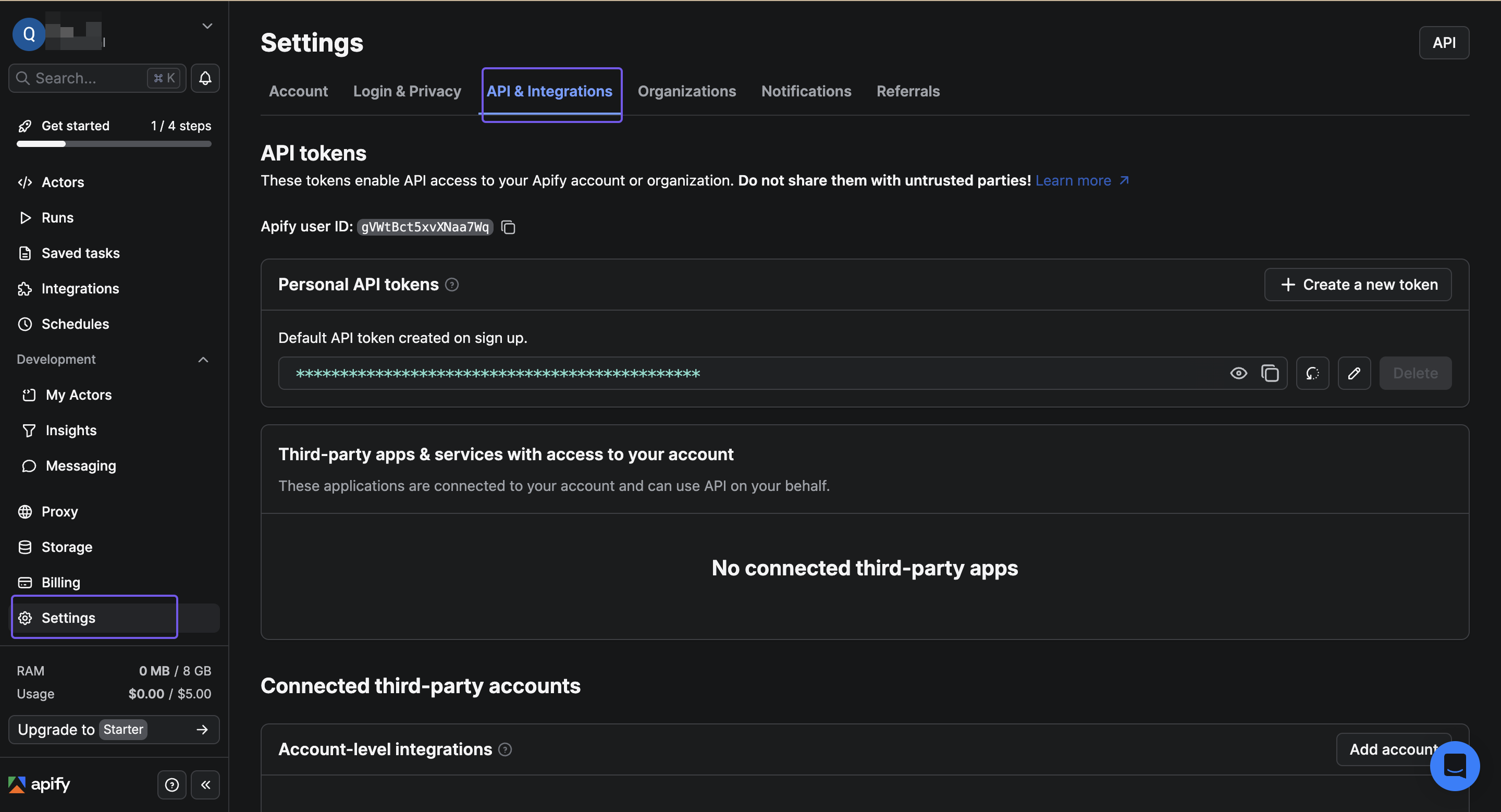
- Click + Create a new token to create a new API key.
-
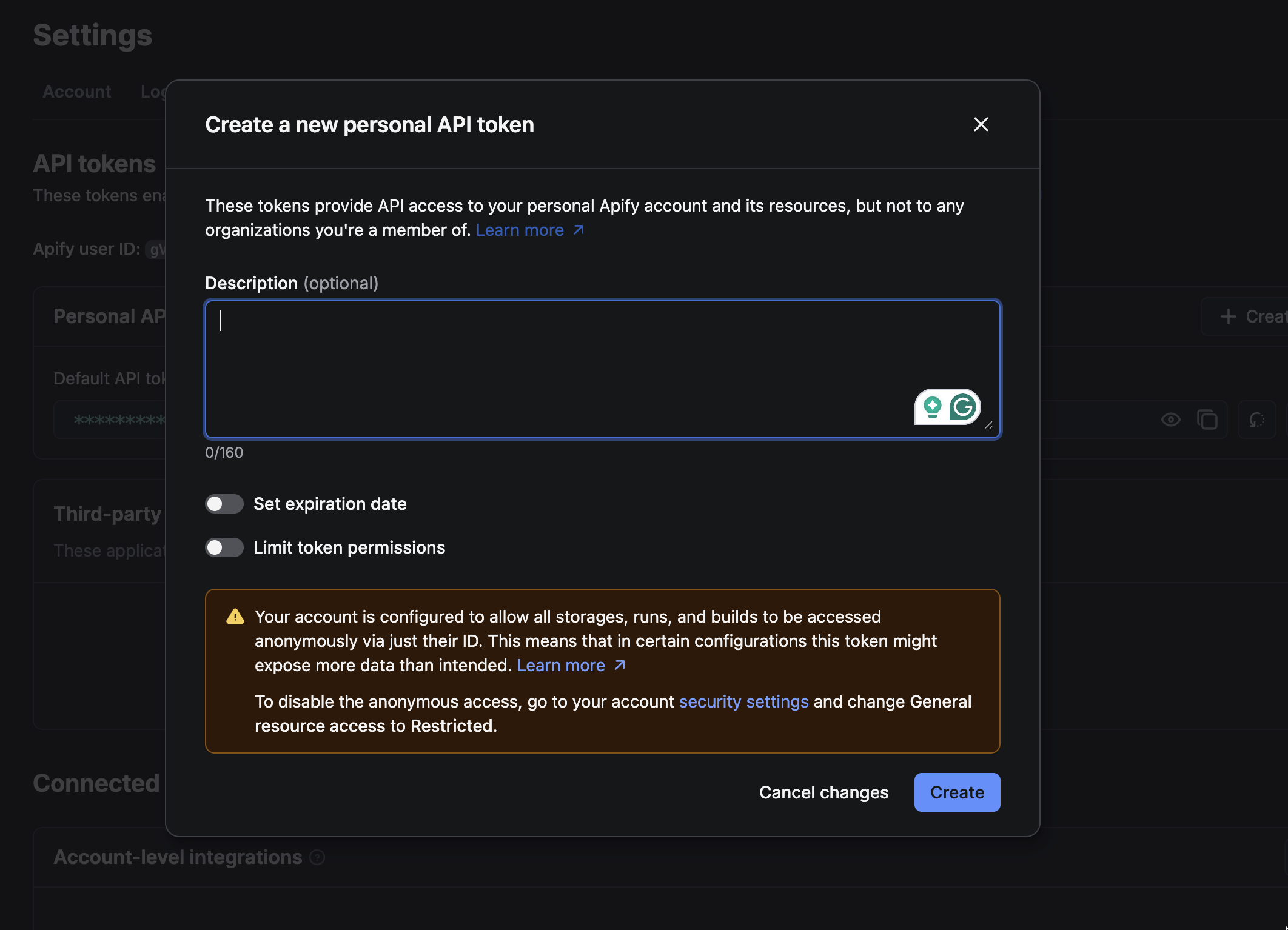
Click Create in the dialog that appears to create your new API key..
-
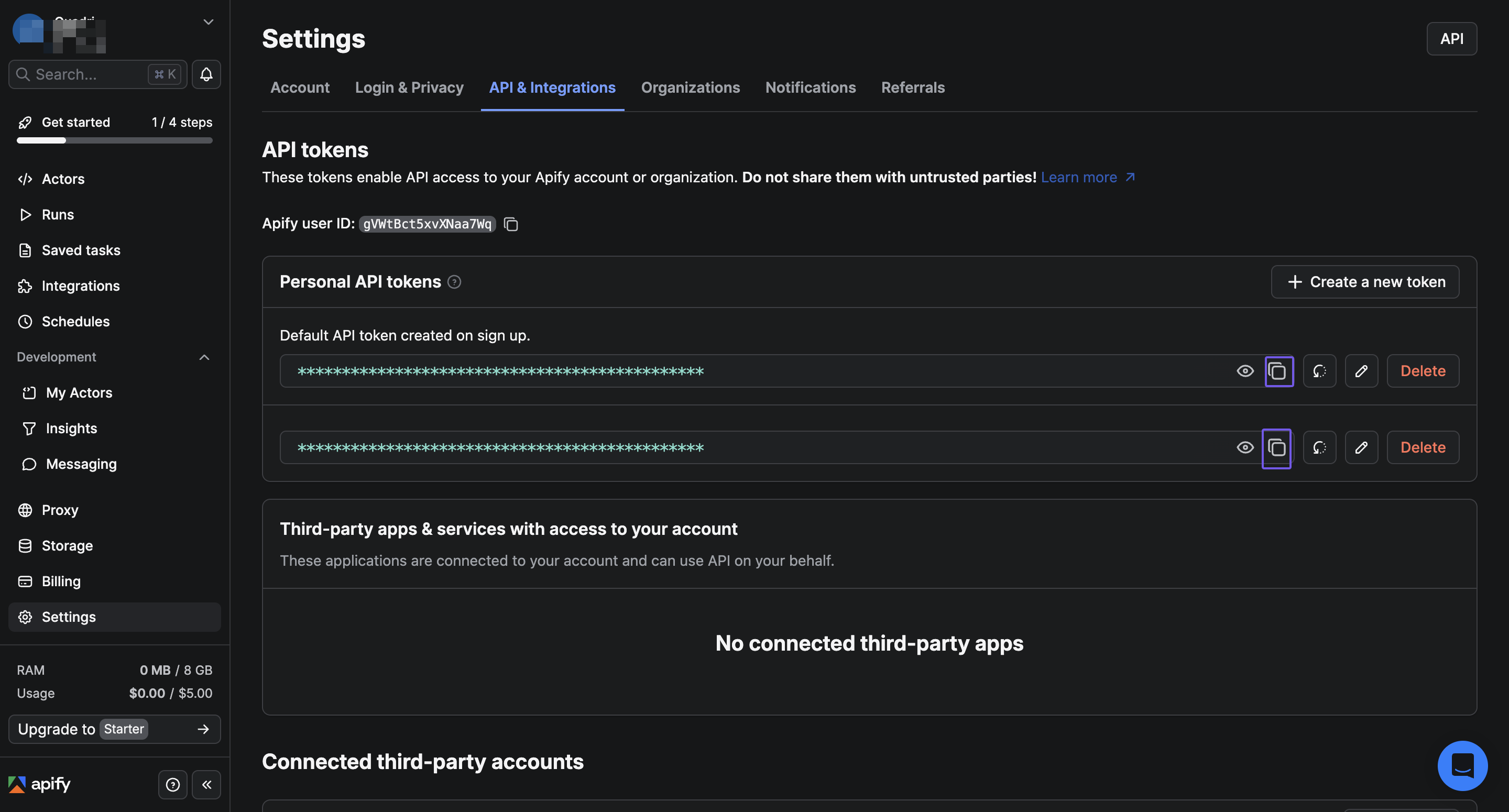
The new API key will appear on the page. Click the copy icon next to the API key to copy the generated key, then store it in a safe place..
Connect Apify in xpander
- In Xpander Chat, open the agent’s settings and click Add skill.
- Search for Apify and select it.
- Click + Create new connection.
- Enter a connection name, e.g., “xpander-apify”.
- Choose API Key as the authentication method.
- Paste your Apify access token into the provided field.
- Choose Bearer as the Type.
-
Save the configuration.