https://monitoring.googleapis.com and carry an OAuth 2.0 token obtained with Sign in with Google on the cloud edition, or an API key or custom header on a self-hosted installation, which offers no sign-in flow.
What the skill can do
API connector: 53 actions, as they appear in the skill panel. 27 of them create, change or delete something in Google Cloud Monitoring; mark those under These actions need approval when you add the skill to an agent.- Notification channel management (10): Cloudmonitoring Notification Channels Manage List Channel Descriptors, Cloudmonitoring Notification Channels Manage Create Channel By Project, Cloudmonitoring Notification Channels Manage Delete Channel By Id, Cloudmonitoring Notification Channels Verify By Code, Cloudmonitoring Notification Channels Manage Get Channel By Id, Cloudmonitoring Notification Channels Get Verification Code, Cloudmonitoring Notification Channels Send Verification Code, Cloudmonitoring Notification Channels Manage Get Descriptor By Id, Cloudmonitoring Notification Channels Manage List Channels By Project, Cloudmonitoring Notification Channels Manage Update Channel By Id
- Resource group management (6): Cloudmonitoring Resource Groups Manage Create Group By Project, Cloudmonitoring Resource Groups Manage Update Group By Id, Cloudmonitoring Resource Groups Manage List Groups By Project, Cloudmonitoring Resource Groups Manage Get Group By Id, Cloudmonitoring Resource Groups Manage Delete Group By Id, Cloudmonitoring Resource Groups Manage List Group Members By Id
- Uptime monitoring (6): Cloudmonitoring Uptime Checks Manage Create Uptime Config By Project, Cloudmonitoring Uptime Checks Manage Delete Uptime Config By Id, Cloudmonitoring Uptime Checks Manage Update Uptime Config By Id, Cloudmonitoring Uptime Checks Manage List Uptime Configs By Project, Cloudmonitoring Uptime Checks List Checker Ip Addresses, Cloudmonitoring Uptime Checks Manage Get Uptime Config By Id
- Alert policy management (5): Cloudmonitoring Alert Policies Manage Get Alert Policy By Id, Cloudmonitoring Alert Policies Manage Update Alert Policy By Id, Cloudmonitoring Alert Policies Manage Create Alert Policy By Project, Cloudmonitoring Alert Policies Manage List Alert Policies By Project, Cloudmonitoring Alert Policies Manage Delete Alert Policy By Id
- Slo monitoring (5): Cloudmonitoring Slo Manage Create Service Level Objective By Service, Cloudmonitoring Slo Manage Delete Service Level Objective By Id, Cloudmonitoring Slo Manage List Service Level Objectives By Service, Cloudmonitoring Slo Manage Get Service Level Objective By Id, Cloudmonitoring Slo Manage Update Service Level Objective By Id
- Metric querying (4): Cloudmonitoring Time Series Query List Time Series By Folder, Cloudmonitoring Time Series Query List Time Series By Organization, Cloudmonitoring Time Series Query List Time Series By Project, Cloudmonitoring Time Series Query Search Time Series By Mql
- Metric catalog (4): Cloudmonitoring Metric Descriptors Catalog List Metric Descriptors, Cloudmonitoring Metric Descriptors Catalog Create Metric Descriptor, Cloudmonitoring Metric Descriptors Catalog Delete Descriptor By Id, Cloudmonitoring Metric Descriptors Catalog Get Metric Descriptor By Id
- Alert snoozing (4): Cloudmonitoring Alert Snoozes Manage Update Snooze By Id, Cloudmonitoring Alert Snoozes Manage List Snoozes By Project, Cloudmonitoring Alert Snoozes Manage Create Snooze By Project, Cloudmonitoring Alert Snoozes Manage Get Snooze By Id
- Metric ingestion (3): Cloudmonitoring Time Series Ingest Create Collectd Time Series, Cloudmonitoring Time Series Ingest Create Service Time Series, Cloudmonitoring Time Series Ingest Create Time Series By Project
- Alert monitoring (2): Cloudmonitoring Alerts Monitor Get Alert By Id, Cloudmonitoring Alerts Monitor List Alerts By Project
- Resource descriptors (2): Cloudmonitoring Resource Descriptors Get List Resource Descriptors, Cloudmonitoring Resource Descriptors Get Resource Descriptor By Id
- Service monitoring (2): Cloudmonitoring Services Manage List Services By Metrics Scope, Cloudmonitoring Services Manage Create Service By Metrics Scope
Authentication Options
- Built-in xpander Auth
- API Access
The simplest way to connect Google Cloud Monitoring is by using xpander’s built-in authentication:
- In Xpander Chat, open the agent’s settings and click Add skill.
- Search for Google Cloud Monitoring and select it.
- Click + Create new connection.
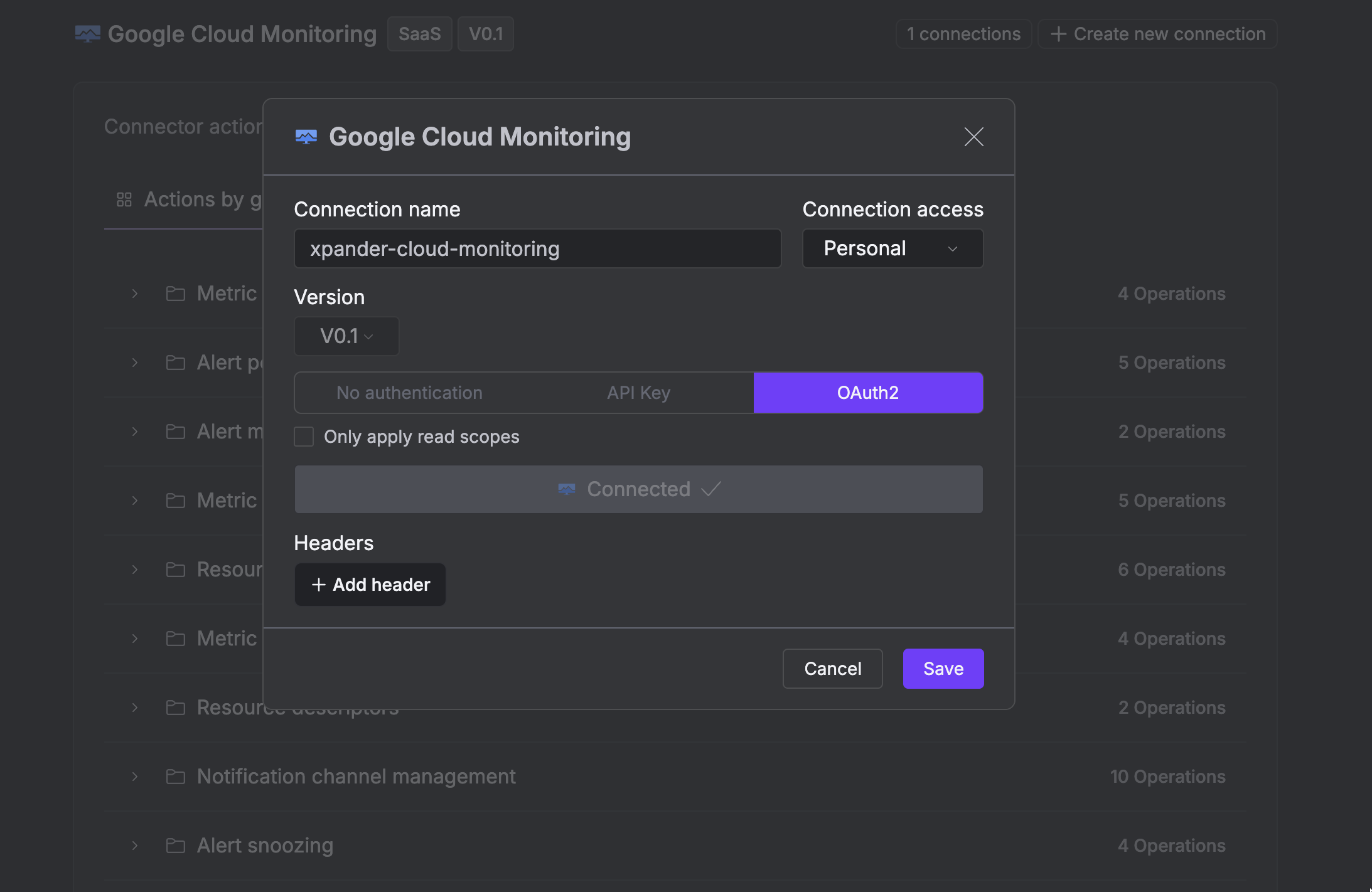
- Enter a connection name, e.g., “xpander-cloud-monitoring”.
- Choose OAuth2 as the authentication method.
- Click Sign in with Google Cloud Monitoring.
- Grant xpander permission to access your account.
-
Save the configuration.