

https://{subdomain}.{domain}.com, filled in when connecting) and carry the credential the connect dialog asks for.
What the skill can do
API connector: 236 actions, as they appear in the skill panel. 118 of them create, change or delete something in Zendesk; mark those under These actions need approval when you add the skill to an agent.- Ticket management (70): Create Voice Ticket, Open Ticket in Agent Browser, Import Tickets, Bulk Import Tickets, Incremental Tickets Cursor, Incremental Metric Events, Incremental Tickets, Create Request, Update Request by ID, List Instance Values, Incremental Ticket Events, List Requests, Show Request by ID, List Request Comments, and 56 more
- User management (41): Manage List Assignable Group Memberships, Manage List Assignable Groups, Incremental Export Users Cursor, Incremental Export Users, Show Organization by ID, Manage List Sessions, Autocomplete Users, Create User, Count Users, Bulk Create Users, Bulk Create or Update Users, Delete Current Session, Renew Current Session, Request User Create, and 27 more
- Organization management (33): List Organization Fields, Reorder Organization Fields, Delete Organization Field by ID, Show Organization Merge by ID, Create Organization Subscription, Create Organization, Bulk Create Organizations, Create or Update Organization, Update Many Organizations, Show Related Organizations, Show Organization Field by ID, Update Organization Field by ID, Create Organization Membership, Bulk Create Organization Memberships, and 19 more
- Group management (17): Manage List Assignable Groups, List Assignable Agents by Group ID, List Groups, Delete Group by ID, Delete Group Membership by ID, Create Group, Show Group by ID, Bulk Create Group Memberships, Bulk Delete Group Memberships, Count Groups, Manage List Assignable Groups And Agents, List Group Memberships, Create Group Membership, Show Group Membership by ID, and 3 more
- Attachment service (11): Toggle Attachment Access, Redact Chat Comment, Show Attachment Details, Redact Chat File, Redact Ticket Comment, Make Ticket Comment Private, Upload File, Redact Comment Attachment, Redact String In Comment, Make Ticket Audit Private, Delete Upload by Token
- Search service (9): Autocomplete Tags, Search Automations, Search Organizations, Autocomplete Problems, Autocomplete Organizations, Search Requests, Count Search Results, Export Search Results, List Search Results
- Tag management (8): List Organizations, List Tags, Count Tags, Delete Tags from Ticket, Update Tags for Ticket, Set Tags for Ticket, List Tags for Ticket, List Users
- Suspended ticket management (8): List Suspended Tickets, Copy Suspended Ticket Attachments, Export Suspended Tickets, Bulk Recover Suspended Tickets, Show Suspended Ticket by ID, Delete Suspended Ticket by ID, Recover Suspended Ticket by ID, Bulk Delete Suspended Tickets
- Target management (7): List Target Failures, Update Target by ID, Show Target Failure by ID, List Targets, Create Target, Show Target by ID, Delete Target by ID
- Workspace management (7): Create Workspace, List Workspaces, Bulk Delete Workspaces, Update Workspace by ID, Reorder Workspaces, Show Workspace by ID, Delete Workspace by ID
- Brand management (6): Update Brand by ID, Delete Brand by ID, Show Brand by ID, Check Host Mapping for Brand, Create Brand, Check Host Mapping
- Bookmark management (5): Create Bookmark, Delete Bookmark by ID, List Bookmarks, Show Ticket by ID, List Tickets
- Email notification service (4): List Email Notifications, Show Many Email Notifications, Show Email Notification by ID, List Ticket Comments
- Activity management (3): List Recent Activities, Count Recent Activities, Show Activity by ID
- Attribute management (3): List Attribute Definitions, List Attributes, Create Attribute
- Subdomain management (2): List Brands, Check Subdomain Availability
- Relationship filter management (1): Get Relationship Filter Definitions
- Record management (1): Record New Skip
Authentication Options
- API Access
Generate a Zendesk API Key
- Log in to your Zendesk account.
-
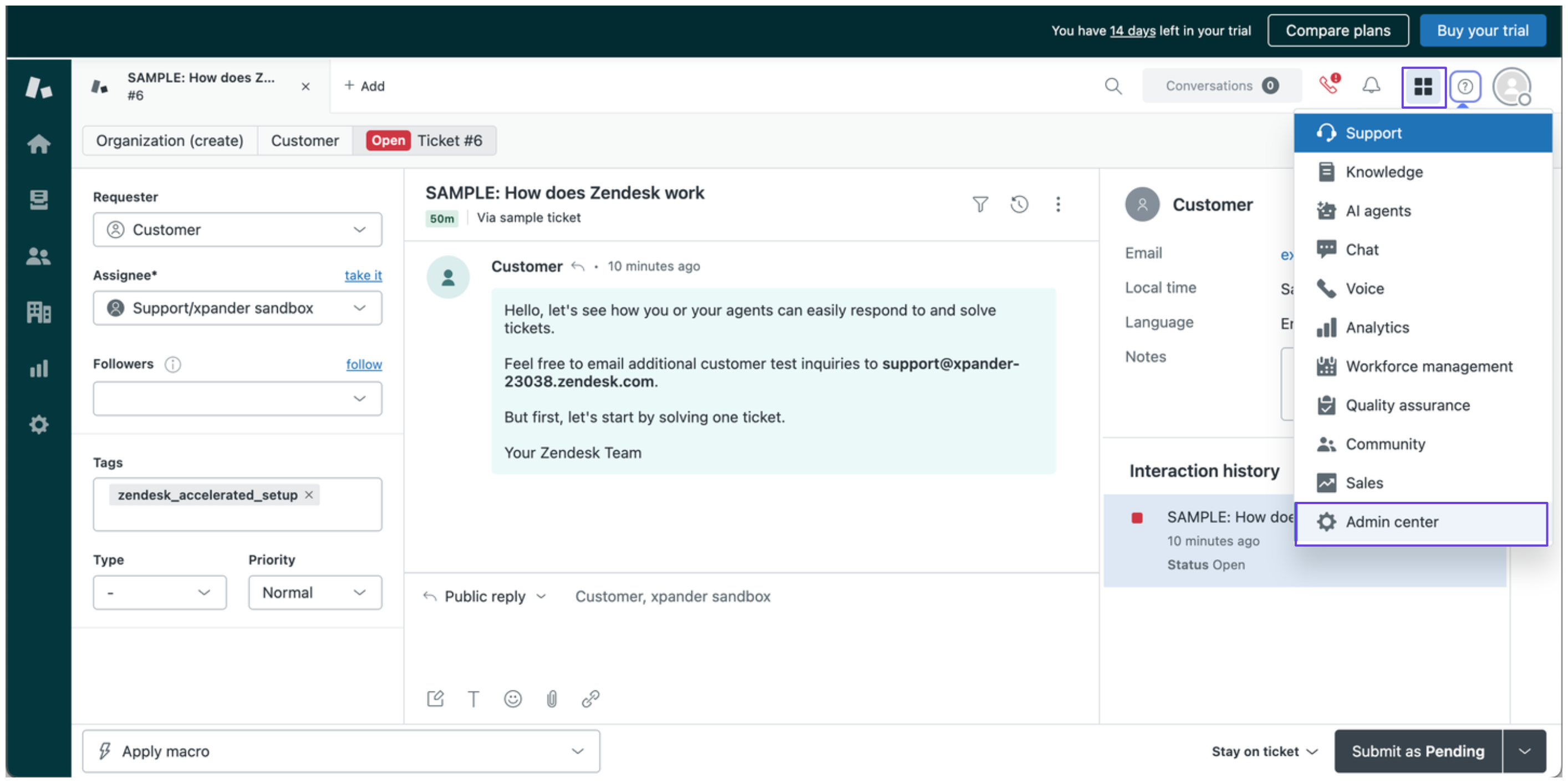
Click on your Zendesk app icon in the top-right corner and select Admin Center.
-
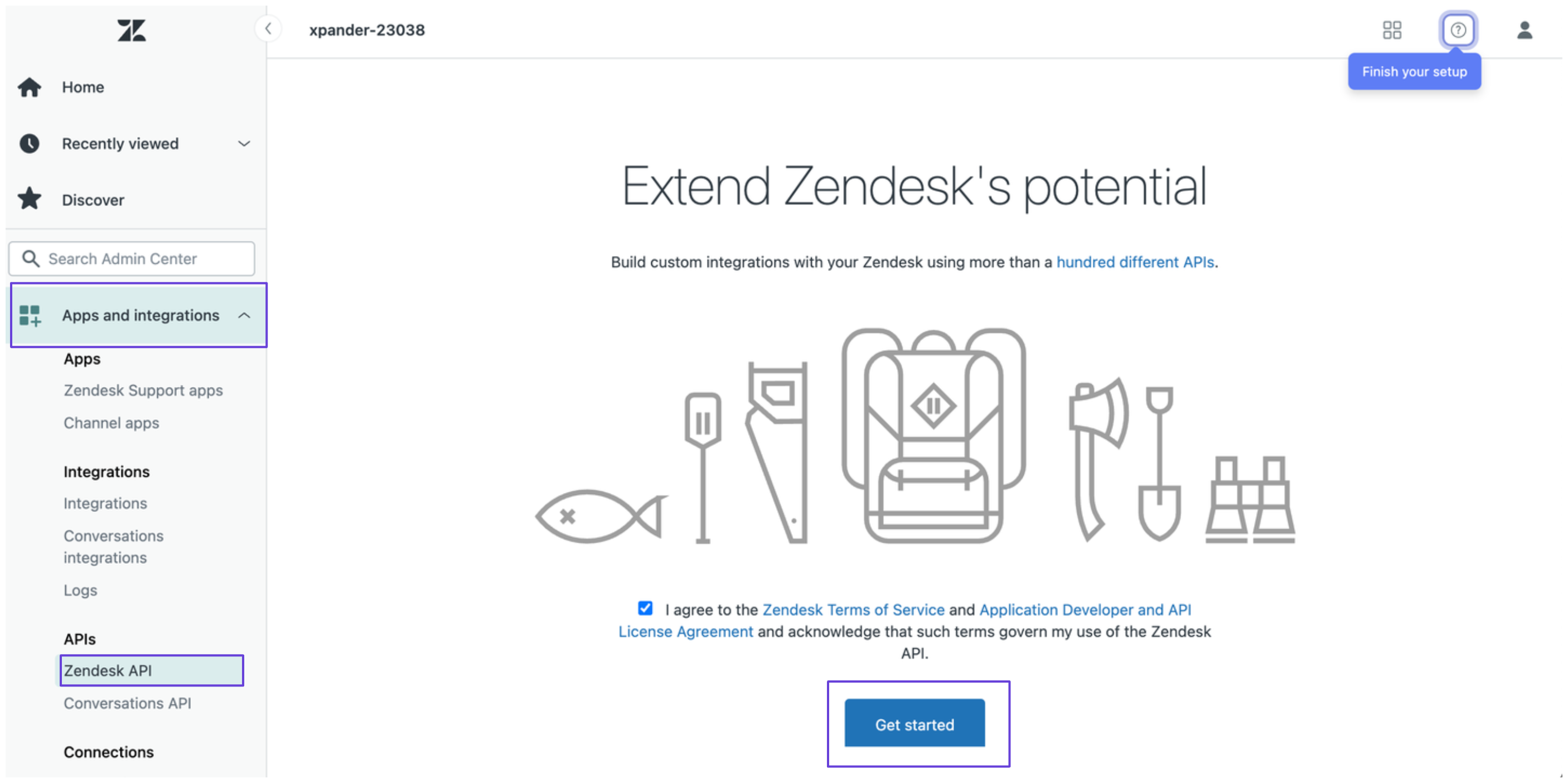
In the Admin Center, click Apps and integrations in the sidebar, then select Zendesk API and click Get Started.
-
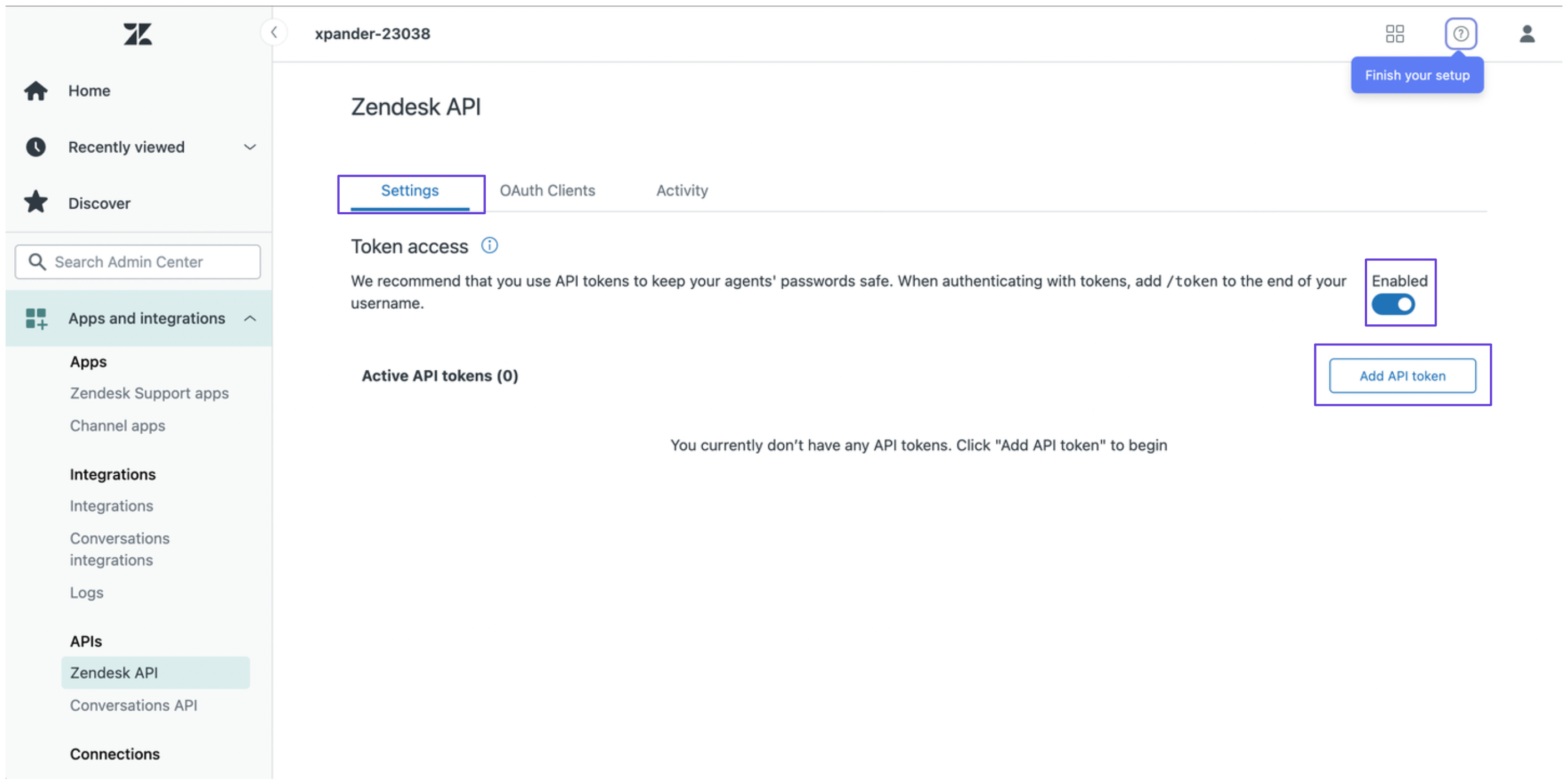
Under the Settings tab, enable token access, then click Add API token.
- You’ll now see your Zendesk API token, copy and store it safely.
-
Combine your Zendesk email address and API token using the following format:
Then, encode it in Base64. You can do this in a couple of ways:
- Run the following command in your terminal (Linux/macOS):
- Use an online Base64 encoder.
- Run the following command in your terminal (Linux/macOS):
- The encoded result will serve as your Zendesk API key.
Connect Zendesk in xpander
- In Xpander Chat, open the agent’s settings and click Add skill.
- Search for Zendesk and select it.
- Enter a connection name, e.g., “xpander-zendesk”.
- Choose Organization access (one shared account) or Personal (your own account, so the agent acts with your permissions where systems allow). On an agent other people use, a personal connection runs their requests as you unless the binding requires each person’s own sign-in; see whose credential a shared agent uses.
- Select API Key as the authentication method.
- Paste the Base64-encoded token into the provided field.
- Choose Basic as the Type.
- Under Server URL, enter your Zendesk domain name (e.g.,
https://xpander-23038.zendesk.com). - Click Connect.