

https://www.gitlab.com/api/v4 and carry the credential the connect dialog asks for.
What the skill can do
API connector: 73 actions, as they appear in the skill panel. 39 of them create, change or delete something in Gitlab; mark those under These actions need approval when you add the skill to an agent.- Badge service (12): Create Group Badge, Update Group Badge By ID, Render Project Badge, Get Project Badge By ID, List Group Badges, Render Group Badge, Get Group Badge By ID, Delete Project Badge By ID, Delete Group Badge By ID, List Project Badges, Create Project Badge, Update Project Badge By ID
- Access request management (8): Create Project Access Request, Create Group Access Request, Approve Group Access Request By User ID, List Group Access Requests, Delete Group Access Request By User ID, Delete Project Access Request By User ID, List Project Access Requests, Approve Project Access Request By User ID
- Repository management (7): List Project Branches, Create New Branch, Delete Branch By Name, Get Branch By Name, Protect Branch By Name, Unprotect Branch By Name, Delete All Merged Branches
- Bulk import service (6): List Bulk Imports, Create Bulk Import, List Bulk Import Entities, Get Bulk Import By ID, List Entities By Import ID, Get Entity By Import And Entity ID
- Background migration management (5): Pause Batched Migration, List Batched Background Migrations, Resume Batched Migration, Mark Migration As Executed, Get Batched Migration By ID
- Ci variable management (5): List Instance CI/CD Variables, Create Instance CI/CD Variable, Delete Instance CI/CD Variable, Get Instance CI/CD Variable By Key, Update Instance CI/CD Variable
- Cluster management (5): Update Cluster By ID, Get Cluster By ID, Delete Cluster By ID, List Instance Clusters, Add Existing Cluster
- Broadcast message service (5): Create Broadcast Message, Update Broadcast Message By ID, Get Broadcast Message By ID, Delete Broadcast Message By ID, List Broadcast Messages
- Alert management (5): List Metric Images For Alert, Upload Metric Image For Alert, Update Metric Image For Alert, Authorize Metric Image Upload, Delete Metric Image For Alert
- Job management (3): Get Job By ID, List Project Jobs, Trigger Manual Job
- Appearance settings (3): Update Appearance Settings, Get User Avatar URL, Get Current Appearance Settings
- Application management (3): Create OAuth Application, List OAuth Applications, Delete Application By ID
- Plan limit management (2): Get Current Plan Limits, Update Plan Limits
- Metadata service (2): Get Instance Version, Get Instance Metadata
- Database management (1): Get Table Dictionary
- Branches (1): Check Branch Existence
Authentication Options
- API Access
Generate a Gitlab API Key
- Log in into your Gitlab account.
-
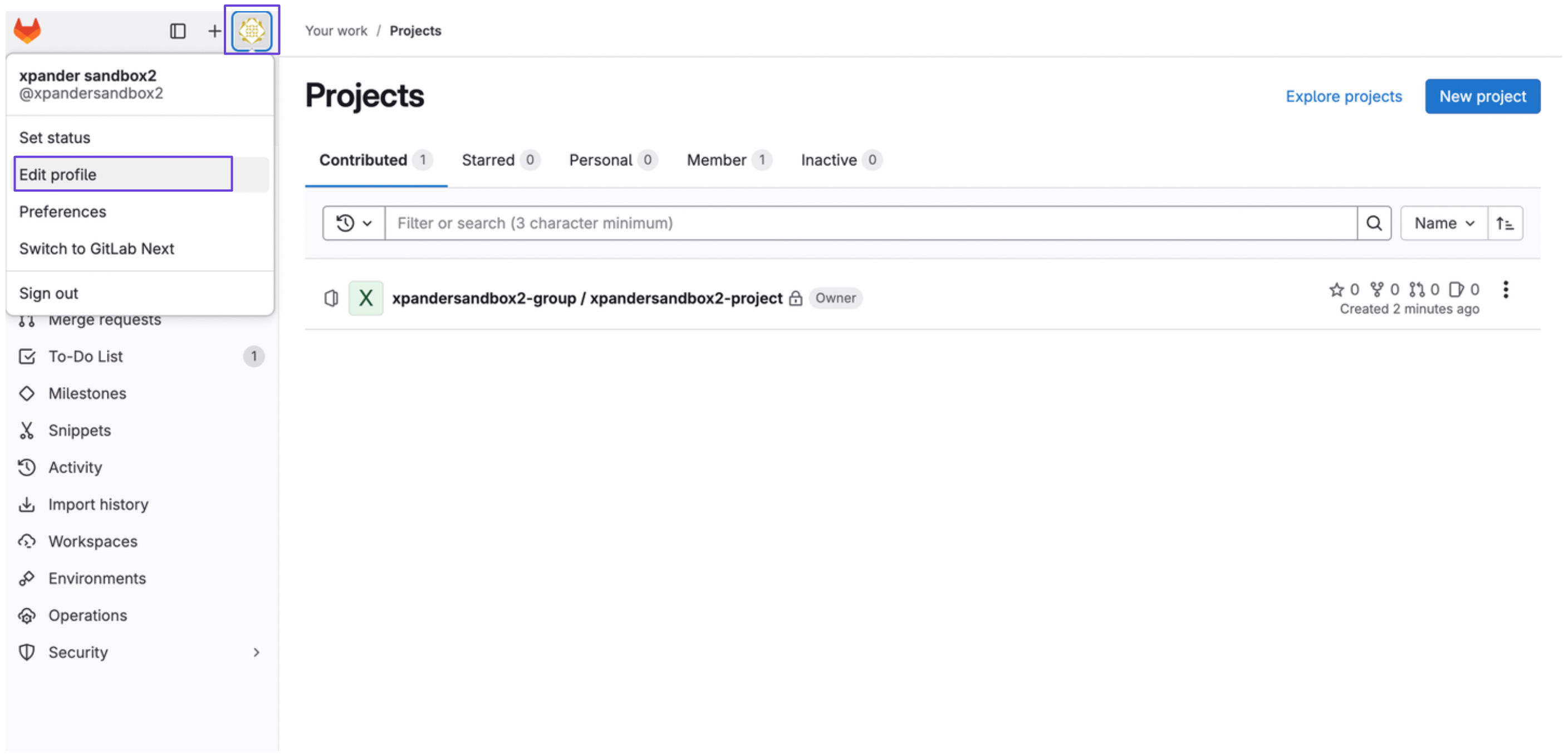
On the top left of your sidebar, click on your profile account, and then select Edit profile
-
Navigate to Access token in the sidebar, and then click on Add new token
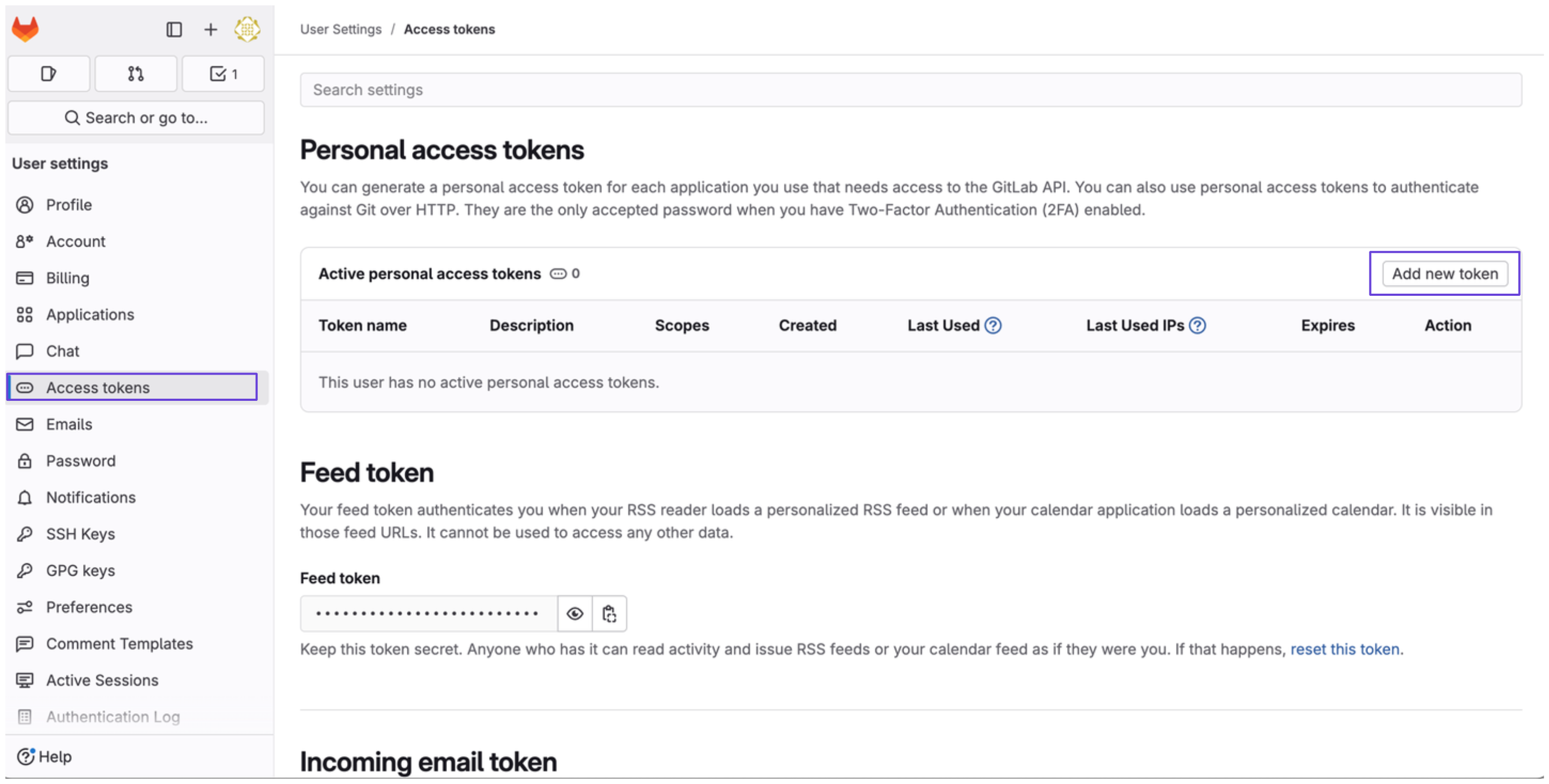
- Give your access token a name, expiration date, and the necessary scopes. Then, click on Create personal access token
- You’ll see your Gitlab access token afterwards.
Connect Gitlab in xpander
- In Xpander Chat, open the agent’s settings and click Add skill.
- Search for GitLab and select it.
- Enter a connection name, e.g., “xpander-gitlab”.
- Choose Organization access (one shared account) or Personal (your own account, so the agent acts with your permissions where systems allow). On an agent other people use, a personal connection runs their requests as you unless the binding requires each person’s own sign-in; see whose credential a shared agent uses.
- Select API Key as the authentication method.
- Paste the Gitlab access token the provided field.
- Choose Bearer as the Type.
- Click Connect.