

What the skills can do
The platform lists 2 Supabase skills, each added to an agent separately. All are HTTP APIs described by OpenAPI specs, not MCP servers:- Supabase: 99 actions. Calls go to
https://api.supabase.comand carry an API key as a bearer token in theAuthorizationheader. - Supabase Database API: 6 actions. Calls go to your Supabase address (
https://{project_ref}.supabase.co/rest/v1, filled in when connecting) and carry an API key in theapikeyheader.
What the Supabase skill can do
API connector: 99 actions, as they appear in the skill panel. 56 of them create, change or delete something in Supabase; mark those under These actions need approval when you add the skill to an agent.- Database config service (20): Get PostgreSQL Config, Run Database Query, Get PgBouncer Config, Get Pooler Config, Update Pooler Config, Get Storage Config, Update Storage Config, Update PostgreSQL Config, Get Database Context, Enable Database Webhook, Update Pgsodium Config, Update PostgREST Config, Get Read-Only Status, Disable Read-Only Mode, and 6 more
- Branch management (8): Delete Branch by ID, Update Branch Config by ID, Push Branch by ID, List Project Branches, Reset Branch by ID, Get Branch Config by ID, Create Project Branch, Disable Preview Branching
- Function management (8): Bulk Update Functions, Delete Function by Slug, List Project Functions, Deploy Function, Get Function by Slug, Create Function, Get Function Body by Slug, Update Function by Slug
- Oauth service (7): Delete Third Party Authb93f By Id, Create Third Party Authb93f, Revoke OAuth Token, Exchange OAuth Token, List Third Party Authb93f, Authorize User via OAuth, Get Third Party Authb93f By Id
- Api key management (5): Get API Key by ID, Delete API Key by ID, Update API Key by ID, List Project API Keys, Create API Key
- Signing key management (5): Delete Signing Key by ID, List Project Signing Keys, Create Project Signing Key, Update Signing Key by ID, Get Signing Key by ID
- Sso provider management (5): Ssoproviderb93f Management Get Providerb93f By Id, Ssoproviderb93f Management List Providerb93fs, Ssoproviderb93f Management Create Providerb93f, Ssoproviderb93f Management Delete Providerb93f By Id, Ssoproviderb93f Management Update Providerb93f By Id
- Custom hostname service (5): Get Custom Hostname Config, Initialize Custom Hostname Config, Reverify Custom Hostname Config, Activate Custom Hostname Config, Delete Custom Hostname Config
- Backup management (5): List Project Backups, Restore PITR Backup, Cancel Project Restore, Get Restore Versions, Restore Project
- Organization management (4): List Organizations, Create Organization, Get Organization, List Organization Members
- Project management (4): Create Project, Delete Project by Reference, Get Project Logs, Pause Project
- Network management (4): Retrieve Network Bans, Get Network Restrictions, Delete Network Bans, Apply Network Restrictions
- Vanity subdomain service (4): Deactivate Vanity Subdomain, Activate Vanity Subdomain, Check Vanity Subdomain Availability, Get Vanity Subdomain Config
- Storage bucket service (3): List All Projects, Get Project by Reference, List Storage Buckets
- Secret management (3): Create Secrets, List Project Secrets, Delete Secrets
- Postgres upgrade service (3): Check PostgreSQL Upgrade Eligibility, Upgrade PostgreSQL Version, Get PostgreSQL Upgrade Status
- Auth config service (2): Update Auth Service Config, Get Auth Service Config
- Read replica management (2): Setup Read Replica, Remove Read Replica
- Snippet management (2): List All SQL Snippets, Get Snippet by ID
What the Supabase Database API skill can do
API connector: 6 actions, as they appear in the skill panel. 5 of them create, change or delete something in Supabase Database API; mark those under These actions need approval when you add the skill to an agent.- Database management (5): Update Records in Table, Delete Records from Table, Get All Records from Table, Upsert Record in Table, Insert New Record into Table
- Function service (1): Call Postgres Function
Authentication Options
- API Access
Generate a Supabase API Key
- Log in to your Supabase account.
-
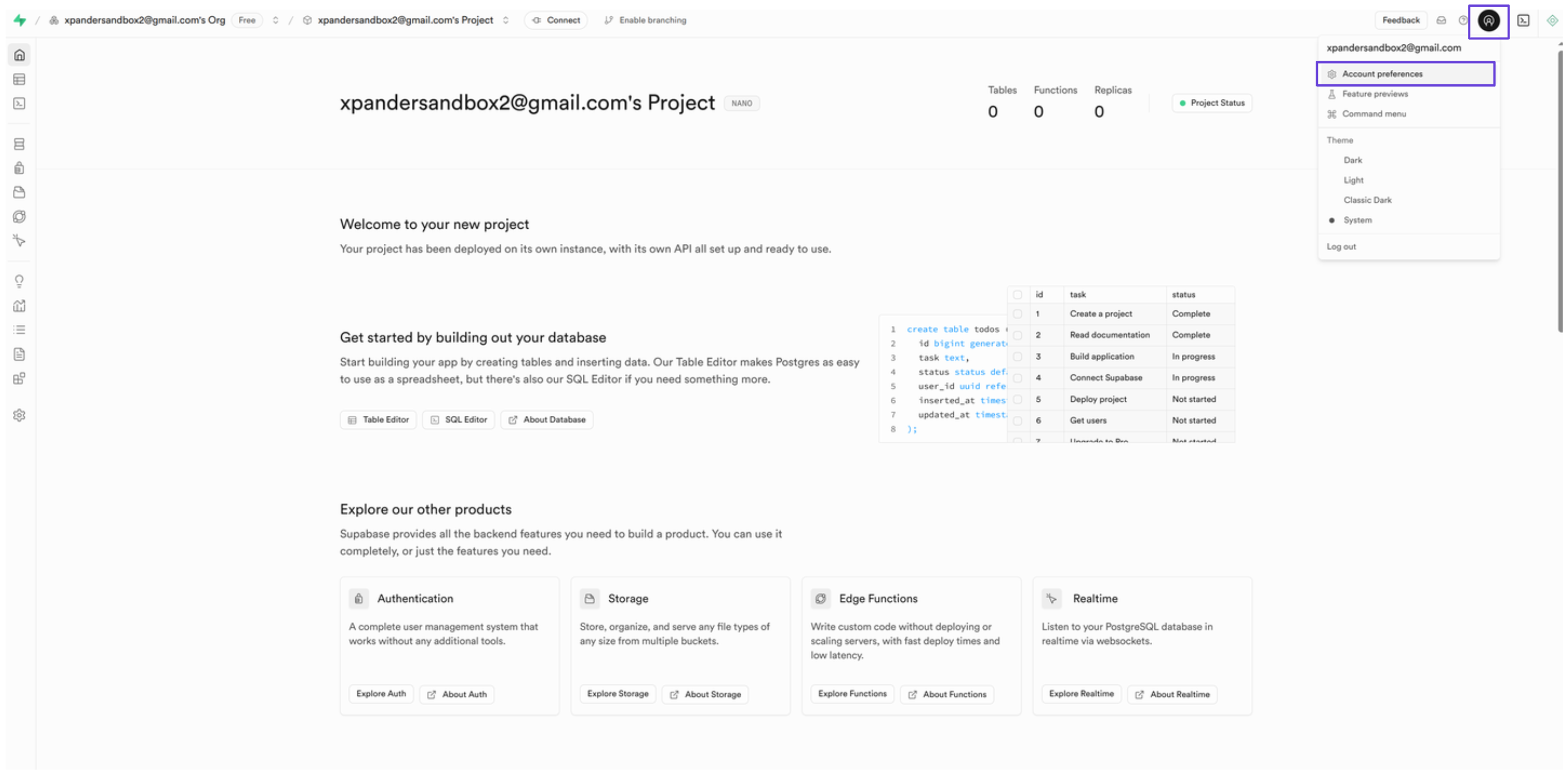
Click your profile icon at the top right of the dashboard, then select Account preferences.
-
In the sidebar, click Access tokens, then click Generate new token.
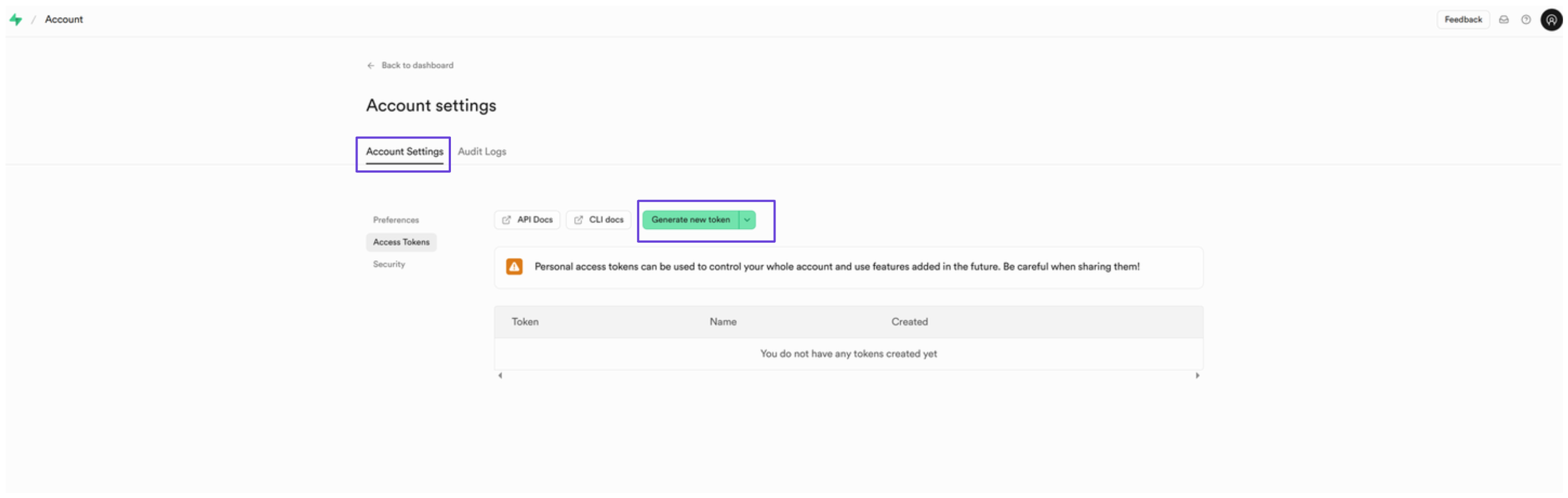
- Give the token a name and click Generate token.
- Your access token will be shown, copy it somewhere safe.
Connect Supabase in xpander
- In Xpander Chat, open the agent’s settings and click Add skill.
- Search for Supabase and select it.
- Enter a connection name, e.g., “xpander-supabase”.
- Choose Organization access (one shared account) or Personal (your own account, so the agent acts with your permissions where systems allow). On an agent other people use, a personal connection runs their requests as you unless the binding requires each person’s own sign-in; see whose credential a shared agent uses.
- Select API Key as the authentication method.
- Paste the Supabase access token into the provided field.
- Set the Type to Bearer.
- Click Connect.
Give an agent the Supabase skill
Once Supabase is connected, any agent you can edit may be given the skill: open the agent’s settings, click Add skill, and choose Supabase. The skill panel lists the Supabase actions by group. Enable only the groups the agent needs, and mark the actions that should wait for a named person’s sign-off under These actions need approval. Which skills exist for your organization, and who may add them, is decided by your admins; see Skills.Related Resources
Supabase: connect and authenticate
Authentication Options
- API Access
Generate a Supabase API Key
- Log in to your Supabase account and open your desired project.
-
Navigate to Project Settings in the sidebar, then click on Data API.
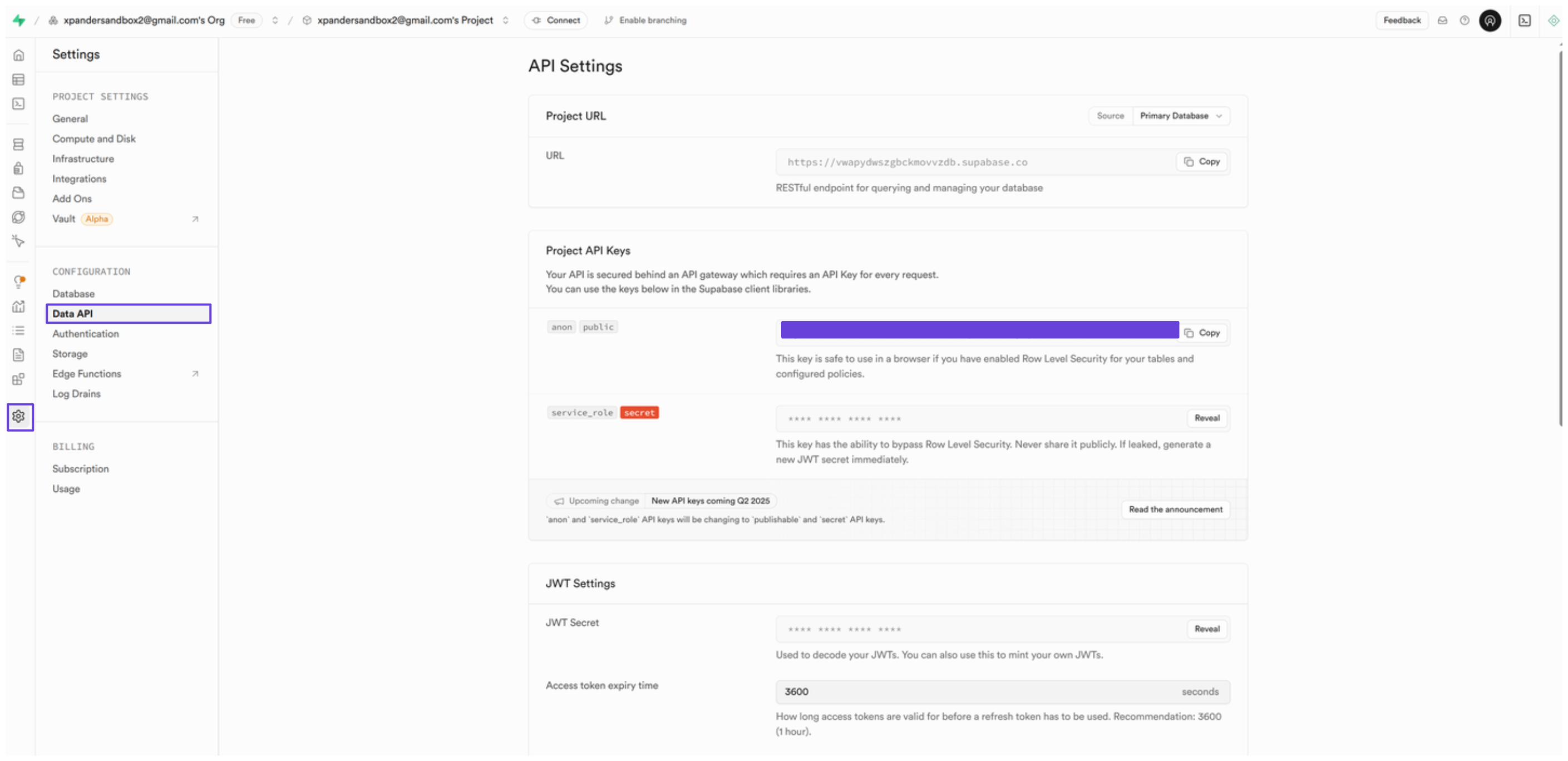
- In the Project API Keys section, you’ll see your project API key, copy it somewhere safe.
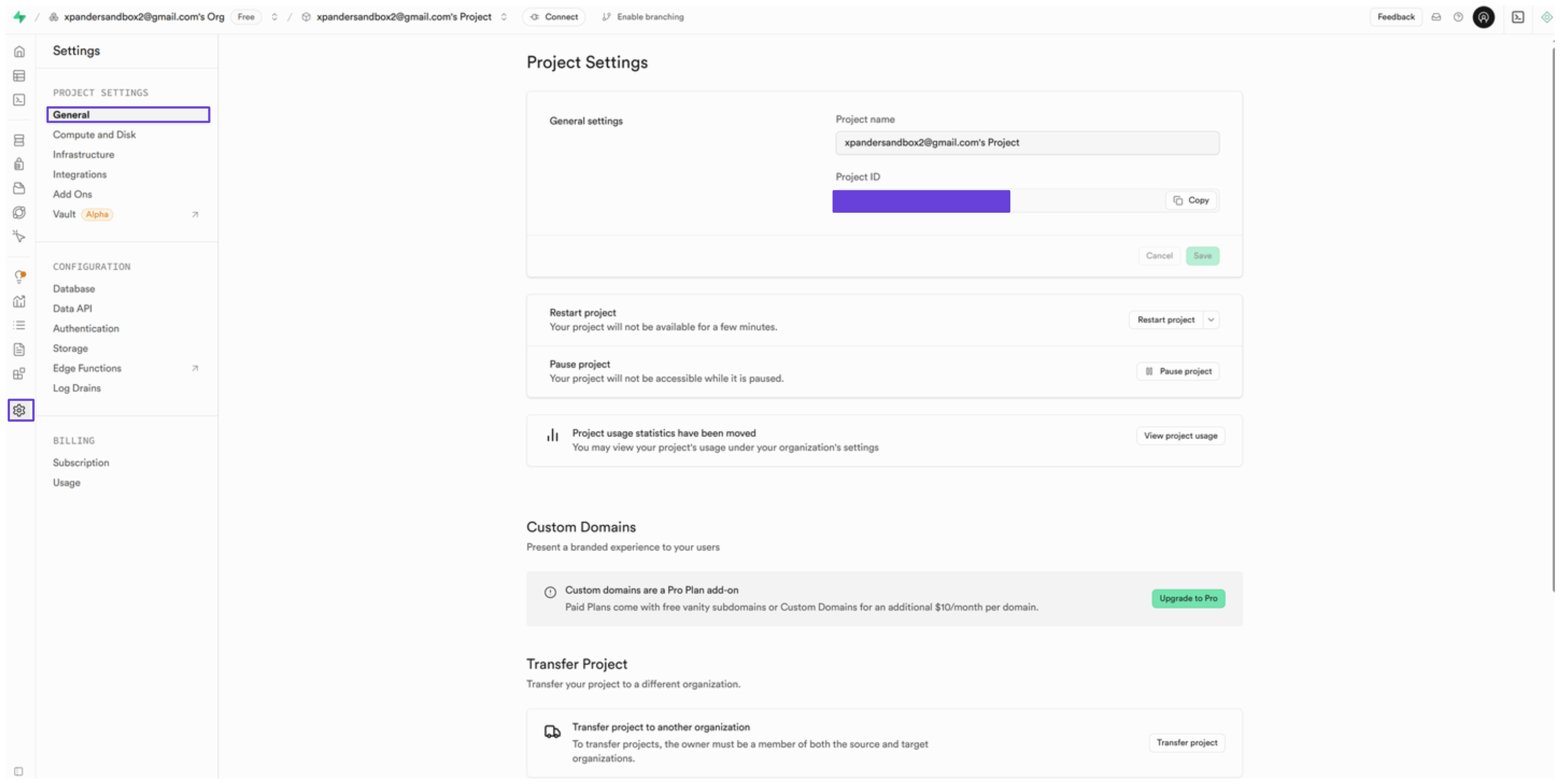
- Next, you’ll also need the project ID to use the Supabase API. To find it, go to General in the sidebar.
-
Under General settings, you’ll see your project ID, save this ID for later use.
Connect Supabase in xpander
- In Xpander Chat, open the agent’s settings and click Add skill.
- Search for Supabase and select it.
- Enter a connection name, e.g., “xpander-supabase-database”.
- Choose Organization access (one shared account) or Personal (your own account, so the agent acts with your permissions where systems allow). On an agent other people use, a personal connection runs their requests as you unless the binding requires each person’s own sign-in; see whose credential a shared agent uses.
- Select API Key as the authentication method.
- Paste the Supabase project API key into the provided field.
- Set the Type to Custom.
- In the Header name field, type:
apikey - In the Interface specific settings section, enter your Supabase project ID in the following format:
https://<project_id>.supabase.co/rest/v1 - Click Connect.