https://{your-domain}/wiki/api/v2, filled in when connecting) and carry an OAuth 2.0 token obtained with Sign in with Atlassian on the cloud edition, or an API key or custom header on a self-hosted installation, which offers no sign-in flow.
What the skill can do
API connector: 172 actions, as they appear in the skill panel. 64 of them create, change or delete something in Confluence; mark those under These actions need approval when you add the skill to an agent.- Comment service (35): Get Inline Comments from Blog Post, Get Comment Property By ID, Get Attachment By ID, Get Custom Content By ID, Create Comment Property, Delete Comment Property, Get Attachment Comments, Get Footer Comments from Blog Post, Get Comment Properties, Update Comment Property, Get Footer Comments from Custom Content, Create New Inline Comment, Update Inline Comment, Delete Inline Comment, and 21 more
- Classification system (20): Get Classification Levels, Update Blog Post Classification Level, Reset Blog Post Classification Level, Get Blog Post By ID, Get Blog Post Classification Level, Get Database By ID, Reset Page Classification Level, Update Default Classification Level, Reset Whiteboard Classification Level, Reset Database Classification Level, Get Page Classification Level, Get Default Classification Level, Get Data Policy Metadata, Get Data Policy Spaces, and 6 more
- Page management (18): Get Child Pages, Get Page Properties, Update Page Property, Delete Page Property, Get Page By ID, Get Page Ancestors, Get Page Like Count, Get Page Operations, Get Version Details of Page, Get Space By ID, Get Bulk User Details, Create New Page, Update Page, Delete Page, and 4 more
- Custom content management (16): Get All Custom Content, Delete Custom Content, Get Custom Content Operations, Create Custom Content Property, Get Custom Content Property By ID, Create New Custom Content, Get Child Custom Content, Update Custom Content Property, Get Custom Content from Blog Post, Update Custom Content, Get Custom Content Properties, Delete Custom Content Property, Get Custom Content Versions, Get Version Details of Custom Content, and 2 more
- Blog post service (14): Get Blog Post Like Count, Update Blog Post Property, Delete Blog Post, Get Blog Post Attachments, Get Blog Post Like Users, Get Blog Post Property By ID, Get Blog Post Versions, Update Blog Post, Get Blog Post Operations, Delete Blog Post Property, Get Version Details of Blog Post, Create New Blog Post, Get Blog Post Properties, Create Blog Post Property
- Attachment management (12): Get All Attachments, Get Attachment Operations, Get Attachment Property By ID, Get Attachment Properties, Get Attachment Versions, Get Attachments from Custom Content, Update Attachment Property, Get Version Details of Attachment, Delete Attachment, Create Attachment Property, Delete Attachment Property, Get Page Attachments
- Label service (10): Get Attachment Labels, Get Custom Content Labels, Get Blog Post Labels, Get Label Blog Posts, Get All Labels, Get Label Pages, Get Page Labels, Get Label Attachments, Get Space Content Labels, Get Space Labels
- Embed management (10): Get Smart Link By ID, Create Smart Link Property, Update Smart Link Property, Get Smart Link Operations, Get Smart Link Properties, Get Smart Link Property By ID, Get Smart Link Ancestors, Delete Smart Link Property, Create New Smart Link, Delete Smart Link
- Whiteboard service (10): Get Whiteboard By ID, Get Whiteboard Operations, Create Whiteboard Property, Delete Whiteboard Property, Delete Whiteboard, Get Whiteboard Property By ID, Create New Whiteboard, Get Whiteboard Ancestors, Get Whiteboard Properties, Update Whiteboard Property
- Database service (9): Create New Database, Get Database Ancestors, Delete Database, Get Database Operations, Get Database Properties, Create Database Property, Get Database Property By ID, Update Database Property, Delete Database Property
- Space management (9): Get Space Blog Posts, Get Space Pages, Get Space Properties, Get Space Permissions, Create Space Property, Update Space Property, Get Space Operations, Get Space Property By ID, Delete Space Property
- User administration (5): Get All Blog Posts, Invite Users by Email, Check Access by Email, Get All Pages, Get All Spaces
- Task management (3): Get All Tasks, Get Task By ID, Update Task
- Content type conversion (1): Convert Content IDs to Types
Authentication Options
- Built-in xpander Auth
The simplest way to connect to Confluence is by using xpander’s built-in authentication:
- In Xpander Chat, open the agent’s settings and click Add skill.
- Search for Confluence and select it.
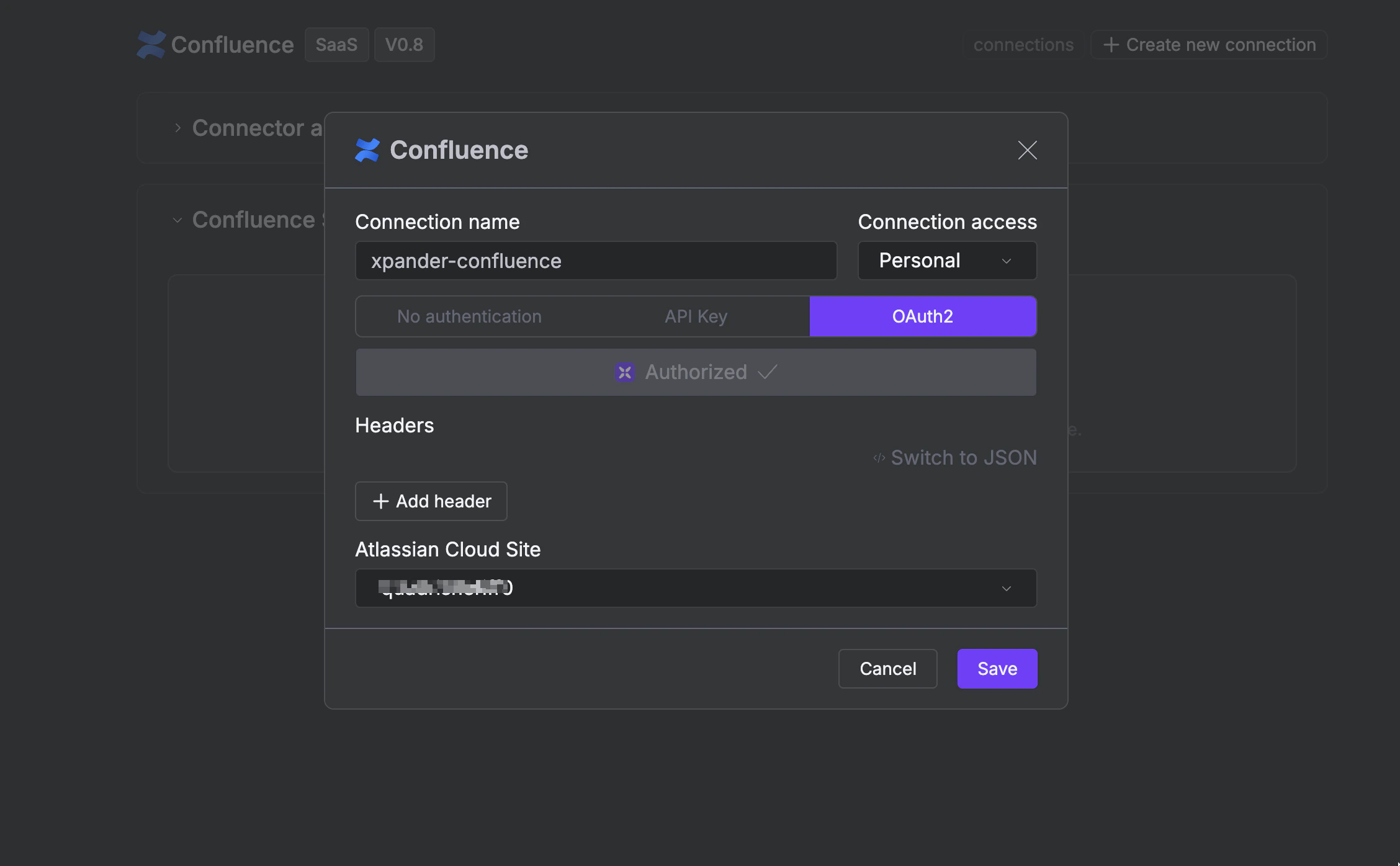
- Click + Create new connection.
- Enter a connection name, e.g., “xpander-confluence”.
- Choose OAuth2 as the authentication method.
- Click Authorize xpander.
- Grant xpander permission to access your account.
-
Save the configuration.