

How it works
- xpander-connect is installed on your computer, by you or by your company’s device management (Jamf, Intune and others). It also comes inside xpander Desktop.
- You sign in once: xpander-connect shows a short code, and you approve it in xpander in your browser.
- It sets up the clients your organization chose. Model calls from them run as you: on the models enabled for you, within your budgets, under your name in Logs. The MCP entry gives you your own skills from the Skills registry (MCP gateway).
Set up a computer by hand
Install it from your xpander. On a self-hosted install, use the command from that install, and the computer signs in there:irm https://<your xpander>/desktop/connect/install.ps1 | iex. The commands with your address filled in are on Platform > AI governance > MCP gateway under Install on one computer and on your install’s /desktop/ page. Each download is checked against your xpander’s published checksum. Then:
xpander-connect status shows who is signed in and what the background agent last did. xpander-connect sync applies your organization’s latest settings now. xpander-connect logout signs the computer out.
What it writes in each client
What it writes in each client
xpander-connect only writes its own entries and keeps a one-time backup of each file it changes. When an admin turns a client off, it removes what it wrote there; settings you made yourself stay.MCP sign-in. Claude Code reaches your organization’s MCP address without asking you to sign in again: when it connects, xpander-connect hands it a short-lived MCP sign-in made from the computer’s own sign-in. Nothing is stored in a file. It stops at once when the computer is signed out or removed, or you leave the organization, and Claude Code then opens the browser sign-in, as it does when this is off or refused. Cursor, Codex and OpenCode sign in to the MCP address once in the browser.Organization skills. Each published skill you may use is written to
~/.claude/skills/xpander-<name>/, with its SKILL.md and the text files that come with it. It is updated when the skill changes, removed when it leaves your library, and put back if changed by hand, within a minute. Only folders xpander-connect created are touched: your own skills, and a folder of the same name you made yourself, never are. If xpander can’t be reached, or one skill can’t be read right now, the skills already on the computer stay. Skills you write yourself in ~/.claude/skills follow your organization’s rule for skills people make.Your own Claude plan. If you also signed in to Claude Code with your own Claude plan (/login), setup and sync say that Claude Code uses your organization’s models, and Claude Code shows a warning that begins claude.ai connectors are disabled. Type /logout in Claude Code to clear it.What the background agent does
What the background agent does
It renews the sign-in before it expires and checks your organization’s settings every minute, so a rule an admin saves reaches the computer within a minute. Every 30 minutes it puts back any setting it manages that was changed. After each change it reports the computer’s state to your organization, and
setup and sync report at once. It checks for a new release every 6 hours (xpander-connect update checks now). Each release is signed, and xpander-connect installs only a release whose signature and checksum match. The copy inside xpander Desktop is updated with Desktop.Which xpander it talks to
By default it talks to xpander cloud (https://chat.xpander.ai). Installed from your own install’s command, it talks to that install and takes the AI Gateway and MCP addresses from there. People in an organization with a Hybrid install keep the default.
To point one computer elsewhere, run xpander-connect config set-server https://<your xpander> once. xpander-connect config show shows what it uses.
Other ways to set the address, and which one wins
Other ways to set the address, and which one wins
xpander-connect login --server https://<your xpander> saves the address too, and xpander-connect config clear-server goes back to xpander cloud. When more than one address is set, the first of these wins: the address from device management, --server on the command, the XPANDER_CONNECT_SERVER_URL environment variable, the address saved on the computer, then xpander cloud. An address set by device management can’t be changed on the computer.Your computers
Settings > Computers lists only the computers signed in as you, with each one’s status, last report, AI clients set up, organization skills and skills made on it.- Sign out stops its AI clients from reaching your organization now. Run
xpander-connect loginon it to sign in again. - Remove signs it out and takes it off the list. Signing in again later brings it back. A computer an admin removed stays signed out until an admin restores it.
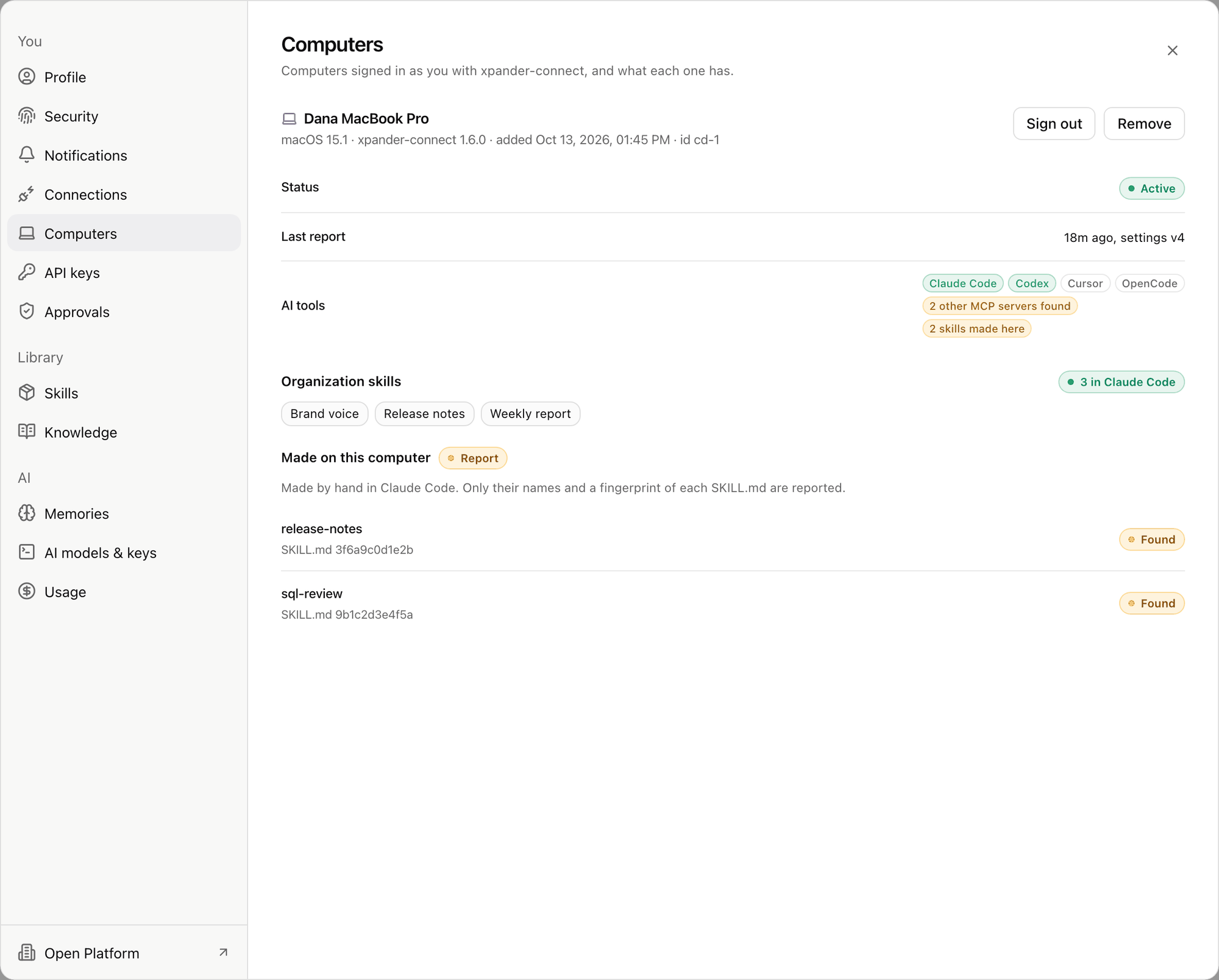
Settings > Computers: a person's own computer, its status and what xpander-connect set up on it. Shown with sample data.