

CHANNEL row on the settings card). Email has its own switch beside the composer. What you see depends on what your organization connected and your user group’s switches.
In Slack, Teams, Telegram, WhatsApp and email, the answer is the message itself. The agent publishes a live surface there only when you ask for a report, dashboard, scorecard or live view, or when its instructions say to.
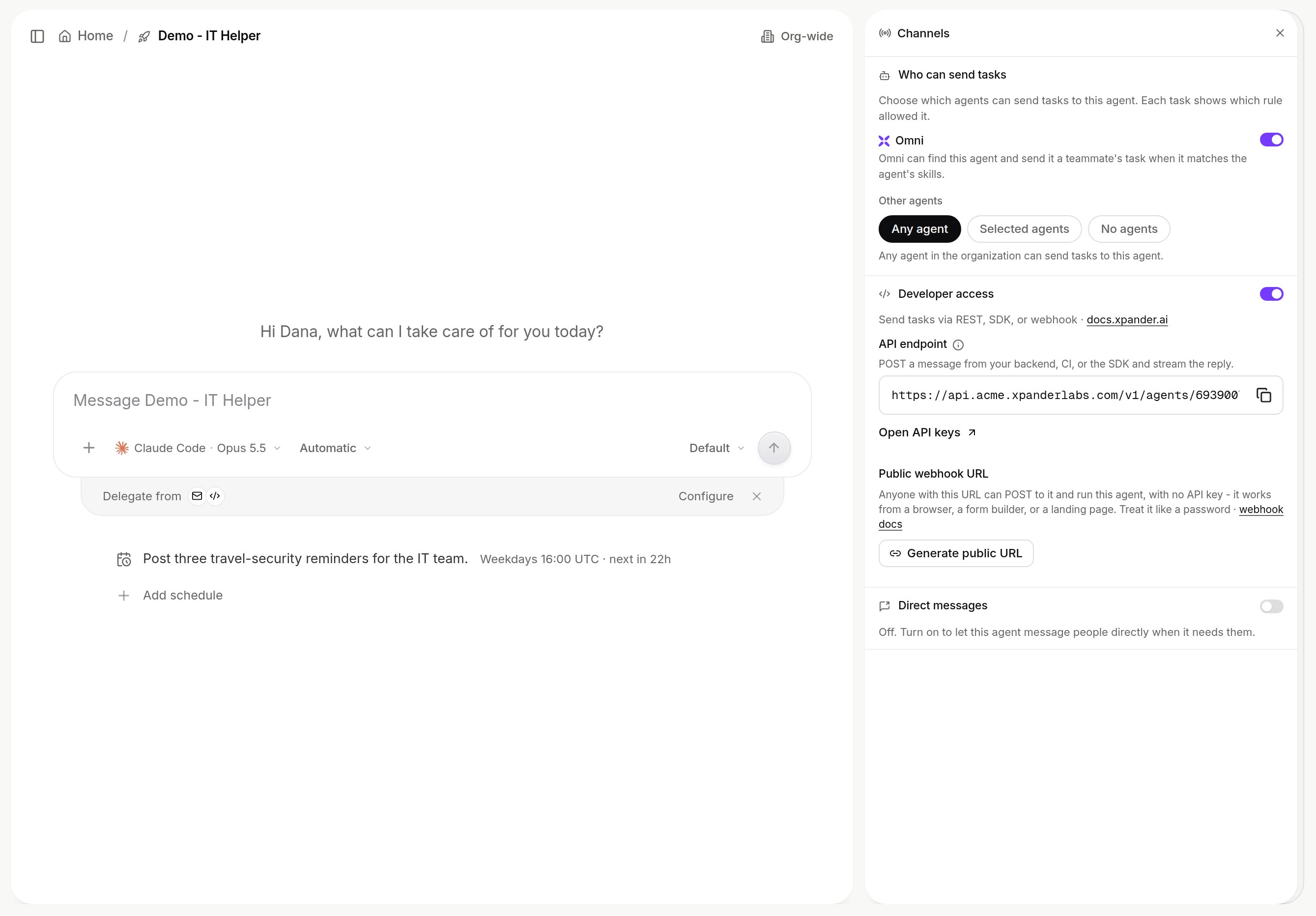
The Channels pane on an agent. Shown with sample data.
Other agents
Who can send tasks decides which agents may hand this agent work. Each task shows which rule allowed it.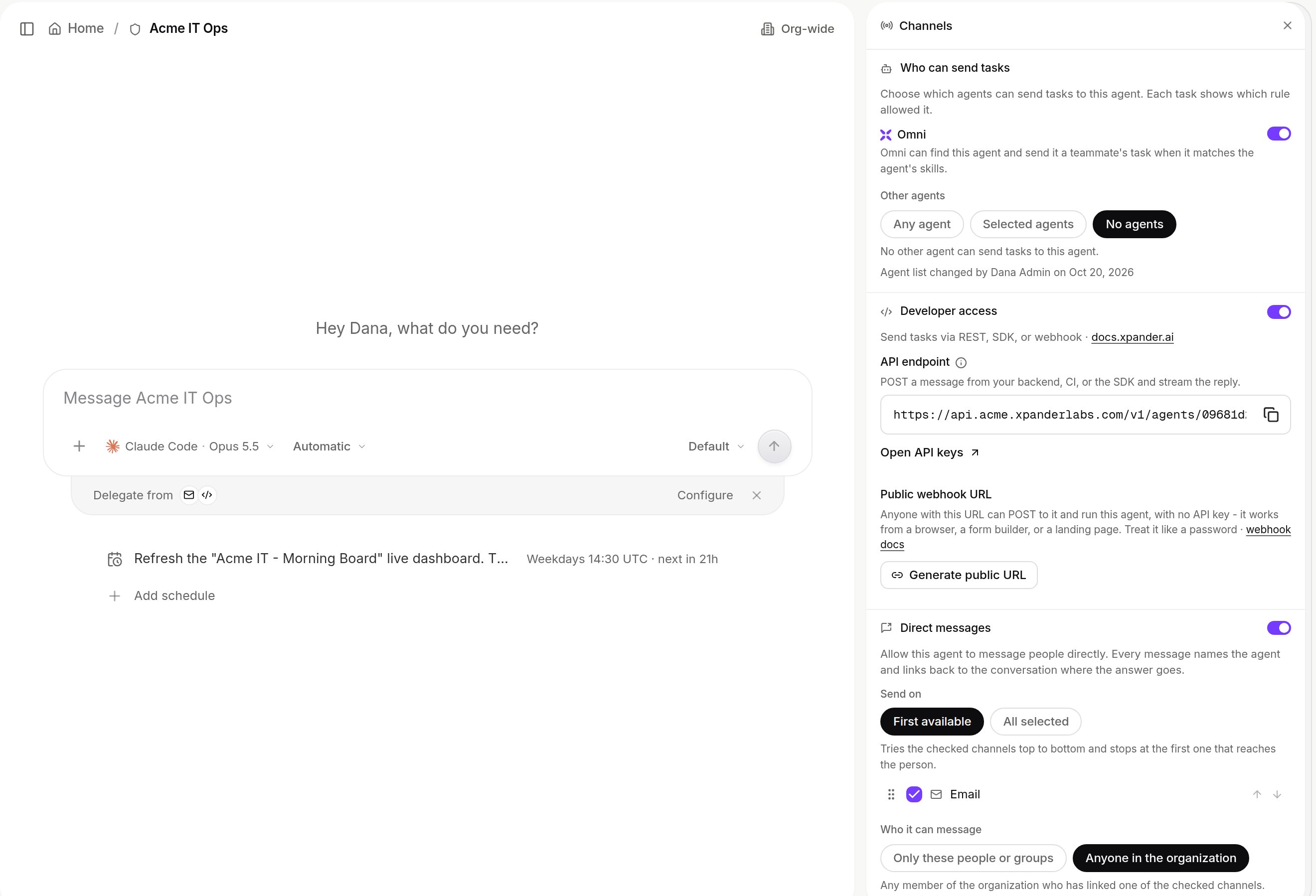
Agent settings > Channel > Configure: Who can send tasks, Developer access and Direct messages. Shown with sample data.
- Omni: when on, Omni can send this agent a teammate’s task that matches its skills.
- Other agents: Any agent, Selected agents or No agents. An
@Agentmention in chat follows the same rule.
Slack and Microsoft Teams
An admin connects the workspace or tenant once under Platform > Agents > Channels. One workspace or tenant maps to one organization. People are matched by verified email. Anyone who doesn’t match gets a Link account button with a code valid for fifteen minutes.Which agent answers a message
Checked in order:Route a channel to an agent
Use Add a channel to listen to in the Channels pane, or the composer’s channel selector. One agent per channel. The xpander Slack app must be in the channel (/invite @xpander in a private one).
Rule edits apply within a minute. The agent answers under its own name and icon, attributed to the message’s author, and acts with that person’s permissions where systems allow. The thread is shared, the five-minute follow window is per person. Teams follows the same rules, in the reply chain.
Progress while the agent works
- One status line that updates, then the answer. Show detailed tool activity lists the steps instead.
- Slack streams word by word only in DMs with Omni. Other replies arrive whole.
- Images and PDFs are read with OCR, voice notes transcribed and links fetched. Each is switchable under Slack behavior.
- Held approvals reach approvers in Slack too.
<handle>@xpander.bot on xpander cloud. Choose who may write: Anyone, Listed senders or a Custom pattern, and whether to Reply to newsletters. Each mail, with attachments, becomes a turn, answered in the same thread. Self-hosted installs can use their own domain. See Email.
WhatsApp and Telegram
Members link a phone number or Telegram account and talk to Omni, which hands work to your agents. Replies come back whole in the same chat. A message sent mid-run steers the run. xpander cloud only, switched per organization under Platform > Agents > Channels.Webhook
Developer access in the Channels pane covers REST and webhooks. Public webhook URL mints a URL that is itself the credential: anyone with it canPOST and run the agent with no API key. Good for form builders, CI jobs and landing pages.
By default the call returns the task’s result. With ?asynchronous=true it returns {"status": "Started", "task_id": ...}. It accepts JSON, form fields and multipart files. See Webhooks.
API
Developer access > API endpoint shows the address.POST /v1/agents/{agent_id}/conversations/invoke sends a message and returns the reply with the conversation record. POST /v1/agents/{agent_id}/invoke starts tasks to read back later. Both take an organization API key, which can be scoped to named agents. See API and structured output.
MCP clients
Claude Code, Cursor, Claude Desktop, ChatGPT and other MCP clients reach Omni athttps://omni.xpander.ai/mcp, signed in with OAuth. It is a personal connection, not a per-agent setting. See Connect your MCP client.
https://api.xpander.ai/mcp/ is a separate endpoint that exposes the xpander API over MCP (OAuth 2.1). It is not an agent. See Model Context Protocol.
Direct messages
An agent can message one person on their own linked Slack, email, WhatsApp or Telegram, for example to hand over a result or ask for input. Off until an organization admin turns on Direct messages in the Channels pane. Saving publishes at once.- Send on: First available (the first checked channel that delivers, in the order shown) or All selected. Slack and email start checked.
- Who it can message: Only these people or groups, or Anyone in the organization. With no one picked, nobody.
xpmessage-send action: one person per call, by email or user ID, on a checked channel.
- Unlinked channels and channels switched off for the organization are skipped.
- If nobody can be reached, nothing is sent and the agent is told why.
- Every message links back to the conversation. Email subjects read
<Agent> (agent) via xpander. - At most ten messages an hour per person per channel, platform notifications included.
direct_messages field of Update Agent.
Schedules
A cron schedule, or a re-check the agent books itself, starts a turn in the agent’s own conversation. See Schedules.What your administrator controls
Admins connect workspaces and tenants and switch each channel per organization under Platform > Agents > Channels. See Slack workspace and Microsoft Teams tenant. Which channel sections you may configure is set per user group under Triggers.What is recorded
Every task appears in the Session Manager with its source, under the person who asked. Webhooks and schedules run as the agent’s background user. Slack and Teams channel conversations are listed in the organization’s tasks, direct messages in your personal sidebar. Organization switch changes are logged asOrg Channels Updated in the Audit log.
Next steps
Put an agent in Slack
Handles, relays, troubleshooting.
Put an agent in Microsoft Teams
Routing and replies.
Connect your MCP client
Reach Omni from your client.
Call an agent from code
API and structured output.