

About MongoDB Atlas
MongoDB Atlas is a fully managed cloud database service built on MongoDB — the most popular NoSQL document database. It provides a flexible, scalable, and developer-friendly platform for modern applications. Key features include:- Document Model: MongoDB stores data as flexible JSON-like documents, making it easy to model complex, hierarchical data structures without rigid schemas.
- Multi-Cloud Deployment: Atlas runs on AWS, Azure, and Google Cloud, offering global clusters, automated failover, and cross-region replication for high availability.
- Full-Text Search: Built-in Atlas Search powered by Apache Lucene enables rich text search capabilities directly on your MongoDB data without external search engines.
- Aggregation Framework: MongoDB’s powerful aggregation pipeline supports complex data transformations, grouping, filtering, and analytics directly within the database.
- Security & Compliance: Atlas provides encryption at rest and in transit, network isolation, role-based access control, and compliance with SOC 2, HIPAA, PCI DSS, and GDPR.
- Scalability: From serverless instances for development to dedicated clusters handling millions of operations per second, Atlas scales with your needs.
Authentication
The MongoDB Atlas connector currently supports API Key authentication only in xpander.ai.Supported method
- Auth Method: API Key
- Header Name:
x-mongodb-uri - Header Value: your full MongoDB connection string
MongoDB-side requirements
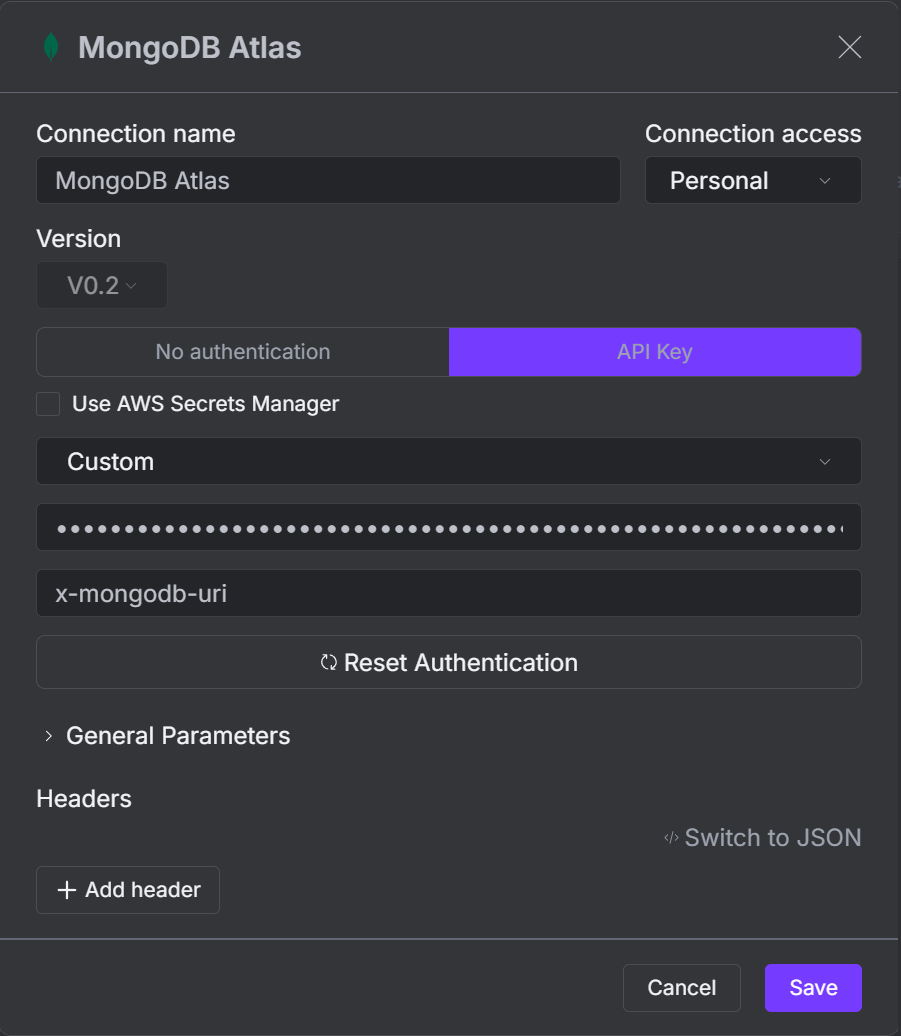
On the MongoDB side, use standard MongoDB username/password credentials in the connection string.Configure in xpander.ai
- In xpander.ai, open Connectors.
- Select MongoDB Atlas and click Create new connection.
- Set Connection name.
- Set Connection access (for example,
Personal). - Select API Key as the authentication method.
- In the API Key section, choose type Custom.
- Set the custom header name to
x-mongodb-uri. - Paste your MongoDB connection string as the header value.
- Click Save.
Integration of MongoDB Atlas into AI Agent
Once you’ve configured your MongoDB Atlas connector with the authentication option(s) described above, you can integrate it into your AI agent with xpander.ai:- In your xpander.ai dashboard, go to the Agent Configuration tab and select Tools, then click Add Tools.
- Select Connectors.
- Choose MongoDB Atlas with the same connector name you configured in the previous section (e.g., xpander-mongodb).
- Select the available MongoDB operations that suit your use case.
Available Operations
The MongoDB Atlas connector provides the following operations: Discovery (Control Plane)
Data Plane — Read
Data Plane — Write